
While conducting daily business, requesters often begin a requisition before every detail is ready. A requisition may still be waiting for attachments, accounting corrections, line validation from an inbound feed, or final internal review. Is there a way for the requester to keep the requisition in progress, but prevent it from moving forward too soon?
New PeopleSoft Fluid Requisition functionality now allows requesters to place a requisition on hold directly from the checkout experience. This helps prevent accidental submission and gives organizations better control over requisitions that are not yet ready for further processing.
What is Hold from Further Processing?
A new checkbox, Hold from Further Processing, is available in the Fluid Requisition checkout summary. When the requester selects hold, the requisition remains available for update, but processing actions that should not occur yet are prevented.
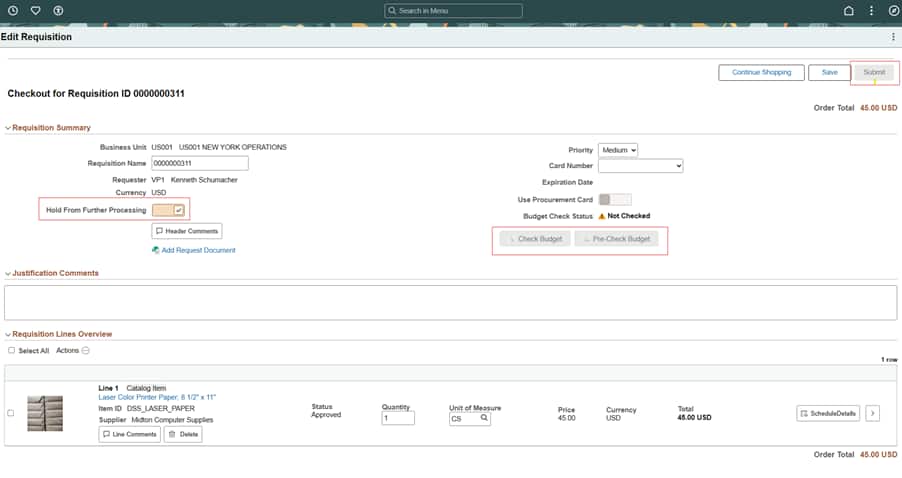
Requester will be unable to do budget checking nor submit requisition when Hold From Further Processing Checkbox is ON.
For example, while a requisition is on hold, users cannot:
- Submit for approval
- Run budget check or pre-budget check
- Cancel or close the requisition
- Source the requisition to a purchase order or RFQ
At the same time, the requester can continue preparing the requisition where appropriate, such as updating information, adding lines, or completing required details before release.
This gives requesters a safer way to manage work in progress and helps ensure the requisition is complete before it continues through downstream processing.
Why is this useful?
This feature is especially helpful in situations where requisitions are created from external systems, such as Requisition Loader or third-party integrations. In those cases, organizations may want the requisition held until all inbound lines finish error handling and the document is ready for review.
It is also useful for online requesters who may still be waiting for attachments, accounting updates, or other required information. Instead of rushing to finish or worrying that the requisition might move ahead too early, they can place it on hold until it is ready.
Additional visibility across Fluid Requisition pages
The hold status is not limited to checkout. Requesters and buyers can also benefit from improved visibility in other areas of Fluid Requisitions, including:
- Hold status visibility in My Requisitions
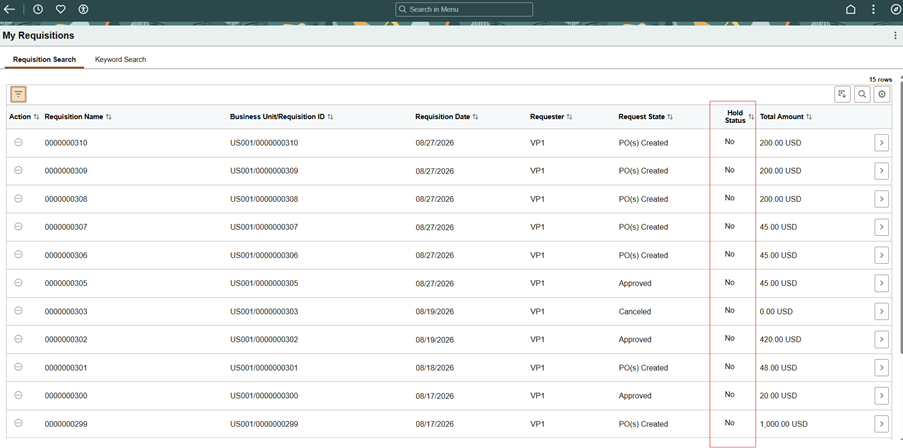
Requester will know which requisition are put on Hold by looking at Hold Status column in My Requisitions page
- Hold-based filtering in requisition searches
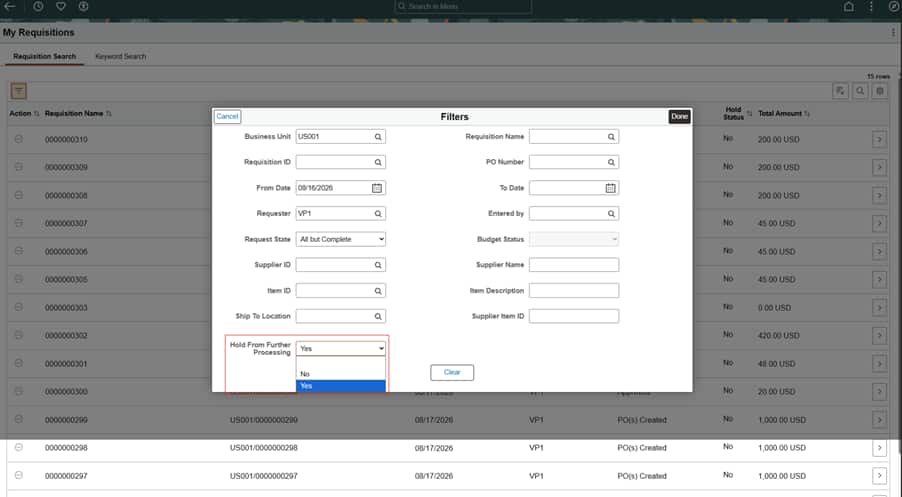
Requester will be able to filter Requisitions by choosing desired option in Hold From Further Processing Dropdown
- Hold status shown in inquiry and print
- Restricted actions when the requisition is on hold
- Better visibility for held requisitions in operational work areas
- This broader visibility helps users quickly understand which requisitions are still in progress and which are ready for normal downstream processing.
In summary
Fluid Requisition Hold functionality gives requesters more control over incomplete requisitions and helps organizations avoid accidental submission, approval, and sourcing activity before the document is truly ready. It extends an important capability already available in Core Requisition and brings the same practical control to the modern Fluid experience.
Take advantage of this feature available in PI56.