
Summary
On September 21, 2026, the U.S. Department of Labor (DOL) will discontinue the Voluntary Self-Identification of Disability Form (CC-305).
The final rule removes the Section 503 requirement for covered federal contractors to ask applicants and employees to voluntarily identify their disability status. The rule also removes the related data collection requirements and the 7 percent utilization goal.
Section 503 nondiscrimination and reasonable accommodation requirements remain in place.
Work with your legal counsel to decide whether to continue collecting voluntary disability self-identification information. PeopleSoft HCM provides configuration options to remove access or update the displayed text.
Sources: DOL notice | Federal Register final rule
Your action: Work with your legal counsel to decide whether to discontinue voluntary disability self-identification. Then update PeopleSoft HCM configuration based on your decision before September 21, 2026.
How to Update PeopleSoft HCM
Employee Self Service Navigation Security
Use PeopleSoft navigation security to remove access to the disability self-identification menu item, tile, or page.
Before making a change, review the employee self-service navigation in use. Disability and veteran self-identification can share the same navigation. The DOL change applies only to disability self-identification.
Navigation security removes future access to the transaction. The security change does not delete information already stored in PeopleSoft. Legal counsel can advise on data retention, confidentiality, and use of existing information.
Updating Employee Self Service Disability Page Text
If your organization continues using the Voluntary Self-Identification of Disability page, review the delivered Text Catalog entries and update the page to reflect your approach. Work with your legal counsel before making changes.
Navigation: Set Up HCM > Common Definitions > Text Catalog and Notepad > Maintain Text Catalog
| Page Content Section | Text ID | What to Update |
| Form name, OMB Control number, and expiration date | SEC503_HEADER SEC503_HEADER_SFF | Insert a new effective-dated row for each Text ID. Leave the Text field blank, then save. |
| Public Burden Statement in the page footer | SEC503_FL_FOOTER | Insert a new effective-dated row. Leave the Text field blank, then save. |
| Question title explaining why the form is required | SEC503_SECTITLE1 | Do not blank out Text ID SEC503_SECTITLE1. Keep the delivered title or insert a new effective-dated row and update the title. |
| Information shown below the question title | SEC503_FL_INSTR1 | Insert a new effective-dated row, as needed. Update the Text field with organization-approved information that supports the title used for SEC503_SECTITLE1. |
After completing the updates, test the employee self-service page to confirm that the page displays the intended text.
OnBoarding and PreBoarding
Review the U.S. activity guide templates you currently use for PreBoarding and OnBoarding. The delivered U.S. templates include separate Disability and Veteran Status steps.
| Template | Type | Description |
| OBDUSA1 | OnBoarding | OnBoarding for USA |
| OBDUSA2 | OnBoarding | OnBoarding with PreBoarding for USA |
| OBDUSAS | OnBoarding | Short Version of OnBoarding with PreBoarding USA |
To remove the Disability step, you can add a new effective-dated row to the template currently in use and make the change on the new row. You can also clone a delivered template and remove the Disability step from the clone. Both approaches are valid, although adding a new effective-dated row generally requires less configuration. The DOL change applies only to disability self-identification. Keep the Veteran Status step unless your legal counsel advises a separate change to your veteran self-identification process.
Before moving the change to production, identify activity guides already in progress. Removing access through navigation security before an activity guide is complete leaves the Disability step in the left panel navigation. Selecting the step displays an authorization error. Work with your legal counsel to decide the appropriate approach for those guides.
Recruiting: Candidate Gateway
Candidate Gateway Site Setup controls whether external applicants see the Disability page.
Navigation: Set Up HCM > Product Related > Recruiting > Candidate Gateway > Site Set Up
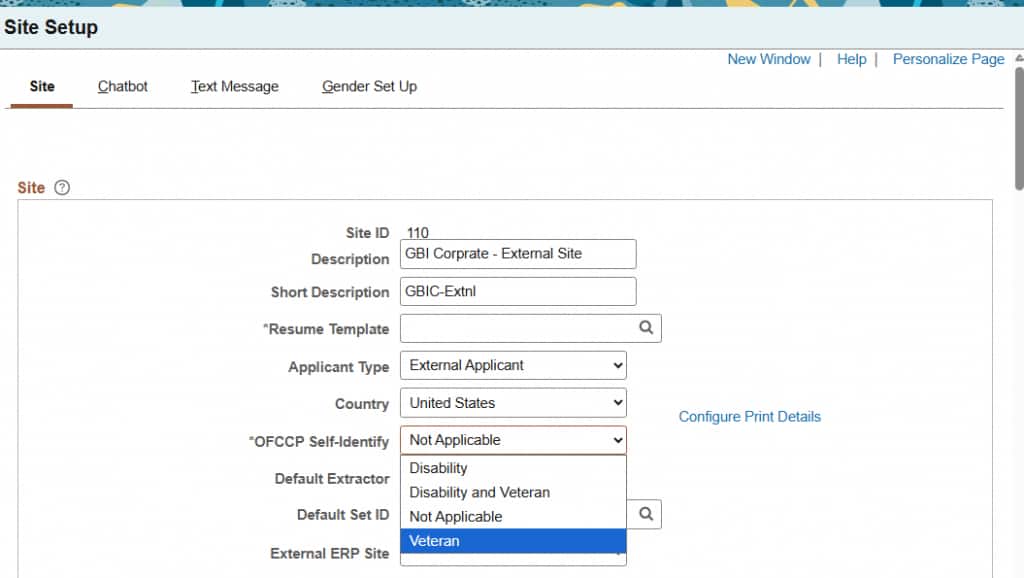
Image: Candidate Gateway Site Setup: OFCCP Self-Identify field
Select the Site ID for each applicable site and update the OFCCP Self-Identify field.
| Desired outcome | OFCCP Self-Identify value | Result |
| Stop collecting disability information and continue collecting veteran information | Veteran | Displays the Veteran page only. |
| Stop collecting disability and veteran information | Not Applicable | Does not display the Disability or Veteran page. |
Use Not Applicable only if your legal counsel advises you to stop collecting both disability and veteran self-identification information.
Apply the selection to each Candidate Gateway site where you want to remove the Disability page.
Save the change and test the external applicant process in Candidate Gateway. Verify that the Disability page no longer appears. When you select Veteran, verify that the Veteran page remains available.
Candidate Gateway does not collect disability or veteran information from internal applicants. The Start page uses Text Catalog ID HRAM_CE_DIS_INSTR4 to direct internal applicants to Human Resources self-service. Review the message and employee self-service navigation security so both experiences match your decision.
Updating Applicant Disability Page Text
If your organization continues collecting disability information from external applicants, review the delivered Text Catalog entries and update the Disability page to reflect your approach. Work with your legal counsel before making changes.
Navigation: Set Up HCM > Common Definitions > Text Catalog and Notepad > Maintain Text Catalog
| Page Content Section | Text ID | What to update |
| Form title, OMB Control number, and expiration date | HRAM_FL_DIS_HDR HRAM_FL_DIS_HDR1 | Insert a new effective-dated row for each Text ID. Leave Context Keys blank and leave the Text field blank, then save. |
| Public Burden Statement in the page footer | HRAM_FL_DIS_FTR | Insert a new effective-dated row. Leave Context Keys blank and leave the Text field blank, then save. |
| Question title explaining why the form is required | HRAM_FL_DIS_SEC1 | Do not blank out Text ID HRAM_FL_DIS_SEC1. Keep the delivered title or insert a new effective-dated row and update the title. |
| Information shown below the question title | HRAM_FL_DIS_INSTR1 | Insert a new effective-dated row, as needed. Update the Text field with organization-approved information that supports the title used for HRAM_FL_DIS_SEC1. |
After completing the updates, test the external applicant process in Candidate Gateway and confirm that the Disability page displays the intended text.
Recommended Next Steps
- Work with your legal counsel to decide whether to continue collecting voluntary disability self-identification information before September 21, 2026.
- Review the affected PeopleSoft areas, including employee self-service navigation security, Candidate Gateway Site Setup, OnBoarding and PreBoarding templates, and Activity Guides already in progress.
- Apply the approved changes. For discontinued collection, update navigation security and Candidate Gateway Site Setup. Clone delivered OnBoarding and PreBoarding templates before removing the Disability step, or add a new effective-dated row when updating an existing customer clone. For continued collection, update the applicable employee and applicant Text Catalog entries.
- Plan for Activity Guides already in progress before moving changes to production. Test the external applicant, PreBoarding, OnBoarding, and employee self-service experiences.
- Review reports, integrations, business processes, and disability information already stored in PeopleSoft. Work with your legal counsel on retention, confidentiality, and continued use of stored information.