
Why a new level of query access matters
PeopleSoft Query has always included security controls. Those controls help determine which records and rows of data a user can access. They are important, but they do not always answer a simpler question: who should be allowed to use this specific query?
A single record can contain many kinds of information. Some fields may be appropriate for a broad audience, while others may be sensitive. An organization may build a carefully designed public query that returns only approved information yet still wants to make sure that only a specific group of people can find and run it.
PeopleTools 8.63 addresses that need with Query Access Control. Administrators can now assign access to an individual public query instead of relying only on the security of the records used by that query.
What changes for a query user
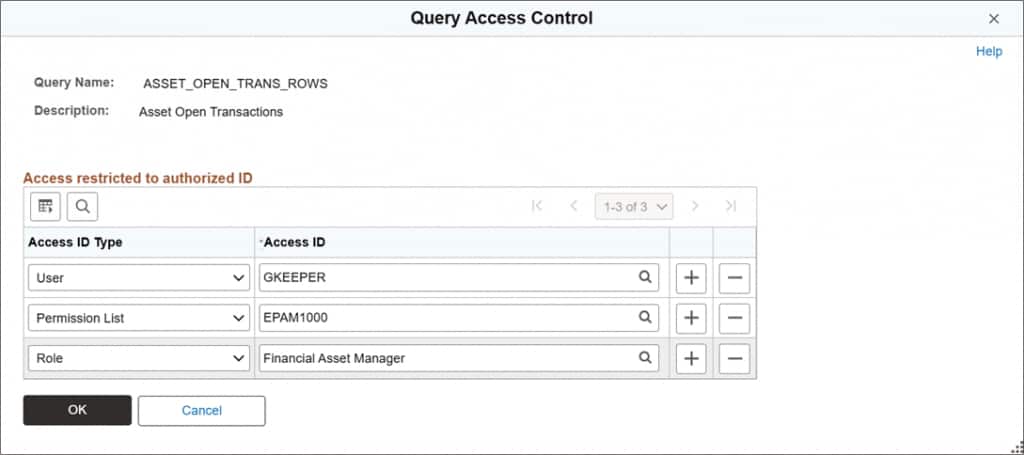
For most users, this new feature is straightforward. A restricted query is available only when access has been granted in at least one of three ways:
- Directly to your user ID.
- Through a role assigned to you.
- Through one of your permission lists.
When you have access, the query appears and works as expected. When you do not have access, it may not appear in Query Viewer or Query Manager search results. If you try to open it from a saved link or another location, you may receive a message that you are not authorized to use it. This can make the query experience cleaner. Instead of seeing every public query and then discovering that some are not meant for you, users are more likely to see a list that reflects their actual responsibilities.
A practical example
Consider a public query created for department managers. It returns employee names, departments, job titles, and work locations. The underlying record may also contain information that is not intended for all managers, but the approved query does not include those fields.
With Query Access Control, the query administrator can assign the query to a manager role. Managers with that role can find and run the approved query. Employees outside that role do not see it in their normal search results and cannot run it simply because they have access to some of the same records.
The benefit is not that the query reveals more data. The benefit is that the organization can share one approved query with a clearly defined audience, while reducing the chance that it will be used by someone outside that audience.
What does not change
Query Access Control adds a new security check; it does not replace the protections that already exist. Record access controlled through Query Access Trees, row-level security, data masking, and other PeopleSoft security rules continue to apply. A user must pass both the existing checks and the new query-specific check when one has been configured.
Public queries that do not have a Query Access Control list continue to behave as they did before, provided the user passes the existing security checks. This allows organizations to apply the additional query-specific security only where it is needed, while existing queries can continue to use the current security model.
Private queries are also unchanged. They remain available only to the user who owns them.
The bottom line
PeopleTools 8.63 makes public-query access more precise. Query administrators can approve an individual query for a specific audience, and query users receive a more relevant list of available queries. The result is easier sharing of approved information without depending only on broad access to the records underneath the query.
For everyday users, there is little new to learn: the queries you are authorized to use appear and run normally. Behind the scenes, however, organizations gain a clearer and more flexible way to make sure the right query reaches the right people.