
In procurement, getting the right item is only part of the process. Requesters also need to order the right quantity. For many suppliers, items must be purchased in defined multiples, such as cases of 10, packs of 25, or other supplier-defined quantity groupings. This is especially true when loading in Requisitions from a third party system which may have separately defined UOMs than those in Peoplesoft and will undergo conversions as part of the Requester Load process.
When requesters are not aware of these order multiple requirements, they may enter quantities that cannot be fulfilled as requested. That can create downstream work for buyers, cause sourcing errors, or result in supplier changes during purchase order acknowledgement.
To help reduce those issues, PeopleSoft has enhanced order multiple validation in eProcurement and Purchasing.
What Are Order Multiples?
Order multiples define the quantity increments in which an item should be ordered for a specific supplier and unit of measure. For example, an item may need to be ordered in multiples of 10 eaches for a particular supplier and supplier location.
These rules can be defined at the Item, Supplier, Supplier Location, and UOM level, helping organizations align requisition quantities with supplier fulfillment requirements.
Bringing Visibility Earlier in the Process
Previously, order multiples were checked in online Purchase Order entry, but requesters creating requisitions did not have the same visibility. This meant a requester could enter a quantity that did not meet the supplier’s multiple requirements, only for the issue to be discovered later by the buyer or during sourcing.
With this enhancement, PeopleSoft now checks order multiples during both Fluid eProcurement and Core Requisition entry.
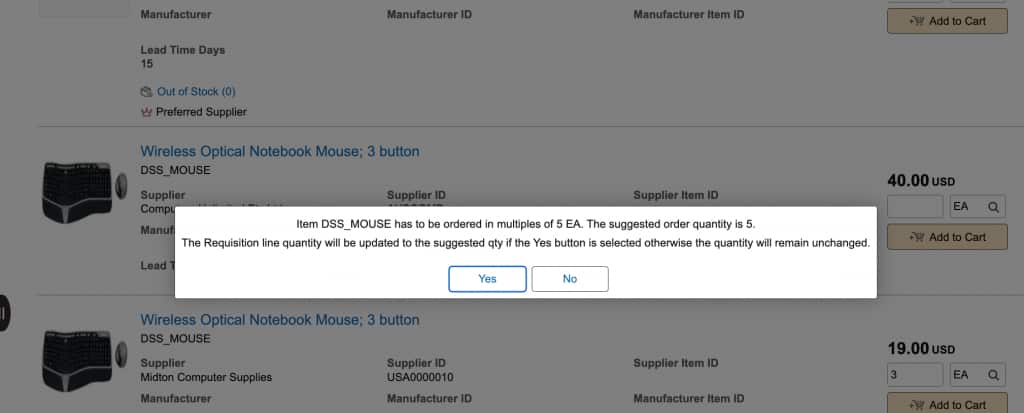
If the requester enters a quantity that is not a valid multiple, PeopleSoft displays a warning message and suggests a valid order quantity based on the rounding rule defined for the item supplier setup.
For example, if an item must be ordered in multiples of 10 and the requester enters a quantity of 13, the system may suggest a quantity of 20, depending on the rounding rule.
The requester can then choose to accept the suggested quantity or continue with the original quantity.
Where the Check Applies
- Creating requisitions in Fluid eProcurement and Core Requisition
- Adding items from search or browse
- Adding items from templates and order sheets
- Express Entry
- Favorites and item history
- Editing requisitions and cart quantities
- Checkout, save, and submit processing
- Change request processing
The check only applies to lines with an Item ID. Punchout items, special requests, and services are therefore not included as they have no associated Item.
A Purchasing Safety Net
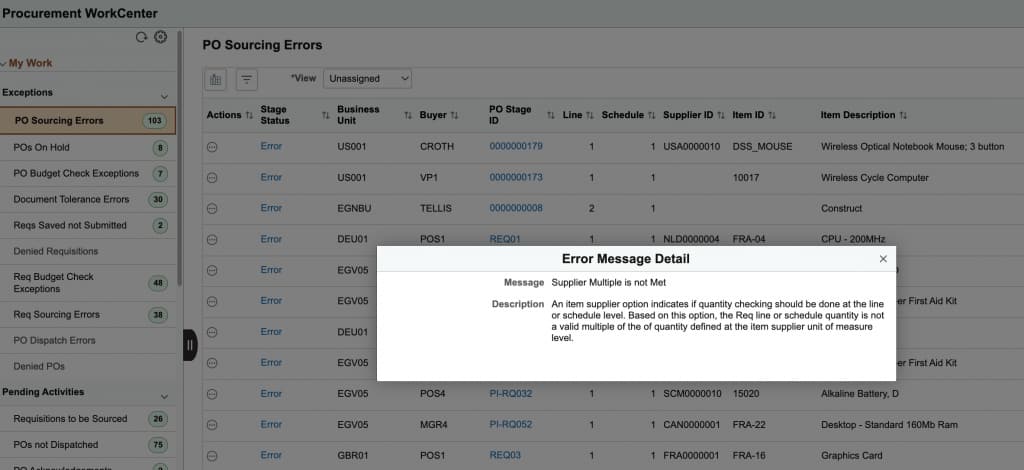
PeopleSoft also adds order multiple validation to PO Sourcing. If a requisition quantity still does not meet the defined multiple requirement, sourcing can create an error similar to existing minimum and maximum quantity sourcing errors.
This gives buyers visibility to the issue before the purchase order is created and dispatched. The error can be reviewed through sourcing pages and the Procurement WorkCenter, helping buyers and requesters resolve the quantity before it becomes a supplier-facing problem.
Why This Matters
- Gives requesters better visibility to supplier ordering rules
- Reduce sourcing errors and buyer cleanup
- Create cleaner purchase orders
- Reduce supplier acknowledgement changes
- Improve compliance with item supplier purchasing attributes
- Streamline the path from requisition to purchase order
This enhancement brings supplier ordering requirements closer to the point of request, helping requesters make better decisions before the requisition reaches Purchasing.
As organizations continue to look for ways to reduce manual intervention and improve procurement efficiency, small validations like order multiples can make a meaningful difference in keeping the procurement process moving smoothly.