
Security fixes are most valuable when they move quickly from announcement to action. Yet in many organizations, that work can become fragmented. One team monitors security advisories, another searches for patches, and application teams determine what belongs in the next maintenance window. That gap between awareness and action matters. Oracle continues to receive reports of attempted malicious exploitation of vulnerabilities for which security patches are already available. Some attacks have succeeded because available patches were not applied. Staying current with security fixes is one of the most important steps organizations can take to reduce that risk.
Security Alerts
For PeopleSoft customers, a consistent process starts with knowing when Oracle publishes security information, where to find the related application updates, and how to identify the fixes that apply to your environment.
- Critical Patch Updates (CPU): Cumulative collections of security patches released quarterly for supported Oracle on-premises products.
- Critical Security Patch Updates (CSPU): Smaller, targeted collections of high-priority security fixes delivered in the months between the quarterly Critical Patch Update.
- Security Alerts: Notifications and fixes for vulnerabilities considered too critical to wait for the next scheduled update.
- Common Vulnerabilities and Exposures (CVE) Mapping: Information that maps individual CVEs to the appropriate advisory or alert.
The June 2026 Critical Security Patch Update, for example, included security updates for PeopleSoft as well as several other Oracle product families. Rather than depending on someone to remember to check the Oracle Security Alerts and Bulletins page, customers can subscribe to receive email notifications when Oracle releases a Critical Patch Update, Critical Security Patch Update, or Security Alert.
Find the PeopleSoft Fix
An Oracle security advisory identifies the affected products and supported versions. The next step is to connect that information to the maintenance available for your PeopleSoft environment.
PeopleSoft security updates can either be PeopleTools updates or application updates. PeopleTools updates are delivered through the standard patch process; PeopleSoft application updates are posted via a PeopleSoft Release Patch (PRP) that are applied manually to your update image source or automatically patched to your update image through PeopleSoft Automated Updates. Regardless of method applied, PeopleSoft Update Manager is then used to create a custom change package that is applied to your target environment.
The PeopleSoft Update Manager dashboard also provides insight into the maintenance level of an environment, helping teams understand which fixes have been applied and where additional maintenance may be needed.
New This Month: Timely Application Updates and Easier Security Searches in PUM
Starting this month, PeopleSoft will begin delivering potential vulnerabilities in weekly PRPs in the application as soon as fixes are available, ahead of them being announced in a CPU/CSPU.
Also new with application update images released this month, PeopleSoft Update Manager now includes additional security-focused search options that help customers locate bugs identified as security-related. Instead of starting with a broad set of application fixes or depending entirely on a known bug number or bug subject, customers can narrow the search to security bugs and then refine the results using other available PUM search criteria.
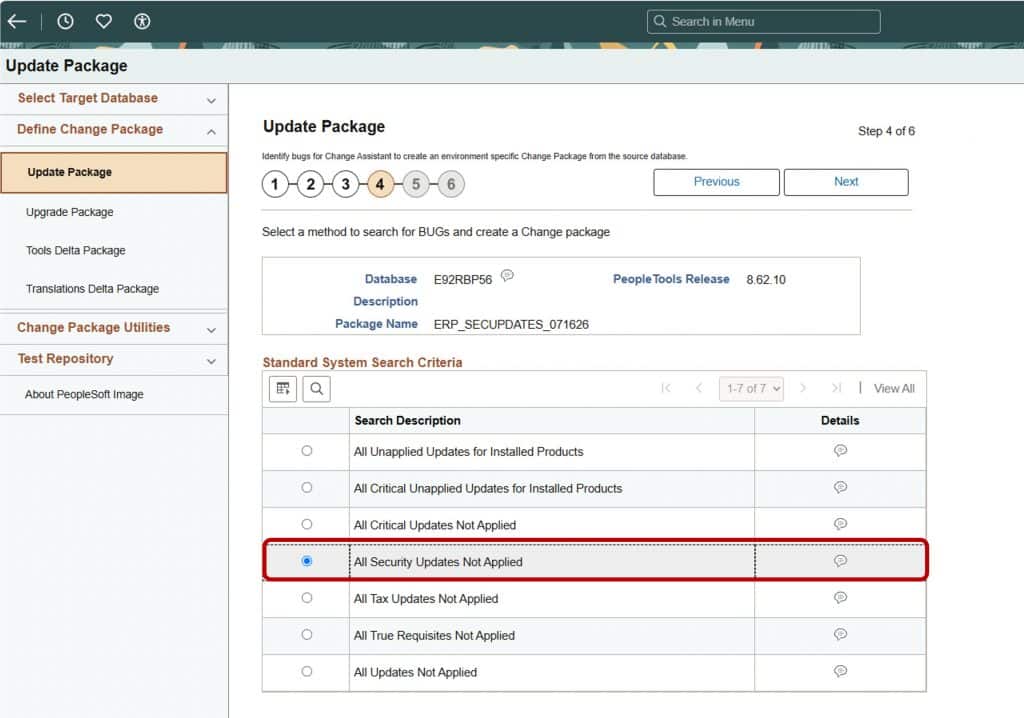
Benefits at a Glance
- Faster discovery: Focus the result set on security-related fixes.
- More targeted maintenance: Identify the fixes that apply to the products and areas used by your organization.
- Less manual cross-referencing: Reduce the effort required to connect security advisories with PeopleSoft application maintenance.
- Better change-package planning: Review the selected fixes and their requisites before creating a change package.
- Improved traceability: Make it easier to document how an Oracle security notification was evaluated and addressed.
Subscribe to Security Alerts
Subscribing takes only a few minutes:
- Sign-in to your Oracle Account. An Oracle Account is required and is different from an Oracle Cloud Account.
- Select the person icon in the upper-right corner.
- Select your account name.
- Select Subscriptions from the left pane.
- Find Oracle security notifications in the Oracle Subscriptions section.
- Select the checkbox for Oracle security notifications or Security Alerts, and then select Save.
Embedded Resources
- Oracle Security Blogs
- Oracle Security Alerts
- Subscribe to Oracle Security Notifications
- PeopleSoft Selective Adoption and Update Manager
- PeopleSoft Update Manager
Closing Thoughts
Security maintenance should not depend on someone remembering where to look or manually searching through a long list of unrelated fixes. With Oracle security email notifications, a clear process for reviewing advisories, and the new security-focused search options in PeopleSoft Update Manager, teams can move from awareness to action more quickly.
Staying current is not simply a quarterly task. It is a disciplined lifecycle that brings security, application maintenance, testing, and change management together. When that rhythm becomes routine, organizations are better positioned to protect critical operations while continuing to take advantage of the flexibility and control provided by PeopleSoft Selective Adoption.