
In most organizations, important messages struggle to land at the right moment. Emails get buried. Announcements fade from view. Teams repeat the same reminders week after week. Notification Publisher changes that pattern. It gives business users a guided way to compose, target, schedule, and deliver communications—directly where people work—so the right message shows up at the right time, in the right place. For employees on the go, a text/SMS message. For heads down business users in PeopleSoft day-in-day-out, an in-app notification as an action or alert. For infrequent users of the application, an email. Or, to ensure better chances of viewing important communications, delivery as an email and displaying directly in a section on the landing page upon login to PeopleSoft.
Available now in application update images, Notification Publisher pairs a simple publishing experience with enterprise governance—roles, security, templates, logging, and archiving—so daily communications scale without chaos. The result is a communication layer that’s repeatable, auditable, and easy to trust.
Notification Delivery
- Notifications Panel (Actions or Alerts) for work‑in‑context awareness with the PeopleSoft application.
- Landing Page Sections—Suggestions, Continue With, Announcements, and Banner Announcement—for high‑value, high‑visibility items.
- Email for reach and reinforcement, using PeopleTools Generic Templates that standardize subject and body with bind parameters resolved by the application.
- Text/SMS for users on the go or time sensitive communications.
Key Features at a Glance
| Feature | Benefits |
| Delivery Options | Publish as email, in-app (action or alert), in a section on landing page, or text/SMS. |
| Dismissal | Dismiss notifications manually by the user or administrator or only when defined criteria is met. |
| Expiration Dates | Expire notifications on landing page at a date you choose. |
| Recipient Types | Define reusable recipient populations with criteria such as business unit, company, paygroup, or department. |
| Rich Text | Format notifications using rich text and images. |
| Ad-hoc or Recurring | Send one-time or recurring frequency notifications posted immediately or on future date. |
| Attachments | Embed attachments. |
| Links | Add links to PeopleSoft transactions or external websites. |
A Day in the Life: Three Moments that Show Business Value
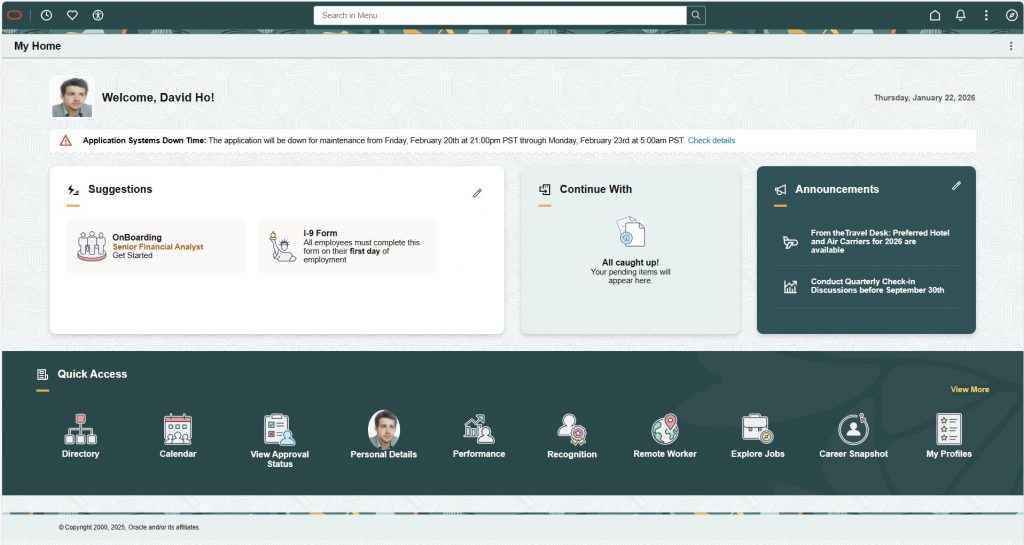
The system outage made visible
Early Thursday, IT must broadcast an upcoming system outage. The admin selects the Banner Announcement category and posts a concise, high-visibility message. It appears at the top of the landing page—front and center—until resolved. A “Check details” link opens the full update and timeline. Once the window closes, employees can dismiss it. No hunting and no duplicated emails.
Outcome: The employee didn’t have to ask around; the status was right there on the Landing Page.
The reminder made routine
Midweek, payroll operations need a timesheet reminder for a specific pay group. Instead of manual lists, Notification Publisher uses a Recipient Type that resolves the audience automatically—via SQL, Query, Role, or an Application Class. The message is scheduled for Thursday and set to recur each pay period. Recipients see a crisp in-app notification and a consistent email using an approved template. What used to be labor‑intensive becomes a dependable rhythm.
Outcome: The reminder hit at the right moment – no chasing and no spreadsheets.
The nudge to complete a task
New hires need to complete OnBoarding tasks such as completing compliance forms, reviewing the employee handbook, verifying personal information, and completing training. A nudge is published to the Suggestions section on the landing page when the new hire first logs in that is one-click access to complete the guided process for OnBoarding tasks.
Outcome: The employee sees the most important tasks they need to action when they first login, not just in their email inbox.
Availability
Now available with the below update images for customers on PeopleTools 8.59 and above (Landing Page section notifications require PeopleTools 8.62 or above).
- HCM Update Image 53
- ELM Update Image 25
- CRM Update Image 23
- FSCM Update Image 55
- Coming Soon to Campus Solutions and Cloud Manager!
Quick Glossary
- Notification Publisher: A guided way for business users to compose, target, schedule, and deliver messages across in‑app notifications, Landing Pages, and email.
- In-App Notification: Notification which displays in a section on the landing page or in the notification panel as an action or alert.
- Landing Page Notifications: High‑visibility announcements and banners that appear on sections of the PeopleSoft landing page in-app.
- Recipient Types: Reusable audience definitions (e.g., SQL, Query, Role, Application Class) that resolve the final recipient list at send time such as a business unit, company, or department.
- Bind Parameter: A placeholder (e.g.,
%EMPLOYEENAME%) that is replaced with context‑specific data when the notification is sent. - PeopleTools Generic Templates: Standardized email templates that keep subject and body consistent and support bind parameters.
Embedded Resources
- Notification Composer on Information Portal
- Notification Composer Homepage Knowledge Document
- Landing Pages on Information Portal
- PeopleSoft Landing Page Knowledge Document
Closing Thoughts
Notification Publisher does more than send messages. It turns everyday communications into a dependable system—a way to keep people informed, reduce duplicated effort, and make every announcement purposeful. Whether the need is a time‑sensitive alert, a recurring operational reminder, or a manager’s note in the flow of work, the outcome is the same: people get the right message, at the right time, in the right place.