
At Oracle, we’re always listening to our customers and working to simplify complex enterprise configuration. That’s why we’re excited to announce two major enhancements for Project Costing Rate Sets: Partial Wildcards and Pricing Exclusions. These new capabilities let you build smarter, leaner, and more flexible criteria for pricing your project transactions.
In this blog post, we’ll look at why these features matter, how they work, and how your organization can benefit.
The Challenge: Managing Complex Rate Sets
Project Costing often ingests transactions from multiple Finance and HCM applications—Accounts Payable, Expenses, General Ledger, Time and Labor, and more. Each transaction might have coding across several fields, such as analysis type, account, source type, category, subcategory, operating unit, department, and others. These codes control how (and if) your project transactions are priced and billed.
But when hundreds—or thousands—of valid coding combinations exist, defining the right pricing criteria in your Rate Sets can become complicated, time-consuming, and prone to error.
What’s New: Partial Wildcards & Pricing Exclusions – Available in Update Image 53
1. Partial Wildcards
What are they?
Previously, you could use the % symbol as a full wildcard in any Rate Set rule criteria—meaning “match all values” for a given field. Now, partial wildcards let you use a value like 51% for the account criteria (with the % at the end) to match all codes that start with a certain prefix.
Why is this great?
As an example, if you had account codes 5100 to 5199 that should be priced the same way, you used to need dozens—or even hundreds—of rows in the rate set. Now, one row with 51% does the job.
How it works:
- You select the leading values of the field value followed by a % symbol.
- Partial wildcards are allowed in multiple fields at once.
- This greatly reduces setup time and makes ongoing maintenance easier.
- Oracle validates your rate set keeping your criteria precise and avoiding accidental errors
2. Pricing Exclusions
What are they?
Not all transactions should be priced or billed. Now, you can specify exclusions in your Rate Sets—defining which codes or combinations should never be priced.
Benefits:
- Simplifies Rate Sets by eliminating the need to list every included value.
- Reduces risk of errors and eases updates when codes change.
How it works:
- Any row can now be marked as “Exclude,” indicating matching transactions will be skipped during pricing.
- Exclusion rows are always processed first.
- If a transaction matches an exclusion row, it will not be evaluated for pricing in other rows of criteria.
- Exclusions may also have partial wildcards.
Example:
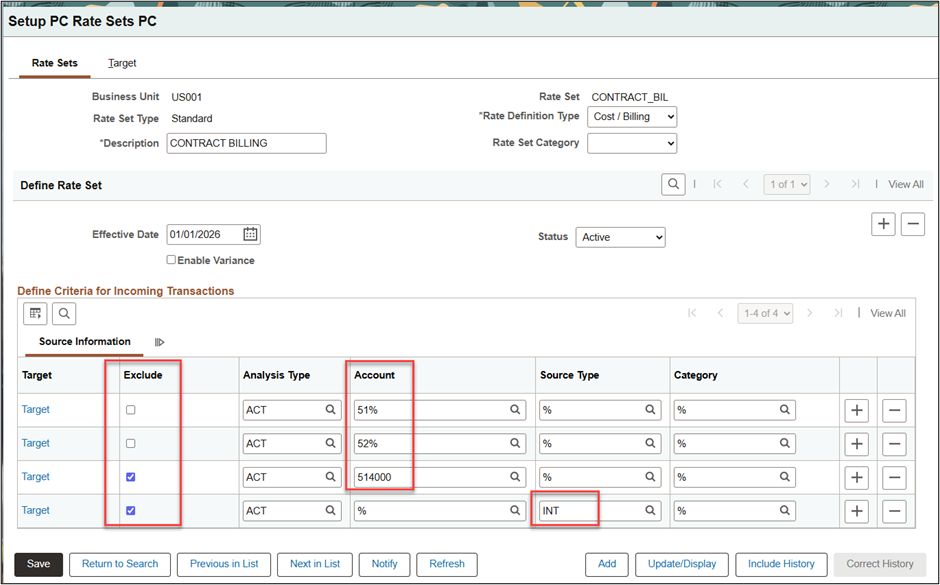
You want all accounts priced that start with ‘51’ or ’52’ except for account ‘514000’. In addition, transactions with source type ‘INT’ should never be priced regardless of account.
Instead of entering all possible combinations of account and resource type that can be priced, you can enter:
- One row: Account = ‘51%’
- One row: Account = ‘52%’
- Exclusion row: Account ‘514000’
- Exclusion row: Source Type ‘INT’ (see below)
Smarter Processing & Better Performance
- The system automatically prioritizes the most specific rules, meaning transactions always match the best-fitting criteria, whether those are fixed values or partial wildcards.
- Online validations catch potential errors in your Rate Set definitions.
- Exclude rows never include target information, which is enforced at setup—so it’s clear when a rule is intended to suppress, not price, transactions.
Getting Started
These enhancements are designed for flexibility and control, helping you make Rate Sets work for your business logic—not the other way around. To learn more, review the updated documentation in PeopleSoft Online Help – Defining Rate Sets