
U.S. Federal agencies must ensure Personnel Action Requests (PARs) align with U.S. Office of Personnel Management (OPM) guidelines especially when administering career ladder promotions. A common challenge arises when an employee is not yet at the minimum Salary Grade and Step required to qualify for a promotion. In these cases, administrators often need to take two actions, both effective on the same date:
- Use Pay Rate Change to assign the minimum qualifying Salary Grade and Step, defaulted from Position Data
- Use Promotion to move the employee to the new Salary Grade and Step for the career ladder promotion
To support this real-world data entry scenario, PeopleSoft has introduced the ability to select the Position Effective Sequence whenever Position Data has more than one Effective Sequence rows for the same Effective Date directly. A new field ‘Effective Sequence’ has been added under Position Details within the Fluid Guided Personnel Action, Job Related Data page and the Classic HR Processing, Job Data page. This ensures PAR data can be precisely aligned with Position Data, action by action. This enhancement is delivered in PeopleSoft HCM Image 54.
What’s new?
A Position Details section now appears on the Fluid Personnel Action Request page.
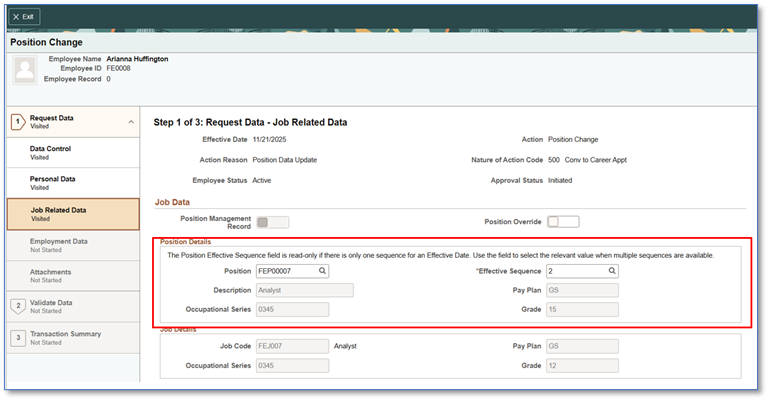
When a Position has multiple Effective Sequence rows for the same Effective Date, the Position Effective Sequence field becomes editable.
Administrators can choose the appropriate sequence so that each PAR (e.g., Pay Rate Change vs. Promotion) pulls the correct Salary Grade and Step from Position Data.
How it works in practice?
- Configure Position Data with multiple Effective Sequences on the same Effective Date:
- A lower Effective Sequence holds the minimum qualifying Salary Grade and Step.
- A higher Effective Sequence reflects the career ladder promotion Grade and Step.
- When entering PARs effective the same date, select the appropriate Position Effective Sequence for each action:
- Pay Rate Change: select the lower sequence to align to the minimum required Grade/Step.
- Promotion: select the higher sequence to apply the career ladder promotion.
Benefits of Deploying the Enhancement for U.S. Federal Agencies using Fluid Position Management
- Keeps PARs in strict sync with Position Data and OPM requirements
- Reduces manual corrections and rework
- Clarifies intent and sequencing for complex, same-day actions
- Improves auditability and policy compliance
Key points to remember
- Available for U.S. Federal agencies using Fluid PAR, as well as those using Classic PAR, but only for agencies that have deployed Fluid Position Management.
- The Position Effective Sequence field is editable only when multiple sequences exist for the same Effective Date on the Position.
- For existing PAR records, Position Effective Sequence defaults to 0 (the highest assumed sequence).
Getting started
- Review your Position Data using Manage Positions – Position Details page to ensure appropriate Effective Sequences exist for the same Effective Date (pay rate change v/s promotion).
- Train PAR administrators to select the correct Position Effective Sequence during data entry.
- Validate downstream processes and reports to confirm alignment with the selected sequence.
Learn more
Read PeopleBooks documentation and watch the PeopleSoft HCM Image 54 Highlight Video for configuration details and a demonstration of the user experience.