
In 26C, Oracle Permitting and Licensing introduces new capabilities that help agencies streamline inspections, improve licensing reviews, modernize daily work experiences, and use AI to support faster, more informed decisions—while keeping users firmly in control. From intelligent inspection summaries to automated scheduling and enhanced workspaces, these innovations help agencies improve productivity and deliver better service to their communities.
Let’s look at some of the features you can find in the 26C update for Oracle Permitting and Licensing.
AI Agent: Inspection History Summary
Reinspections often require inspectors to review multiple prior inspections to understand what failed and what still needs attention. Oracle Permitting and Licensing 26C simplifies that process with the AI Agent: Inspection History Summary.
When a reinspection is scheduled following a failed inspection, the AI agent automatically generates a concise summary of previous failed inspections. Inspectors can quickly review failed checklist items, comments, inspection-level notes, and recurring issues—all from the Inspection History drawer. Because the summary is generated and saved when the reinspection is scheduled, it is immediately available without additional processing when the inspector begins work.
The AI-generated summary focuses only on failed inspection information, allowing inspectors to spend less time searching through historical records and more time resolving outstanding issues.
Inspectors gain immediate insight into previous failed inspections, helping them perform more focused and efficient reinspections.
Automated Recurring Inspection Scheduling for Permits
Many inspections occur on recurring schedules or require automatic follow-up based on inspection results. Managing these manually can create unnecessary administrative work and increase the risk of missed inspections.
With Automated Recurring Inspection Scheduling for Permits, agencies can define inspection automation rules directly at the permit type level. The system automatically creates pending inspections, reinspections, and recurring inspections based on agency-defined schedules, inspection outcomes, recurrence patterns, and business rules.
Agencies can configure recurring schedules using daily, weekly, monthly, or yearly frequencies, specify the number of occurrences, determine whether schedules are based on inspection or resulted dates, and define which inspection results trigger future inspections.
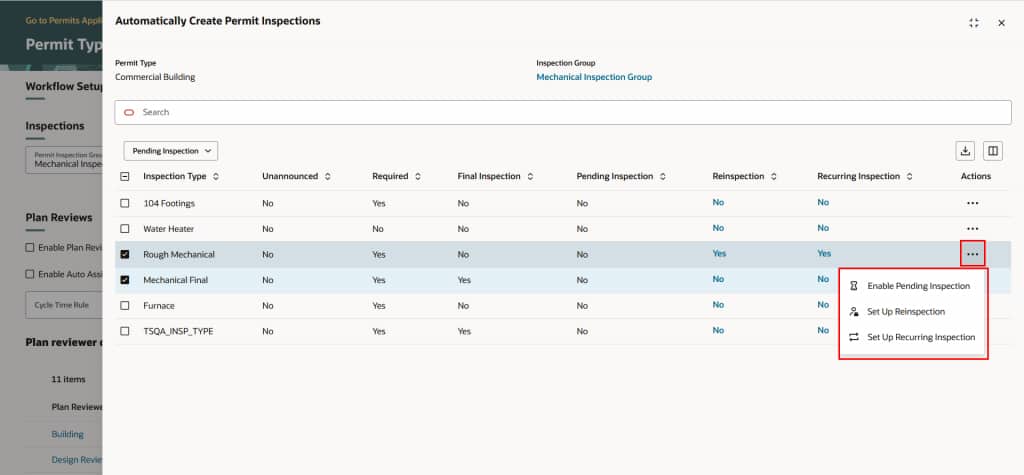
Once an inspection is completed, Oracle Permitting and Licensing evaluates the configured rules and automatically schedules the next required inspection without additional staff intervention.
This reduces manual administrative work, improves consistency, and helps ensure recurring inspections occur on time.
Compare Amendment or Renewal to Prior Activity
Reviewing business license amendments and renewals often requires staff to compare multiple records to determine exactly what has changed. Oracle Permitting and Licensing 26C makes this process significantly easier with Compare Amendment or Renewal to Prior Activity.
Agency staff can now view a side-by-side comparison of the current amendment or renewal alongside the previous completed license activity. The comparison highlights attribute-level differences across key business information, including business details, locations, owners, contacts, credentials, and other functional areas.
By default, the comparison displays only the fields that have changed, allowing reviewers to quickly focus on the requested modifications. Users can also choose to display all compared attributes when a complete review is needed.
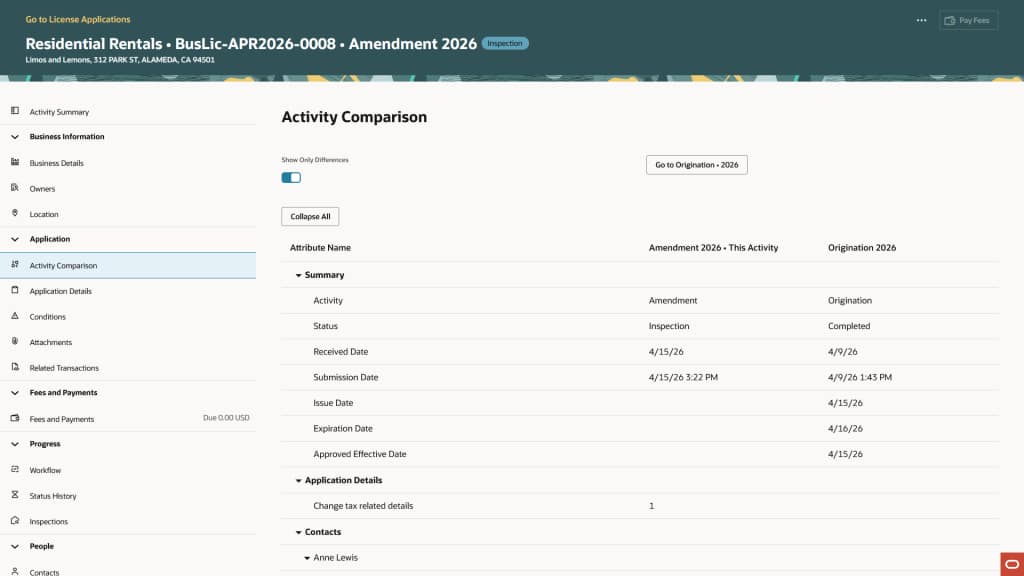
This capability is available exclusively to agency users for amendment and renewal activities allowing them to quickly identify the requested changes, improving both review speed and accuracy.
Code Enforcement Incident Workspace
Managing code enforcement incidents requires agencies to evaluate reports, identify duplicates, prioritize urgent cases, coordinate inspections, and communicate with stakeholders. The new Code Enforcement Incident Workspace brings these activities together into a single intelligent workspace.
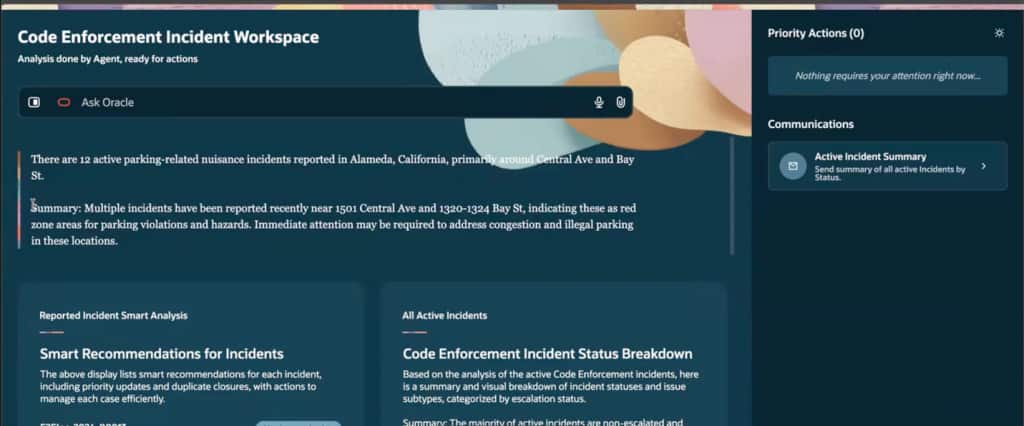
The workspace analyzes incoming incidents as they are submitted and presents AI-generated recommendations that help staff determine the appropriate next action. Recommendations may include closing duplicate incidents, updating incident priority, or scheduling an inspection.
Rather than replacing user decisions, the AI agent prepares recommendations while agency staff remain responsible for approving and executing each action. The workspace also provides incident summaries, workload analytics, priority actions, communication tools, and pre-populated email drafts that users can review and edit before sending.
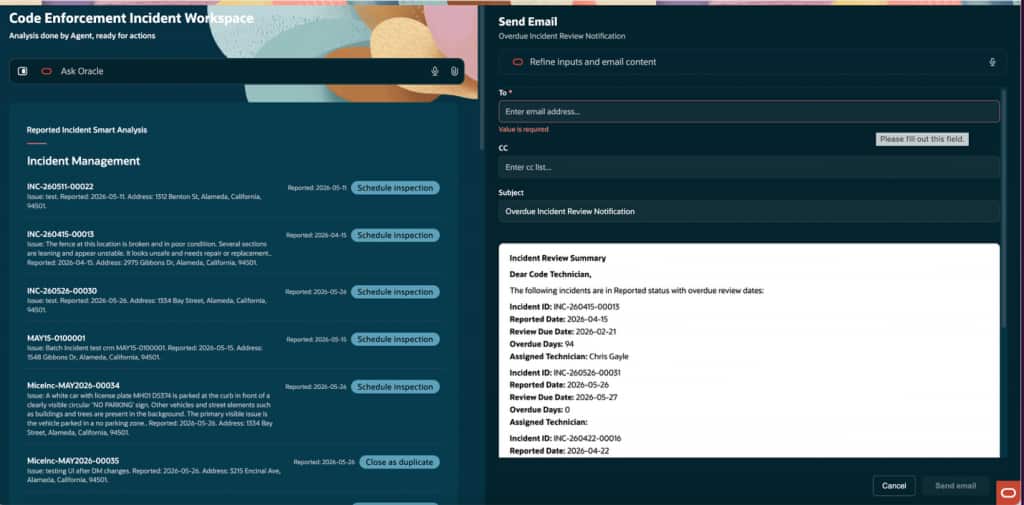
By combining AI analysis with operational workflows, code enforcement teams gain a centralized view of current activity and can respond more consistently and efficiently.
Agencies can review, prioritize, and act on code enforcement incidents more quickly while maintaining complete user oversight of critical decisions.
Redwood Experience for Worklists
Oracle continues its investment in the Redwood user experience by modernizing worklists across Oracle Permitting and Licensing.
The new Redwood Experience for Worklists delivers a cleaner, more intuitive interface for the Common, License, Code Enforcement, Permits, and Planning and Zoning worklists. Each worklist is tailored to user roles and security permissions, ensuring staff members see only the work that is relevant to their responsibilities.
Users can claim, update, reassign, or release tasks directly from the worklist while viewing real-time task counts and statuses. Role-specific filters, search capabilities, and contextual navigation help users quickly locate records and complete daily work more efficiently.
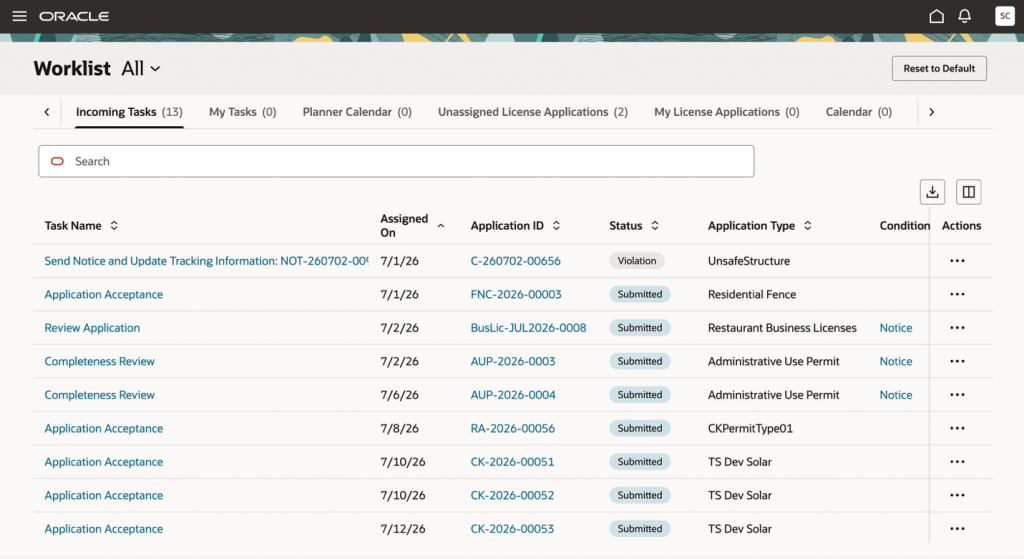
Whether permit technicians are reviewing assigned tasks, business license specialists are processing applications, or code officers are managing inspections, the updated experience provides faster access to the information and actions they need throughout the day.
The enhanced Redwood experience streamlines task management with a modern, role-based interface that improves productivity across agency worklists.
Discover More in 26C
Oracle Permitting and Licensing 26C continues to help agencies modernize operations through practical innovation. To find out more about these features as well as the rest of the 26C features see the following:
- What’s New in Permitting and Licensing 26C – A comprehensive list of features delivered in 26C including how to enable them.
- Spotlight on Permitting and Licensing 26C – A video overview of some of the most exciting features in 26C.
- Oracle Online Help for Update 26C – Implementation and user guides for each offering.