

Operations teams can use OCI Event Service with Management Agent to move from manual agent monitoring to timely notifications and event-driven automation for important lifecycle changes. With OCI event rules, teams can be notified when new agent images are available, upgrades complete or fail, agents become Silent, or agent availability changes.
Management Agent is an Oracle Cloud Infrastructure service that provides low-latency interactive communication and data collection between OCI and the environments where agents are installed, helping customers collect operational data and manage agent-based integrations across hosts, compartments, and platforms.
OCI Events service creates automation based on resource state changes. When an event matches a rule, Events can route it to Notifications, Streaming, or Functions. For Management Agent, this enables teams to receive timely updates for important lifecycle events instead of manually checking the Console or building custom polling jobs.
What are Management Agent Events?
Management Agent events are service-generated messages that describe important changes in the lifecycle of an agent or agent image. These events help administrators respond to operational changes as they happen.
- Notify administrators when a new Management Agent or Management Gateway image is available.
- Confirm when a Management agent upgrade completes successfully.
- Inform operators when a Management Agent has remained in the Silent state for an extended period and is at risk of automatic deletion.
- Notify administrators when a Management Agent upgrade fails.
- Report Management Agent availability transitions, such as Active to Silent or Silent to Active.
- Route selected events to automation by using OCI Functions or downstream processors by using OCI Streaming.
A common first use case is email notification. For example, you can create a rule that sends an email when the latest Linux Management Agent image is available, or when an agent changes from Active to Silent.
How OCI Events Service Works with Management Agent
The Management Agent service emits an event when a supported lifecycle change occurs. OCI Events service evaluates the event against the rules in the selected compartment. If the event matches the configured service, event type, and optional attributes, Events sends the payload to the configured action.
Actions can include:
- Notifications, such as an email subscription on an OCI Notifications topic.
- Streaming, for downstream consumers that process events at scale.
- Functions, for automation or remediation workflows.
Before creating a rule, make sure that the required IAM policies are in place and that the action resources, such as a Notifications topic and subscription already exist as every event rule must have at least one action.
Management Agent Event Types
| Event | When to use it |
| Management Agent – New Version Available | To notify teams when a new Management Agent or Management Gateway image is available. |
| Management Agent – Upgraded | This event confirms that an agent has moved from one version to another. |
| Management Agent – Deletion Pending | To alert teams before a silent agent is automatically deleted. |
| Management Agent – Upgrade Failed | To notify teams when an agent upgrade fails and includes failure details. |
| Management Agent – Availability Status Changed | To notify teams when an agent moves from Active to Silent, or from Silent to Active. |
The event payload includes common fields such as eventType, eventTime, source, compartmentId, resourceId, and resourceName. Each event also includes additional details that are specific to the event.
Attribute filters can be added based on event-specific fields such as state, version, platform, error code, or days before deletion. For the complete list of supported Management Agent event attributes, see Use Management Agent Events.
Prerequisites
Complete these prerequisites before creating an Events rule:
- Confirm that your user group has permission to manage Events rules and use the selected action resources.
- Create or identify an OCI Notifications topic.
- Create a subscription for the topic, such as an email subscription.
- Confirm the subscription from the email sent by OCI Notifications. Notifications remain pending until the subscription is confirmed.
- Identify the compartment where the rule should be created. Events evaluates messages from resources in that compartment and child compartments.
For a simple notification workflow, the action resource is usually an OCI Notifications topic with an email subscription.
For more details, check Events Prerequisites.
Steps to Configure an Event Rule
Use this example when you want to notify operators that an agent is no longer active.
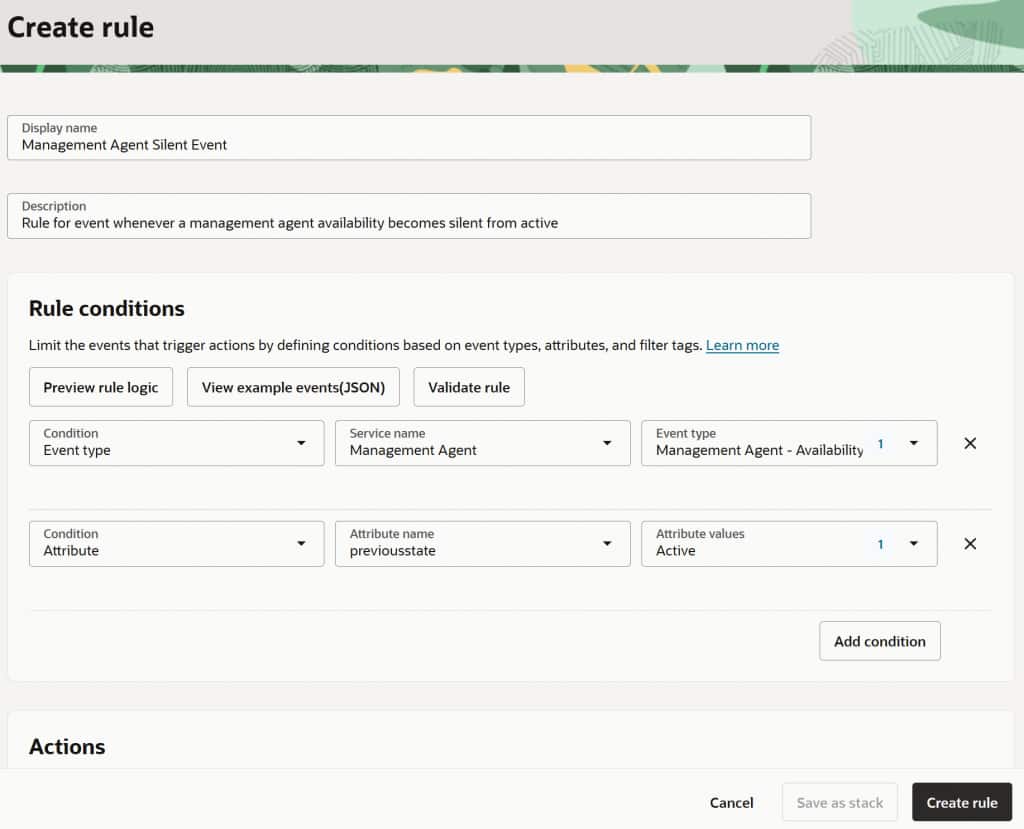
- Navigate to Observability & Management and select Rules under Events Service in the OCI console.
- Select Create Rule on the desired compartment.
- Enter a display name, such as
ManagementAgent Silent Event. - In the condition section, select Event Type and Service Name as Management Agent.
- For Event Type, select the desired event type. eg: Management Agent – Availability Status Changed.
- Add any of the related attribute filters such as
previousstate=Active. - In the action section, select Notifications and the required topic with subscriptions.
- Select Create Rule.
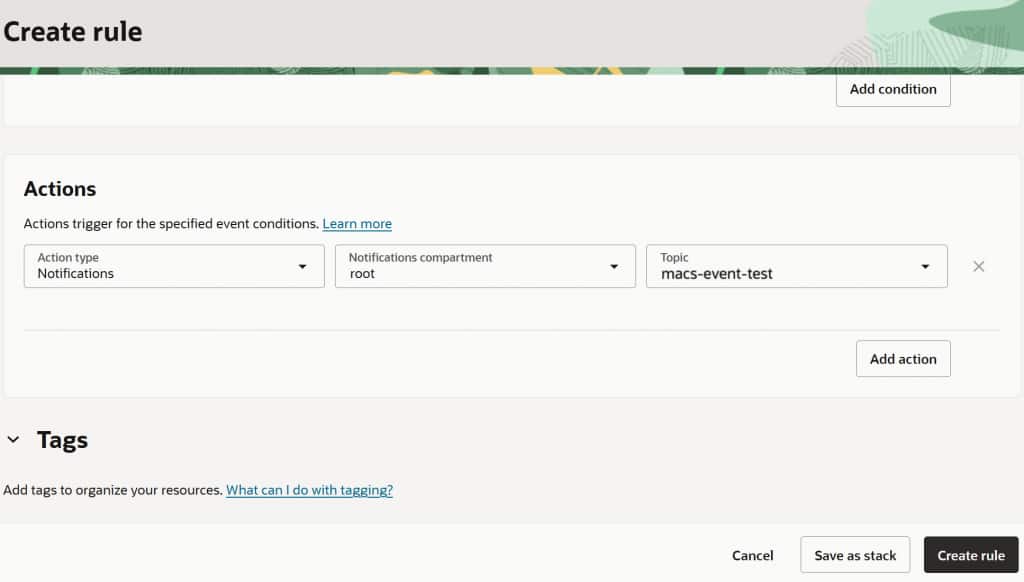
When a matching agent changes from Active to Silent, OCI Events service sends a notification to the topic. The payload can include previousstate, currentstate, silentsince, and a description of the transition.
A simplified payload looks like this:
{
  "eventType": "com.oraclecloud.managementagent.agentavailabilitystatuschanged",
  "source": "managementagent",
  "eventTime": "2025-07-02T13:14:31Z",
  "data": {
    "compartmentId": "<compartment_ocid>",
    "resourceName": "my-management-agent",
    "resourceId": "<management_agent_ocid>",
    "additionalDetails": {
      "previousstate": "Active",
      "currentstate": "Silent",
      "silentsince": "2025-07-02T12:27:19.605Z",
      "description": "Agent availability has moved from Active to Silent",
      "referencedoc" : "https://docs.oracle.com/iaas/management-agents/index.html",
      "eventcategory" : "WARNING",
    }
  }
}
Receiving and Using the Notification
If you use an email subscription, OCI Notifications sends an email when the rule matches an event. The subject identifies the OCI Event notification and the event type. The message body contains the event payload.
From the notification, an operator can identify:
- The event type that triggered the rule
- The compartment and resource associated with the event
- The Management Agent name and OCID
- The event time
- Event-specific details such as version, platform, state, scheduled deletion date, or error message
For operational workflows, you can use the same event rule pattern with other action types. For example, send upgrade failure events to a function that creates an incident, or send all agent availability events to a stream for centralized processing.
Conclusion
Management Agent events provide a simple way to move from periodic checks to event-driven operations. By combining Management Agent event types with OCI Events rules and Notifications topics, you can alert the right teams when important agent lifecycle changes occur. You can start with email notification for high-value events, such as new agent image availability or Active to Silent transitions, and later extend the same event flow to automation with Functions or downstream processing with Streaming.