

The rise of agentic AI is changing how enterprises interact with operational systems. As organizations adopt AI assistants and agents for IT operations, they need a standardized way to connect these applications to enterprise operational data without creating and maintaining a custom integration for every AI application.
This is where the Model Context Protocol (MCP) comes in.
Starting with Oracle Enterprise Manager 24.1 Release Update 12 (RU12), Enterprise Manager introduces a built-in MCP Server that enables MCP-compatible AI assistants and agents to access Enterprise Manager operational data through a standardized interface while continuing to operate within Enterprise Manager’s existing security and governance model.
MCP provides a standard way for AI applications and agents to discover and use capabilities exposed by enterprise systems. In Enterprise Manager, the MCP Server provides an AI-friendly layer over EM capabilities, allowing MCP-compatible clients to discover available tools, understand how to use them, and retrieve current operational information from Enterprise Manager.
The initial release focuses on read-oriented capabilities while establishing an extensible foundation for deeper AI integration over time.
Why MCP?
Traditionally, an organization building an AI assistant for IT operations would need to create custom integrations with Enterprise Manager REST APIs. The AI application would need to understand the relevant API endpoints, request formats, and parameters, and those integrations would need to be maintained as APIs and applications evolve.
MCP provides a more standardized approach. Instead of requiring each AI application to understand Enterprise Manager-specific APIs, an MCP-compatible AI client can:
- Discover available tools
- Understand each tool’s description and input schema
- Invoke the appropriate tool through a standardized interface
Enterprise Manager adopts this model by exposing selected Enterprise Manager capabilities as discoverable MCP tools. The result is a simpler and more scalable integration model for AI applications that need access to Enterprise Manager operational data.
Enterprise Manager as an MCP Server
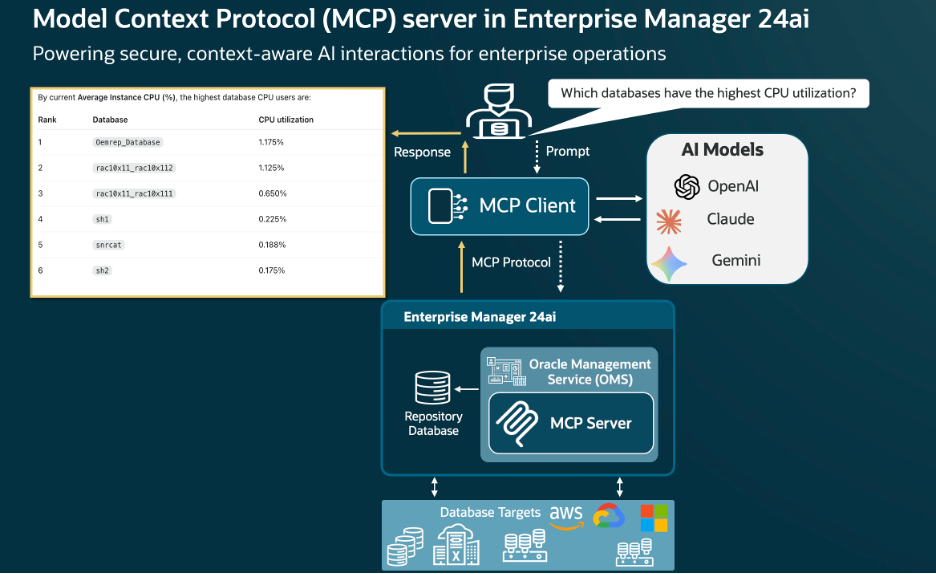
The Enterprise Manager MCP Server runs within the Oracle Management Service (OMS) alongside Enterprise Manager’s existing management services. Because the MCP Server is built into Enterprise Manager, customers do not need to deploy or maintain separate MCP server infrastructure. It complements, rather than replaces, Enterprise Manager REST APIs by providing an AI-friendly, self-describing interface for MCP-compatible clients.
A key benefit of the EM MCP Server is that it allows AI applications to ground their responses in current Enterprise Manager operational data. Instead of relying only on the model’s general knowledge, an MCP-compatible client can discover an Enterprise Manager tool, retrieve information such as targets, metrics, or jobs, and use that information as context when formulating its response.
For example, when a user asks a question about their environment, an MCP-compatible client can discover the appropriate Enterprise Manager tool, retrieve current information from EM, and use the returned data to generate a response grounded in the customer’s environment.
Security Remains in Enterprise Manager
Security is a core principle of the EM MCP Server architecture.
The MCP Server does not introduce a separate authorization model or bypass Enterprise Manager security. Requests are authenticated using Enterprise Manager credentials, and the underlying Enterprise Manager services continue to enforce the authenticated user’s privileges, validation, and applicable auditing.
An MCP client can therefore access only the Enterprise Manager information available to the authenticated user under that user’s existing privileges.
For customers, this is an important distinction. Introducing an MCP client does not require creating a parallel security model. Existing Enterprise Manager controls continue to govern access to the underlying operational data.
This allows organizations to integrate Enterprise Manager with their AI ecosystem while continuing to rely on the security and governance model already established for their EM environment.
A Typical AI Workflow
A typical interaction between an MCP-compatible AI application and Enterprise Manager follows a straightforward flow:
- The AI client connects to the Enterprise Manager MCP Server.
- The client discovers the available Enterprise Manager tools.
- Based on the user’s request, the AI application identifies the appropriate tool.
- The client invokes the tool with the required inputs.
- Enterprise Manager retrieves the requested information while enforcing the authenticated user’s privileges.
- The MCP Server returns the result to the AI client.
- The AI application uses the Enterprise Manager data as context to formulate its response.
The important point is that Enterprise Manager remains the source of operational data, while MCP provides a standardized way for AI applications to discover and retrieve that data.
This separation allows the AI application to focus on understanding the user’s request and formulating a response, while Enterprise Manager continues to provide the underlying operational information and enforce access controls.
Example: Connecting an MCP AI Client to Enterprise Manager MCP server
Because the Enterprise Manager MCP Server follows the MCP-compatible interface, it can be integrated with MCP-compatible AI clients. The following example illustrates how Codex can be configured as an MCP client to connect to Enterprise Manager MCP server.
To register the Enterprise Manager MCP Server with Codex, edit the Codex config.toml file. The default location is:
~/.codex/config.tomlAdd the following TOML configuration, replacing the placeholders with values for your Enterprise Manager environment:
[mcp_servers.em_mcp]
enabled = true
url = "https://<subdomain>.<domain>.com:<EM_CONSOLE_HTTPS_PORT>/em/api/mcp"

[mcp_servers.em_mcp.http_headers]
Authorization = "Basic <base64Encoded(username:password)>"
The Enterprise Manager HTTPS console port can be identified from EM_CONSOLE_HTTPS_PORT in the emgc.properties file or by running:
emctl status oms -detailsand locating the HTTPS Console Port in the command output.
When configuring authentication for an MCP client, follow your organization’s credential-management, access-control, and file-permission policies.
After adding the configuration, restart Codex and start a new conversation. Codex can then discover the Enterprise Manager tools exposed through the MCP Server and use those tools to retrieve current information from EM.
For example, a user could ask:
Show databases with the highest Average Active Sessions
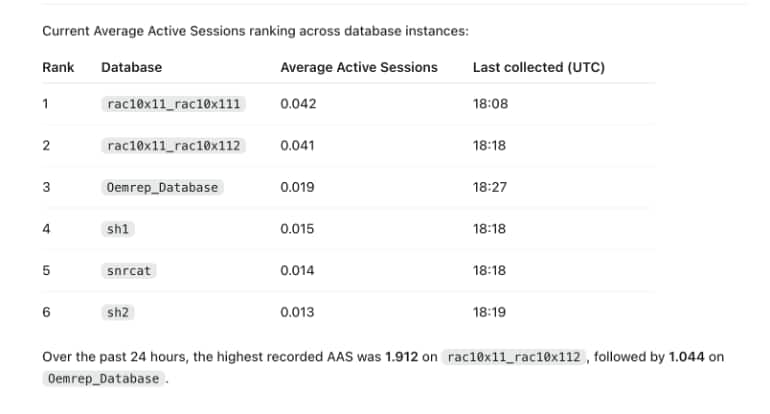
Codex can discover the appropriate Enterprise Manager tool, retrieve the current target information, and use that data to formulate its response.
This is one example of how the Enterprise Manager MCP Server can make EM operational data available to MCP-compatible AI applications through a standardized MCP interface. Other MCP-compatible AI clients can follow the same integration model based on their supported MCP configuration.
Why This Matters: Securely Connecting AI to Enterprise Manager Data
Enterprise Manager has long been the operational management platform for Oracle databases and enterprise infrastructure. With MCP support, Enterprise Manager can now participate directly in the growing ecosystem of MCP-compatible AI applications.
For customers, this means:
- No separate MCP server infrastructure to deploy
- Less custom integration between EM and AI applications
- Standardized, discoverable access to EM capabilities
- Existing EM privileges continue to govern access
- Current EM operational context available to AI applications
- An extensible foundation for future AI-driven EM capabilities
More importantly, MCP enables customers to bring Enterprise Manager operational data into the AI environments they are already building. Rather than requiring an AI application to understand Enterprise Manager-specific APIs and integrations, MCP provides a common interface for discovering the capabilities that Enterprise Manager makes available.
Looking Ahead
MCP provides a foundation for making enterprise systems more accessible to AI applications through standardized, discoverable interfaces.
The current Enterprise Manager MCP Server focuses on retrieving operational information, giving customers a way to connect Enterprise Manager data to MCP-compatible AI assistants and applications today.
As the MCP ecosystem evolves, this extensible architecture provides a path for exposing additional Enterprise Manager capabilities to AI applications over time.
With MCP support, Enterprise Manager can participate directly in the growing ecosystem of MCP-compatible AI applications, making current operational data available to AI while continuing to rely on the security and governance controls enterprises already use in EM.