

As covered in Blog 1: Monitoring FinOps Data Across Multicloud with Oracle Log Analytics, Oracle Log Analytics provides the observability layer for multicloud FinOps. This post focuses on one practical implementation path: taking FOCUS FinOps standard cost and usage data in AWS, curating it into a daily file, landing it in OCI Object Storage, and then ingesting it into Oracle Log Analytics for analysis.
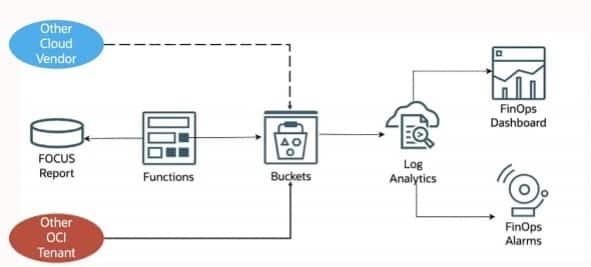
AWS FOCUS Data Pipeline Overview
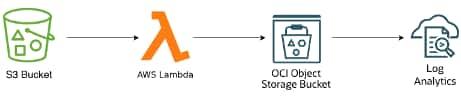
This workflow turns AWS cost data into a dependable FinOps data pipeline that you can monitor in Oracle Log Analytics. FOCUS 1.2 with AWS columns reports into an Amazon S3 bucket, a scheduled AWS Lambda function curates the export, OCI Object Storage receives the final daily object. From there, the file can be ingested into OCI Log Analytics.
It helps you:
- standardize AWS FinOps data
- create a predictable daily output
- reduce duplicate or overlapping records
- prepare the data for Oracle Log Analytics ingestion
- support showback, chargeback, and budget review
- create a clean handoff from AWS to OCI
The result is a repeatable pipeline for AWS cost and usage data that makes daily monitoring easier and the output more trustworthy.
1. Collect AWS FOCUS Data
AWS Billing and Cost Management Data Export writes the FOCUS export to Amazon S3.
That gives you the raw source data, but not yet the daily output you want for analysis. AWS exports can be refreshed during the billing period, and they can contain cumulative data. So you should not treat every exported object as the final daily record.
2. Land the Raw Export in Amazon S3
Amazon S3 is the raw landing area in this workflow.
This keeps the AWS export close to the source while allowing the next stage to curate it before it reaches OCI. At this point, the export is still source data, not the final daily FinOps object.
3. Use AWS Lambda to Curate the Data
The AWS Lambda function is the curation layer. It does more than move files. It:
- identifies the latest available export for the billing period
- reads the exported FOCUS records
- keeps only the records for the target usage date
- writes one deterministic output file for that date
This step matters because it prevents duplication and gives you a stable daily output.
A flat output name such as:
aws_focus_daily__usage_date=YYYY-MM-DD.csv.gzmakes the contract with downstream consumers clear:
- one file
- one usage date
- one stable ingestion target
4. Publish the Curated File to OCI Object Storage
The curated daily file is published into OCI Object Storage.
This gives you a durable landing zone for the AWS FOCUS data and separates source-export behavior from downstream analytics behavior.
Object Storage is useful here because it:
- creates a reliable handoff point
- keeps the daily file ready for ingestion
- supports a governed landing zone
- allows the same pattern to scale into broader multicloud FinOps workflows later
5. Prepare for Ingestion into Oracle Log Analytics
Before you ingest the file into Oracle Log Analytics, you need the supporting Log Analytics setup in place.
At a high level, the prerequisites are:
- Parser
- Create or identify a parser that maps FOCUS FinOps standard data to Log Analytics fields.
- Create a Parser
- Advanced parser creation use-case
- Source
- Create or identify the Log Analytics source that will receive the ingested data.
- Create a Source
- Log group
- Create the log group that will store the collected data.
- Create Log Groups to Store Your Logs
- Entity
- Create or identify the entity to map your log-emitting resource in Oracle Log Analytics.
- Create an Entity to Represent Your Log-Emitting Resource
- IAM policy
- Create the IAM policy with the required permissions for object collection and Log Analytics ingestion.
- Allow Log Collection from Object Storage
If you use LIVE or HISTORIC_LIVE collection, the Log Analytics Object Storage collection flow also requires the supporting stream setup described in the official guide.
6. Ingest into Oracle Log Analytics
Once the curated file is in OCI Object Storage, you can ingest it into Oracle Log Analytics.
For the exact setup flow, see Collect Logs from Your OCI Object Storage Bucket.
On a broad level:
- create the object collection rule
- use the required source, log group, entity, and IAM permissions
- collect the curated daily file from OCI Object Storage
Analyze the Ingested Data
Once the data is ingested, you can analyze it with the FinOps dashboard.
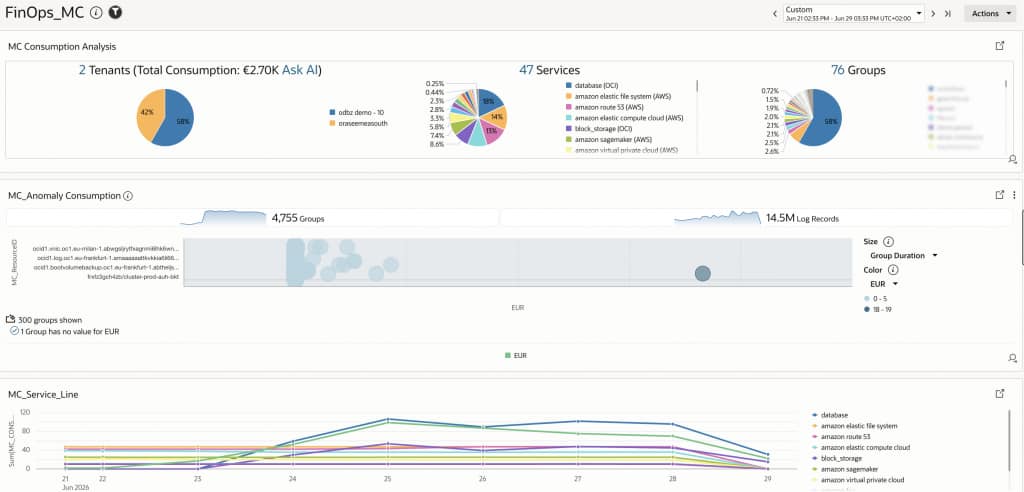
The dashboard helps you:
- see spend trends
- drill into services, accounts, regions, and tags
- identify anomalies
- support chargeback and showback
- compare cost signals across teams and environments
Extending the Pattern
This workflow is not just for one export. It can be generalized because:
- the source is standardized with FOCUS
- the daily output is deterministic
- the landing zone is durable and governed
- the analytics layer is separated from the source delivery behavior
That means you can later extend the same approach to:
- other AWS datasets
- OCI cost data
- other cloud providers
- business-context enrichment for cost center, owner, application, or environment
Conclusion
Moving AWS FOCUS exports from Amazon S3 into OCI Object Storage is more than a file transfer exercise.
When you curate the data correctly, you create a reliable FinOps data pipeline that:
- avoids duplicate or overlapping records
- gives you a stable daily dataset
- makes Oracle Log Analytics ingestion straightforward
- prepares the data for the dashboard and analysis model from Blog 1
For AWS-side implementation details, including the Lambda curation logic, S3 export handling, latest-delivery selection, and daily filtering approach, see the reference implementation on GitHub: AWS FOCUS to OCI Object Storage implementation.
For you, the end result is a practical AWS FinOps monitoring workflow that improves visibility, reduces reconciliation effort, and creates a trusted foundation for cloud cost observability and analysis.
Useful references