
Exadata has delivered predictable, high-performance Oracle database operations for the most stringent, high-activity application workloads. What’s changed is where Exadata runs: not only in Oracle Cloud Infrastructure (OCI), but also in customer data centers (Cloud@Customer) and in other cloud hyperscalers through Oracle’s multicloud partnerships.
This shift creates a new operational reality for DBAs, cloud ops, and SRE teams: you still need the same outcomes – availability, performance, capacity, and fast troubleshooting across a more distributed footprint. The good news is you don’t need a patchwork of siloed dashboards to get there. OCI Database Management is a cloud-native service built to provide a consistent monitoring and diagnostics experience across Oracle database deployments, and it becomes especially valuable as your Exadata estate grows across a distributed, multicloud footprint.
DB system monitoring: Treat the database system as one resource
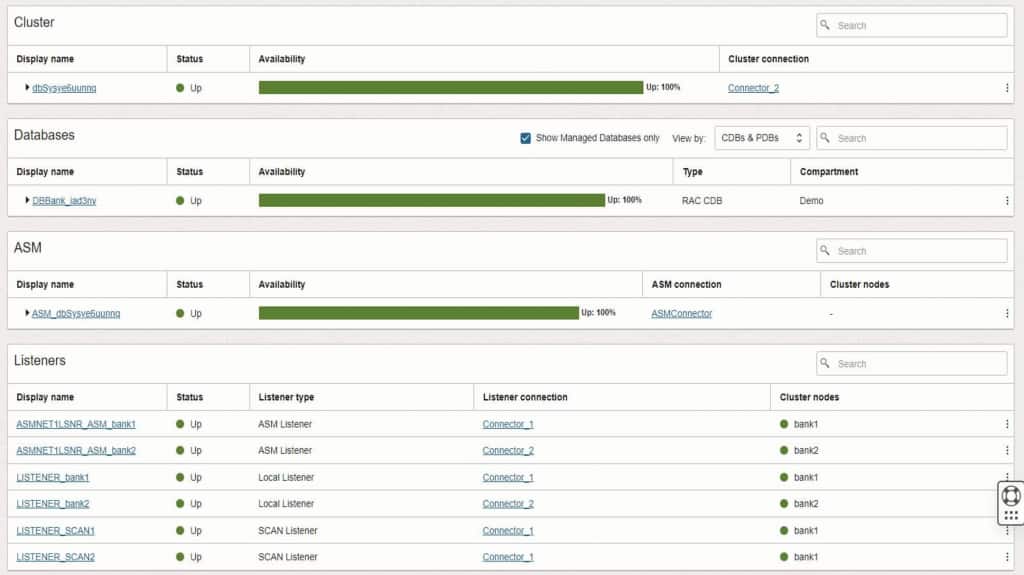
Database Management is well-known for performance diagnostics, but its system-level capabilities are equally important for production operations. Instead of discovering and tracking each dependency independently, aim to manage the database system as an ecosystem, because production incidents rarely respect component boundaries.
With Database Management, you can monitor key components that make up an Oracle database system as a cohesive unit, including clusters, databases, ASM, and listeners. For DBAs, this accelerates triaging complex issues by allowing a quick indication of whether an issue is rooted in database, cluster, ASM, or connectivity problems. For SRE teams, it supports service health views that align with how production platforms are operated end-to-end and answers questions, like:
- Are all nodes up and healthy?
- Are we approaching CPU or memory pressure on specific nodes?
- Is interconnect activity behaving normally?
- Is SCAN configured and operating as expected?
Exadata infrastructure monitoring: Bring storage server visibility into your cloud ops posture
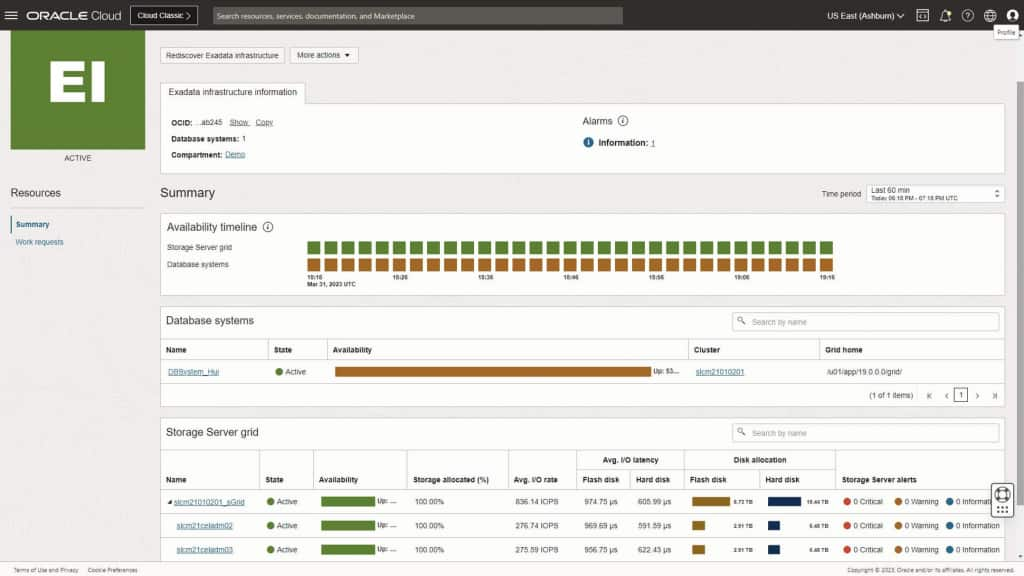
Exadata’s differentiation isn’t just raw performance, it’s the tight integration between database and storage. In cloud environments, you still want the ability to spot I/O bottlenecks, understand where latency is introduced, and correlate database symptoms to infrastructure misconfigurations or resource limitations. Operationally, this matters because many “database” incidents are actually resource contention or I/O path issues that only become obvious when database and infrastructure telemetry are viewed together.
With Database Management’s Exadata infrastructure monitoring, teams can quickly assess overall health of all their Exadata deployments in easy-to-use consoles, tools, and visualizations including the following:
- Fleet-style visibility across Exadata deployments
- Drill-down into a specific Exadata infrastructure
- Health, availability, and performance insights for storage components (where exposed or available)
What this enables for multicloud Exadata teams
For DBAs, cloud ops, and SRE teams managing Exadata across OCI, Cloud@Customer, and Oracle’s multicloud offerings, the goal is consistency:
- Consistent health and availability views across deployments
- Faster isolation of component-level faults (cluster vs. ASM vs. listener vs. DB)
- Better correlation between database performance symptoms and underlying platform behavior
- A more unified operational model – even when apps and databases live in different clouds
Database Management’s new Security features and why they matter
Performance and availability are only part of operating successfully in the cloud and multicloud – security posture needs continuous visibility as well. Database Management’s new Security features help you monitor key security controls for Oracle databases. The feature extends the existing Users monitoring console, previously focused on account-level visibility, to include profile enforcement, privilege analysis, and audit configuration status.
Why this is important for your database environment
Most enterprise security standards require periodic validation of database access controls and audit readiness. Those checks often come down to questions like:
- Who has access, and is it appropriate for their job role?
- Are password policies enforced consistently?
- Are there dormant, locked, or expired accounts that should be cleaned up?
- Are privileged roles tightly controlled and reviewable?
- Is auditing enabled and configured as required?
The challenge is that these answers are frequently scattered across scripts, queries, and point-in-time reports. The Security section centralizes the information so teams can continuously validate posture – not just scramble ahead of an assessment.
Consider a common gap: a user account exists and has a profile assigned, but the profile sets PASSWORD_LIFE_TIME to UNLIMITED. This poses a significant risk to the security of the database allowing bad actors to exploit long-lived or compromised credentials. Other potential risks include:
- Accounts may effectively never expire, increasing exposure if credentials are stale or compromised.
- Inconsistent policy enforcement can trigger assessment findings and time-sensitive remediation.
- Overly permissive resource settings can also impact operational stability, especially at scale.
What you’ll see in the Security section
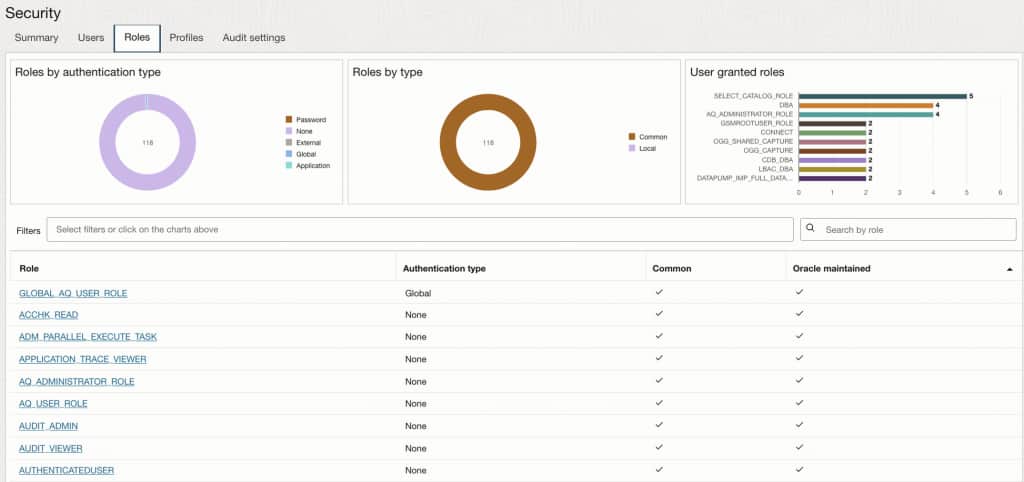
From the Managed database details page, select Security in the left pane under Resources.
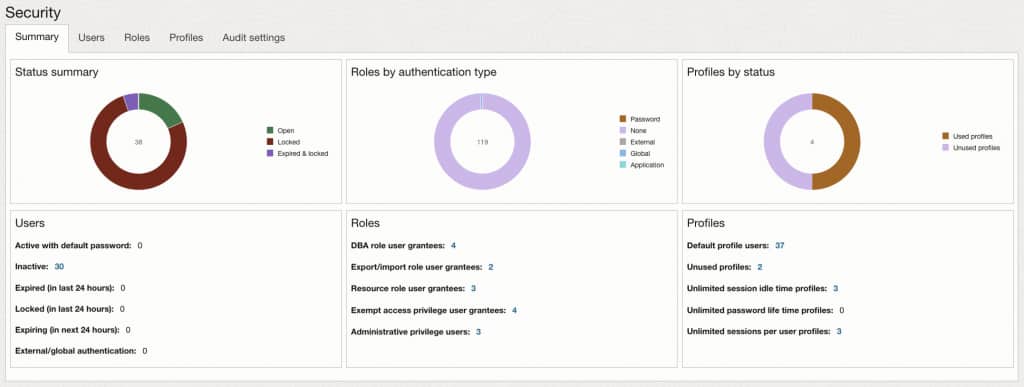
- Summary: Consolidated posture view with at-a-glance charts and clickable metrics.
- Users: Account status, password and login indicators, and a filterable user inventory with drill-down to user grants.
- Roles: Role scope and authentication characteristics; visibility into assignment of key administrative roles.
- Profiles: Profile usage and identification of profiles with “unlimited” password or resource parameters, with drill-down to full profile settings.
- Audit settings: Audit mode, audit policies, and audit trail activity breakdowns.
Gain visibility to your database user configurations
Beyond high-level charts and counts, Database Management supports click-through investigations so you can move from “something looks off” to “here’s exactly what’s configured”. User drill-down to review the security-relevant grants and access paths associated with that account, including:
- Roles granted
- System privileges
- Object privileges
- Consumer group privileges
- Proxy users and the clients they can act on behalf of
- Default container data access (where applicable)
The drill-down capabilities are especially useful during assessments to validate least privilege and to quickly explain why an account has access.
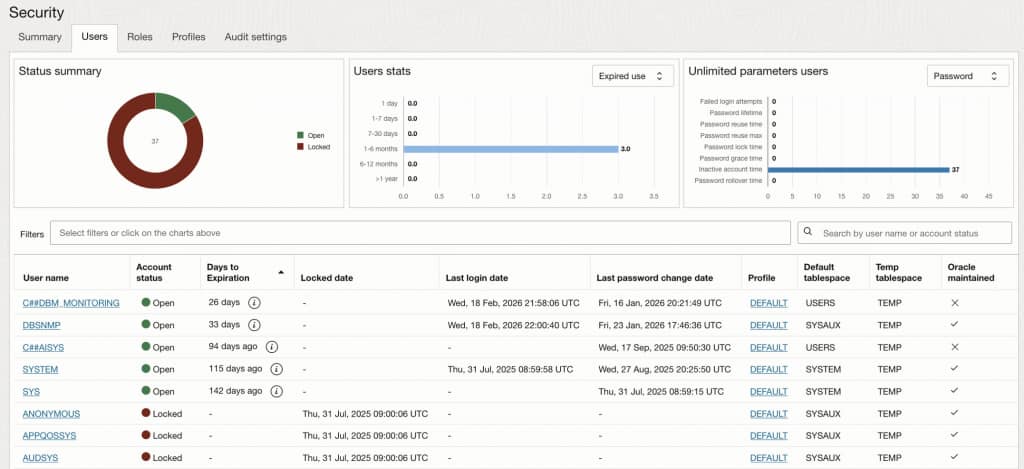
Profile drill-down to review its password and resource parameter settings and their values enables fast verification of policy compliance (for example, confirming password lifetime and expiration-related controls are set as required) and quick identification of risky “unlimited” settings.
These drill-down paths turn the Security section into more than a dashboard—it becomes an evidence-oriented workflow for audits, access reviews, and proactive risk reduction.
Get started
If you’re already using OCI Database Management for database performance, expanding to system-level and Exadata infrastructure monitoring is a natural next step giving you the full-stack visibility needed to detect and resolve issues before they impact workloads. If you’re evaluating Database Management for the first time, the capabilities covered here are available today across OCI, Cloud@Customer, and Oracle’s multicloud deployments. If you’re looking for more information regarding the service capabilities, check out the following resources: