
MySQL HeatWave Service (MHS) on Oracle Cloud Infrastructure (OCI) already provides multiple ways to create a new DB system, such as restoring from a backup, using Point-in-Time Recovery (PITR), or importing data from Object Storage. However, when creating a new DB system from an existing DB system, especially in another region, the process required several sequential operations:
- Create a backup of the source DB system;
- Copy the backup to another region if needed;
- Restore the backup into a new DB system;
When the new DB system is intended to be used as a replica in a Disaster Recovery (DR) setup, a replication channel between the source and the new DB system must also be created.
Although all those operations are already available in MHS, orchestrating them manually is time-consuming and error-prone, especially for DR environments where fast provisioning and operational simplicity are important. Wouldn’t it be better to be able to create a replica DB system with a single operation, simply pushing one button?
We are pleased to announce that MHS now supports creating a replica DB system directly from an existing DB system using a single operation. The feature allows a DB system to be cloned within the same region or across regions, while optionally configuring replication automatically during the creation process.
How it works
The new feature extends the existing operation to create a DB system, allowing an existing DB system to be used as a source. In practice, existing operations to create a backup, to copy a backup cross-region, to restore a DB system from a backup, or to create an inbound replication channel are used behind the scenes, but they are automatically orchestrated by MHS.
The newly created DB system clones the database data of the source DB system, but it is not a full copy of all source resources and metadata. The new DB system can be configured independently, including choosing different compute shapes, networking settings, maintenance windows, backup policies, and other supported DB system properties. The feature supports cloning a DB system within the same region or across different OCI regions within the same realm. Optionally, a replication channel can be enabled for the creation of the new DB system, allowing it to immediately start acting as a replica DB system of the source DB system. This makes the feature particularly useful for DR setups that require a warm standby DB system in another region.
Considerations and limitations
Although the feature significantly simplifies the creation of replica DB systems, there are some important considerations and limitations to keep in mind:
- The source DB system must be in an Active or Inactive state;
- The compartment must be the same for the new DB system and source DB system;
- The storage size of the new DB system must be greater than or equal to the source DB system;
- Crash recovery must be enabled on the source DB system;
- The MySQL version of the new DB system must be greater than or equal to the source DB system;
- The new DB system will use the same administrator credentials of the source DB system;
- “Always free” DB systems are not supported;
- There is a maximum number of concurrent backup copies that can be performed from a source region, which will also limit the number of cross-region DB system clones that can be performed from that same region;
- This is defined by the service limit “MySQL Maximum Parallel Cross-Region Backup Copy Count”, for more information, see: Copying a Backup to Another Region;
Some considerations and limitations only apply when a replication channel with the source DB system is also chosen to be created:
- The source DB system must be in an Active state (Inactive state not allowed when a replication channel is created);
- The source DB system must be configured with a minimum value for the binlog_expire_logs_seconds variable, depending on whether it is located in the same region or a different region of the new DB system:
- Same region: 259200 (72 hours);
- Different region: 345600 (96 hours);
- The connectivity between the VCN of source DB system and the new DB system must be ensured for the inbound replication channel to work properly. For more information about how to configure the connectivity between VCN, see VCN Peering.
Creating a replica DB system
To create a replica DB system, access the OCI Console, navigate to the desired source DB system and, follow the instructions:
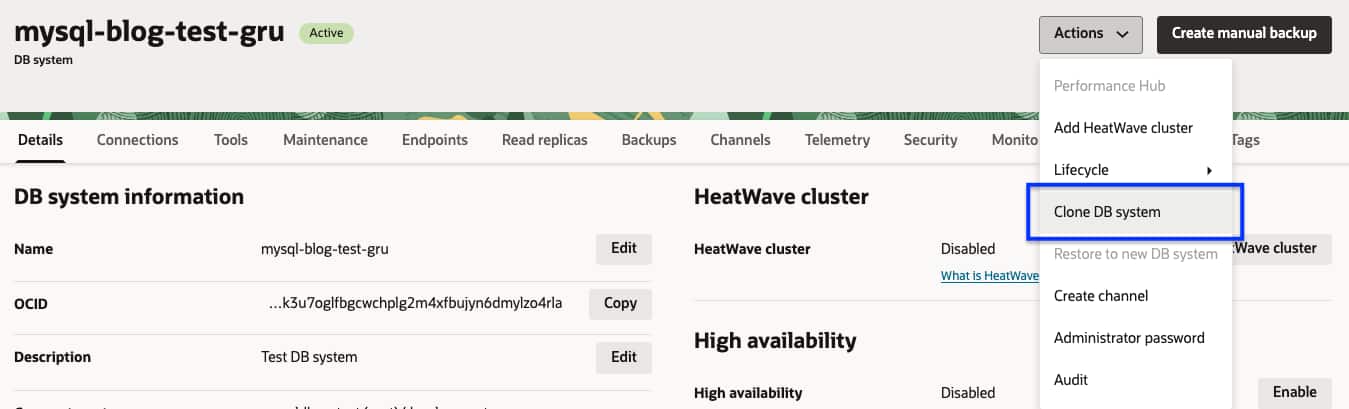
- On the source DB system details page, go to the Actions menu;
- Select and click the Clone DB system action;
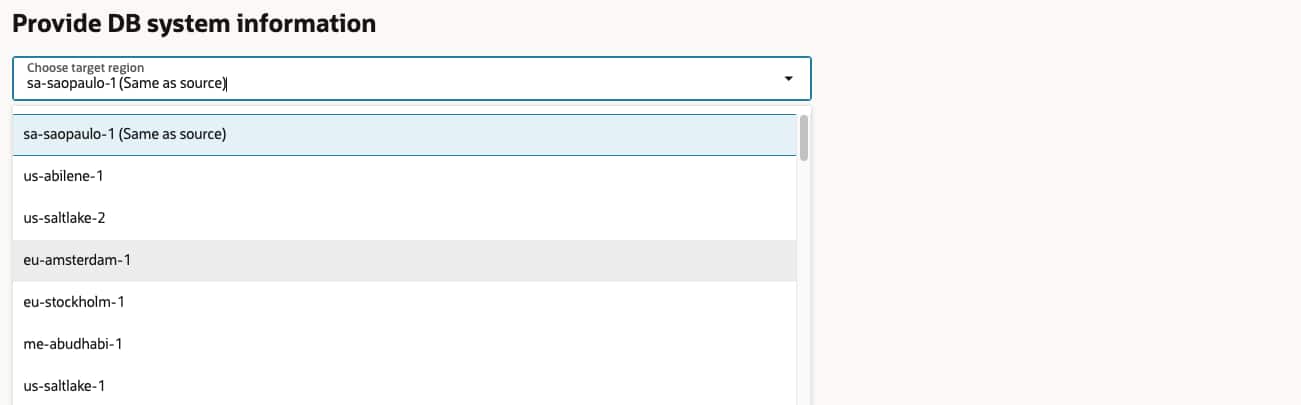
On the new page to Provide DB system information:
- Use the Choose target region dropdown list to select the destination region of the new DB system;
- In the Replication channel section, use the Enable replication toggle to choose to enable replication with the source DB system or not;
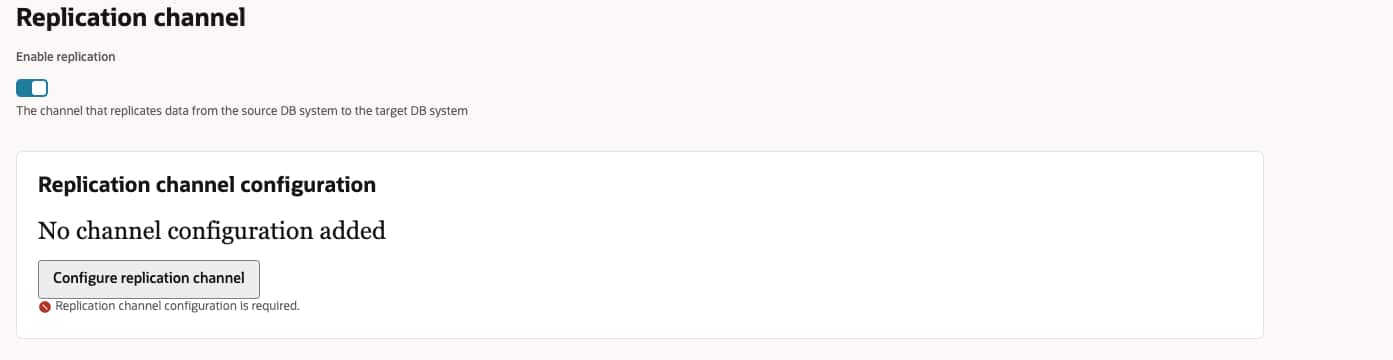
If you choose to enable replication, then click Configure replication channel button;
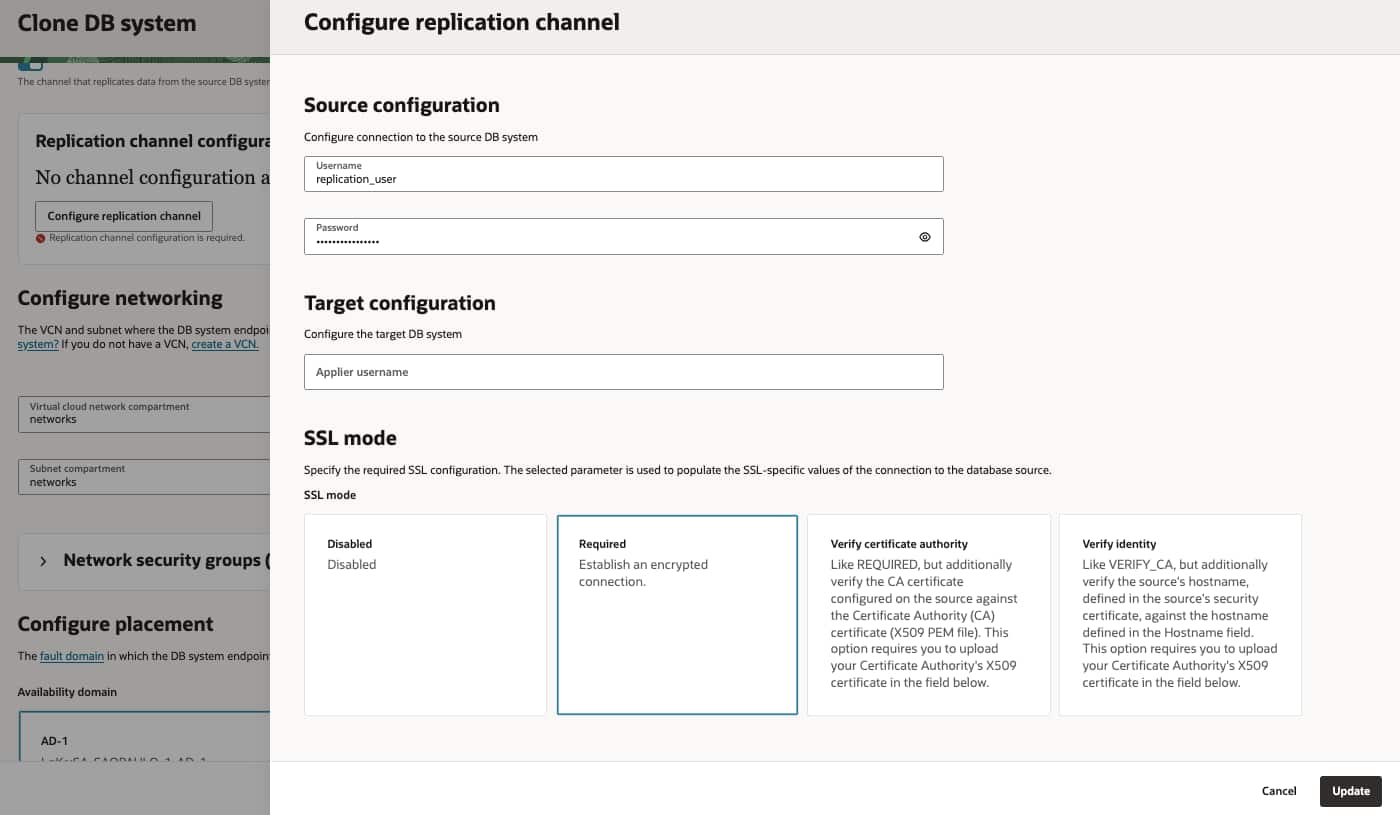
- On the Configure replication channel page:
- Fill the Username for the replication user used for the channel;
- Fill the Password for the replication user used for the channel;
- Select the SSL mode;
- Optionally, fill the Applier username for the replication applier user used on the new DB system;
NOTE: The default setting will be used for all the remaining Inbound Replication channel properties. To use different settings, update the channel after the new DB system is created or choose to not enable replication and create the inbound replication channel after completing the creation of the new DB system. - Click the Update button;
- Fill the remaining properties and configuration for the new DB system;
- In the Advanced options section, by default, the Database mode is set to “Read-only” and Access mode to “Allow administrators access only” for the new cloned DB system. This is the recommendation for DB systems used as replicas. Go to the Management sub-section to change it when required.
- Click the Clone button to create the new DB system;
Summary
The new feature to create a replica DB system in MySQL HeatWave Service simplifies one of the most common operational and Disaster Recovery processes on OCI. Instead of manually orchestrating backups, cross-region backup copies, restores, and replication channel creation, a replica DB system can now be provisioned using a single operation. By reducing operational complexity and automating the underlying steps, the feature helps to simplify cross-region database provisioning for Disaster Recovery or other use cases requiring the clone of an existing DB system. Whether building a Disaster Recovery strategy, preparing isolated testing environments, or provisioning replicas for operational needs, the new feature provides a faster, simpler, and safer experience.
Start exploring the new capability to clone a DB system today and take advantage of a more streamlined way to provision replica DB systems in MHS.
To try MySQL HeatWave Service and explore its capabilities, visit oracle.com/heatwave/free.
For more information about MySQL HeatWave Service, visit oracle.com/mysql.