
JSON Duality Views (JDVs) let applications read and write JSON documents backed by relational tables (see our introductory JDV blog). MySQL handles the document-to-table mapping, reducing application code while preserving relational integrity.
We still need to decide which parts of a document applications can change. Earlier JDVs offered limited choices: table writes were generally all-or-nothing, and every projected value participated in ETAG checks. Across several releases, JDVs have gained finer control over writes and which changes invalidate an edit. This blog brings those changes together in one example.
What’s new
- MySQL 9.6.0 made table-level
INSERT,UPDATE, andDELETEindependently configurable and introducedNO INSERT,NO UPDATE, andNO DELETE. Previously, a projected table was generally read-only or enabled for all three operations. - MySQL 9.7.0 made JDV DML, previously closed source, open source and available in Community Edition.
- MySQL 26.10.0 adds column-level
UPDATEandNO UPDATE, plusCHECKandNO CHECKat both table and column level. Columns can now override table settings, and ETAG calculation can exclude selected values instead of including every projected value.
Control writes to tables and columns
For each projected table, we can control which write operations are allowed through the view. We use INSERT, UPDATE, and DELETE to enable operations, or NO INSERT, NO UPDATE, and NO DELETE to disable them. If we omit a write tag, the corresponding operation is disabled by default.
Columns inherit their table’s UPDATE setting, but we can override it using WITH UPDATE or WITH NO UPDATE. This gives us flexibility in both directions: we can allow updates to specific columns even when the table is not updatable, or prevent updates to certain columns when the table allows them.
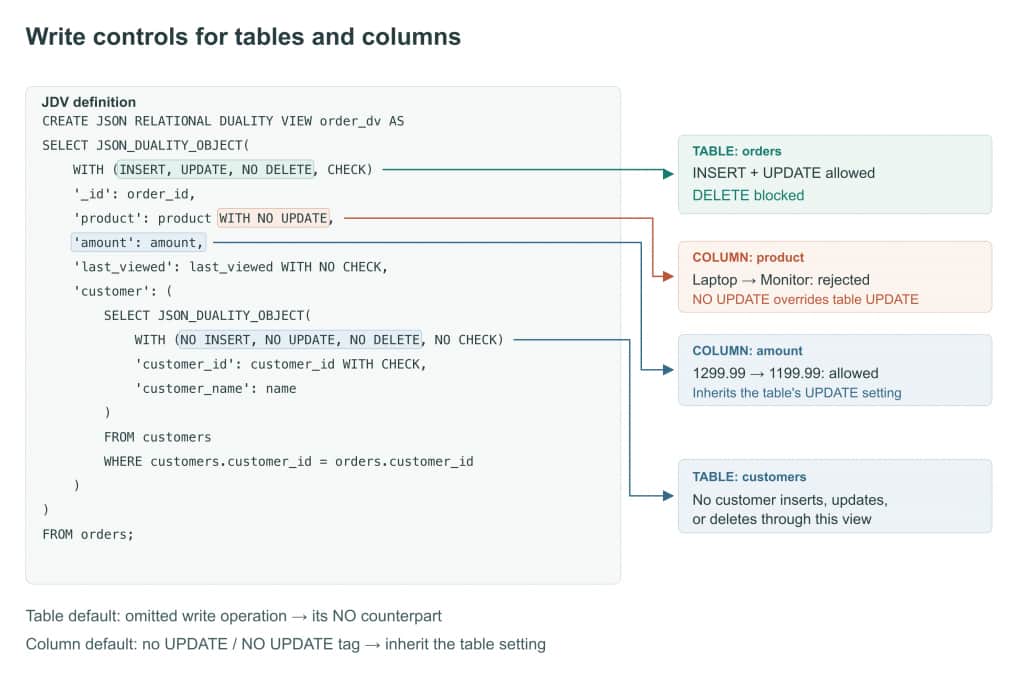
In the above diagram, orders table allows inserts and updates but blocks deletion. amount column inherits UPDATE, while product column overrides it with NO UPDATE. For example, we create two tables for customers and orders, then add Alice as a customer:
CREATE DATABASE jdv_controls_demo;
USE jdv_controls_demo;
SET SESSION autocommit = 1;

CREATE TABLE customers (
    customer_id INT PRIMARY KEY,
    name VARCHAR(100) NOT NULL
) ENGINE = InnoDB;

CREATE TABLE orders (
    order_id INT PRIMARY KEY,
    customer_id INT NOT NULL,
    product VARCHAR(100) NOT NULL,
    amount DECIMAL(10,2) NOT NULL,
    last_viewed DATETIME NOT NULL,
    FOREIGN KEY (customer_id) REFERENCES customers(customer_id)
) ENGINE = InnoDB;

INSERT INTO customers VALUES (1, 'Alice');
Now, let’s create the JSON Duality View shown in the above diagram, then insert Alice’s order through it (our DDL blog explains how to define such views, and our DML blog explains how to perform DMLs against them):
CREATE JSON RELATIONAL DUALITY VIEW order_dv AS
SELECT JSON_DUALITY_OBJECT(
    WITH (INSERT, UPDATE, NO DELETE, CHECK)
    '_id': order_id,
    'product': product WITH NO UPDATE,
    'amount': amount,
    'last_viewed': last_viewed WITH NO CHECK,
    'customer': (
        SELECT JSON_DUALITY_OBJECT(
            WITH (NO INSERT, NO UPDATE, NO DELETE, NO CHECK)
            'customer_id': customer_id WITH CHECK,
            'customer_name': name
        )
        FROM customers
        WHERE customers.customer_id = orders.customer_id
    )
)
FROM orders;

INSERT INTO order_dv VALUES ('{
  "_id": 101,
  "product": "Laptop",
  "amount": 1299.99,
  "last_viewed": "2026-09-28 09:00:00",
  "customer": {"customer_id": 1, "customer_name": "Alice"}
}');

SELECT JSON_PRETTY(data)
FROM order_dv WHERE data->'$._id' = 101;
The insert creates order 101 and reuses the existing customer. The document read returns:
{
  "_id": 101,
  "amount": 1299.99,
  "product": "Laptop",
  "customer": {
    "customer_id": 1,
    "customer_name": "Alice"
  },
  "_metadata": {
    "etag": "843df2d201edf7dbf253ca3691d8ac39"
  },
  "last_viewed": "2026-09-28 09:00:00.000000"
}
The ETAG values shown in these outputs are from this run. NO UPDATE allows the initial product value but prevents later changes. Before trying an update, let’s inspect the effective write and CHECK settings in the JDV metadata tables.
Let’s start with the table tags. A value of 1 means enabled and 0 means disabled:
SELECT REFERENCED_TABLE_NAME AS base_table,
       ALLOW_INSERT, ALLOW_UPDATE, ALLOW_DELETE, ALLOW_CHECK
FROM INFORMATION_SCHEMA.JSON_DUALITY_VIEW_TABLES
WHERE TABLE_SCHEMA = DATABASE() AND TABLE_NAME = 'order_dv'
ORDER BY REFERENCED_TABLE_NAME;
Recorded output:
| base_table | ALLOW_INSERT | ALLOW_UPDATE | ALLOW_DELETE | ALLOW_CHECK |
|---|---|---|---|---|
| customers | 0 | 0 | 0 | 0 |
| orders | 1 | 1 | 0 | 1 |
Next, lets’s check how those settings apply to individual fields:
SELECT REFERENCED_TABLE_NAME AS base_table,
       JSON_KEY_NAME AS json_field, ALLOW_UPDATE, ALLOW_CHECK
FROM INFORMATION_SCHEMA.JSON_DUALITY_VIEW_COLUMNS
WHERE TABLE_SCHEMA = DATABASE() AND TABLE_NAME = 'order_dv'
ORDER BY REFERENCED_TABLE_NAME, JSON_KEY_NAME;
Recorded output for the projected fields:
| base_table | json_field | ALLOW_UPDATE | ALLOW_CHECK |
|---|---|---|---|
| customers | customer_id | 0 | 1 |
| customers | customer_name | 0 | 0 |
| orders | _id | 0 | 1 |
| orders | amount | 1 | 1 |
| orders | last_viewed | 1 | 0 |
| orders | product | 0 | 1 |
The product field cannot be updated even though its table allows updates. These flags show the effective settings after inheritance and column overrides. We’ll use the ALLOW_CHECK values when we try the ETAG controls.
Now let’s read the document, change its amount, and submit it with the original _metadata.etag intact:
SELECT data INTO @order_doc
FROM order_dv WHERE data->'$._id' = 101;

SET @order_doc = JSON_SET(@order_doc, '$.amount', 1199.99);

UPDATE order_dv SET data = @order_doc
WHERE data->'$._id' = 101;

SELECT product, amount FROM orders WHERE order_id = 101;
The table’s UPDATE tag permits the amount change. The final query returns:
product  amount
Laptop  1199.99
Now read the current document and try changing the protected product:
SELECT data INTO @order_doc
FROM order_dv WHERE data->'$._id' = 101;

SET @order_doc = JSON_SET(@order_doc, '$.product', 'Monitor');

-- Expected failure: product is marked NO UPDATE.
UPDATE order_dv SET data = @order_doc
WHERE data->'$._id' = 101;
The update returns:
ERROR 6497 (HY000): Missing UPDATE tag on `jdv_controls_demo`.`orders`.product, path '$.product'.The order remains Laptop at 1199.99. This delete also fails because orders has NO DELETE:
DELETE FROM order_dv WHERE data->'$._id' = 101;ERROR 6498 (HY000): Missing DELETE tag on table `jdv_controls_demo`.`orders`, path '$'.Choose which values affect the ETAG
Our Preventing Read-Write Conflicts post explains how returning a document’s original ETAG with an edit lets MySQL detect intervening changes. In that model, every projected value contributed to the ETAG. CHECK and NO CHECK now let you choose which values count, so changes to excluded values do not cause ETAG conflicts.
CHECK is the default at table level. Columns inherit their table’s setting unless they specify WITH CHECKor WITH NO CHECK. A column can override either table setting, and each nested table has its own setting.
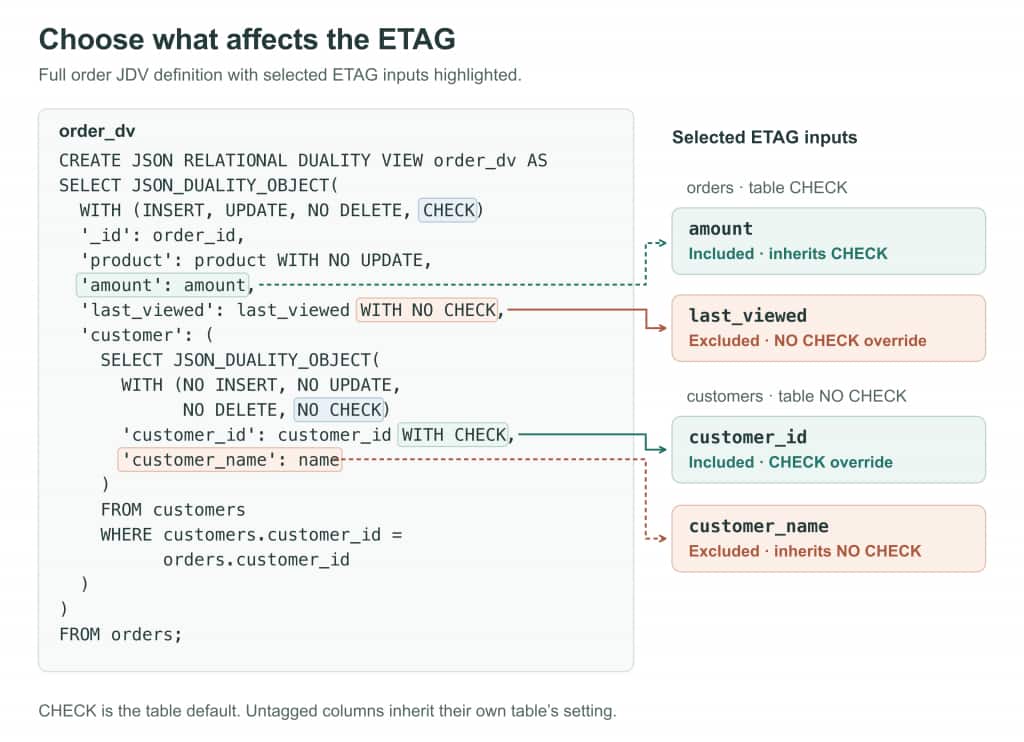
The above diagram shows both overrides: last_viewed is excluded despite the orders table’s CHECK, while customer_id is included despite the customers table’s NO CHECK. Write rules apply independently of these settings.
Building on the previous example, let’s change Alice’s name directly in the base table and compare the ETAGs. Use a transaction so these comparisons leave the sample data unchanged:
START TRANSACTION;

SELECT data INTO @customer_snapshot
FROM order_dv WHERE data->'$._id' = 101;

UPDATE customers SET name = 'Alice Smith' WHERE customer_id = 1;

SELECT JSON_EXTRACT(data, '$._metadata.etag') =
       JSON_EXTRACT(@customer_snapshot, '$._metadata.etag') AS name_ignored
FROM order_dv WHERE data->'$._id' = 101;
name_ignored
1The untagged name inherits the customer table’s NO CHECK. Now let’s point the order at another customer with the same name, so only the projected customer identifier changes:
INSERT INTO customers VALUES (2, 'Alice Smith');
UPDATE orders SET customer_id = 2 WHERE order_id = 101;

SELECT data->'$.customer.customer_id' AS customer_id,
       JSON_EXTRACT(data, '$._metadata.etag') <>
       JSON_EXTRACT(@customer_snapshot, '$._metadata.etag') AS identity_checked
FROM order_dv WHERE data->'$._id' = 101;

ROLLBACK;
customer_id identity_checked
2 1The column’s CHECK overrides its table’s NO CHECK. ROLLBACK restores Alice’s original name and the order’s original customer.
Next, let’s read the order and simulate a background update to last_viewed. Its NO CHECK tag should leave the captured ETAG valid:
SELECT data INTO @snapshot
FROM order_dv WHERE data->'$._id' = 101;

UPDATE orders SET last_viewed = '2026-09-28 10:00:00'
WHERE order_id = 101;

SELECT JSON_EXTRACT(data, '$._metadata.etag') =
       JSON_EXTRACT(@snapshot, '$._metadata.etag') AS etag_unchanged
FROM order_dv WHERE data->'$._id' = 101;
etag_unchanged
1The timestamp changed, but its NO CHECK tag excludes it from ETAG calculation, even when changed directly in the base table.
Now let’s change the checked amount and try submitting an edit with the captured ETAG:
UPDATE orders SET amount = 1099.99 WHERE order_id = 101;

SET @snapshot = JSON_SET(@snapshot, '$.amount', 999.99);

-- Expected failure: the checked amount changed after the read.
UPDATE order_dv SET data = @snapshot
WHERE data->'$._id' = 101;
The update returns:
ERROR 6494 (HY000): Cannot update JSON duality view. The ETAG of the document in the database did not match the ETAG '"d5dae930097111af8842b4b3f8b60fba"' passed in.A check of the base row confirms that it still has 1099.99:
SELECT product, amount FROM orders WHERE order_id = 101;product amount
Laptop 1099.99NO CHECK changes conflict detection, not write access. A stale document can still overwrite an unchecked, updatable field, so we should exclude only values whose changes should not invalidate the edit.
Summary
JSON Duality Views gives us control over both document writes and concurrency checks in the view definition. We can now set each table’s permitted write operations through the view, override update settings for specific columns, and choose which values contribute to the ETAG.
Learn more and explore MySQL: