
Planning, compatibility testing, performance validation, application readiness, and rollback strategies for a large production deployment
MySQL 8.0 reached its official End of Life (EOL) in April 2026 alongside the final release of version 8.0.46, but specific support extensions are available depending on your hosting environment. Oracle extended support for MySQL 8.0 instances in MySQL HeatWave until April 2027, during which existing 8.0 instances remain fully functional and receive critical security patches. But, April will soon be here, and if you are still running 8.0.46, here are some considerations for performing the upgrade. In this post, we will focus on upgrading a MySQL HeatWave instance that is utilizing high-availability.
Upgrading a production database to a new major version requires more planning than a routine patch update. This is particularly true for a large MySQL HeatWave deployment where database availability, application compatibility, performance, and rollback time all have to be considered.
This post describes a recommended approach for upgrading a MySQL HeatWave High Availability (HA) DB System from MySQL 8.0.46 to MySQL 8.4 LTS on Oracle Cloud Infrastructure (OCI). The examples assume a large production database – let’s use 6 TB for this example – but the same process applies to smaller HA deployments.
At the time of writing, MySQL HeatWave supports MySQL 8.4.11 LTS. Again, MySQL 8.0 reached end of life in April 2026, making migration to the 8.4 LTS release an important lifecycle consideration for existing 8.0 deployments.
The goal should not simply be to complete the database upgrade. The goal is to perform the upgrade while answering four important questions:
- Is the existing database compatible with MySQL 8.4?
- Will the application continue to function correctly?
- Will performance remain within the expected range?
- If a serious problem appears, what is the recovery path?
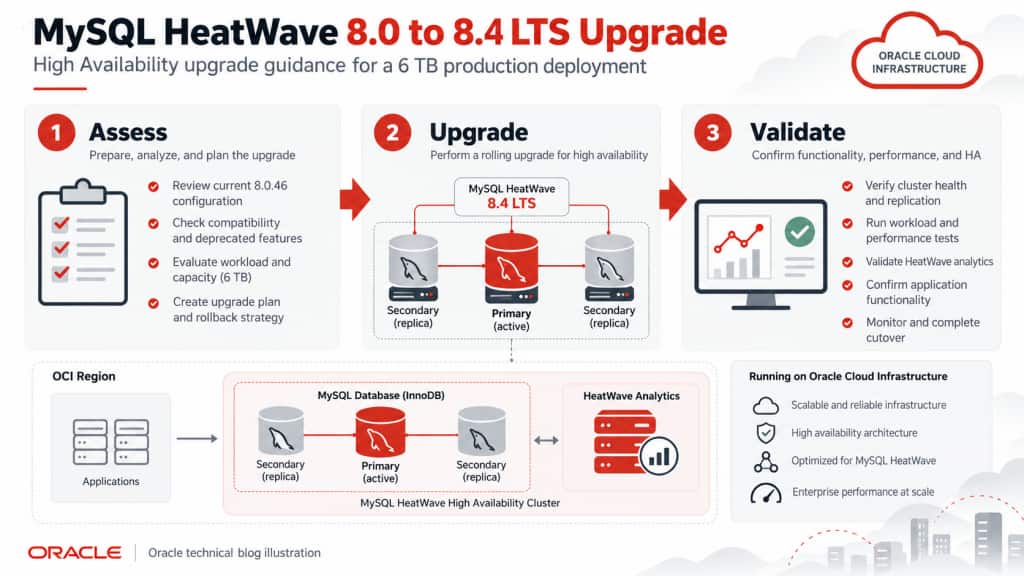
Figure 1 – MySQL HeatWave 8.0 to 8.4 LTS Upgrade Overview
Why High Availability changes the upgrade approach
A MySQL HeatWave High Availability (HA) DB System contains three MySQL instances: one primary instance and two secondary instances. Applications connect to the primary endpoint, while data written to the primary is replicated to the secondary instances.
For an HA DB System, Oracle performs the upgrade as a rolling operation. Read replicas, if present, are upgraded first, followed by the secondary instances. The primary is upgraded last.
Oracle also supports a controlled two-phase upgrade for HA DB Systems. This capability allows the secondary instances and read replicas to be upgraded in Phase 1 while the existing primary remains online. The administrator then determines when Phase 2 begins and therefore when the brief interruption to the primary endpoint occurs.
During Phase 2, existing connections to the primary are closed, the primary leaves the group, and one of the already-upgraded secondary instances is promoted to primary. Applications must reconnect to the newly promoted primary. Oracle describes this as a brief period of downtime.
This two-phase process creates a useful operational checkpoint:
Phase 1 is the best go/no-go decision point in the upgrade.
If the secondary instances do not upgrade successfully or if the HA system does not return to a healthy state, do not proceed to Phase 2.
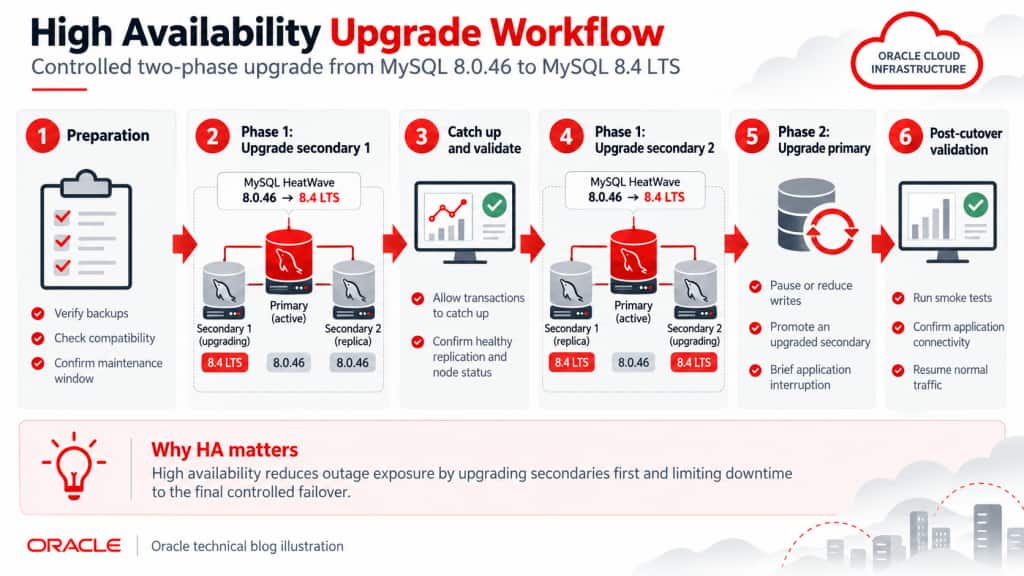
Figure 2 – High Availability Upgrade Workflow
Understand what changed between MySQL 8.0 and 8.4
Before performing the upgrade, review changes that can affect schemas, applications, deployment tools, operational scripts, and client software.
MySQL Shell’s Upgrade Checker will detect many compatibility issues automatically, but application teams should still understand the major differences.
Authentication changes
One of the most important changes involves authentication.
In MySQL 8.4, the default_authentication_plugin server variable has been removed and caching_sha2_password is the default authentication mechanism. The older mysql_native_password plugin is deprecated and disabled by default.
MySQL HeatWave provides a compatibility safeguard during an 8.0-to-8.4 upgrade: if existing accounts use mysql_native_password, HeatWave enables the plugin so those existing users can continue authenticating. Oracle nevertheless recommends migrating those accounts to caching_sha2_password, because mysql_native_password is removed in later MySQL major versions.
Before the upgrade, identify the authentication plugin used by application accounts:
SELECT user, host, plugin
FROM mysql.user
ORDER BY plugin, user;
Any application using an older database driver should be tested specifically against caching_sha2_password.
New keywords and reserved words
The MySQL 8.4 series introduced several new SQL keywords, including (but not necessarily limited to):
MANUAL, PARALLEL, QUALIFY, and TABLESAMPLE.
There is an important version-specific detail. In the current MySQL 8.4.11 release, MANUAL and PARALLEL became non-reserved, while QUALIFY and TABLESAMPLE remain reserved. Applications upgrading to an earlier 8.4 patch level may see different behavior, so the target patch version matters. Other keywords and reserved words were also removed in MySQL 8.4, compared to MySQL 8.0 – see this link for a list.
Search schemas and application SQL for identifiers that use these names. Unquoted reserved identifiers can produce syntax errors.
For example:
SELECT id, qualify FROM jobs;
may need to become:
SELECT id, `qualify` FROM jobs;
Renaming the object is generally preferable when practical.
FLOAT and DOUBLE AUTO_INCREMENT columns
MySQL 8.4 no longer supports AUTO_INCREMENT on FLOAT or DOUBLE columns.
Unlike some compatibility differences, this one can prevent the upgrade from succeeding. Any such columns must be corrected before upgrading.
Check for them with:
SELECT
TABLE_SCHEMA,
TABLE_NAME,
COLUMN_NAME,
DATA_TYPE,
EXTRA
FROM INFORMATION_SCHEMA.COLUMNS
WHERE DATA_TYPE IN ('float', 'double')
AND EXTRA LIKE '%auto_increment%';
Ideally this query returns zero rows.
Nonstandard foreign keys
Historically, InnoDB allowed foreign keys to reference non-unique or partial indexes. This is an extension to standard SQL.
MySQL 8.4 restricts this behavior by default through restrict_fk_on_non_standard_key. Existing 8.0 tables containing these relationships do not necessarily prevent the upgrade; MySQL reports warnings. However, an application, ORM, or deployment tool attempting to create similar foreign keys after the upgrade can have its CREATE TABLE or ALTER TABLE statement rejected.
This makes ORM-generated DDL, Liquibase migrations, Flyway migrations, and application-created tables important test cases.
Replication terminology and administrative commands
MySQL 8.4 removes several older replication statements that used MASTER and SLAVE terminology.
Examples include:
| Removed command | Replacement |
START SLAVE | START REPLICA |
STOP SLAVE | STOP REPLICA |
SHOW SLAVE STATUS | SHOW REPLICA STATUS |
CHANGE MASTER TO | CHANGE REPLICATION SOURCE TO |
SHOW MASTER STATUS | SHOW BINARY LOG STATUS |
RESET MASTER | RESET BINARY LOGS AND GTIDS |
PURGE MASTER LOGS | PURGE BINARY LOGS |
These changes are particularly important for Change Data Capture (CDC) products, monitoring tools, database administration scripts, and home-grown automation.
Search operational repositories for old replication syntax before the upgrade.
Privilege and DEFINER changes
The deprecated SET_USER_ID privilege was removed in MySQL 8.4. Its replacement functionality uses privileges such as SET_ANY_DEFINER and ALLOW_NONEXISTENT_DEFINER.
Review deployment processes that create:
- Stored procedures
- Functions
- Triggers
- Views
- Events
Pay particular attention to scripts containing explicit DEFINER= clauses.
Spatial indexes
If the database uses spatial data, MySQL recommends dropping spatial indexes before an upgrade to MySQL 8.4.4 or later and recreating them afterward. Alternatively, they can be rebuilt immediately after the upgrade before the affected tables are used.
Identify them with:
SELECT DISTINCT
TABLE_SCHEMA,
TABLE_NAME,
INDEX_NAME
FROM INFORMATION_SCHEMA.STATISTICS
WHERE INDEX_TYPE = 'SPATIAL';
Changed server defaults
MySQL 8.4 changes several default settings that can affect workload behavior and performance. Examples include:
innodb_adaptive_hash_index: ON → OFFinnodb_change_buffering: all → noneinnodb_io_capacity: 200 → 10000innodb_log_buffer_size: 16 MB → 64 MBtemptable_max_mmap: 1 GB → 0temptable_max_ram: now based partly on available memorygroup_replication_consistency: EVENTUAL → BEFORE_ON_PRIMARY_FAILOVER
MySQL HeatWave is a managed service and its configuration may not simply mirror every generic MySQL default. The important point is to compare effective configuration and workload behavior, rather than assuming an 8.4 server will behave identically to 8.0.
These changes are one reason performance baselining should be part of the upgrade process.
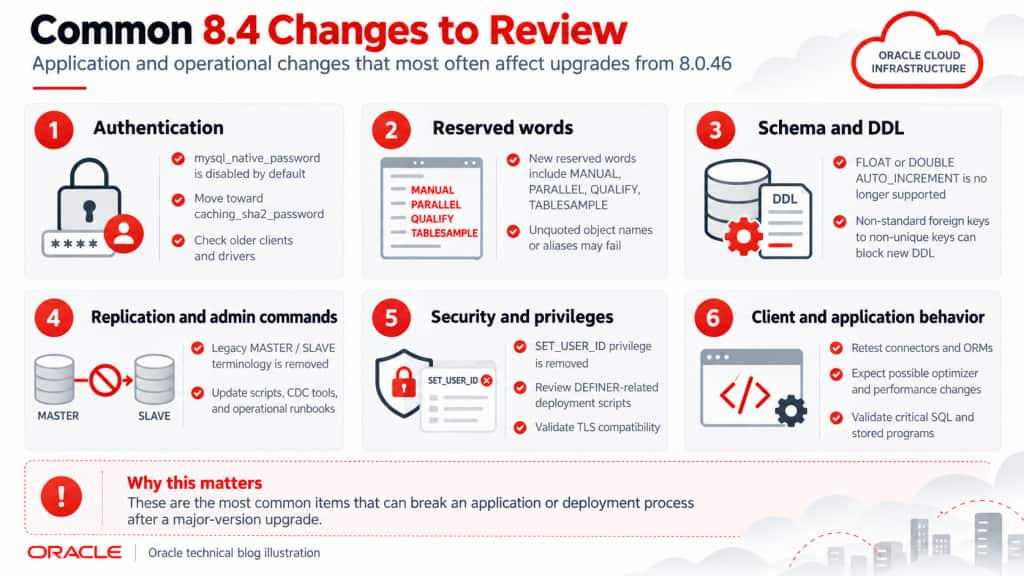
Figure 3 – Common MySQL 8.4 Changes to Review
Use MySQL Shell Upgrade Checker before touching production
The MySQL Shell Upgrade Checker Utility should be one of the primary tools used to validate the migration.
util.checkForServerUpgrade() evaluates a MySQL instance for known compatibility issues with a specified target version and reports errors, warnings, and additional checks that may require manual investigation. Oracle recommends using the Upgrade Checker and resolving reported issues before upgrading.
Use a recent MySQL Shell release. Oracle recommends the latest MySQL Shell for supported MySQL Server versions; as of October 2026, MySQL Shell 26.7.1 is the current general release, while MySQL Server 8.4.11 is the current HeatWave 8.4 LTS server release.
Step 1: Run the Upgrade Checker against Development or QA
Start in a non-production environment containing a representative copy of the production schema, stored programs, accounts, and configuration.
For example:
mysqlsh -- util check-for-server-upgrade \
  upgradecheck@qa-host:3306 \
  --target-version=8.4.11 \
  --output-format=JSON \
  > qa_upgrade_check_8_4.json
The target version should match the specific 8.4 LTS release being offered for the HeatWave DB System at the time of the upgrade.
Resolve the findings in QA first. Then run normal application regression testing against an 8.4 environment.
Test not only CRUD operations, but also stored procedures, scheduled jobs, reporting workloads, schema migrations, authentication, connection pooling, ETL processes, and administrative tooling.
Step 2: Repeat the Upgrade Checker against production
Once QA testing is successful, run the same Upgrade Checker against the production 8.0.46 DB System.
For example:
mysqlsh -- util check-for-server-upgrade \
  upgradecheck@production-host:3306 \
  --target-version=8.4.11 \
  --output-format=JSON \
  > production_upgrade_check_8_4.json
This second check is important because production frequently contains objects, users, stored programs, or schema changes that are not present in QA.
For a large production database, run the checker during an appropriate operational window and monitor system load while it executes.
After completing the final production compatibility check, minimize unnecessary DDL, account changes, or configuration changes before the upgrade so that the validated system does not drift significantly from the configuration that was checked.
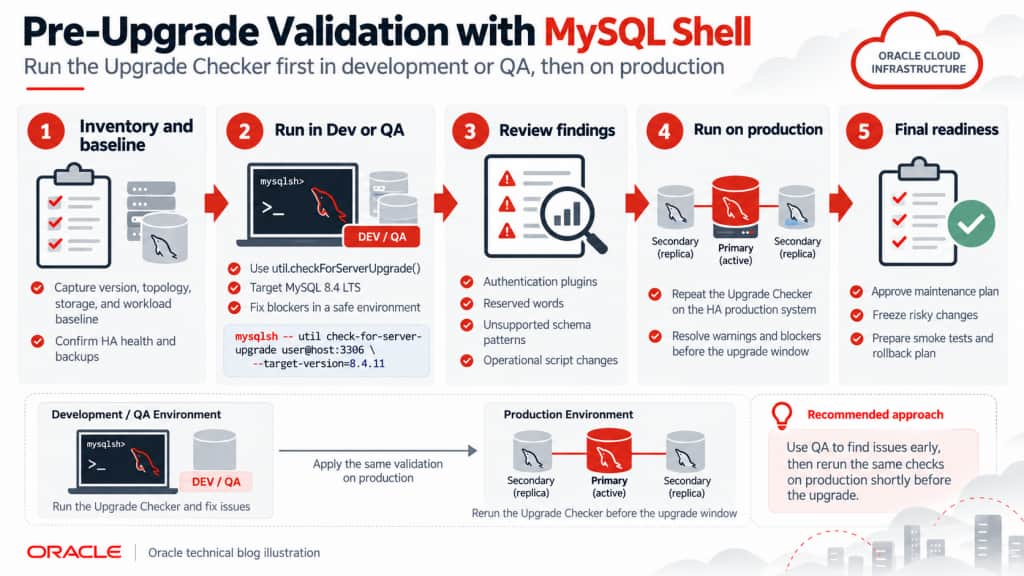
Figure 4 – Pre-Upgrade Validation with MySQL Shell
Validate the application stack – not just the database
A database can pass the Upgrade Checker and still encounter application problems. The application runtime, database driver, connection pool, ORM, TLS implementation, and generated SQL should all be included in testing.
Python applications
Upgrading MySQL Server does not automatically mean that Python (or any other programming language) itself must be upgraded.
The important component is usually the database connector. Applications may use:
- mysql-connector-python
- PyMySQL
- SQLAlchemy
- aiomysql
- asyncmy
or another database connector/driver.
For example, Oracle recommends using a current MySQL Connector/Python release with supported MySQL Server versions. Connector/Python’s supported Python runtime versions also change over time, so if the connector is upgraded as part of this project, verify that the application’s existing Python version is supported by that connector release.
For Python (or other) applications, test the exact production combination of:
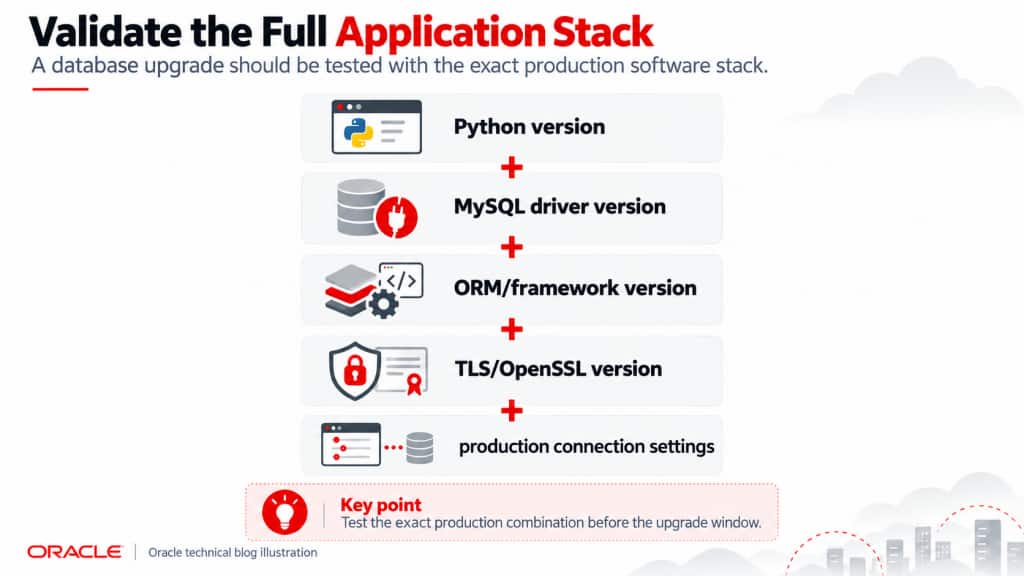
Do not validate an application using a newer developer laptop configuration and assume that an older production runtime will behave identically.
Authentication compatibility
Verify that the connector supports caching_sha2_password.
With caching_sha2_password, password exchange requires either a secure connection or supported RSA-based password exchange.
This is especially important for legacy applications that were originally deployed when mysql_native_password was common.
TLS compatibility
MySQL 8.4 supports TLS 1.2 and TLS 1.3 for encrypted connections. An older client runtime, OpenSSL implementation, or explicitly configured cipher list can create connection problems even when the database itself upgraded successfully.
Test production connection strings, certificate validation, CA files, TLS versions, and cipher configuration in QA.
Connection pools and HA failover
During Phase 2 of the HA upgrade, existing primary connections are closed while an upgraded secondary is promoted.
Applications therefore need to tolerate a temporary database disconnect and establish new connections.
Connection pools should not assume that every connection remains valid indefinitely. Validate:
- automatic reconnect behavior
- retry logic
- connection timeout settings
- stale connection handling
- transaction retry behavior
- application response when the database endpoint is briefly unavailable
For example, SQLAlchemy applications commonly use connection validation mechanisms such as pool_pre_ping to detect stale pooled connections before they are reused. The exact approach depends on the application’s framework and transaction semantics.
A database HA architecture is most effective when the application is also designed to tolerate a brief database connection interruption.
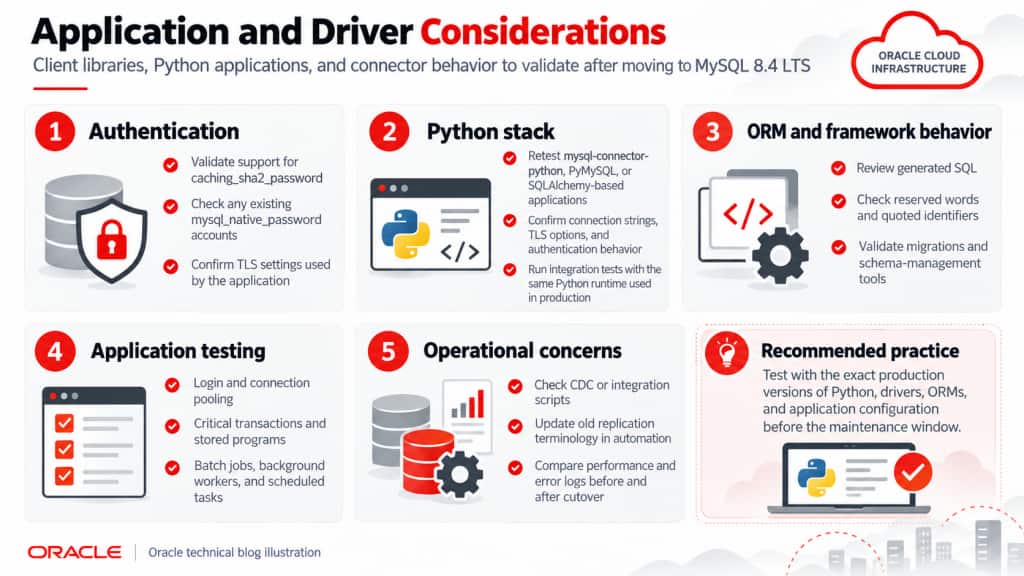
Figure 5 – Application and Driver Considerations
Establish a performance baseline before the upgrade
Compatibility is only one half of upgrade validation.
A query that still returns the correct result may use a different execution plan after the upgrade. An application can therefore be functionally correct but noticeably slower.
Before beginning the upgrade, capture a baseline during a representative production workload.
OCI exposes MySQL HeatWave service metrics automatically, and Database Management provides additional database-performance information such as statement latency and detailed SQL statistics.
The most useful upgrade metrics include:
| Metric | What to compare |
| CPU utilization | Baseline versus 8.4 under comparable workload |
| Memory utilization | Look for increased pressure or changed caching behavior |
| Storage utilization | Maintain adequate storage headroom |
| Read/write IOPS | Detect changes in physical I/O behavior |
| Read/write throughput | Compare MB/sec under equivalent workload |
| Active/current connections | Detect abnormal connection growth or pooling problems |
| Failed/terminated connections | Particularly important immediately after Phase 2 |
| Statement count | Ensure workload volume is comparable |
| Average statement latency | One of the best indicators of user-visible regression |
| Total statement latency | Useful for understanding overall database workload |
| Buffer pool utilization | Look for changes in memory efficiency |
| Row/index/table-scan activity | Identify possible execution-plan changes |
| Binary-log I/O and space | Useful with Full monitoring |
| Error log activity | Identify new warnings, authentication errors, or SQL errors |
| HA status | Confirm the DB System returns to a healthy state |
OCI Database Management exposes charts for CPU, disk utilization, IOPS, throughput, connections, terminated connections, statement latency, row reads, row writes, and other MySQL metrics. Full monitoring adds more advanced metrics, including binary-log I/O statistics.
Compare equivalent workload windows
Avoid comparing arbitrary periods. For example, if the database experiences its peak workload from 10:00 AM to 2:00 PM on weekdays, compare:
MySQL 8.0.46 – Tuesday 10:00 AM – 2:00 PM
with:
MySQL 8.4 – Tuesday 10:00 AM – 2:00 PM
after the upgrade.
The workload volume should be similar enough for the comparison to be meaningful.
Pay particular attention to the top SQL statements by latency. A handful of changed optimizer plans can affect application performance even when overall CPU and memory utilization look normal.
Performance Hub can be useful for identifying SQL statements whose execution latency changed after the upgrade.
Monitoring limitation during maintenance
There is an important monitoring detail for HA systems.
For a high-availability MySQL HeatWave DB System, HeatWave service metrics represent the primary MySQL instance. The secondary instances are not independently represented in those metrics.
In addition, MySQL HeatWave Service does not monitor service metrics during maintenance itself.
Therefore, during the upgrade, use both:
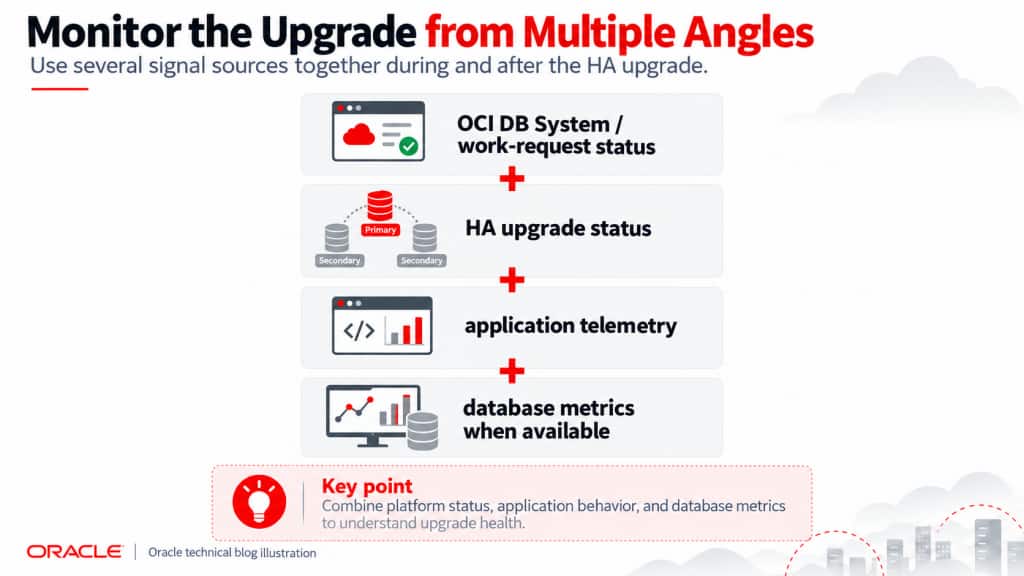
Do not interpret a metric gap during maintenance as a database performance event.

Figure 6 – Metrics to Watch Before and After the Upgrade
Prepare the rollback strategy before the maintenance window
High Availability reduces upgrade downtime and provides an excellent checkpoint before the primary is upgraded, but HA does not provide an in-place downgrade from MySQL 8.4 back to MySQL 8.0.
Oracle explicitly states that a DB System cannot be downgraded to a lower MySQL version. Oracle recommends taking a backup before the upgrade so a new DB System can be restored at the original version if necessary.
For a large production database, rollback planning should therefore begin before Phase 1.
Take a manual full backup
Create a manual full backup immediately before the planned upgrade and confirm that the backup completes successfully. Perform the backup in the Oracle Cloud web console, or use the Oracle Command Line Interface.
For example, using OCI CLI:
oci mysql backup create \
  --db-system-id <DB_SYSTEM_OCID> \
  --backup-type FULL \
  --display-name pre-8.4-upgrade-backup \
  --retention-in-days 30 \
  --soft-delete ENABLED
MySQL HeatWave supports full manual backups, and Oracle recommends performing a full backup before a DB System upgrade.
For a 6 TB production environment, it is also valuable to test restoring a representative backup before the upgrade project. This establishes a real recovery procedure and a realistic recovery-time expectation instead of relying on an assumed restore time.
Use Phase 1 as the primary rollback checkpoint
The safest place to stop the process is after the secondary instances have been upgraded but before Phase 2 begins.
At this point:
- Primary = MySQL 8.0.46
- Secondary 1 = MySQL 8.4
- Secondary 2 = MySQL 8.4
The production application is still operating against the 8.0 primary.
Verify that:
- both upgraded secondaries are healthy
- the HA DB System has returned to the expected state
- replication/catch-up has completed
- no significant upgrade errors are present
- application performance on the existing primary remains normal
If any significant issue exists, do not begin Phase 2. Investigate the issue while the production primary remains on MySQL 8.0.46. This is one of the strongest advantages of using the controlled HA upgrade process.
Control application writes around Phase 2
For particularly important systems, consider pausing or minimizing application writes immediately before the Phase 2 cutover.
Then perform the primary upgrade/failover and execute a focused smoke test before reopening normal write traffic.
The smoke test should exercise the application’s most important operations, including authentication, connection pooling, representative reads, controlled inserts and updates, stored procedures, APIs, and scheduled processes.
Also examine:
- application logs
- database error log
- failed connections
- statement latency
- CPU
- memory
- I/O
- HA health
If the tests succeed, reopen normal application traffic.
This approach reduces the amount of new data created on MySQL 8.4 before the environment has been validated.
Rollback after Phase 2
Once Phase 2 completes, the production primary is running MySQL 8.4.
At that point, there is no button that converts the HA system back to MySQL 8.0.46.
If a severe incompatibility requires a return to 8.0, the recovery path is:
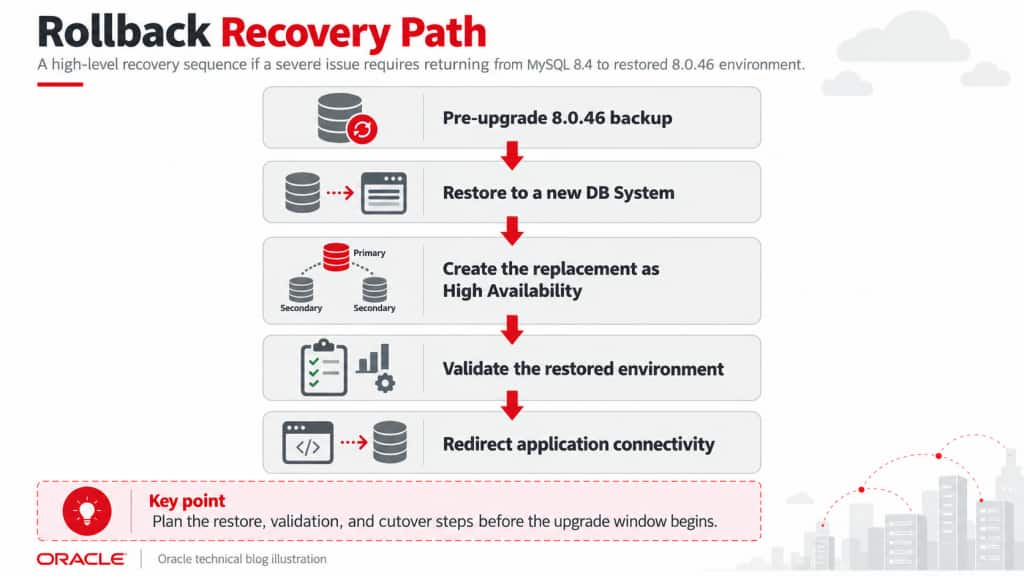
When a HeatWave backup is restored, OCI creates a new DB System. The restored DB System retains the backup’s database version by default unless a higher version is selected. A backup from an HA DB System can be restored to another HA DB System.
Because the restored system is a new DB System, plan how application connectivity will be redirected. Avoid building a rollback procedure that depends upon retaining the exact IP address of the original DB System.
Using application configuration, service discovery, or a controlled DNS abstraction can make this redirection considerably easier.
What about transactions written after the cutover?
This is the most important rollback consideration.
Suppose the pre-upgrade backup was created at 10:00 PM, Phase 2 completed at midnight, normal writes resumed at 12:15 AM, and a serious problem was discovered at 1:00 AM.
Restoring the 10:00 PM backup does not automatically contain the transactions written after the cutover.
Those transactions require a data-reconciliation strategy.
That is why the safest sequence is:
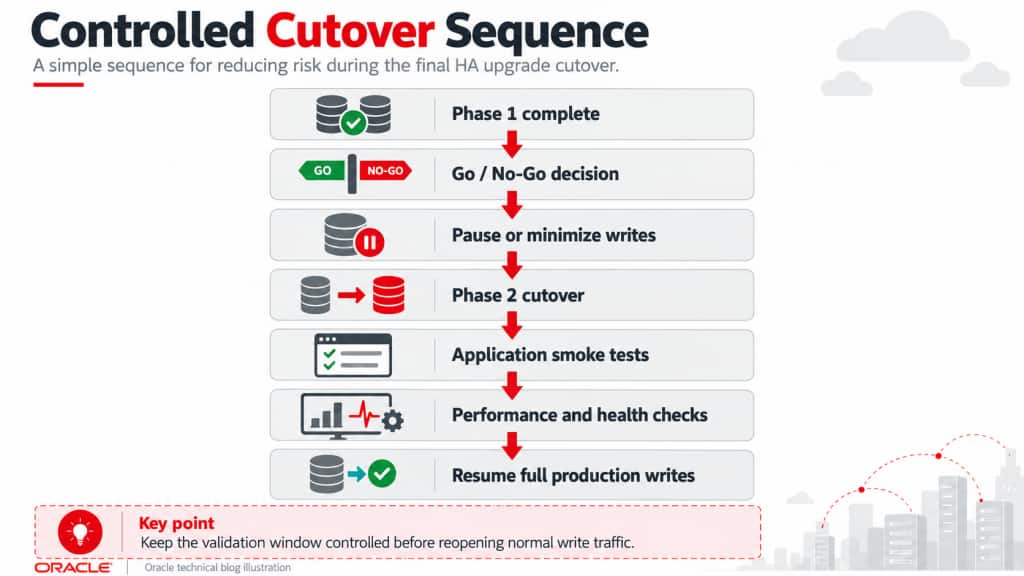
Keeping the validation window short and controlled substantially simplifies rollback.
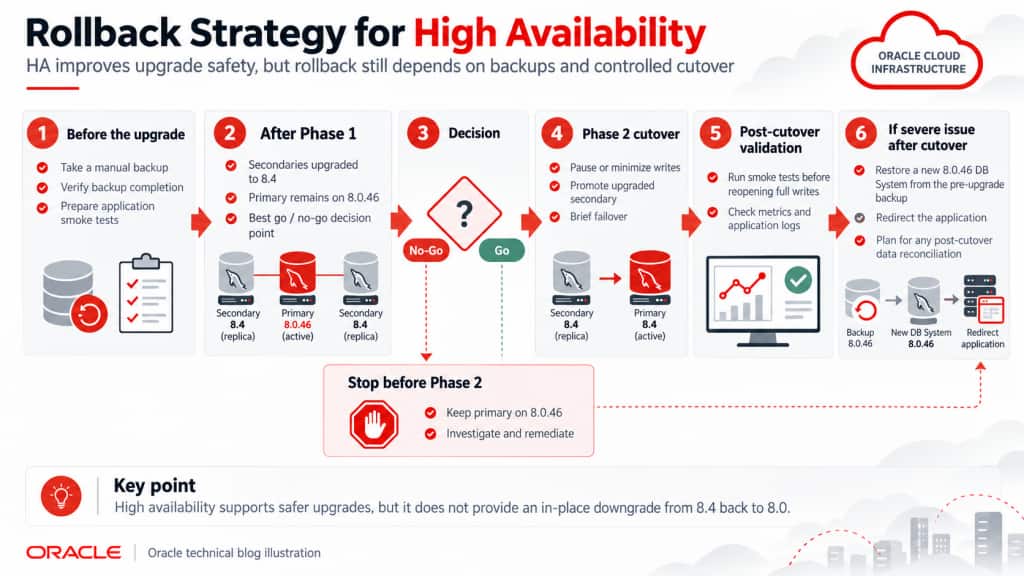
Figure 7 – Rollback Strategy for High Availability
Recommended end-to-end upgrade procedure
For a large MySQL HeatWave HA production system, the overall procedure can be summarized as follows:
- Inventory the production environment, including MySQL version, schema, users, stored programs, drivers, ORMs, integrations, and operational scripts.
- Establish a production performance baseline.
- Build or refresh a representative Development or QA environment.
- Run the latest MySQL Shell Upgrade Checker against QA.
- Resolve all blockers and investigate warnings.
- Upgrade QA to MySQL 8.4 LTS.
- Run full application, driver, ORM, SQL, integration, and performance testing.
- Run the Upgrade Checker against the production 8.0.46 DB System.
- Freeze unnecessary schema and configuration changes.
- Take and verify a manual full production backup.
- Confirm the application retry/failover behavior.
- Begin HA controlled-upgrade Phase 1.
- Upgrade and validate the secondary instances and any read replicas.
- Stop if the DB System is not fully healthy.
- Schedule the Phase 2 cutover.
- Pause or minimize application writes where operationally possible.
- Begin Phase 2 and allow the upgraded secondary to become primary.
- Run application smoke tests before restoring full traffic.
- Resume normal writes.
- Compare 8.4 metrics and critical SQL performance against the 8.0 baseline.
- Continue enhanced monitoring through representative peak workload periods.
- Retain the pre-upgrade backup according to the organization’s rollback and retention policy.
Conclusion
Upgrading MySQL HeatWave from MySQL 8.0.46 to MySQL 8.4 LTS is more than a database-version change. Authentication methods, SQL keywords, foreign-key behavior, privileges, replication commands, connector compatibility, configuration defaults, and query execution behavior can all affect an existing application.
For a large production deployment, High Availability provides a significant operational advantage. Oracle’s controlled two-phase upgrade enables the secondary instances to be upgraded first while the 8.0 primary remains available, creating a natural validation and go/no-go checkpoint before the final primary cutover.
The safest strategy combines several layers of protection:
MySQL Shell Upgrade Checker → QA application testing → production compatibility validation → pre-upgrade backup → HA Phase 1 → go/no-go validation → controlled Phase 2 → smoke testing → performance comparison
High Availability minimizes the disruption associated with the upgrade, but it does not replace a rollback strategy. A verified pre-upgrade backup, controlled application writes during cutover, tested restore procedures, and comprehensive pre- and post-upgrade monitoring remain essential – particularly for a multi-terabyte production database.
With these controls in place, the move from MySQL 8.0 to the 8.4 LTS release can be approached as a planned, measurable, and recoverable production change rather than simply a maintenance event.