
In the first post, we exported native MySQL telemetry to Prometheus. In the second, we organized those metrics around DBA questions. In the third, we built a Grafana dashboard that makes those questions visible. This final post shows how to use that dashboard when an application slows down or a database signal changes.
The goal is not to turn a dashboard into an automatic root-cause engine. Metrics identify a change, show its timing, and narrow the investigation. The next step is to collect MySQL evidence from Performance Schema, server status, query analysis, and the surrounding platform.
The examples below are representative investigation paths. They are hypotheses to test, not universal incident runbooks or fixed alert thresholds. Establish a baseline for each workload before treating a value as abnormal.
Start with a troubleshooting sequence
Begin with the dashboard question that changes the next decision. A rise in a counter is not enough on its own. Compare it with demand, concurrency, latency, and host context over the same time range.
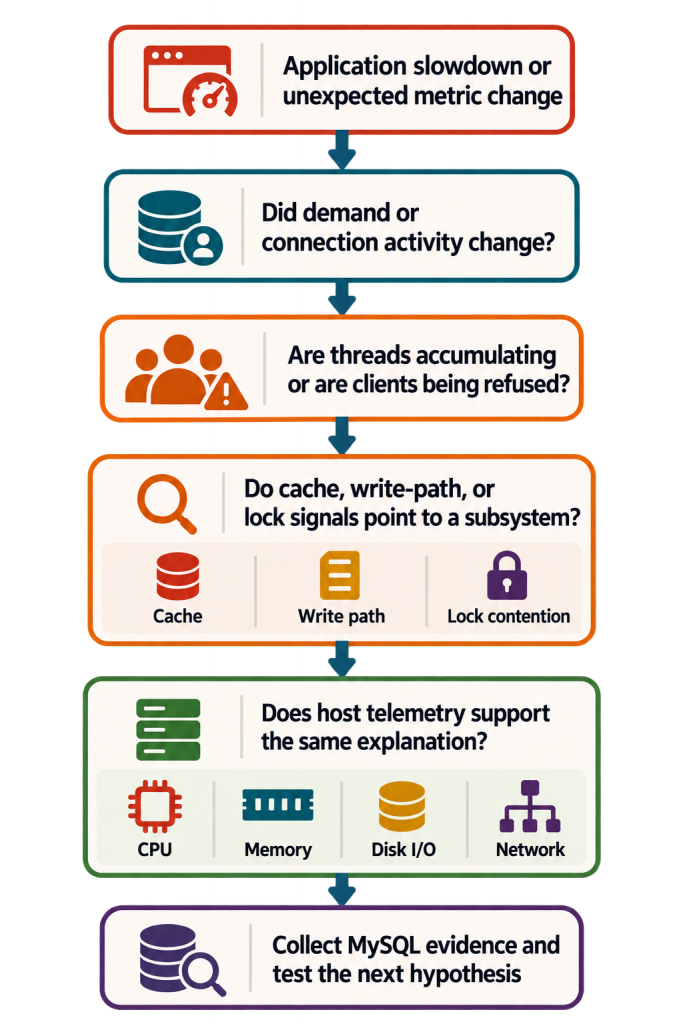
Use a narrow time window first, then widen it to compare with the normal pattern. If application traces or application latency metrics are available, align them with the MySQL and host series. OpenTelemetry makes that shared time range practical; it does not eliminate the need to understand the server.
A compact map from symptom to evidence
| Dashboard symptom | Metrics that narrow the question | MySQL evidence to collect next |
|---|---|---|
| Connections rise or clients are refused | threads_connected, errors_max_connections_total, questions_total | max_connections; connection and thread status; application pooling behavior |
| Workload rises and response time worsens | questions_total, threads_running, CPU utilization | Active statements and statement summaries; slow-query or application evidence |
| Read performance changes | read_requests_total, reads_total, buffer-pool hit ratio, disk read time | Buffer-pool sizing; query plan and access pattern; data and working-set changes |
| Write activity becomes slow | os_log_written_total, log_waits_total, os_log_pending_fsyncs, disk write time | Redo and commit behavior; storage context; write workload and transaction size |
| Transactions wait | row_lock_current_waits, row_lock_waits_total | data_lock_waits; data_locks; current statements; transaction owners |
Scenario 1: Connection pressure or connection refusal
A connection incident has two distinct questions. Is concurrency rising toward the service capacity, or has MySQL already rejected clients because the configured connection limit was reached? The dashboard separates the current gauge from the failure counter so that the second condition is not hidden by the first.
Signal and hypothesis
Use threads_connected, errors_max_connections_total, and questions_total to distinguish rising demand from an exhausted connection limit. A nonzero rejection counter is the stronger symptom: clients were refused because the configured max_connections limit was reached.
increase(errors_max_connections_total{
  job="mysql/mysqld",
  instance="$instance"
}[5m])
Evidence to collect
Confirm the configured limit, current connection count, and relevant counters. This establishes whether the observed dashboard signal is consistent with server state at the time of investigation.
SHOW VARIABLES LIKE 'max_connections';
SHOW GLOBAL STATUS
WHERE Variable_name IN (
  'Threads_connected',
  'Threads_running',
  'Max_used_connections',
  'Connection_errors_max_connections'
);
If connections rise without a corresponding workload increase, examine application connection lifecycle and pooling before changing max_connections. More connections also consume memory and may create more scheduler work. Increasing the limit can postpone a symptom while moving the pressure elsewhere.
Scenario 2: Demand increases and work begins to queue
A higher command rate is not a problem by itself. The useful pattern is a sustained increase in questions_total followed by elevated threads_running and worsening application latency. This suggests that work is accumulating, but it does not yet identify why.
Signal and hypothesis
rate(questions_total{job="mysql/mysqld", instance="$instance"}[5m])Compare the command rate with threads_running and CPU utilization. If workload increases while threads_running and latency remain near their normal levels, MySQL may be keeping up. If threads_running stays elevated, use cache, write-path, lock, and host panels to decide which direction to investigate next.
Evidence to collect
Use Performance Schema to identify statements that are currently executing and then compare the current picture with aggregate statement history. The current table is a live view; it is most useful while the symptom is happening.
SELECT THREAD_ID, EVENT_ID, EVENT_NAME, TIMER_WAIT, SQL_TEXT
FROM performance_schema.events_statements_current
WHERE SQL_TEXT IS NOT NULL
ORDER BY TIMER_WAIT DESC;
For a longer-lived workload change, compare statement digests. The digest summary aggregates completed statements by normalized digest and retains a representative sample statement, which can be used for later plan analysis.
SELECT DIGEST_TEXT, COUNT_STAR,
  ROUND(SUM_TIMER_WAIT / 1000000000000, 2) AS total_latency_s,
  ROUND(AVG_TIMER_WAIT / 1000000000, 2) AS avg_latency_ms,
  SUM_ROWS_EXAMINED, QUERY_SAMPLE_TEXT
FROM performance_schema.events_statements_summary_by_digest
WHERE DIGEST_TEXT IS NOT NULL
ORDER BY SUM_TIMER_WAIT DESC
LIMIT 10;
Do not assume that a higher threads_running value means a MySQL configuration problem. The same signal can arise from inefficient SQL, a lock wait, CPU saturation, storage delay, or a sudden change in demand.
Scenario 3: Physical reads rise and cache efficiency changes
When physical reads rise with a fall from the normal hit-ratio baseline and worse application read latency, move promptly from cache symptoms to the statements and access paths responsible for the reads.
Signal and hypothesis
The direct-export setup uses reads_total for physical reads and read_requests_total for logical read requests. Use rates to identify the change, then test whether a query, a plan, a batch job, or data growth changed the working set.
rate(reads_total{job="mysql/mysqld", instance="$instance"}[5m])
1 - (
  rate(reads_total{job="mysql/mysqld", instance="$instance"}[5m]) /
  rate(read_requests_total{job="mysql/mysqld", instance="$instance"}[5m])
)
If the ratio is noisy on a lightly loaded server, widen the range or use a longer baseline. Do not treat one absolute percentage as a universal target. The same workload can have a healthy baseline that differs from another service.
Evidence to collect
Using the digest summary from the previous scenario, identify the high-cost statement first, then inspect a representative statement and its execution plan. Query plan and access-pattern evidence is more useful than buffer-pool size alone when the goal is to explain a new physical-read pattern.
EXPLAIN FORMAT=TREE
/* representative statement from QUERY_SAMPLE_TEXT */
SELECT ...;
Compare the access path with the workload behavior you expect, including tables read, join order, index use, and estimated rows. Confirm buffer-pool size only after workload and plan evidence have been reviewed.
SELECT @@innodb_buffer_pool_size / 1024 / 1024 / 1024
       AS buffer_pool_gib;
Scenario 4: Write activity rises and write-path pressure is suspected
Redo throughput measures activity. It does not, by itself, prove a saturated log or storage subsystem. Use os_log_written_total to see whether redo volume changed, log_waits_total to see whether waits are accumulating, and os_log_pending_fsyncs to see whether a pending-fsync queue persists.
Signal and hypothesis
rate(os_log_written_total{job="mysql/mysqld", instance="$instance"}[5m])
rate(log_waits_total{job="mysql/mysqld", instance="$instance"}[5m])
os_log_pending_fsyncs{job="mysql/mysqld", instance="$instance"}
A controlled write workload can raise redo throughput while log waits remain at zero and a temporary pending-fsync value drains quickly. That is evidence of activity without sustained pressure. Investigate further when redo volume, waits, queue depth, commit latency, and host disk write time worsen together over a meaningful period.
Evidence to collect
Check the write workload and storage context before changing redo-related configuration. Look for larger transactions, batch work, a changed commit pattern, or an infrastructure event. Host-level read and write time are useful context signals, but they are not end-to-end application latency measurements.
Scenario 5: Row-lock waits point to a blocking relationship
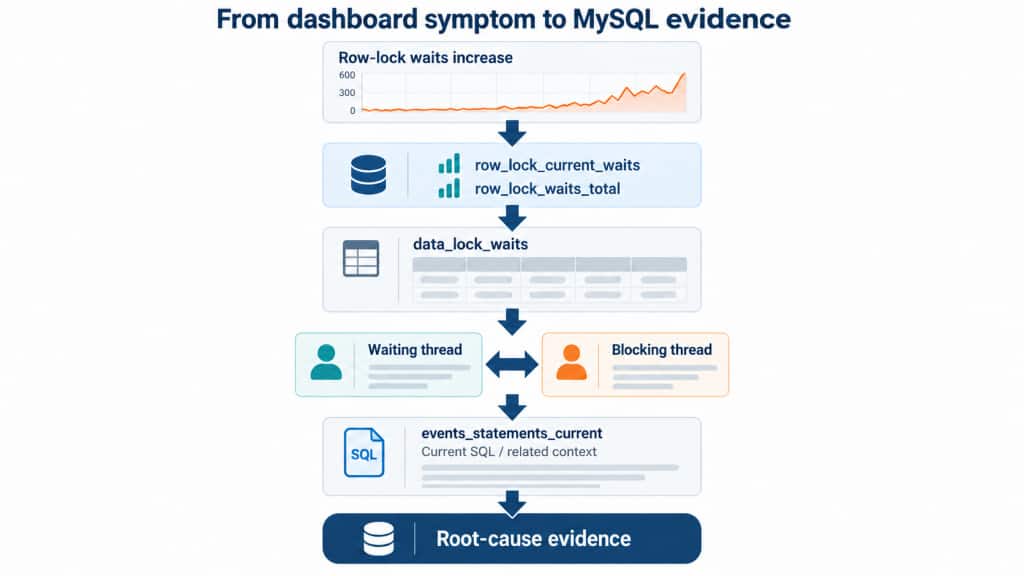
Lock metrics are a good example of the handoff from telemetry to MySQL evidence. A rise in row_lock_current_waits or row_lock_waits_total tells you that transactions are waiting. It does not identify the blocking transaction, the locked object, or the SQL involved.
Signal and hypothesis
row_lock_current_waits{job="mysql/mysqld", instance="$instance"}
rate(row_lock_waits_total{job="mysql/mysqld", instance="$instance"}[5m])
Current waits show whether contention exists now. The rate shows whether wait events are occurring during the selected window. When either rises with application latency, capture MySQL evidence promptly because the blocking relationship can disappear before a later investigation.
Evidence to collect
The Performance Schema data_lock_waits table links waiting and blocking lock requests. Start with the identifiers, then use the thread identifiers to find the currently executing statements and related transaction context.
SELECT REQUESTING_ENGINE_TRANSACTION_ID AS waiting_transaction,
  REQUESTING_THREAD_ID AS waiting_thread,
  BLOCKING_ENGINE_TRANSACTION_ID AS blocking_transaction,
  BLOCKING_THREAD_ID AS blocking_thread,
  REQUESTING_ENGINE_LOCK_ID AS waiting_lock,
  BLOCKING_ENGINE_LOCK_ID AS blocking_lock
FROM performance_schema.data_lock_waits;
SELECT THREAD_ID, EVENT_ID, EVENT_NAME, TIMER_WAIT, SQL_TEXT
FROM performance_schema.events_statements_current
WHERE THREAD_ID IN (/* waiting and blocking thread IDs */);Use these results to identify the owning sessions, statements, tables, indexes, and transaction boundaries. The remedy depends on the evidence: query design, transaction scope, concurrency pattern, isolation level, and indexing can all matter. Do not treat a lock-wait rate as a command to change one server variable.
Use host telemetry to test the database hypothesis
MySQL telemetry answers database-specific questions. Host telemetry provides the context needed to test whether CPU, memory, disk, or network conditions support the same explanation. In the Grafana example, node_exporter is scraped by Prometheus separately from MySQL’s direct OTLP export.
A rising threads_running value with high CPU utilization may point toward compute saturation or expensive execution. A write-path pattern that coincides with worse host disk write time strengthens a storage hypothesis. Available memory and network traffic help rule in or rule out adjacent causes. They are supporting signals, not substitutes for MySQL evidence.
Avoid common troubleshooting mistakes
- Do not diagnose from one metric. Add rate, duration, baseline, and corroborating signals.
- Do not confuse correlation with proof. A host signal and a MySQL signal can change together without sharing a root cause.
- Do not change configuration before identifying workload or blocking evidence.
- Do not use fixed thresholds without context.
- Do not wait too long to capture transient evidence. Current statements and lock relationships can be gone after the symptom ends.
From telemetry to an investigation
The dashboard is the beginning of an investigation, not the end. Start with a user-visible symptom or an unexpected change, compare related signals, choose the most plausible subsystem, and then collect evidence from MySQL and the surrounding platform. This reduces the search space without pretending that a single dashboard can prove a root cause.
Across this series, MySQL exports native metrics, DBAs organize them around operational questions, Grafana makes those questions visible, and troubleshooting turns the resulting symptoms into evidence. OpenTelemetry keeps the MySQL, application, and infrastructure signals on a common observability path while the DBA remains responsible for the final technical judgment.
MySQL Telemetry can be a useful part of your monitoring toolkit, helping you correlate MySQL signals with application and infrastructure telemetry.
References
- MySQL 9.7 Server Metrics
- MySQL 9.7 Performance Schema data_lock_waits Table
- MySQL 9.7 Performance Schema events_statements_current Table
- Part 1: A New Era of MySQL Monitoring: OpenTelemetry Metrics with Prometheus
- Part2: Making Sense of MySQL Telemetry Metrics
- Part3: Visualizing MySQL Telemetry with Grafana