
The Oracle Data Science Agent is a new Oracle Machine Learning (OML) feature in Oracle Autonomous AI Database that brings a modern, chat-based experience to the full data science lifecycle, running entirely in-database. It lowers the barrier to analytics and machine learning for every skill level, accelerates expert workflows by automating repeatable steps, and preserves governance by operating fully within the database. Whether you are a business analyst, a data scientist, or an application developer, the agent provides a secure, explainable, and efficient way to work with data directly where it lives.
In short, the Data Science Agent is a conversational, governed, and high‑performance way to profile data, engineer features, and build models—without moving data.
Data Science Agent Details
The Data Science Agent is a conversational assistant embedded in Oracle Autonomous AI Database that guides and performs end-to-end data science workflows. Users interact through a chat-style interface, while an internal PL/SQL package powers the work behind the scenes. Because everything runs in-database, teams benefit from high performance, strong security, and operational simplicity. The agent’s capabilities span from data engineering to modeling. You can profile datasets, wrangle data, compute correlations, and perform feature selection and feature engineering. It also handles model training, evaluation, comparison, and inference, providing clear explanations of metrics and results to support learning and decision-making.
The agent supports fully interactive conversations with the ability to have the agent operate more autonomously at your request. For example, you can begin with guided steps—ask clarifying questions and see explanations—then shift to delegated runs when you are confident in your workflow. Alternatively, you could simply state, “Perform all the necessary steps end to end and give me the final result.”
Additionally, traceability and governance are built in: logs and persistent conversation history enable reproducibility across teams and time. The agent is tuned for efficiency and cost awareness, minimizing unnecessary token usage and computation. Security is integral to the design, allowing users to operate strictly within their own database privileges and Oracle’s governance model. To keep activities focused and limit the database objects the agent has access to, objects and actions can be scoped via the Conversation Objects Catalog. However, if you don’t know which objects to use, the agent can explore your database with a prompt like: “What data do I have about bank marketing campaigns in my database?”
Under the hood, orchestration integrates with the Select AI Agent framework and is designed to be pluggable via the Oracle Open Agent Specification. Modular tools perform specific tasks such as profiling or training, a curated prompt library encodes domain guidance, a response schema structures outputs for reliable UI rendering, and SQL generation is powered by Select AI. Heavy jobs, such as large ML model training, can run asynchronously so you can continue working while they complete.
Why This Matters
Organizations often struggle to deliver data science projects with fast time to value due to fragmented toolchains, steep learning curves, and repetitive setup. Moving data across systems adds risk, cost, and compliance burdens, while opaque “black box” automation can undermine trust and reproducibility. Oracle helps organizations solve these challenges by enabling the Data Science Agent to run natively in Oracle Autonomous AI Database with in-database machine learning features. The agent accesses local data and can even access remote sources via DBLINKs, including multi‑cloud and non‑Oracle databases, so teams can analyze data without moving it out of governed environments. The agent adapts to your desired level of interaction, offering step‑by‑step conversational guidance or fully delegated execution. Furthermore, it enables you to inspect agent action logs and preserves conversation history for continuity, reproducibility, and auditing.
What You Can Do Today
With the Data Science Agent, you can streamline the most time-consuming parts of data work. Start by profiling datasets to assess completeness, distributions, and outliers, then wrangle data, compute correlations, and perform feature selection and feature engineering. Move seamlessly into modeling to train, evaluate, and compare models, run inference, and retrieve clear, contextual explanations of performance metrics and results. If a task will take time, schedule it in the background and keep exploring; the agent manages long-running jobs without blocking your session.
The conversational experience maintains context across turns so you can build naturally on prior steps—ask the Data Science Agent to filter the dataset you just profiled or build a mining model using the training dataset you prepared in a previous exchange. Scope your work with the Conversation Objects Catalog by registering the relevant tables, views, and mining models to improve precision and efficiency. Persist and resume work using conversation history to parallelize projects and preserve an auditable trail. These capabilities translate into tangible outcomes: reduced time to complete common tasks like profiling, feature engineering, and modeling; a higher percentage of tasks completed without manual intervention; stronger user satisfaction around ease of use, transparency, and learning support; and evidence of increased user autonomy and knowledge retention over time.
Getting Started and Next Steps
The Data Science Agent is planned to be released for Oracle Autonomous AI Database Serverless 26ai in the next 12 months and is expected to be supported in all regions. To begin, you will need Oracle Autonomous AI Database with Oracle Machine Learning enabled, along with LLM credentials and an AI profile configured via Select AI’s DBMS_CLOUD_AI package. You also need to have access to the relevant schemas and objects based on your role and privileges.
Next, perform the following steps:
- Define your LLM settings in an AI profile and store credentials with Access Management using DBMS_CLOUD.
- Launch the Data Science Agent from your Oracle Machine Learning UI console—click the Data Science Agent button or select it from the menu.
- Register the specific tables, views, and models you plan to use in the Conversation Objects Catalog or simply ask the agent to identify potentially relevant data, then start a conversation.
- Tell the agent the degree of interactive guidance or autonomy you’d like it to pursue.
As you adopt the agent, consider the following best practices:
- Begin interactively to validate assumptions and refine prompts, then delegate repeatable steps to autonomous mode for faster iteration.
- Keep your Conversation Objects Catalog tightly scoped to improve accuracy and efficiency.
- To reset the agent’s context, start a new conversation to keep the agent focused on the most recent requests.
- Regularly review logs, SQL snippets, and execution details to reinforce transparency, share reproducible workflows, and support audits.
- Leverage conversation history to resume projects, onboard teammates, and document analytic decisions.
As you do for Select AI, you have a wide range of AI providers and LLMs to choose from. The Data Science Agent supports in-database classification and regression algorithms, including XGBoost (in 26ai), Support Vector Machine, Generalized Linear Model, and others.
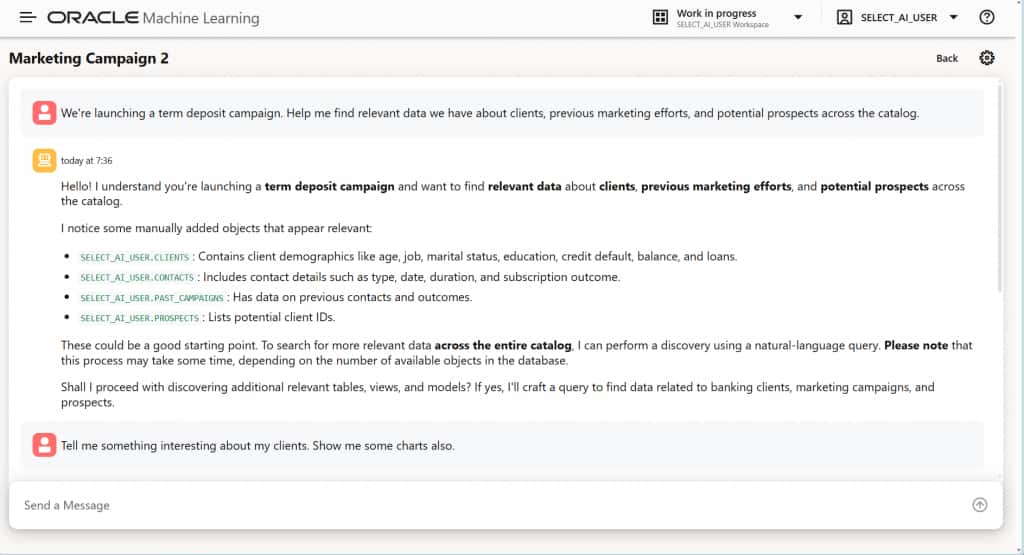
For example, you might start with the prompt: “We’re launching a term deposit campaign period. Help me find relevant data we have about clients, previous market efforts, and potential prospects across the catalogs.”
It might respond with details about available tables and ideas on what you can do with these data, as shown in Figure 1.
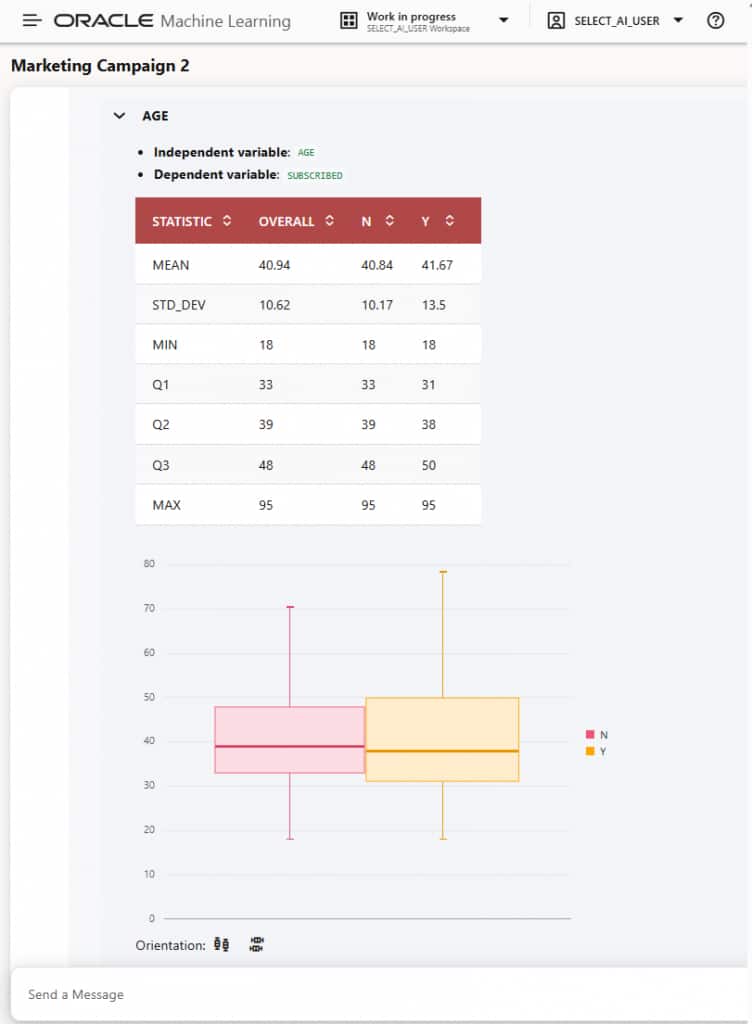
You may gain insights into your data with built-in visualizations, such as in Figure 2.
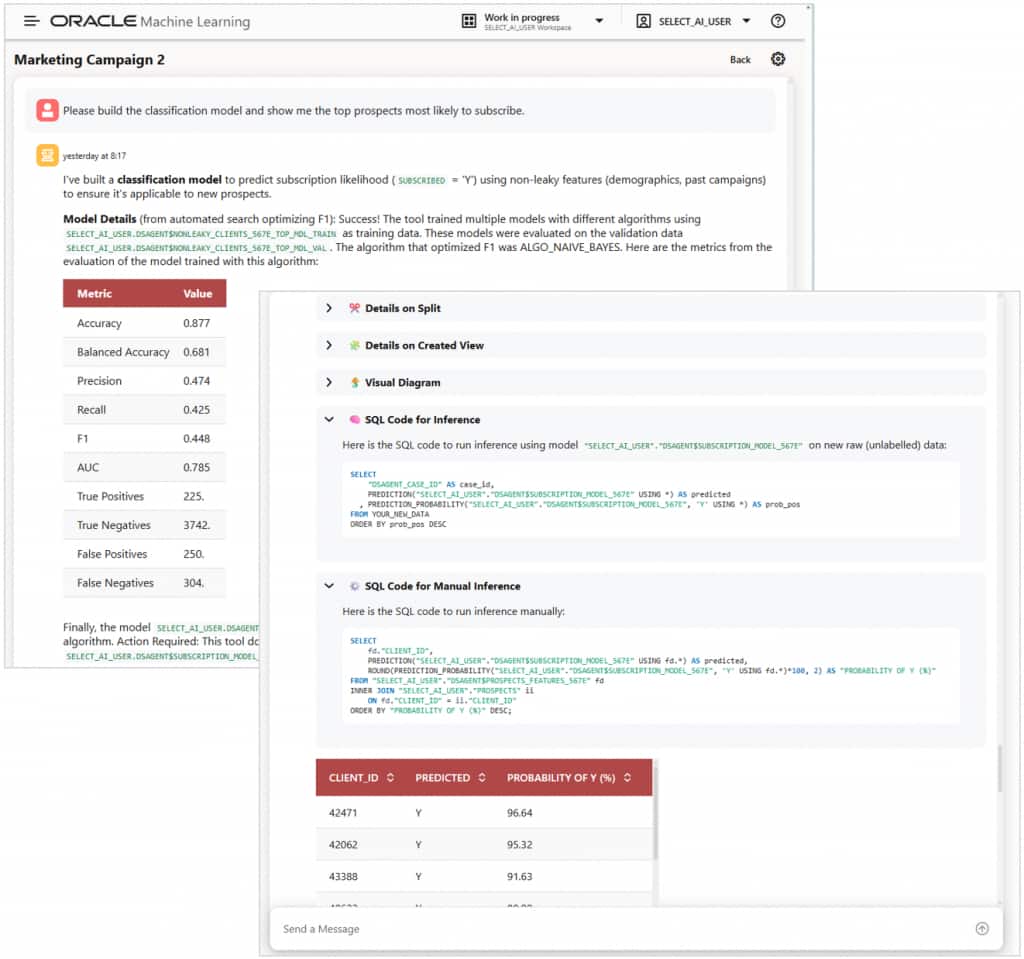
You then ask it to build a classification model and show the top prospects most likely to subscribe. Data Science Agent not only builds an in-database model, but also shows evaluation metrics like accuracy and a confusion matrix, as in Figure 3. It finishes the request showing, for example, the SQL you could use for inferencing and the prospects’ client identifiers ranked in order of probability to subscribe.
Give it a try…
The Data Science Agent is a native, built-in feature in your Oracle Autonomous AI Database 26ai instance, allowing you to use the LLM of your choice, whether from a third-party AI provider, OCI GenAI Service, or one you host privately.
- Try Data Science Agent in Autonomous AI Database for free
- Oracle Machine Learning documentation
- Data Science Agent documentation
- Select AI documentation
- Select AI Agent documentation