



Introduction
Employee onboarding is one of the most context-heavy moments in an employee’s lifecycle. A new hire on Day 1 needs a laptop, an understanding of leave policy, payroll bank details set up, and a personalized learning path, all while juggling forms, portals, and emails across HR, IT, Finance, and Learning & Development. Traditional onboarding workflows tackle this with a chain of rigid, rule-based integrations. They work, but they break the moment a question deviates from the script.
With the introduction of Agentic AI in Oracle Integration, we can rethink onboarding as an intent-driven conversation. Instead of forcing a new hire to navigate ten different systems, a single conversational AI agent, accessible through Slack, WhatsApp, or a web portal, understands what the employee wants, retrieves grounded answers from a corporate knowledge base, invokes the right backend systems as tools, and routes sensitive actions through human approvers when needed.
In this blog, we walk through an employee onboarding use case powered by OCI Generative AI and Oracle Integration Cloud (OIC) AI Agents, with the OIC Knowledge Base acting as the long-term memory that keeps every response grounded, accurate, and policy-aligned.
The Onboarding Challenge
Priya, a new hire is joining on Monday. Within her first week, she needs to:
- Request a laptop and accessories suited to her role.
- Understand HR policies such as leave entitlements, work-from-home rules, dress code, and code of conduct.
- Update her bank details for payroll, and ask questions about salary structure or lease benefits.
- Discover learning paths and certifications relevant to her job profile.
In a conventional setup, each of these touches a different system: an asset management portal, an HR information system, a payroll application, and a learning management system. Priya bounces between tabs, raises tickets, waits, escalates, and repeats. Her first impression of the company is friction.
What if Priya simply opened Slack and typed the following:
“Hi, I just joined. I need a laptop with at least 32 GB RAM, want to know about my leave entitlement, need to update my bank account for payroll, and would like to see learning paths for an integration architect role.”
That single message touches four different domains. An OIC AI Agent can resolve all of them without Priya ever knowing how many systems were called behind the scenes.
Architecture Overview
The architecture is built on four logical layers, each with a specific responsibility:
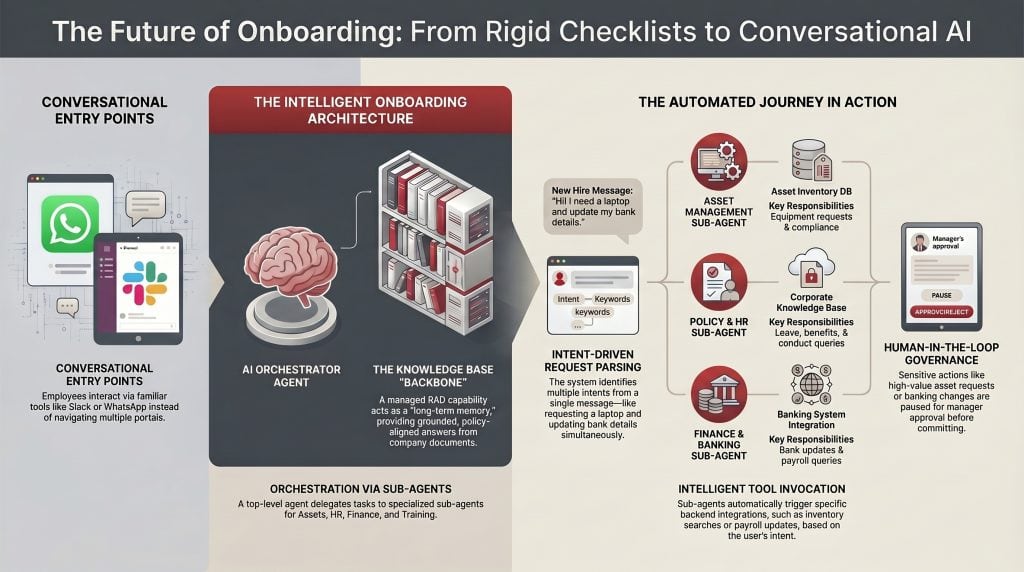
1. User Interfaces—Conversational entry points: Slack, WhatsApp, and a Web Portal. The employee never has to leave the channel they already use.
2. OIC Integration Layer — A lightweight front door consisting of a Request Parser and a Request Classifier. The parser normalizes incoming messages into a structured payload; the classifier identifies the high-level intent and forwards the request to the appropriate sub-agent.
3. OIC AI Agent (with sub-agents) — The reasoning brain. A top-level orchestrator that delegates to four specialized sub-agents, each owning one onboarding domain:
- Asset Management Agent — laptops, peripherals, and equipment requests
- Policy and HR Agent — leave, benefits, code of conduct, and compliance
- Financial & Banking Services Agent — bank detail updates, payroll, and lease queries
- Training Agent — role-based learning recommendations and certifications
4. Integration Skills, Tools, and Backend Systems — Each sub-agent has its own toolbox of OIC integrations (Employee Profile Lookup, Asset Inventory Search, Policy Knowledge Base Search, Update Emp Bank Details, Skills Assessment Engine, and many others). These tools talk to the actual backend systems: the Employee Database, Asset Inventory, Knowledge Base, Training Catalog, and Banking System Integration.
This is not a fixed flow — it’s a capability mesh. The AI agent decides which tools to invoke and in what order, based on the employee’s intent.
Why Knowledge Base Is the Backbone of Onboarding
Onboarding is not a transactional problem alone — it is a knowledge problem. New hires ask questions whose answers live inside corporate documents: HR handbooks, leave policies, code of conduct, security guidelines, benefits brochures, equipment standards, training catalogs, and so on. No LLM, however capable, can answer “What is my leave entitlement?” or “Am I eligible for the wellness reimbursement?” out of the box. It needs your documents.
This is exactly the gap the OIC Knowledge Base fills. As described in detail in the OIC Knowledge Base: Giving Your AI Agents a Long-Term Memory blog, the Knowledge Base is a managed Retrieval-Augmented Generation (RAG) capability built into Oracle Integration. It lets you ingest enterprise documents once into a vector-indexed store backed by OCI with OpenSearch, and then retrieve only the most relevant chunks at runtime — precise, cited, and grounded in your actual content.
In our onboarding use case, the Knowledge Base shows up everywhere:
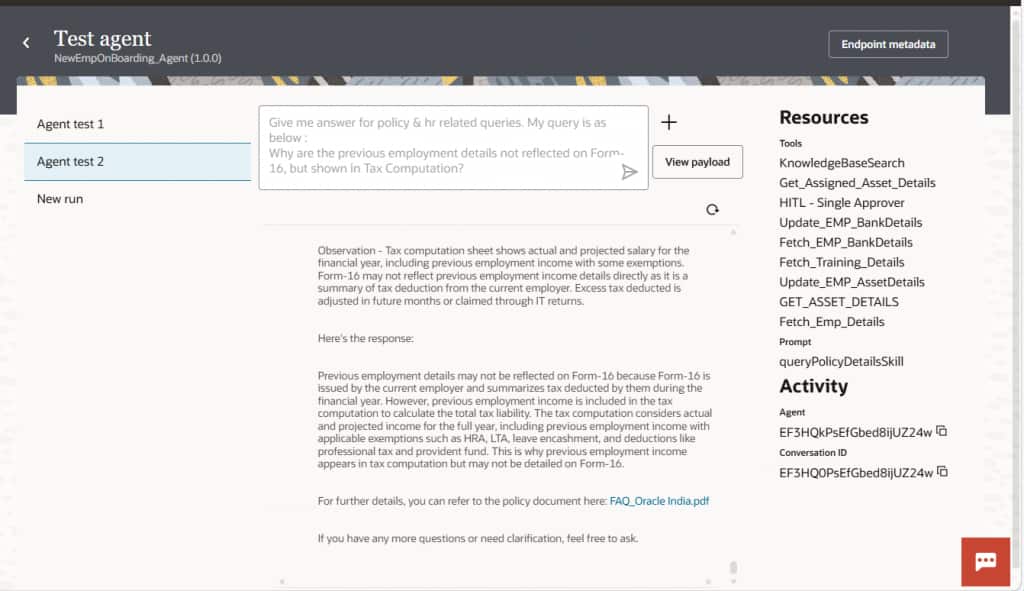
- The Policy and HR Agent uses Policy Knowledge Base Search to answer questions like “How many casual leaves do I have?” or “What is the work-from-home policy?” by retrieving the exact clause from the HR handbook.
- The Asset Management Agent consults a hardware standards document in the KB to validate whether a requested configuration is compliant before raising the request.
- The Financial & Banking Services Agent references payroll policy documents to explain salary components or lease eligibility.
- The Training Agent uses ingested role-skill matrices and certification catalogs to recommend personalized learning paths.
A single, well-curated Knowledge Base becomes the long-term memory of the entire onboarding experience.
Architecture: Ingest → Index → Retrieve
Under the hood, the OIC Knowledge Base runs in two distinct phases, an ingestion phase that populates OpenSearch with vectorized content and a search phase that the AI agents invoke at runtime. Both phases are fully managed inside OIC; the only customer-owned infrastructure is the OCI Search with OpenSearch cluster.
Ingestion phase — populating the KB once. Onboarding documents (HR handbook, code of conduct, leave policy, payroll policy, hardware standards, role-skill matrices, and training catalog) are uploaded to an OCI Object Storage bucket. A scheduled OIC integration, the RAG Ingestion integration — reads each document from the bucket, passes it to the RAG Ingest activity, which chunks the document and vectorizes each chunk via the configured embedding model, and writes the resulting vectors to the OpenSearch index through the OpenSearch Adapter.
Search phase — invoked on every employee question. When the Policy & HR Agent (or any other sub-agent) needs grounded knowledge, it invokes a RAG Search activity wrapped as a KnowledgeBaseSearchTool. The tool queries the OpenSearch index, retrieves the top-ranked chunks, and returns them to the agent along with their source citations.
Walking Through the Onboarding Journey
The setup follows the same path described in the OIC Knowledge Base blog, applied to onboarding content. Now let’s trace what happens when Priya sends her opening message in Slack. The orchestration is fully dynamic — the agent decides the order of operations.
Step 1: Request Parsing and Classification
The OIC Integration layer’s Request Parser receives the Slack message via webhook and converts it to a normalized JSON payload (employee ID, channel, raw text). The Request Classifier identifies that the message contains multiple intents — asset, HR policy, banking, and training — and forwards the conversation to the top-level OIC AI Agent. Multiple integrations need to be developed to handle each task effectively.
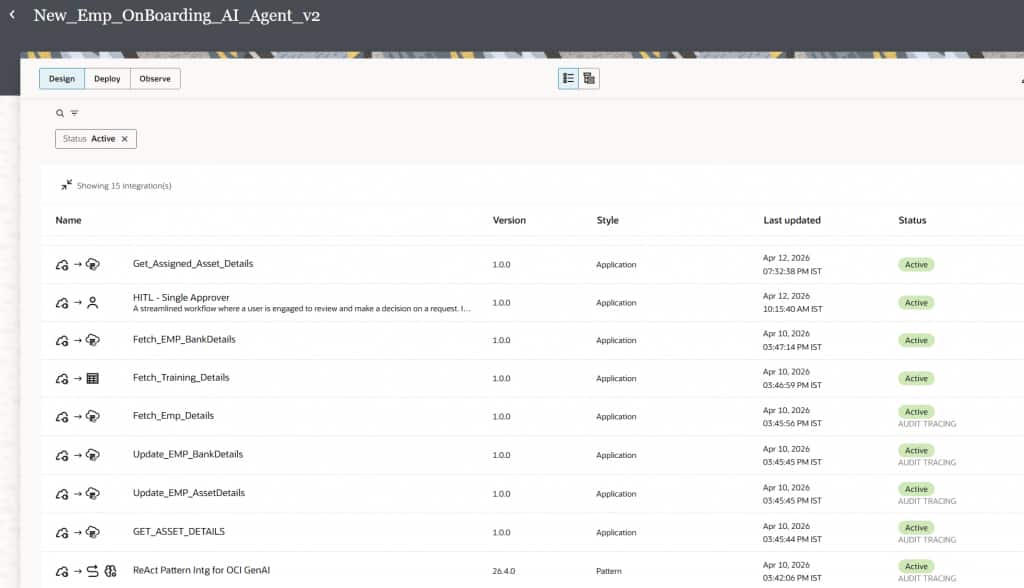
Step 2: Asset Management — Requesting the Laptop
The Asset Management Agent kicks in. It uses its toolbox in sequence:
- Employee Profile Lookup — fetches Priya’s role, grade, and location from the Employee Database.
- Asset Inventory Search — queries the Asset Inventory Database for laptops matching her configuration request.
- Asset Compatibility Checker — cross-references the request against role-based hardware standards stored in the Knowledge Base.
- Cost Analysis Tool — checks whether the chosen configuration is within the budget threshold for her grade.
- HITL Approver — if the request exceeds the auto-approval threshold, the agent routes it through a Human-in-the-Loop workflow. As covered in the Agentic AI in Oracle Integration blog, HITL embeds structured human oversight into the agentic flow — pausing execution until the manager approves, then resuming automatically.
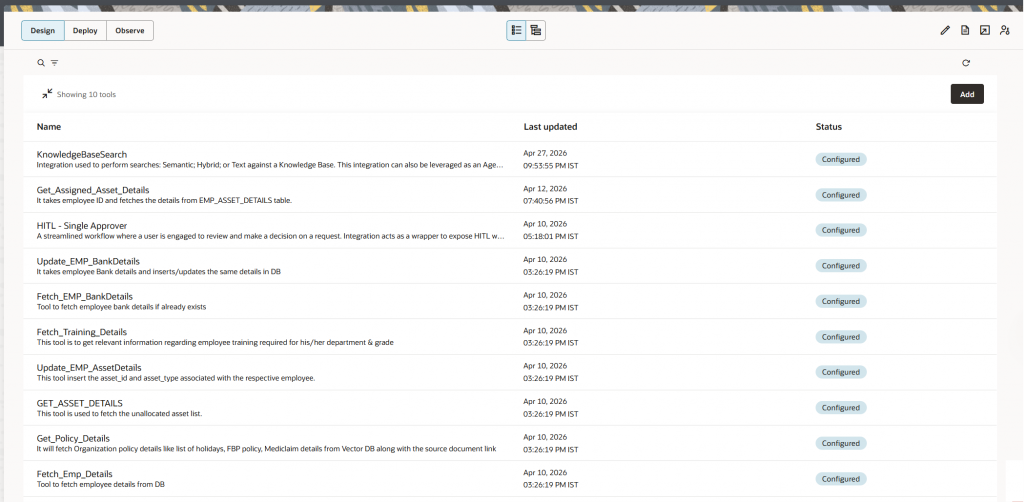
Step 3: Policy and HR — Answering the Leave Question
The Policy and HR Agent invokes:
- Policy Knowledge Base Search — the heart of this sub-agent. Hybrid search retrieves the relevant section from the HR handbook.
- Benefits Eligibility Calculator — applies date-of-joining logic to prorate the entitlement.
- Compliance Requirement Checker — flags any mandatory acknowledgments (for example, code of conduct sign-off).
We have created an Agent Skill designed to automate and manage each task independently.
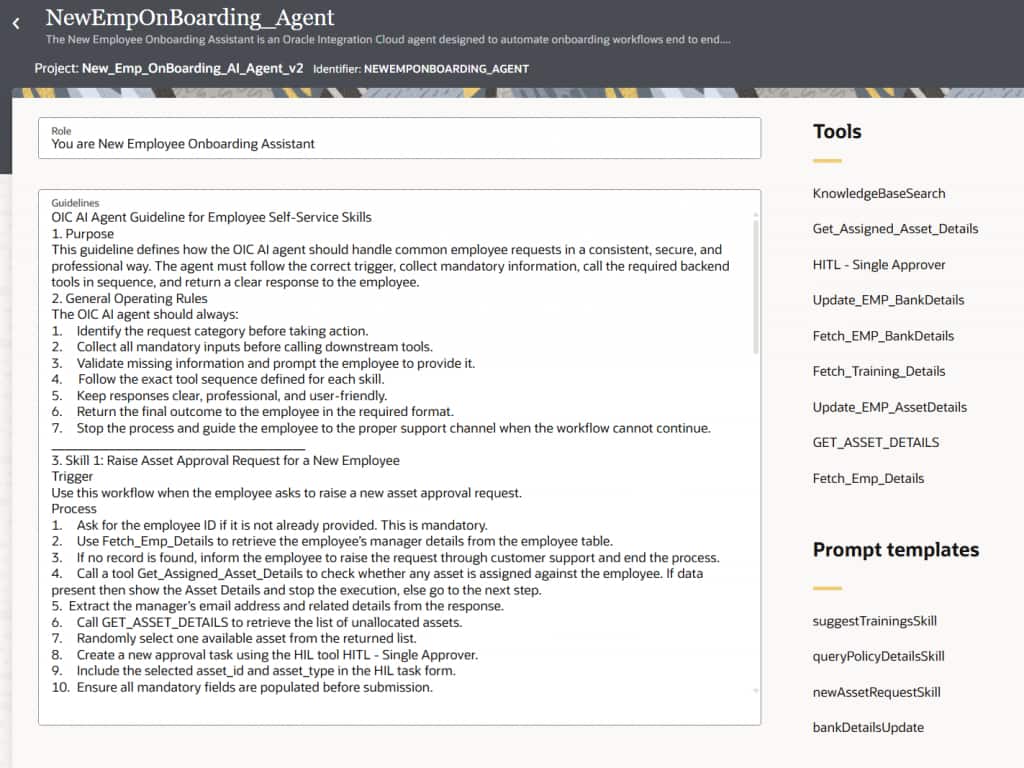
Step 4: Financial & Banking Services — Updating Bank Details
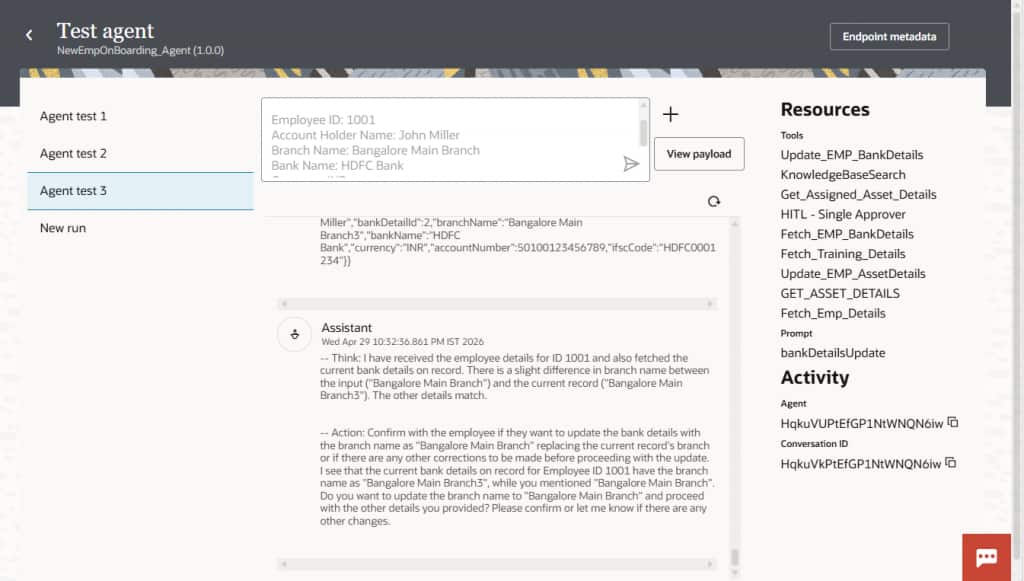
The Financial & Banking Services Agent handles this task with care. Bank detail updates are sensitive, so the agent:
- Calls Fetch Emp Details to confirm Priya’s identity context.
- Calls Fetch Emp Bank Details to show her current state (likely empty for a new hire).
- Collects the new account information through structured prompts in the conversation.
- Routes the change through Update Emp Bank Details, which integrates with the Banking System.
- For sensitive changes, this step is also typically gated by Human in the Loop — the change is staged, an approval is requested, and only then committed.
The agent can also answer related questions like “When is my first payroll cycle?” or “What is the lease deduction policy?” by combining the Fetch Payroll Details and Lease Details tools with payroll policy chunks retrieved from the Knowledge Base.
Step 5: Training — Personalized Learning Recommendations
Finally, the Training Agent gets to work:
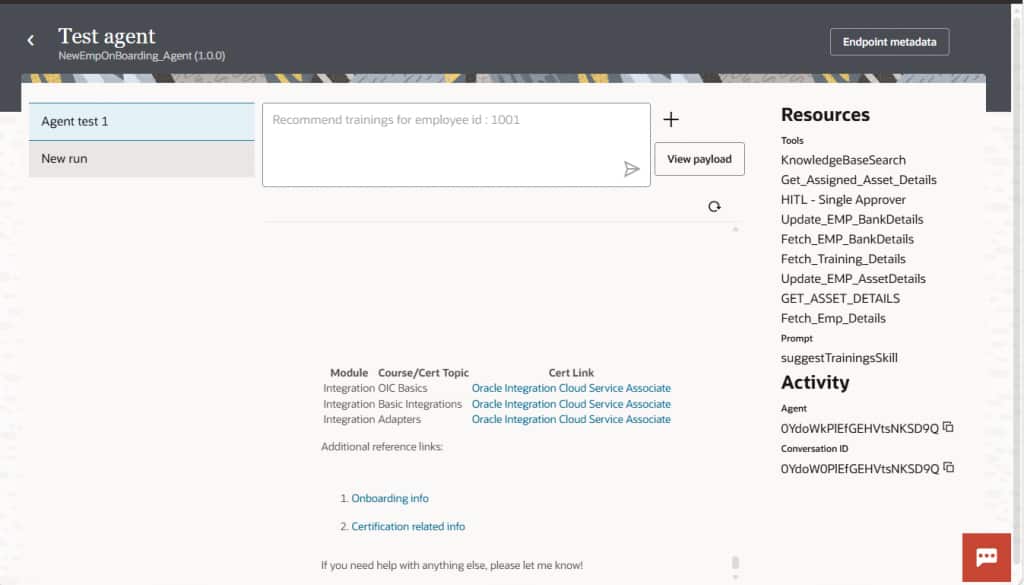
- Fetch Emp Details retrieves Priya’s role and skill profile.
- Skills Assessment Engine identifies skill gaps relative to the Integration Architect competency map (sourced from the Knowledge Base).
- Intelligent Course Recommender queries the Training Catalog and surfaces a curated learning path.
- Certification Path Tracker suggests certifications aligned with her career trajectory.
Below is a representative OIC AI Agent conversation flow that showcases how conversational input is transformed into actionable integration tasks across HR, IT asset management, payroll, and learning. systems.
How the Pieces Fit Together in OIC
Implementing this architecture in OIC follows the same building blocks introduced in the Agentic AI in Oracle Integration blog:
- Integrations as Tools — Each backend capability (Employee Profile Lookup, Asset Inventory Search, Update Emp Bank Details, etc.) is built as a small, reusable OIC integration and exposed as a tool with a clear description so the LLM knows exactly when to invoke it.
- Knowledge Base — The KB is exposed via the
KnowledgeBaseSearchTool(or aKnowledgeExpertAgentfor pure Q&A scenarios), with a tool description that names the content and triggering scenarios. Tool descriptions are the most critical lever for retrieval quality.
- Decisions — Approval thresholds, compliance gates, and grade-based budget checks are encoded as decision tables, keeping business rules out of the integration flow.
- Human in the Loop (HITL) — Sensitive actions (bank updates, high-value asset requests) are routed through HITL workflows that pause execution until a human approves.
- Agent Patterns and Prompt Templates — The ReAct pattern keeps the agent’s reasoning consistent and auditable, while prompt templates guarantee that every invocation receives clean, structured context.
Conclusion
Employee onboarding is a perfect proving ground for agentic AI: it is high-touch, multi-domain, knowledge-heavy, and deeply tied to employee experience. By combining OCI Generative AI, OIC AI Agents, and the OIC Knowledge Base backed by OCI Search with OpenSearch, we can replace the patchwork of portals and tickets with a single conversational front door that understands intent, retrieves grounded knowledge, executes integrations as tools, and respects governance through human oversight.
The Knowledge Base, in particular, is not just one capability among many — it is the long-term memory that turns a generic LLM into a domain-aware assistant for your enterprise. Get the KB right and onboarding (and a hundred other employee experiences) becomes dramatically simpler to deliver.
The future of onboarding isn’t a checklist. It’s a conversation — and OIC makes that conversation possible.