
AI agents are becoming more useful when they can do more than answer questions. They can retrieve enterprise information, trigger workflows, coordinate actions across systems, and help employees complete work faster.
But as agents gain access to enterprise tools, organizations need to maintain control over who can access what, which tools are available, how credentials are handled, and how activity is monitored.
That is where Oracle Integration MCP Gateway comes in.
Oracle Integration MCP Gateway is part of Oracle Integration (OIC). Oracle Integration MCP Gateway features will be available in the Oracle Integration 26.10 release, providing a governed path for MCP clients to access OIC and approved third-party MCP servers with centralized identity, policy, credential, enforcement, and observability controls.
A governed foundation for enterprise AI
Oracle Integration helps organizations connect applications, data, processes, and people. It provides capabilities for:
- Connecting to applications, APIs, services, and data.
- Building integrations and automations across systems.
- Applying business decisions and rules.
- Orchestrating multi-step agent interactions.
- Including people in approvals, reviews, and exception handling.
Oracle Integration MCP Gateway extends this foundation to Model Context Protocol (MCP) interactions.
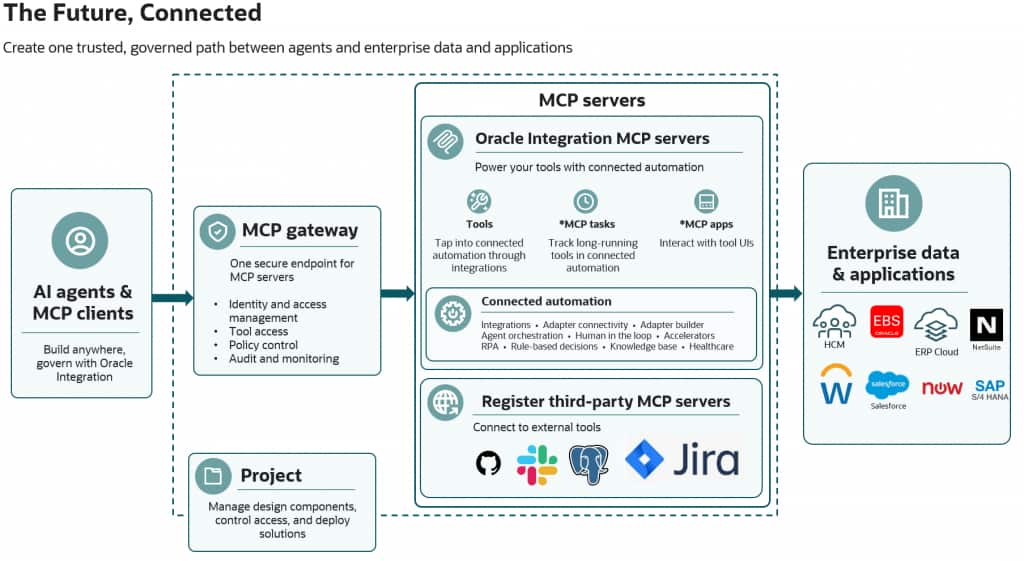
Rather than giving every AI agent direct access to every MCP server, organizations can provide a single governed path through the gateway.
Why governance matters
MCP helps standardize how AI agents discover and invoke tools. However, as enterprises connect more agents and MCP servers, governance can become fragmented.
Without a common control point, organizations can face challenges such as:
- Different identity and authorization approaches across MCP servers.
- Credentials distributed across agent implementations.
- More tools exposed than an agent needs.
- Inconsistent security and business policies.
- Limited visibility into tool usage and outcomes.
Oracle Integration MCP Gateway helps centralize these controls.
MCP clients connect to one gateway endpoint. The gateway then applies the organization’s configured controls before access is granted to OIC MCP servers or approved third-party MCP servers.
Govern access before enterprise tools are invoked
When an MCP client sends a request, Oracle Integration MCP Gateway can help govern the full interaction.
- Authenticate and authorize the requester
Establish the identity of the AI agent, user, or service and determine whether access is permitted. - Expose only approved tools
Tool filters help ensure that MCP clients discover and invoke only explicitly approved tools. - Apply security and business policies
Policies can be evaluated before a request is sent to a downstream MCP server and, where applicable, as a response is returned. - Resolve downstream credentials securely
Agents do not need direct access to downstream credentials. The gateway can resolve the appropriate credentials through controlled stores. - Route the request to the right MCP server
The gateway routes approved requests to OIC MCP servers or approved third-party MCP servers. - Capture operational visibility
Request activity, tool usage, outcomes, policy decisions, and health signals can support operations, audit, and troubleshooting.
Configure governance once
The gateway enables administrators to define governance centrally:
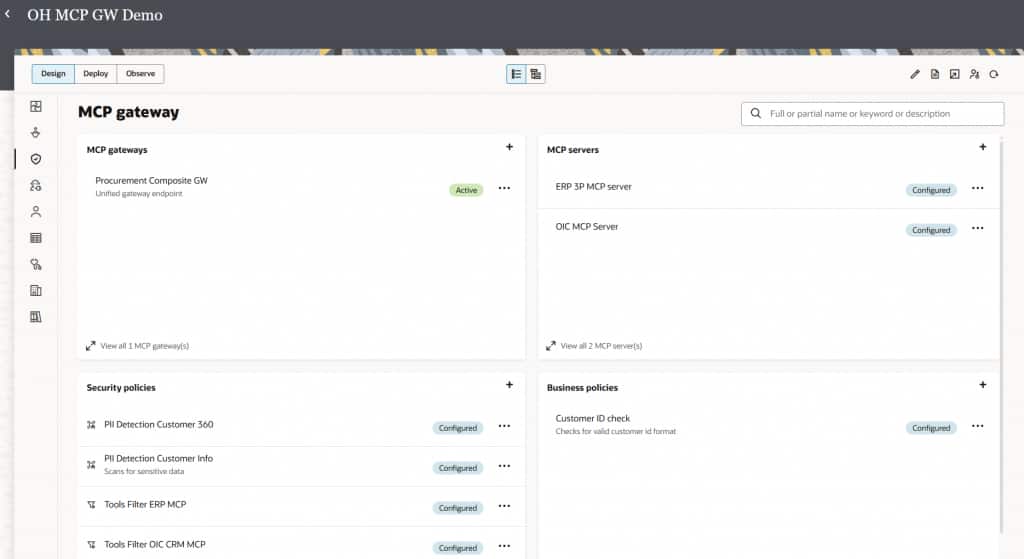
- Register participating MCP servers.
- Select the tools that should be available to agents.
- Create reusable security and business policies.
- Apply policies at the gateway, MCP-server, or individual-tool level.
This supports a least-privilege approach to enterprise agent access.
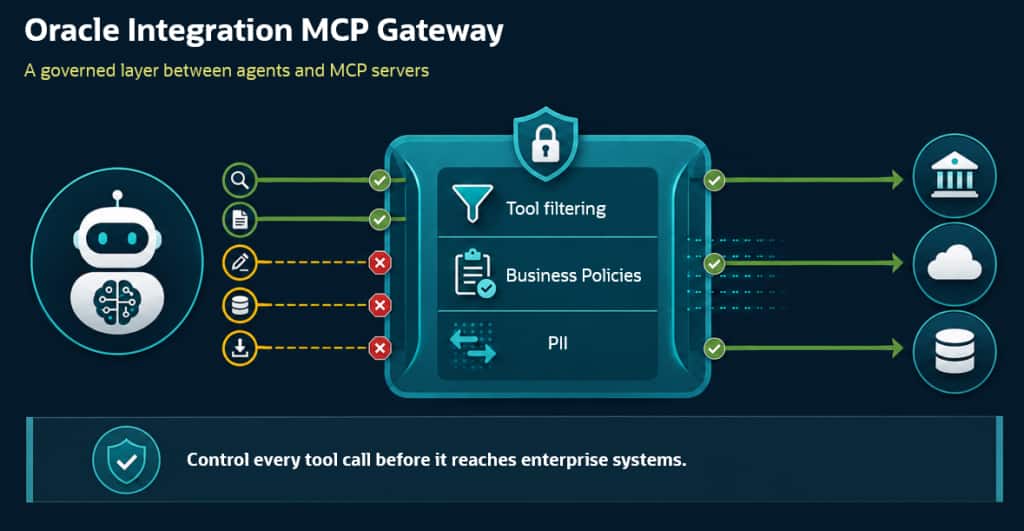
For example, an operations agent may be able to use approved diagnostic tools but not tools that make production changes. A customer-service agent may retrieve relevant customer information but route sensitive actions to a person for review.
From tool access to business action
Enterprise work often spans multiple systems and people.
An AI agent may need to retrieve customer information from CRM, check supplier performance in ERP, apply a business rule, start a workflow, and route an exception to an employee.
Oracle Integration provides the connectivity, integrations, decisions, orchestration, and human-in-the-loop capabilities needed to coordinate those business interactions. Oracle Integration MCP Gateway helps make MCP-based access to those capabilities governed and consistent.
See it in action
The accompanying demo shows a practical example of the process to Create MCP Gateway.
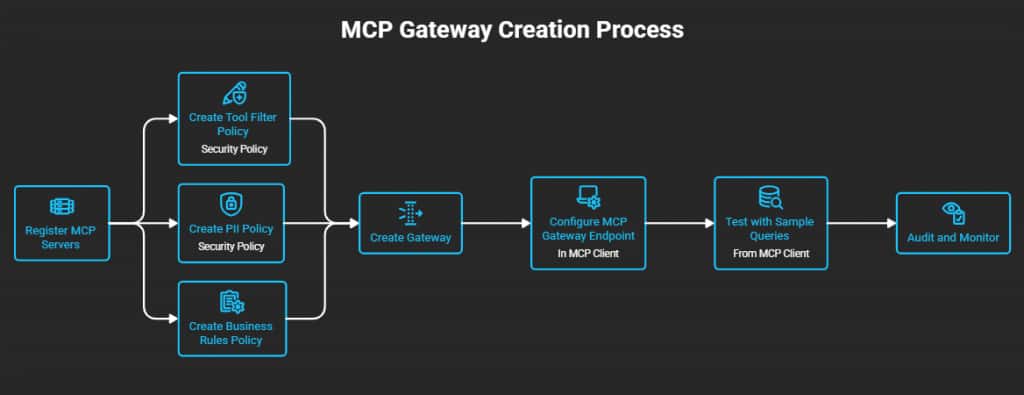
- Multiple MCP servers can be onboarded behind one gateway.
Convert Integrations to MCP Tools and enable MCP Server.
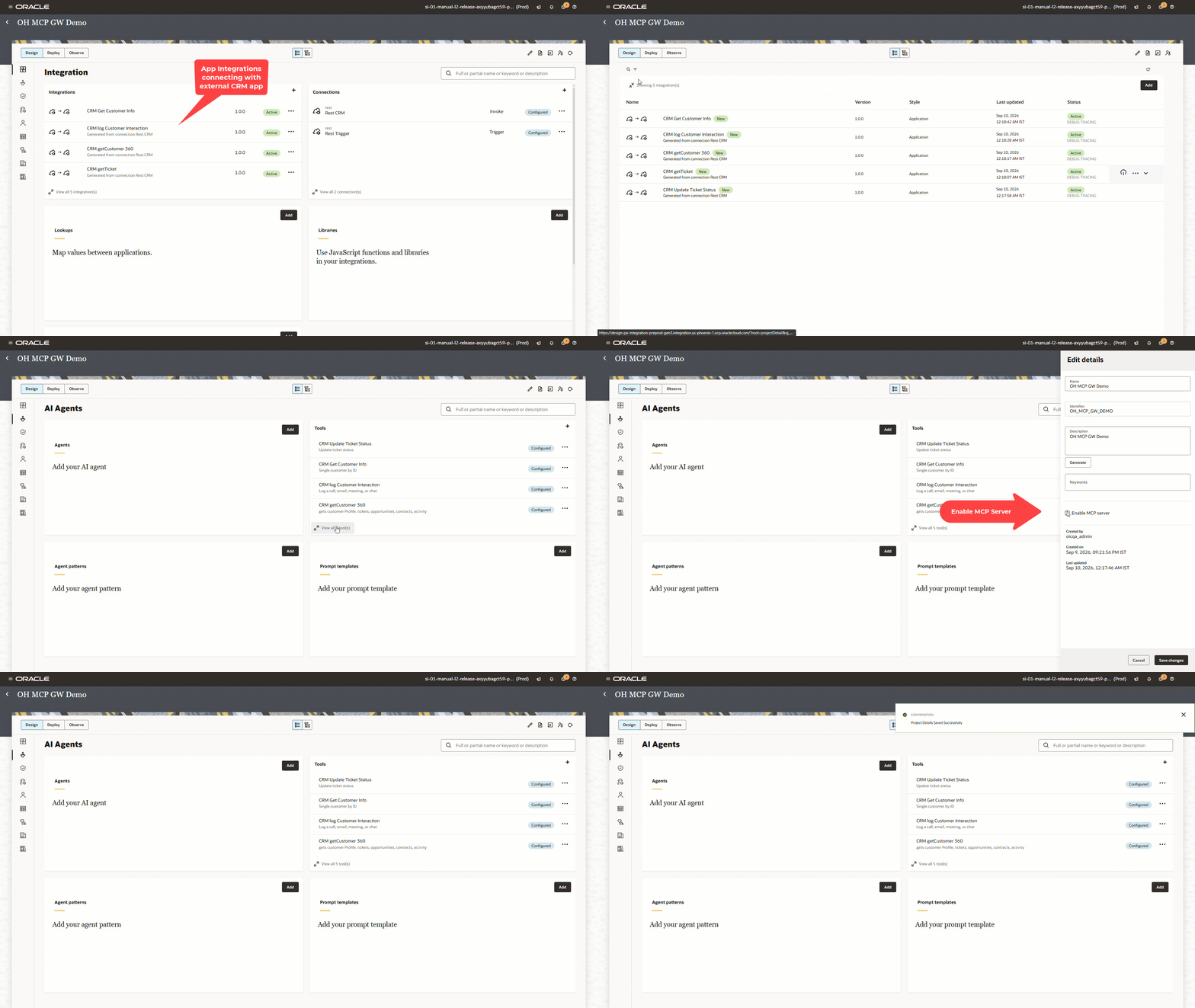
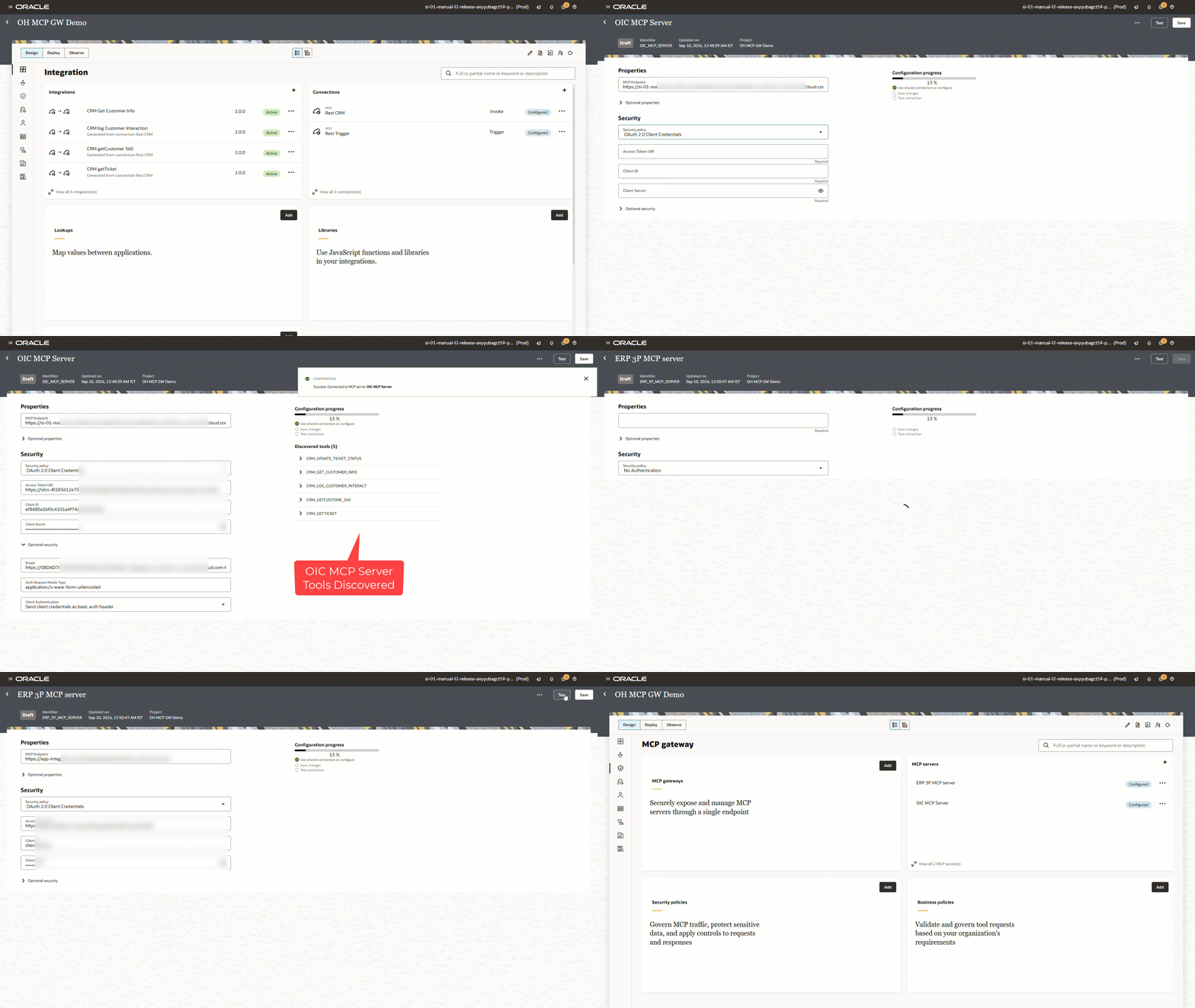
Register MCP Servers (OIC Enabled MCP Server and 3rd Party MCP Server)
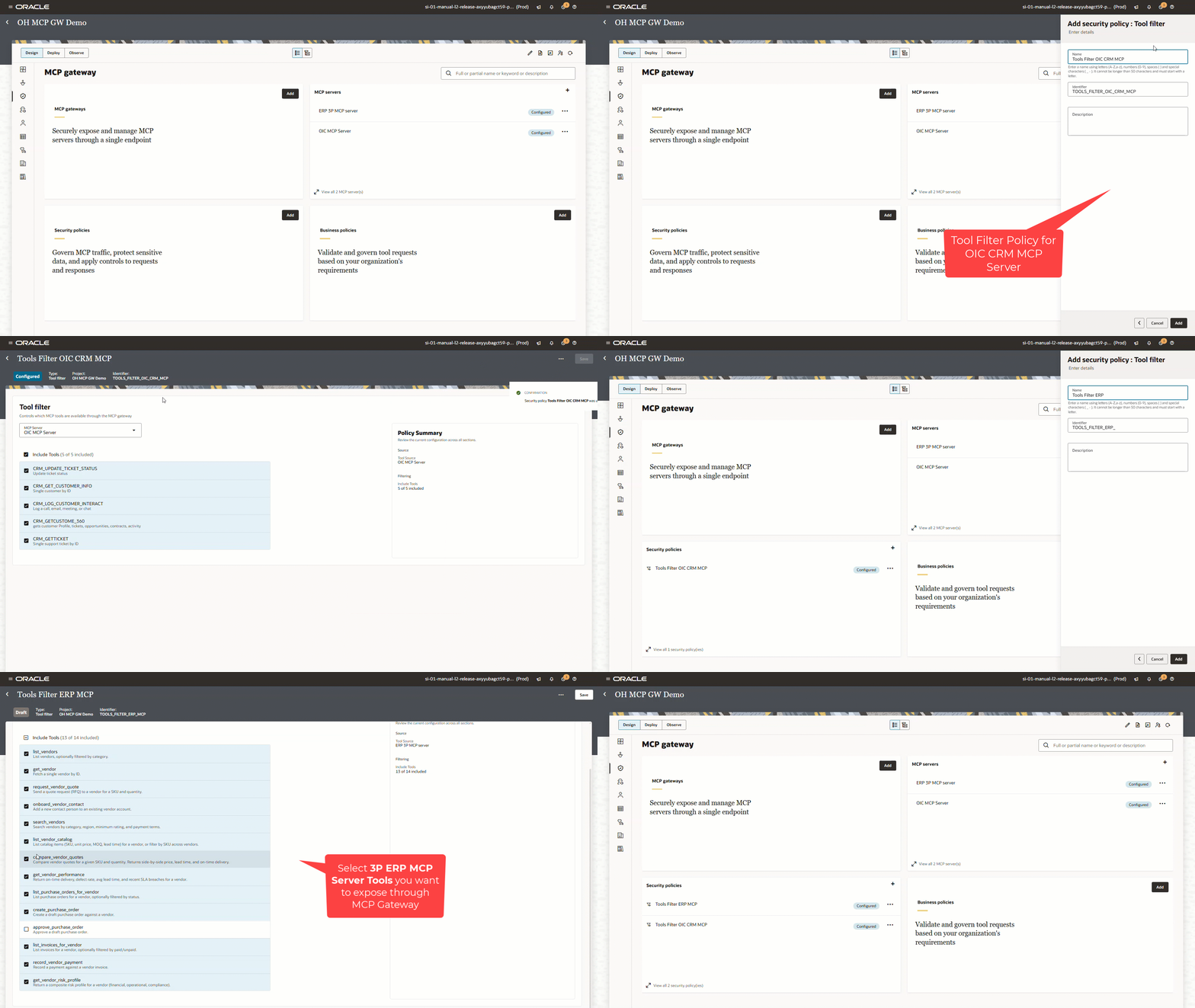
- Create Tool Filter Policy: Tool filters expose only approved MCP Server Tools capabilities.
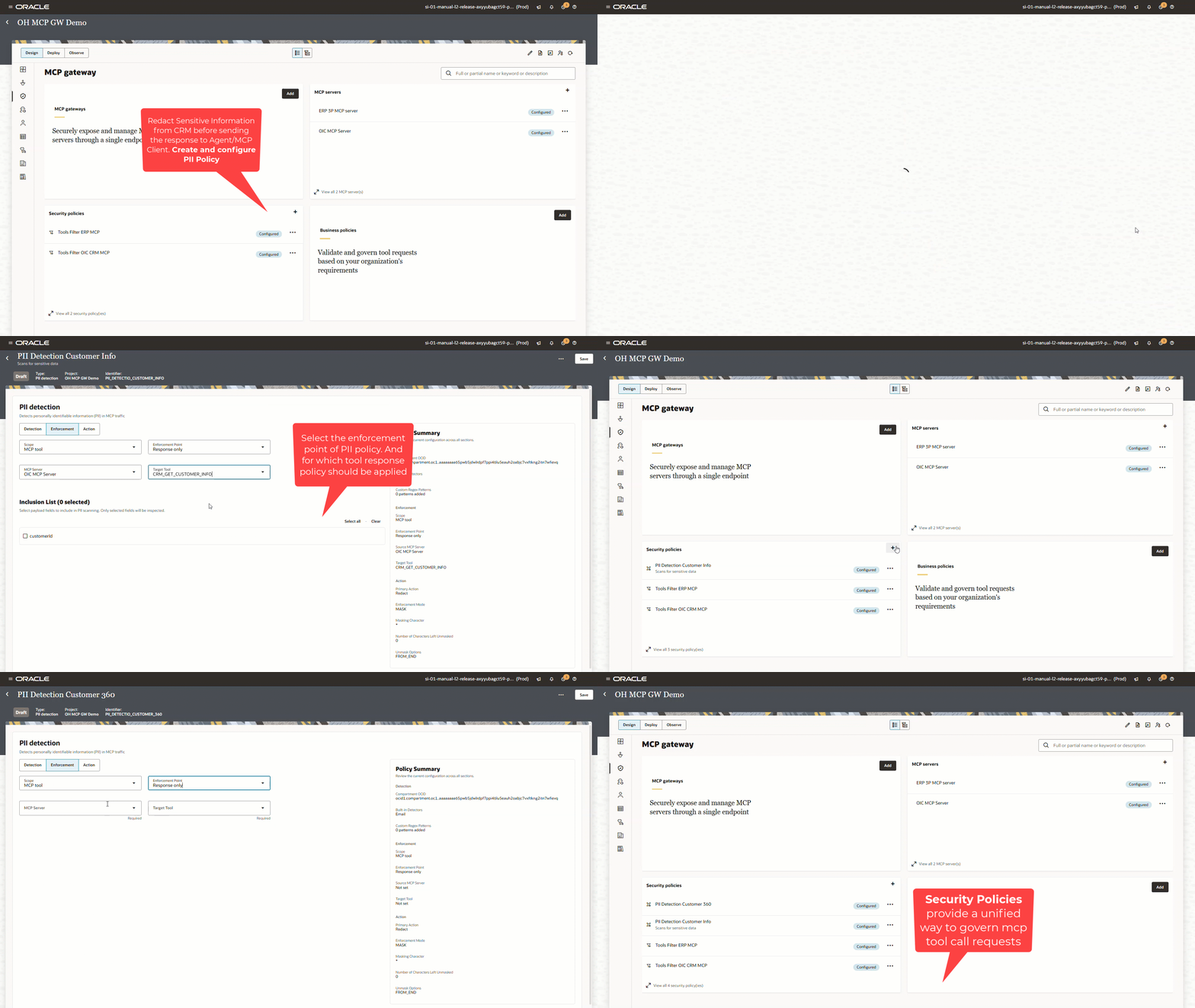
- Create PII Policy: A policy protects sensitive information on the request/response path.
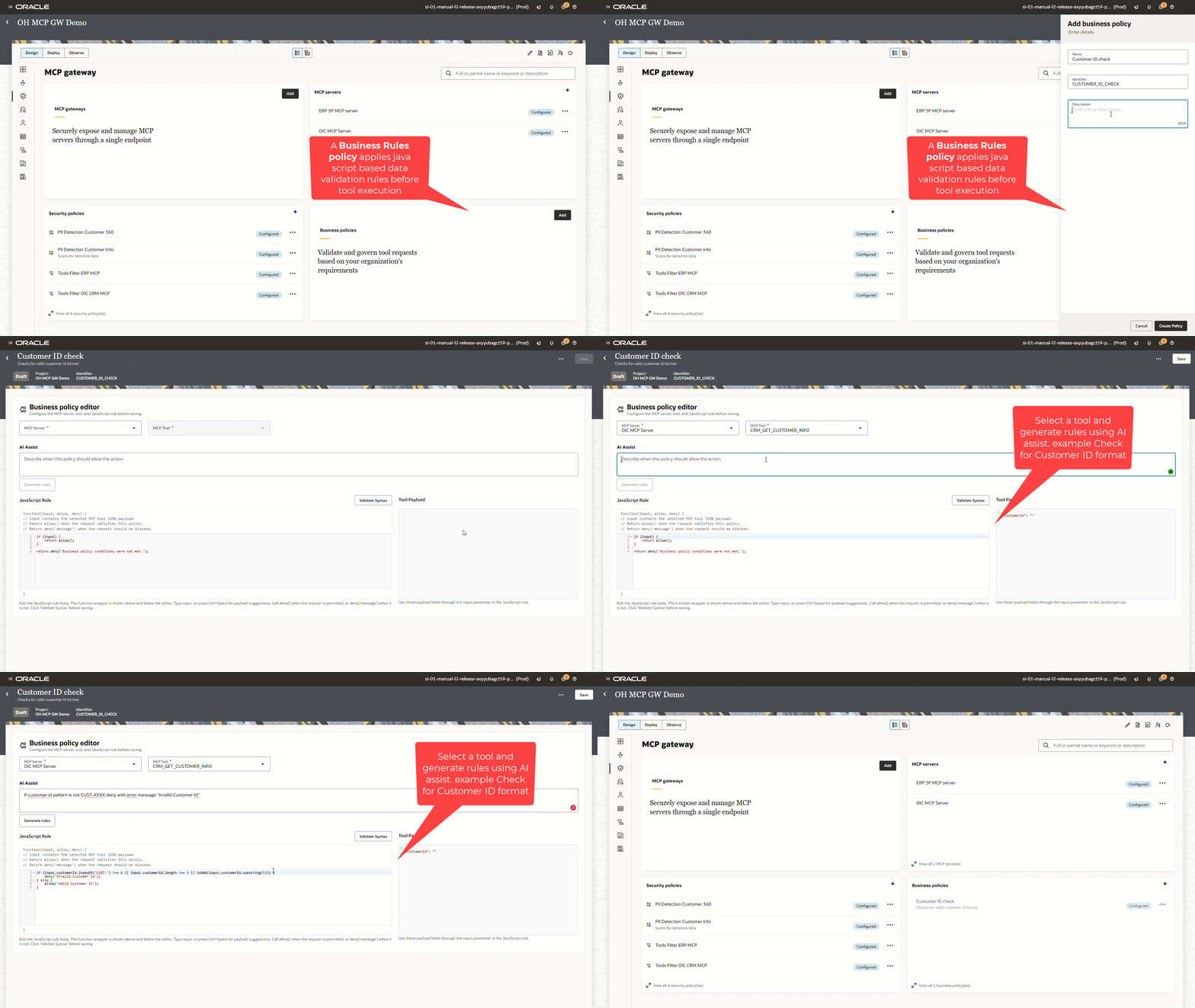
- Create Business Policy: Business Rules Policies protect systems from malformed, incomplete, hallucinated, or business-noncompliant requests.
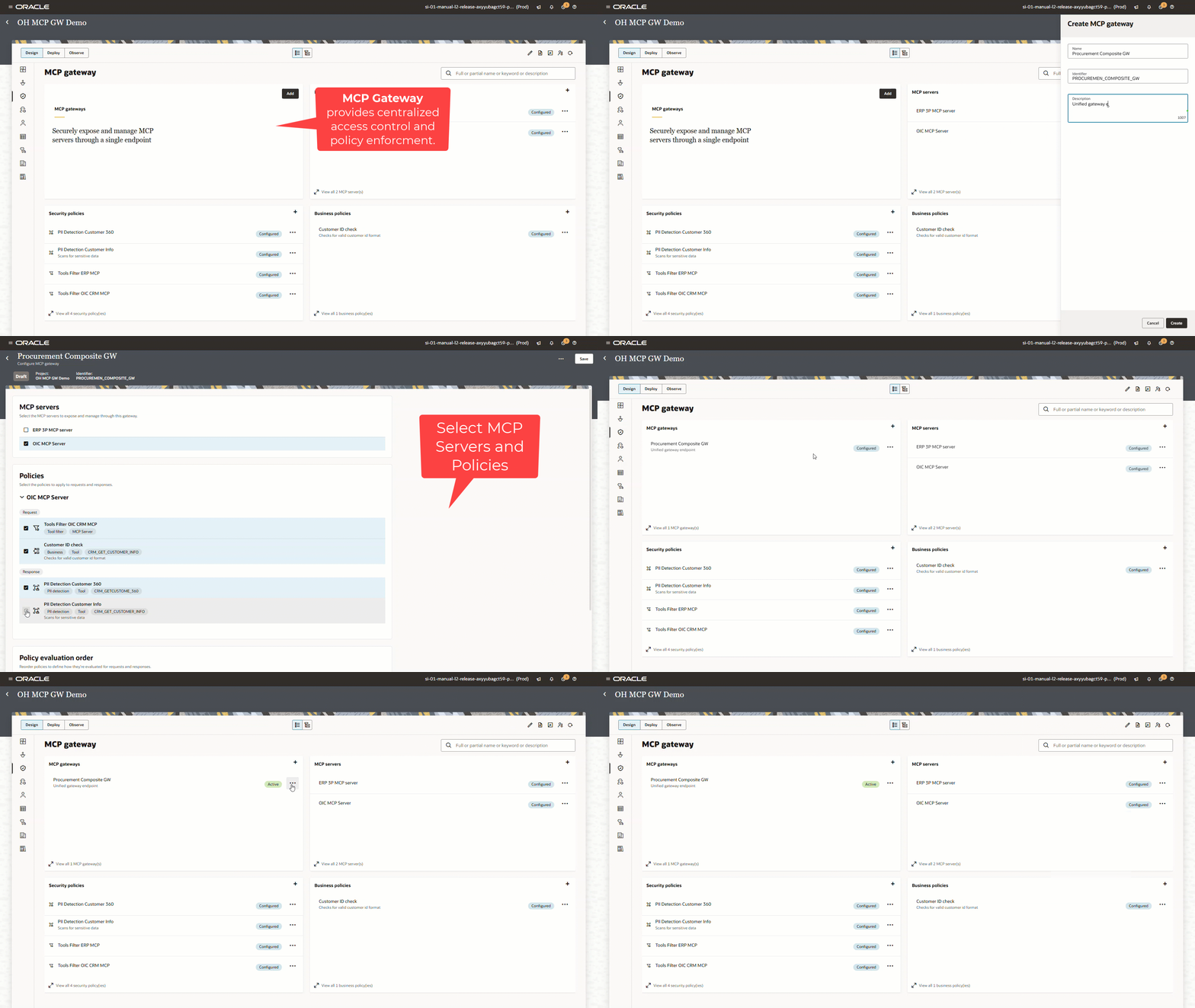
- Create MCP Gateway: MCP Gateway turns MCP connectivity into governed enterprise access.
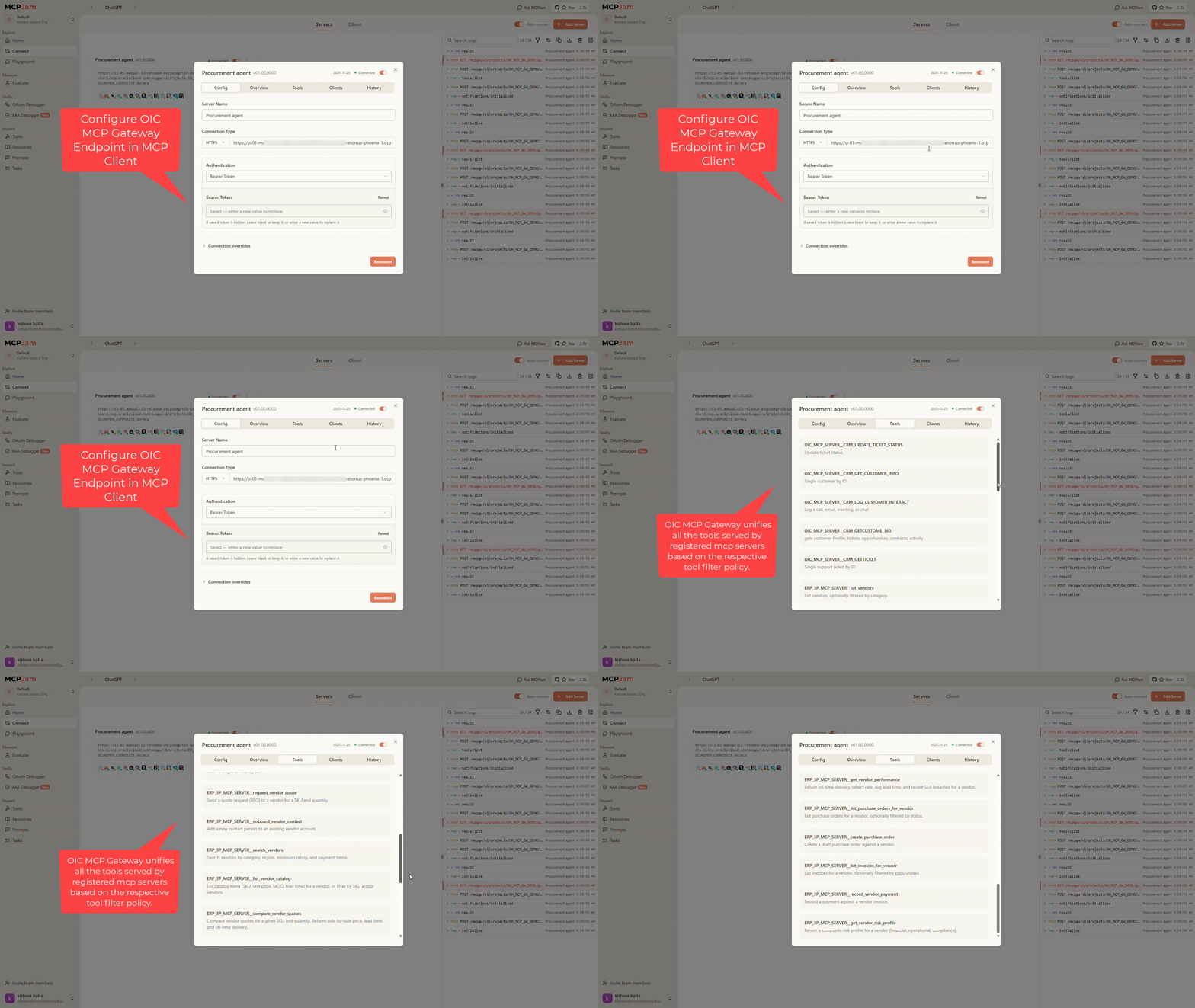
- Configure MCP Gateway Endpoint: An MCP client discovers approved tools through one endpoint.
- Test with Sample Queries: An AI agent/MCP Client uses that endpoint to complete a cross-domain business task.
- Audit and Monitor : Provides a consistent point to capture activity across client requests, policy evaluation, tool invocation, response handling, and downstream outcomes.
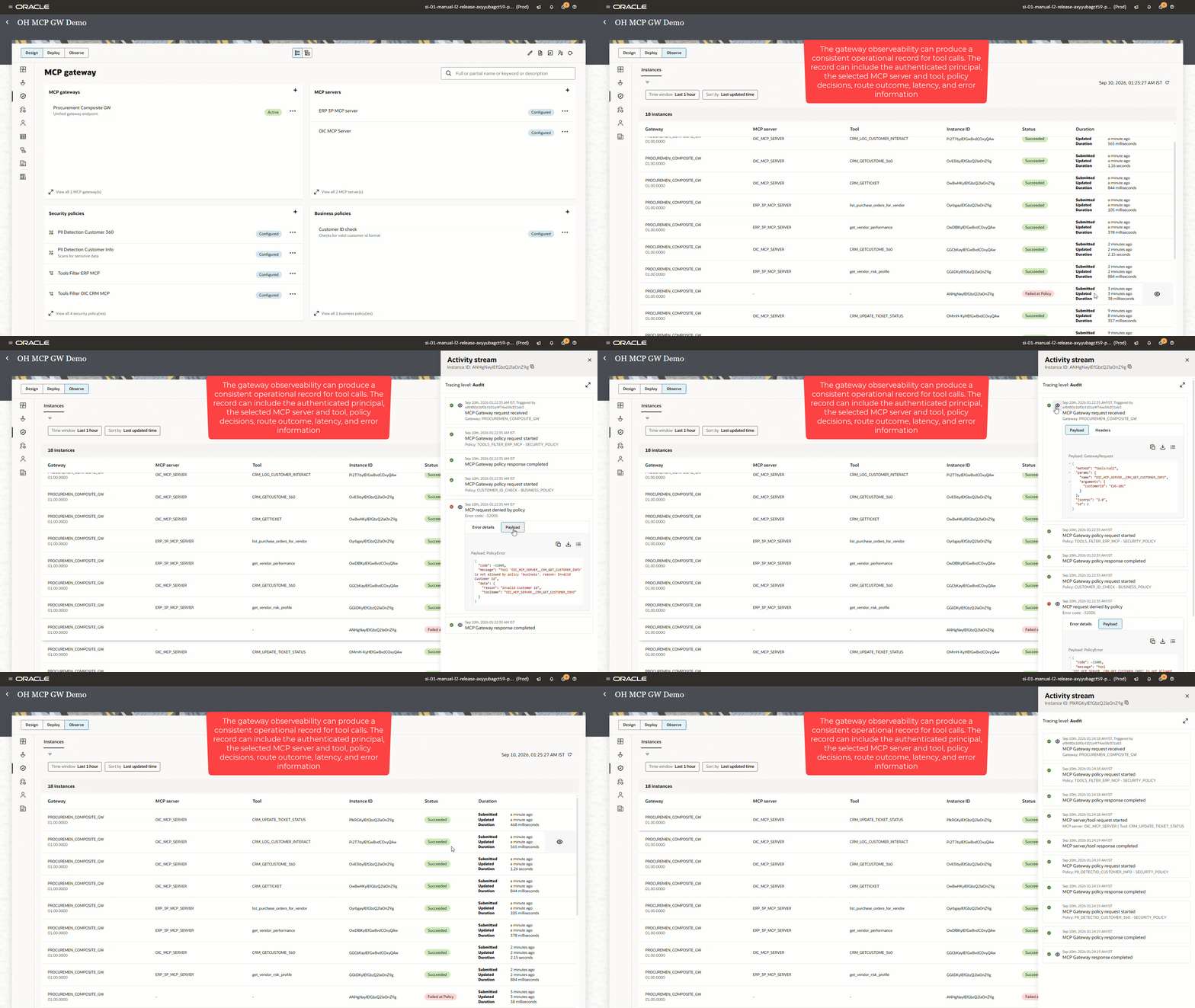
The key outcome is simple: one gateway, multiple MCP servers, and unified governance.
Move from experimentation to enterprise action
AI agents can open up new ways to help employees, simplify everyday work, and create better customer experiences. But for agents to make a real difference, they need to do more than connect to tools—they need to work safely within the systems, rules, and processes that businesses already rely on.
Oracle Integration MCP Gateway helps make that possible. It provides one governed path for agents to access Oracle Integration and approved third-party MCP servers, with the right controls around identity, tool access, policies, credentials, and visibility.
This gives organizations a practical way to move from promising AI experiments to real business outcomes. Teams can give agents the access they need, while retaining the control and confidence needed to scale responsibly.