
Ever since we released the new Agentic AI features in OIC, I have had many people ask me about the connection OIC uses to LLMs and where the data is processed, and whether or not the data leaves their OCI tenancy. In this blog, I want announce our support for using models securely inside the Oracle cloud and clearly answer these questions.
With the rapid evolution of Agentic AI in Oracle Integration, the focus has been clear: give customers flexibility in how they design, deploy, and govern AI-powered automation.
With the 26.04 release, we’re taking the next step by introducing support for OCI Generative AI models as a first-class option for AI agents in Oracle Integration Cloud (OIC). You can read all about OCI Generative AI in this blog.
This is more than just adding access to a greater number of models. It’s about giving organizations greater control over where AI runs, how data is handled, and how AI aligns with enterprise governance requirements.
Expanding Model Choice for Agentic AI in OIC
Oracle Integration follows a pragmatic AI approach—combining deterministic workflows with generative AI, while maintaining enterprise-grade governance and control.
With this release, when creating an AI agent pattern in OIC, you can now choose between:
- A direct route to OCI Generative AI models (new) ; or
- Third-party public models via OIC’s LLM Connection (for example, OpenAI, Anthropic, or Azure)
This flexibility allows you to match the model to the use case, whether that’s broad reasoning and general-purpose tasks, or tightly governed, enterprise-sensitive workflows.
Why OCI Generative AI for Agents?
The key differentiator is where the model executes and how data is handled.
When using models hosted by the OCI Generative AI service:
- LLM inference runs within your OCI tenancy
- Your data remains within your controlled environment
- You can leverage existing OCI security, identity, and governance policies
This is particularly valuable for:
- Regulated industries (finance, healthcare, public sector)
- Workflows involving PII, financial data, or internal documents
- Organizations with strict data residency or sovereignty requirements
Public LLMs remain a powerful and valid choice for many scenarios. What this release enables is choice with control: Use OCI hosted models when data locality and governance are critical and other models when broader generalization or ecosystem reach is preferred.
What Models Are Available in OCI Generative AI?
OCI Generative AI provides access to a curated set of enterprise-ready models from leading AI providers, delivered through a unified platform.
OCI Generative AI includes hosted models from providers such as:
- Cohere
- Meta
- OpenAI
- xAI
These models are hosted and executed within OCI, enabling organizations to take full advantage of:
- Data residency within their tenancy
- OCI-native security and identity controls
- Enterprise-grade governance and compliance
OCI Generative AI continues to evolve, providing access to a broader ecosystem of models through a single platform. However, model execution and data handling characteristics may vary depending on the provider. For use cases requiring strict data residency and tenancy isolation, OCI-hosted models are your best choice.
Note 1
OCI Generative AI offers more model providers than I mentioned above, including Google, but not all of them are hosted in OCI. You can review this page Generative AI Models by Region to see all the models available, if hosted or external, and determine which one meet your needs.
Note 2
We do not currently support cross-region calling of LLMs from OIC. This means that you need to pick a model in OCI Generative AI that is available in the same region as your OIC instance.
When Should You Use OCI Models vs Others?
A simple way to think about model selection:
| Scenario | Recommended Model Choice |
| Sensitive enterprise data | OCI Generative AI |
| Regulated environments | OCI Generative AI |
| General-purpose AI tasks | Public LLMs |
| Mixed workflows | Hybrid approach |
In practice, many organizations will adopt a hybrid model strategy, balancing flexibility with governance.
Bringing It All Together
With support for OCI Generative AI models, Oracle Integration continues to deliver on a core principle:
Unifying integration, automation, and AI on a single enterprise platform
You can now:
- Build agents powered by LLMs running inside your tenancy
- Combine them with deep enterprise connectivity
- Govern them with policy, oversight, and compliance controls
This is what enables pragmatic, enterprise-ready Agentic AI—moving beyond experimentation to real, production-grade automation.
Get Started
To start using OCI Generative AI with OIC agents:
- Complete the prerequisite steps (if not already done – see below).
- Create a new AI agent pattern and choose ReAct for OCI GenAI (26.4) for the pattern recipe.
- Give the pattern a name and description as usual and click Create.
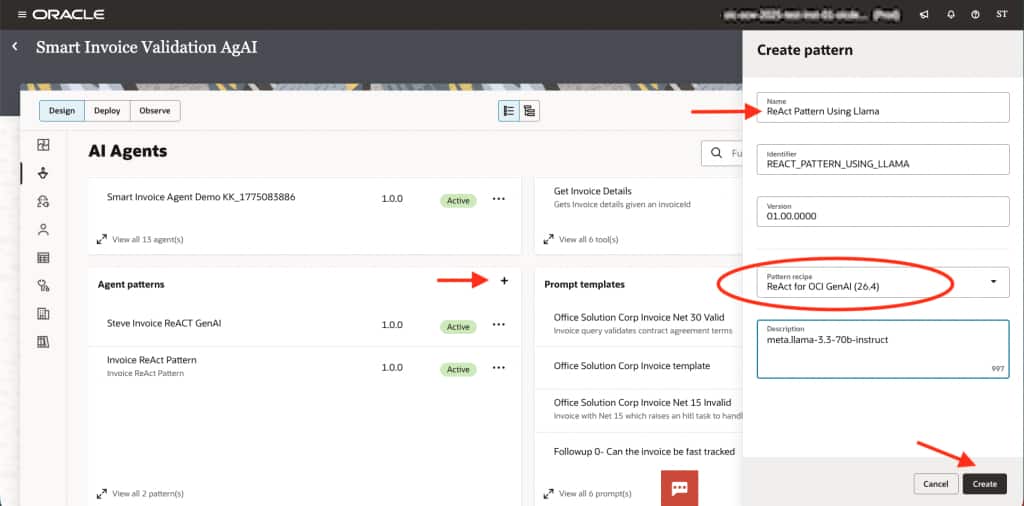
- Configure your pattern guidelines or use the defaults provided (recommended).
- Set the model name to use for your agent (refer to the OCI Generative AI models page). For example, set openai.gpt-oss-120b or
meta.llama-3.3-70b-instruct.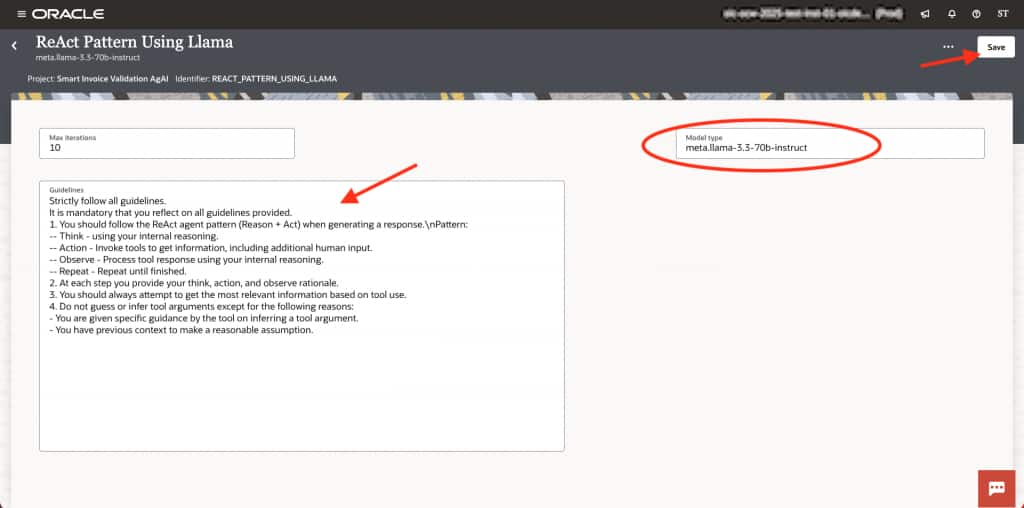
- Navigate to the Integrations tab of your project and locate the Lookups card. You will see a lookup called OCIGenAI_Properties. Edit that lookup and set the Region and the Compartment_OCID
(this will be the region and compartment for the OCI Generative AI model). - Save the lookup.
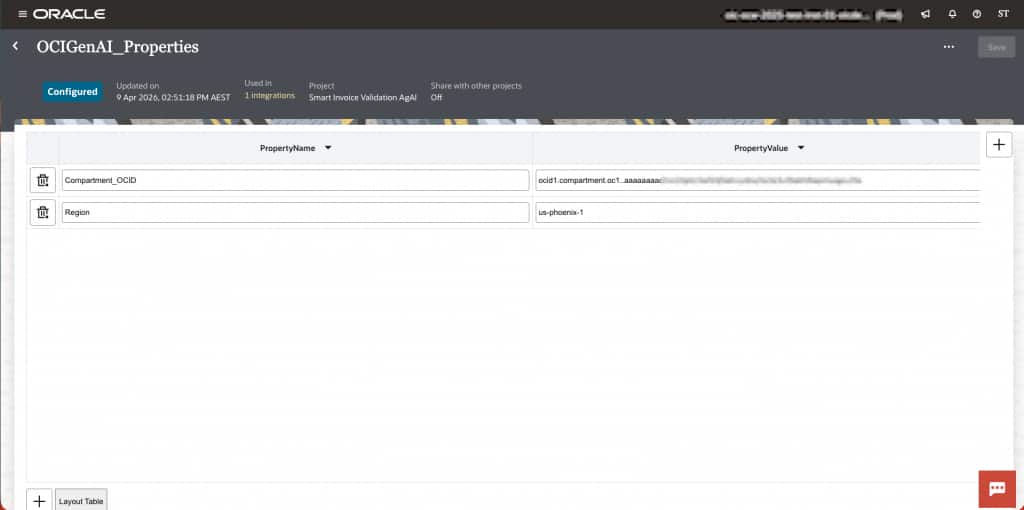
- Create a new agent and select your new pattern.
Prerequisites for OCI Generative AI in OIC
To use OCI Generative AI models within Oracle Integration agents, there are a few one-time setup steps required to establish secure access between OIC and the OCI Generative AI service.
These prerequisites are the same as those used for the OCI Generative AI native action in OIC, ensuring a consistent and governed approach to AI service access.
At a high level, the setup includes:
- Provisioning OCI Generative AI Service
Ensure the service is enabled in your OCI tenancy and available in your target region. - Configuring IAM Policies
Grant permissions that allow Oracle Integration to invoke Generative AI models securely. - Setting Up Dynamic Groups and Resource Principals
Allow OIC to authenticate with OCI services without embedding credentials. - Configuring Secure Connectivity
Ensure private and secure communication between OIC and OCI Generative AI endpoints. - Creating a Reusable Connection in OIC
Define and test the connection so it can be leveraged across agents and integrations.
This approach builds on existing OCI security and access patterns, making it consistent with how other OCI services are consumed within OIC.
For detailed step-by-step instructions, see the official documentation:
👉 https://docs.oracle.com/en/cloud/paas/application-integration/integrations-user/prerequisites.html