
The Problem with “AI + Enterprise Systems”
Every enterprise already has a nervous system: integration platforms that connect ERP, CRM, supply chain, finance, and dozens of other systems. Years of business logic are baked into these platforms — workflow rules, data transformations, approval hierarchies, and compliance checks.
When organizations add AI agents on top of this landscape, the typical approach is to rebuild that logic in agent code. Prompt templates, hardcoded API calls, and custom orchestration scripts. The integration platform becomes a bystander.
In this post, we walk through how we used Oracle Integration (OIC) as an MCP tools provider — turning existing enterprise integrations into tools that an AI agent can discover and call autonomously. The agent is built using the OCI Generative AI Python SDK directly (no LangChain, no third-party agent frameworks), paired with three native OCI tools and four OIC MCP tools. The result is a fully automated invoice validation pipeline where the AI reasons through a multi-step workflow, calls the right tools in the right order, and produces auditable decisions.
What Is MCP and Why Does It Matter Here?
Model Context Protocol (MCP) is an open standard for exposing tools and resources to AI models. An MCP server publishes a catalog of callable tools with names, descriptions, and JSON schemas. An MCP client — the AI agent — calls tools/list at startup to discover what’s available, then invokes tools via tools/call using JSON-RPC 2.0. The LLM never sees implementation code; it just sees tool descriptions in natural language and decides which to call.
OIC’s MCP server capability transforms every integration project into a tool catalog. Any integration flow you publish as an MCP action becomes instantly available to any MCP-compatible AI agent — with OAuth2 authentication, session management, and audit logging handled by OIC.
Key architectural insight: The enterprise business logic stays in the integration platform, and the AI agent becomes a pure reasoning and orchestration layer.
Solution Architecture
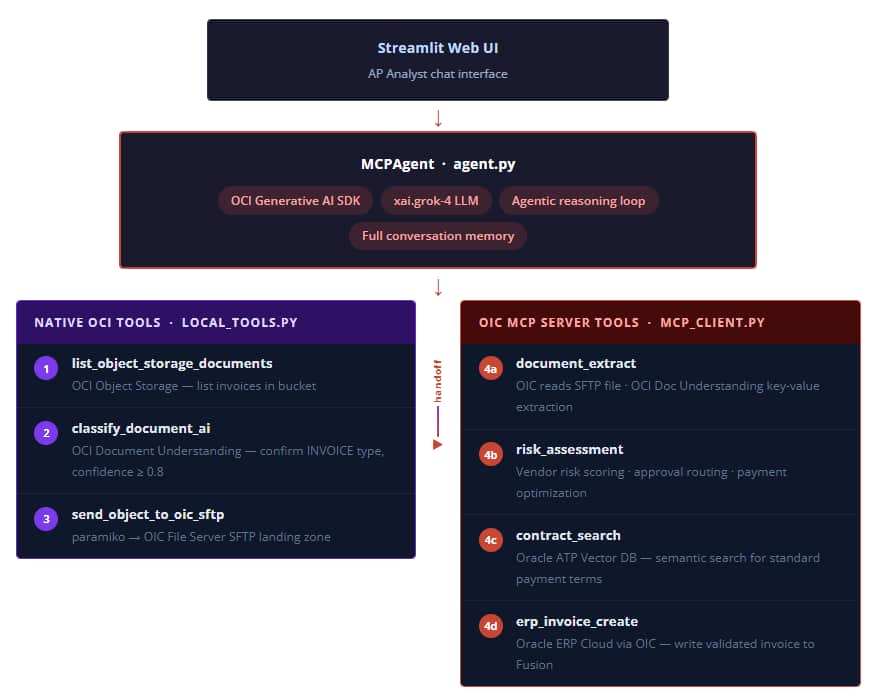
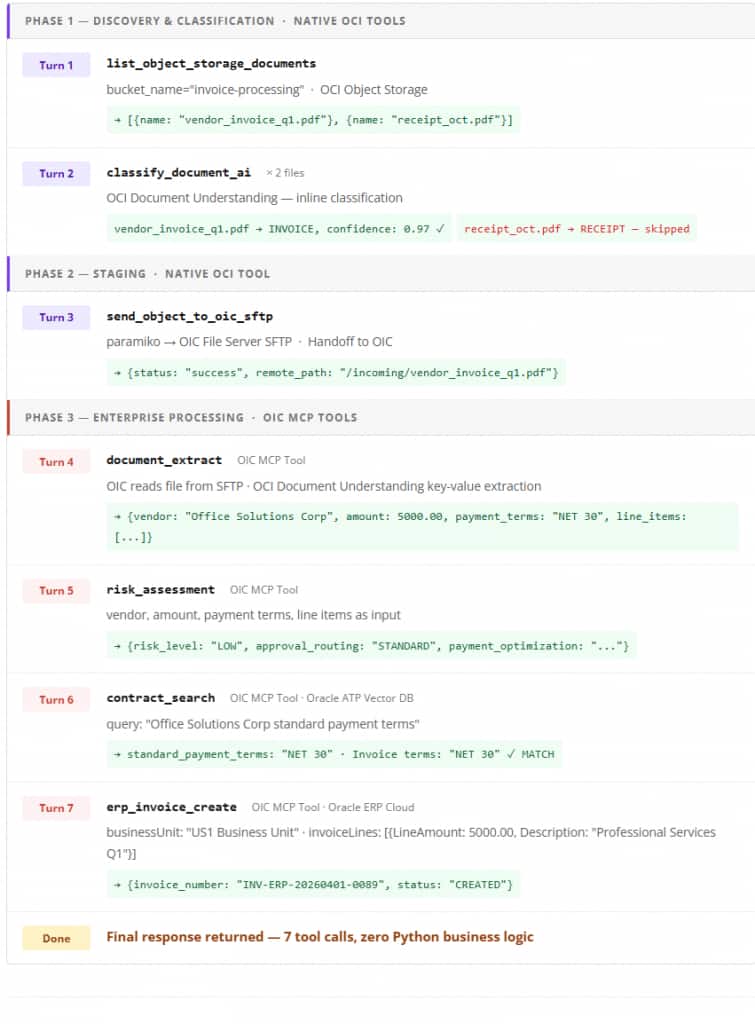
The system processes invoices end-to-end with no human touchpoints for compliant documents. The workflow is split across two tiers: native OCI tools (steps 1–3) handle discovery, classification, and staging; OIC MCP tools (steps 4a–4d) own the enterprise processing pipeline.
Components at a Glance
| Step | Component | Type | Purpose |
|---|---|---|---|
| — | xai.grok-4 LLM | OCI Generative AI | Reasoning, tool selection, decision-making. |
| 1 | list_object_storage_documents | Native OCI | List invoice documents in the bucket. |
| 2 | classify_document_ai | Native OCI | Confirm document is an INVOICE; skip all others. |
| 3 | send_object_to_oic_sftp | Native OCI | Stage invoice on OIC SFTP landing zone — handoff to OIC. |
| 4a | document_extract | OIC MCP Tool | Extract vendor, amount, line items, payment terms through OCI Doc Understanding. |
| 4b | risk_assessment | OIC MCP Tool, Decision Service | Vendor risk scoring, approval routing, and payment optimization. |
| 4c | contract_search | OIC MCP Tool · ATP Vector DB | Vector search of vendor contracts for standard payment terms. |
| 4d | erp_invoice_create | OIC MCP Tool · ERP Cloud | Write validated invoice record to Oracle Fusion. |
Building the MCP Client
The MCPClient class handles all communication with the OIC MCP server using JSON-RPC 2.0 — no external MCP SDK is required.
Session Initialization
Python Code
class MCPClient:
    def initialize(self) -> dict:
        params = {
            "protocolVersion": "2024-11-05",
            "capabilities": {"roots": {"listChanged": True}, "sampling": {}},
            "clientInfo": {"name": "Smart Invoice Validation MCP Client", "version": "1.0.0"}
        }
        response = self._send_request("initialize", params)
        result   = self._extract_result(response)
        # OIC returns Mcp-Session-Id in the response header —
        # included in all subsequent requests for session correlation
        self._initialized = True
        self._send_initialized_notification()
        return result
Tool Discovery
Python Code
def list_tools(self) -> list:
    response = self._send_request("tools/list")
    result   = self._extract_result(response)
    return result.get("tools", []) if result else []
This single call returns all four OIC tools — document_extract, risk_assessment, contract_search, erp_invoice_create — as JSON schema objects. The agent doesn’t need to know these tools exist at code-write time. They are discovered at runtime.
Authentication: OAuth2 Client Credentials
Every request to OIC includes a bearer token obtained via the OAuth2 client credentials flow. The OAuth2TokenManager handles token lifecycle automatically — fetching a new token when the current one is within 60 seconds of expiry:
Python Code
def get_token(self) -> str:
    # Return cached token if still valid (with 60s buffer)
    if self._access_token and time.time() < (self._token_expiry - 60):
        return self._access_token
    token_data         = self._fetch_token()
    self._access_token  = token_data["access_token"]
    self._token_expiry  = time.time() + int(token_data.get("expires_in", 3600))
    return self._access_token
Building the Native OCI Tools
Three OCI native capabilities are implemented as local Python tools running directly against OCI services, with no OIC involvement. These cover steps 1–3: discovering files, classifying them, and staging the confirmed invoice for OIC to process.
Step 1: List Invoice Documents from OCI Object Storage
The agent’s first action is to discover what documents are available for processing. list_object_storage_documents calls the OCI Object Storage API to enumerate all objects in the configured bucket and returns their names as a structured list. The LLM uses this output to decide which files require classification.
Python Code
def list_object_storage_documents(bucket_name: str):
    """List objects from an OCI Object Storage bucket."""
    response = object_storage_client.list_objects(
        namespace_name=NAMESPACE,
        bucket_name=bucket_name
    )
    objects = [
        {"name": obj.name}
        for obj in response.data.objects
    ]
    return {"objects": objects}
The client is initialized once at module level using oci.config.from_file(), which reads the default OCI CLI profile from ~/.oci/config. The returned list of object names feeds directly into the next tool call — the agent iterates over each document and classifies it individually.
Step 2: Document Classification with OCI Document Understanding
Python Code
def classify_document_ai(bucket_name: str, object_name: str):
    # Download from Object Storage
    obj     = object_client.get_object(NAMESPACE, bucket_name, object_name)
    encoded = base64.b64encode(obj.data.content).decode()

    response = ai_document_client.analyze_document(
        analyze_document_details=oci.ai_document.models.AnalyzeDocumentDetails(
            compartment_id=COMPARTMENT_ID,
            document=oci.ai_document.models.InlineDocumentDetails(
                source="INLINE", data=encoded
            ),
            features=[oci.ai_document.models.DocumentClassificationFeature(
                feature_type="DOCUMENT_CLASSIFICATION"
            )]
        )
    )
    doc = response.data.detected_document_types[0]
    return {"file": object_name, "document_type": doc.document_type, "confidence": doc.confidence}
The INLINE source mode sends document bytes directly in the request rather than referencing a storage URI. The agent’s system prompt enforces a minimum confidence threshold of 0.8 — documents below that threshold are not processed automatically.
Step 3: SFTP Transfer — Handing Off to OIC
Before the OIC MCP tools are called, the invoice must be staged where OIC can access it. The agent pushes the file to OIC’s built-in SFTP landing zone using paramiko. This is the handoff point: once the file lands, OIC’s document_extract MCP tool reads and processes it.
Python Code
def send_object_to_oic_sftp(bucket_name: str, object_name: str):
    # Download from Object Storage to /tmp
    response   = object_storage_client.get_object(NAMESPACE, bucket_name, object_name)
    local_path = f"/tmp/{object_name}"
    with open(local_path, "wb") as f:
        for chunk in response.data.raw.stream(1024 * 1024, decode_content=False):
            f.write(chunk)

    # Upload to OIC SFTP landing zone
    ssh = paramiko.SSHClient()
    ssh.set_missing_host_key_policy(paramiko.AutoAddPolicy())
    ssh.connect(hostname=OIC_SFTP_HOST, username=OIC_SFTP_USER,
               port=OIC_SFTP_PORT, password=PASSWORD)
    sftp = ssh.open_sftp()
    sftp.put(local_path, f"{REMOTE_DIR}/{object_name}")
    sftp.close(); ssh.close(); os.remove(local_path)
OIC MCP Tools
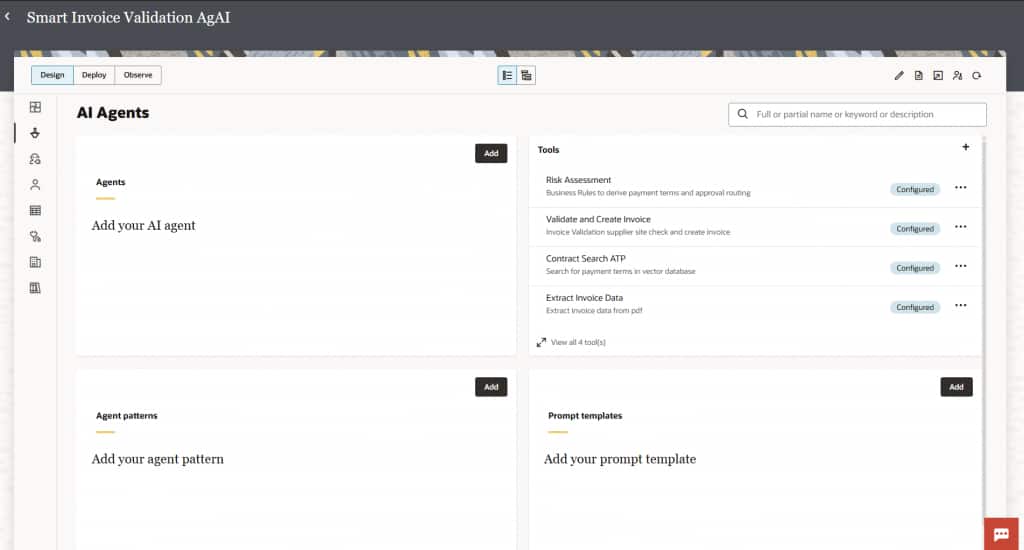
Once the invoice is staged on the OIC SFTP landing zone, the agent delegates all enterprise processing to OIC through the Model Context Protocol. OIC exposes four integration flows as MCP tools — each handling a distinct step of the invoice lifecycle. The agent discovers these tools at startup through tools/list and calls them by name through tools/call, just like any other tool in the unified registry.
Step 4: Extract Invoice Data (document_extract)
The first OIC MCP tool reads the staged file from the SFTP server and uses OCI AI Document Understanding to extract structured invoice fields — vendor name, line items, totals, and more — from the raw PDF.
- Receives PDF documents through the OIC SFTP Server adapter and downloads from the FTP landing zone.
- Leverages AI-powered document analysis to automatically extract invoice details (header, line items, and totals).
- Returns structured JSON payload consumed by downstream OIC tools.
- Includes a catch-all fault handler block for reliability against malformed or unreadable documents.
Why OIC here, and not a local tool? OIC’s SFTP adapter and OCI Document Understanding orchestration are already built and certified. Calling this through MCP reuses existing enterprise integration logic without duplicating it in Python.

Step 5: Risk Assessment and Payment Terms (risk_assessment)
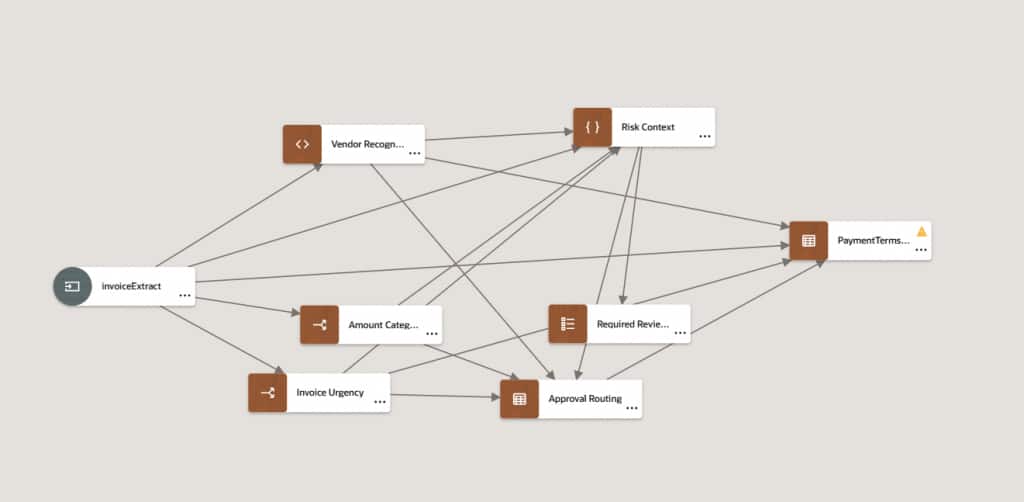
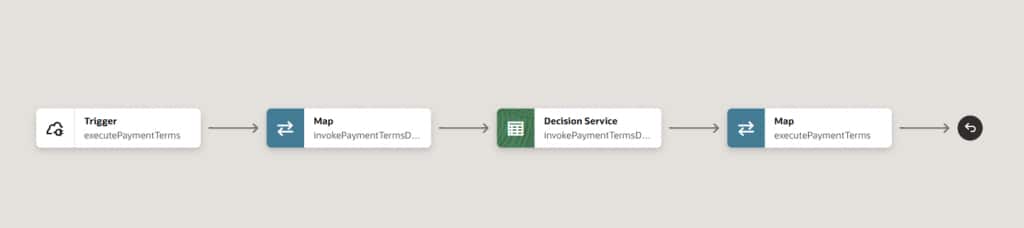
This tool orchestrates payment terms derivation and approval routing. It triggers an OIC REST endpoint that internally invokes an OIC Decision Service to evaluate the invoice against business rules.
- Invokes an OIC Decision Service to derive and calculate payment terms and assess invoice risk.
- Routes the outcome — low risk, medium risk, or requires manual review — back as a structured response.
- Includes a fault handler for error management during Decision Service execution.
- Sends the final response back to the triggering REST endpoint for the agent to consume.
Deterministic Rules implemented in OIC Decision Model
Step 6: Contract Search Against Oracle ATP (contract_search)
This tool enables semantic contract retrieval using Oracle Autonomous Transaction Processing (ATP) with a vector search. Given a vendor name or contract identifier, this tool searches the ATP database for matching contract terms and returns the vendor’s standard payment conditions.
- Receives search requests through a REST endpoint and processes them through Oracle ATP vector search.
- Matches vendor invoices against contract terms stored as embeddings in the ATP vector store.
- Returns contract search results including standard payment terms, discount windows, and penalties
- Implements a fault handler for managing ATP service failures and API errors.
Vector Search in Oracle ATP: Contract documents are prechunked and embedded into the ATP vector store. At runtime, contract_search performs a semantic similarity query — retrieving the most relevant contract clauses even when the vendor name or invoice wording doesn’t match exactly.

Step 7: Validate and Create Invoice in ERP Cloud (erp_invoice_create)
The final OIC MCP tool completes the invoice lifecycle by validating business context and creating the invoice record in Oracle ERP Cloud (Oracle Fusion).
- Validates business unit and supplier information before committing the invoice to ERP Cloud.
- Routes execution through multiple conditional paths based on validation results.
- Creates the invoice in ERP Cloud with a default supplier site assignment when no explicit site is provided.
- Includes activity stream logging throughout and a comprehensive catch-all error handler.
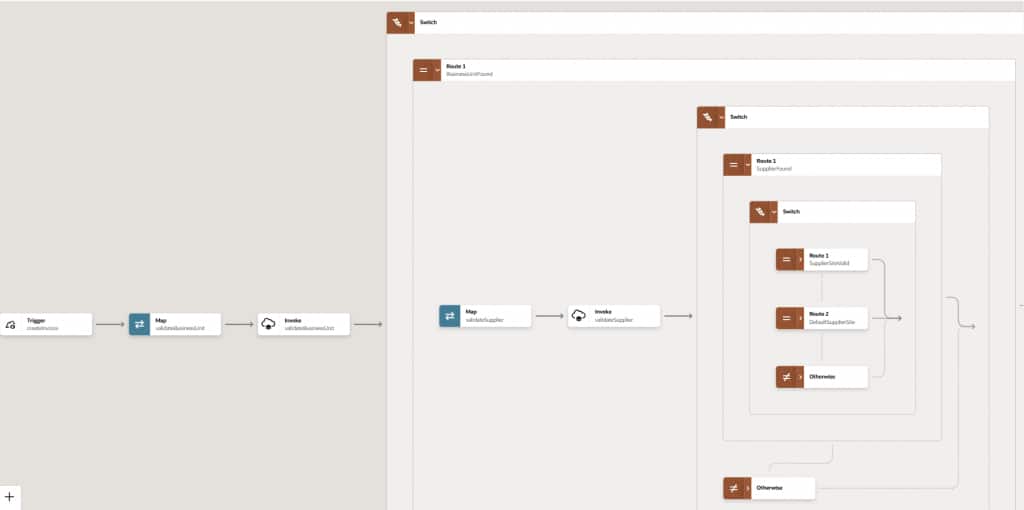
Together, these four OIC MCP tools form a complete enterprise processing pipeline — invoked sequentially by the agent as tool calls, with each tool’s output feeding the next decision in the agentic loop.
Building the Agent with OCI Generative AI SDK
The MCPAgent class uses the OCI Generative AI SDK directly — no agent frameworks and no abstraction layers. Local tools and MCP tools are merged into one flat registry before being passed to the LLM.
Merging Tool Registries
Python Code
class MCPAgent:
    def __init__(self):
        self.client   = oci.generative_ai_inference.GenerativeAiInferenceClient(config)
        self.model_id = "xai.grok-4"

        # Discover OIC tools via MCP at startup
        self.mcp       = MCPClient()
        self.mcp.initialize()
        self.mcp_tools = self.mcp.list_tools()  # [{name, description, inputSchema}, …]

        # Local OCI tools with JSON schemas
        self.local_tools       = {"list_object_storage_documents": list_object_storage_documents, …}
        self.local_tool_schemas = [{"name": "…", "inputSchema": {…}}, …]

        # Single unified registry — LLM sees one flat list
        self.tools = self.mcp_tools + self.local_tool_schemas
The Agentic Loop
Python Code
def run(self, user_input: str) -> str:
    self.conversation.append({"role": "user", "content": user_input})

    while True:
        message = self._call_llm()

        if message.tool_calls:
            for tool_call in message.tool_calls:
                tool_name  = tool_call.name
                arguments = json.loads(tool_call.arguments)

                # Route: local function or OIC MCP
                if tool_name in self.local_tools:
                    tool_result = self.local_tools[tool_name](**arguments)
                else:
                    tool_result = self.mcp.call_tool(tool_name, arguments)

                self.conversation.append({"role": "assistant", "tool_calls": […]})
                self.conversation.append({"role": "tool", "content": json.dumps(tool_result), …})
            continue  # Send results back to LLM

        else:
            final_text = message.content[0].text
            self.conversation.append({"role": "assistant", "content": final_text})
            return final_text
The LLM sees the full conversation history at every turn. This is how it knows risk_assessment completed before attempting contract_search — the state machine is implicit in the history, not in Python code.
Encoding Business Rules in the System Prompt
Business logic lives in the system prompt, not in Python code. This makes it auditable by business analysts and modifiable without a code deployment:
System Prompt
1. Classify the document. If not an INVOICE, stop.
2. Use document_extract tool to get structured invoice data.
3. Run risk_assessment FIRST with extracted data.
4. ONLY AFTER risk_assessment: run contract_search to get
   vendor standard payment terms from the ATP vector database.
5. Validate payment terms:
   - MATCH  → proceed to erp_invoice_create
   - MISMATCH → STOP and generate discrepancy report

EXECUTION ORDER — MANDATORY:
document_extract → risk_assessment → contract_search → erp_invoice_create

STOP CONDITIONS:
- Payment terms mismatch between invoice and contract
- Vendor contract not found in ATP vector store
- Document classification confidence below 0.8
The Complete Invoice Processing Workflow
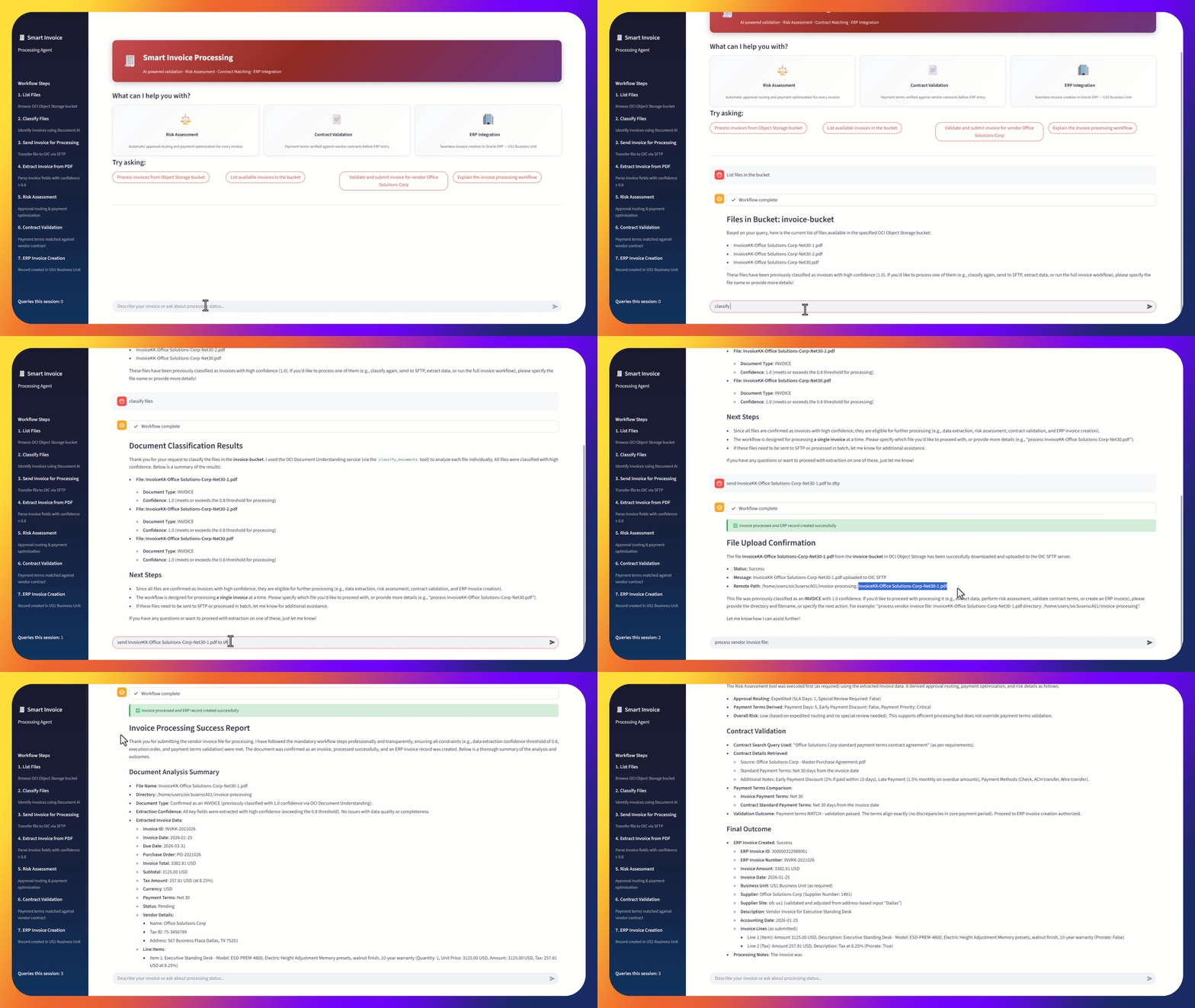
Here is what actually happens when a user submits queries in multiple turns:
“list files in invoice-bucket”
“classify files”
“send Invoice.pdf to sftp”
“process vendor invoice file: Invoice.pdf dir: /home/user/invoice-processing“
What Happens When Validation Fails
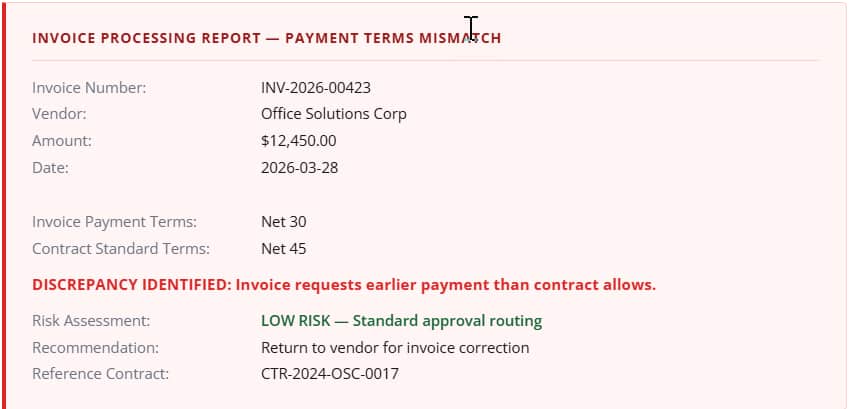
The system prompt’s STOP CONDITIONS ensure the agent never silently skips a failed check. For a payment terms mismatch, the agent generates a structured report and does not call erp_invoice_create:
Key Design Patterns Worth Reusing
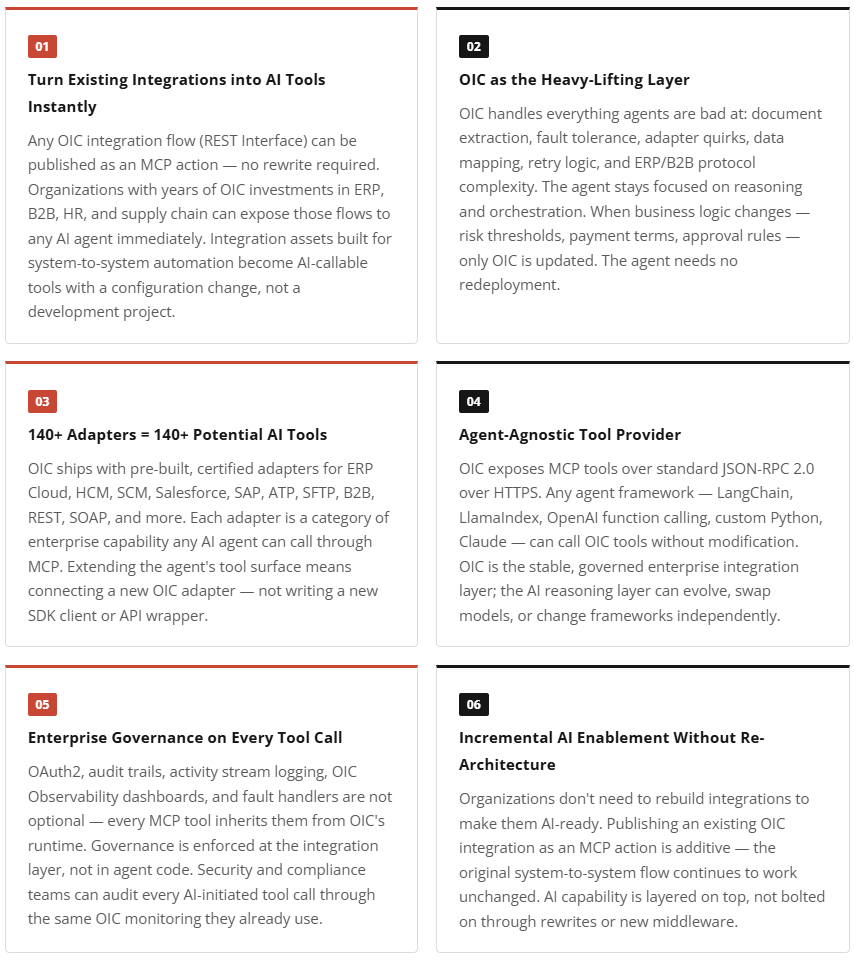
OIC’s role in this architecture goes beyond a single use case. These patterns reflect a broader principle: OIC is the right tools backend for enterprise AI agents, regardless of which agent framework or model is used.
Why This Architecture Wins
The combination of OCI Generative AI, OCI Document Understanding, and OIC as an MCP tools provider delivers something that neither AI nor integration platforms can achieve alone:
| Layer | Contribution |
|---|---|
| OCI Generative AI | Multi-step reasoning, natural language understanding, and adaptive decision-making |
| Oracle Integration | Enterprise integrations, security, audit logging, workflow governance, and certified business logic |
| Oracle ATP + Vector Search | Semantic retrieval of contract terms — no hardcoded lookup tables |
| Model Context Protocol | The bridge that lets AI and OIC work together without either compromising its strengths |
As MCP adoption grows across enterprise software, the pattern demonstrated here — integration platform as MCP server, AI SDK as reasoning layer — will become a standard architecture for agentic automation. This invoice validation system is working proof of that pattern today.
Acknowledgements
A huge thank you to the SE Hub team for their valuable contributions in building the OCI Gen AI artifacts. Special appreciation to Venkata Nagakiran Eluri and Lohith R for their dedication and efforts. Your work has been instrumental in making this possible.
Learn More
OCI Generative AI Service Documentation