

Abstract
SAP spool outputs are often print-oriented fixed-width text reports and are not directly consumable by integration platforms like OIC. This blog presents a practical ATP-based REGEXP parsing framework that converts unstructured spool text into structured CSV format, enabling seamless downstream integration without SAP-side redesign.
Blog Benefits / Key Takeaways
- SAP spool files often export data in text format with all columns merged, making automation and integration tough for downstream systems.
- OIC can efficiently ingest such files from FTP/SFTP but may read all data into a single column due to lack of clear delimiters.
- Using Oracle ATP as a staging area, you can leverage SQL functions to split and parse the single-column data into meaningful fields/columns. Powerful string and regex functions in ATP make it possible to process and restructure the SAP spool data exactly as needed. Keeping transformation logic in SQL (ATP) makes this architecture easy to change, troubleshoot, and scale for new spool formats.
- Once split and validated, the data can be sent seamlessly to various target systems or applications (ERP, HCM, Analytics, EPM, etc.), enabling automated and reliable business processes.
Introduction
SAP spool files are generally generated by ABAP programs or custom SAP reports as output files within the SAP system. These files often serve as the basis for integrations, especially when business or audit-critical information needs to be transferred to other enterprise systems. However, spool files commonly come in text format with data merged in single rows or columns, which makes them less suitable for direct consumption by modern integration tools.
This blog demonstrates an approach to processing SAP spool files using OIC and ATP to enable robust, automated, and scalable data transformation and delivery.
The purpose of this blog is to guide readers through the practical steps of transforming SAP spool files for seamless and accurate integration into downstream systems using OIC and ATP.
Prerequisites
Before implementing the solution, ensure the required database objects are created in Oracle ATP. This includes staging tables, table types, and PL/SQL procedures required for data ingestion and transformation.
To keep this blog concise and focused on the integration flow, the complete SQL scripts (DDL and procedures) are provided in the link below:
These scripts are essential for:
- Storing raw SAP spool data
- Performing regex-based parsing and transformation
- Loading structured data into target tables
Solution
Recently, in many integration scenarios, there is a requirement to read a spool file from SAP, bring it into OIC as a flat single-column dataset, and then parse or split this data for proper consumption by a target system using Oracle ATP.
Step 1: Use FTP adapter to read SAP Spool File
SAP spool files are generally exported in a plain .TXT format, sometimes with all columns merged, separated by spaces or a specific delimiter.
Sample Spool file:
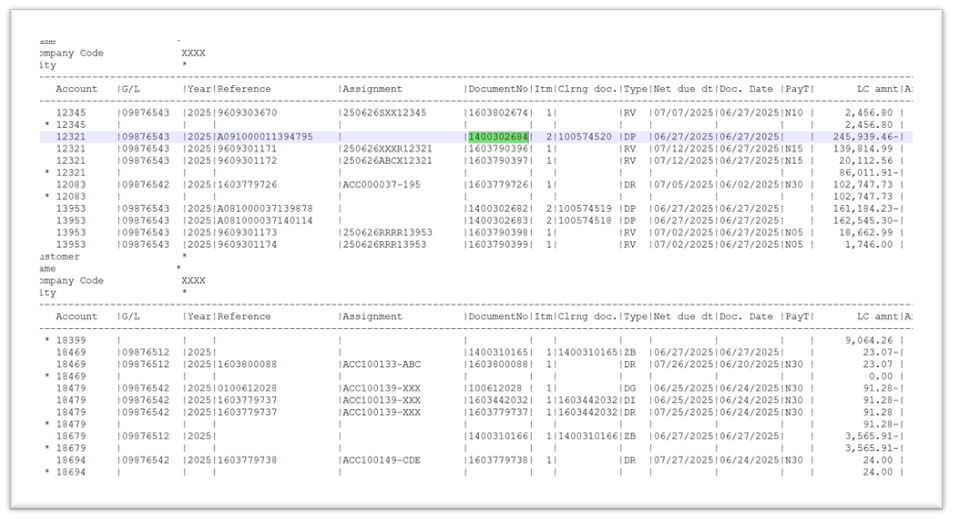
As shown in the above sample file we have standard SAP spool file with repeated headers throughout the file with columns separated with delimiter some * symbol and negative in suffix so to load this and clean the data we are reading the the file in OIC integration from the source location (SFTP) then reading the data in a single column as shown below.
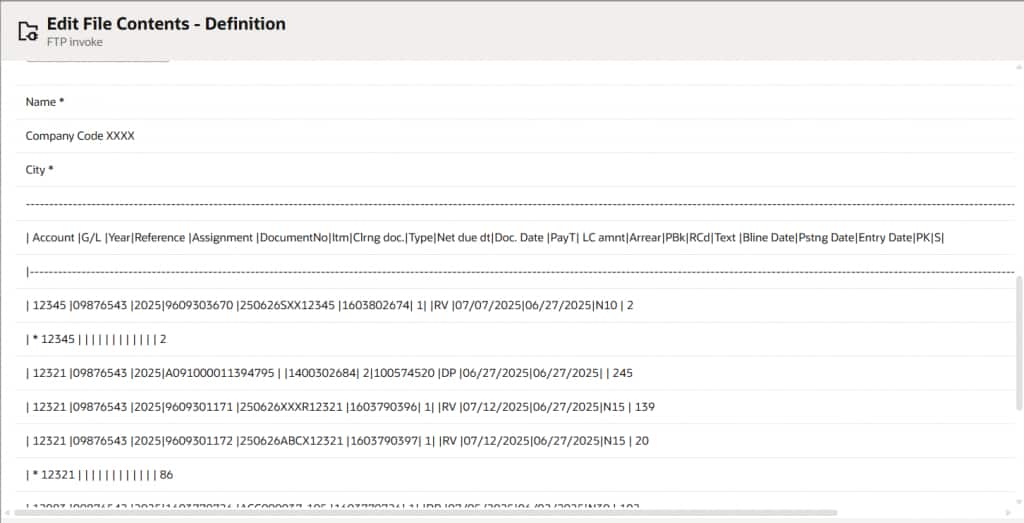
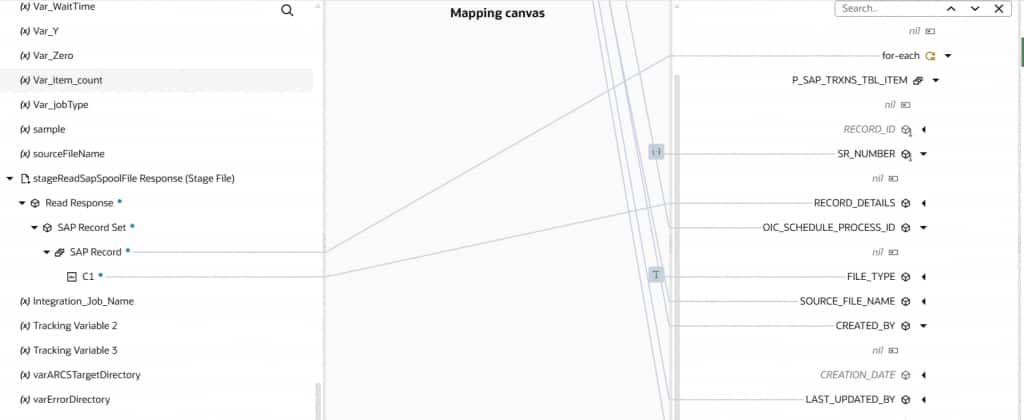
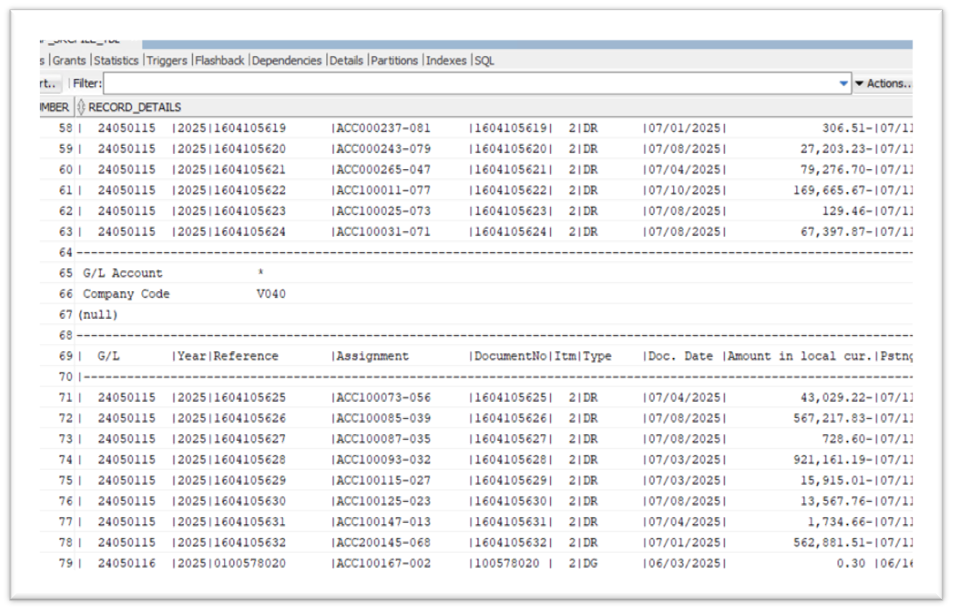
With the file content now available in OIC, the ATP Adapter is used to insert the data row by row into a staging table. This staging table is designed to temporarily store the raw file data along with related metadata such as the source file name, file type, and OIC schedule process identifier.
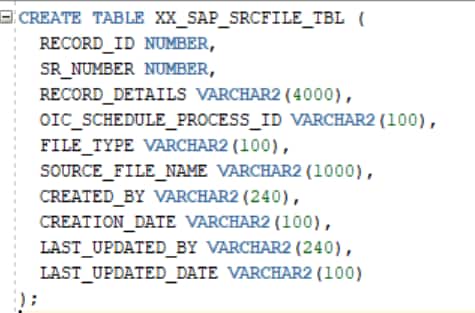
To support this process, a staging table (XX_SAP_SRCFILE_TBL), a corresponding table type (XX_SAP_SRCFILE_TBL_TYPE), and a stored procedure (INSERT_SAP_TRXNS_DETAILS) are created in ATP. The table type is used as an IN parameter in the stored procedure, allowing OIC to pass multiple records in a structured format. The stored procedure then inserts these records into the staging table for further processing.
The staging table structure includes columns such as RECORD_DETAILS (raw file content), SOURCE_FILE_NAME, FILE_TYPE, OIC_SCHEDULE_PROCESS_ID, and audit fields to track record creation and updates.
Source Table:
Below one is table Type which act as IN parameter in the procedure
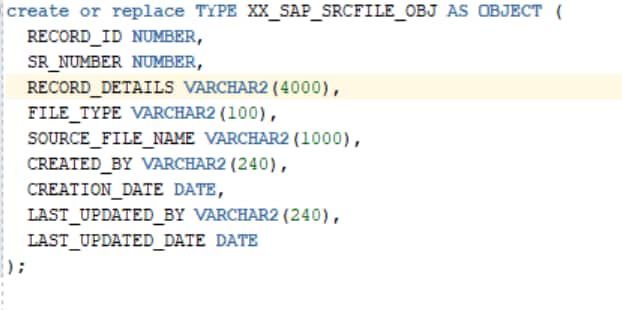
Note: Record type and Staging table columns should be same.
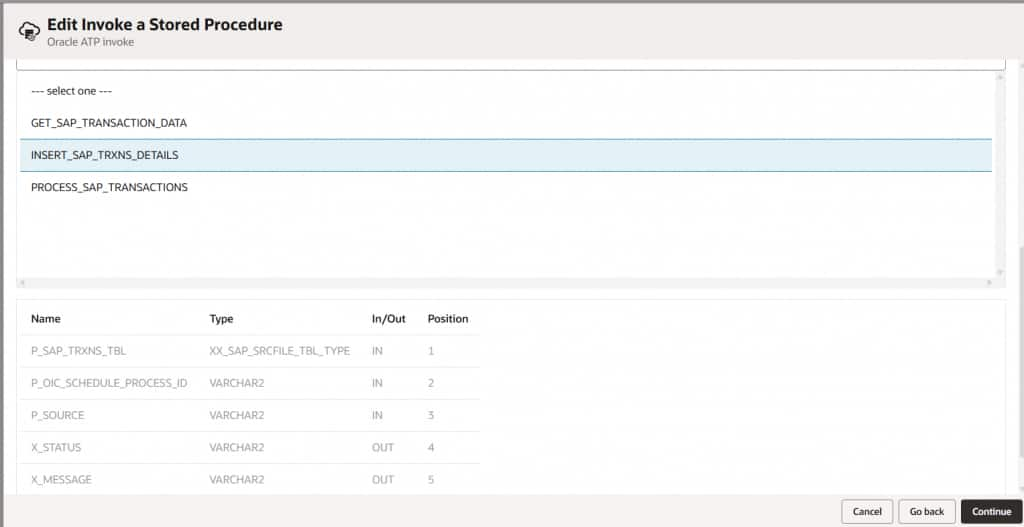
Map the Stage read response to your procedure table type created in the above step.
This is how data would get inserted into the stage table in Oracle ATP.
Step 3: Splitting and Transforming Data Using Regex and substring in ATP
The core transformation logic is implemented in Oracle ATP through a PL/SQL procedure (PROCESS_SAP_TRANSACTIONS). Since the SAP spool file data is initially stored in the staging table as raw text within a single column (RECORD_DETAILS), the procedure reads each record and performs the required parsing and transformation.
Within the procedure, string manipulation functions such as SUBSTR and REGEXP_SUBSTR are used to split each line of the spool data and extract the relevant fields. These extracted values correspond to the structured attributes present in the target table, such as Account, G/L, Year, Reference, Assignment, Document Number, and other related columns.
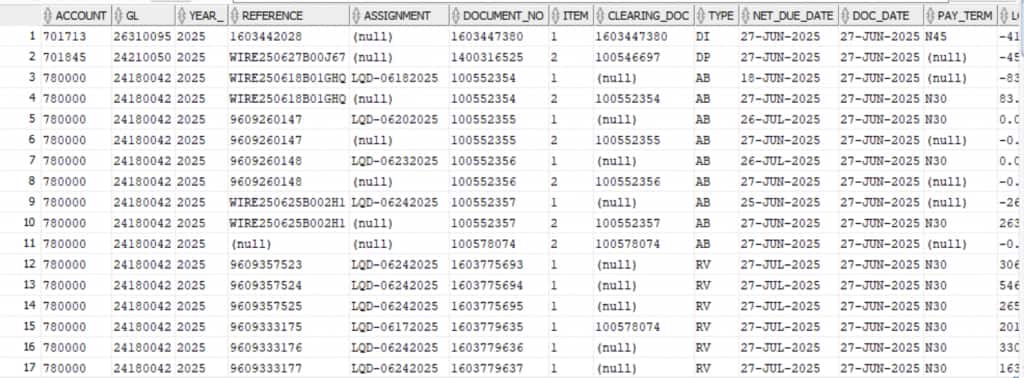
After parsing and transforming the raw data, the processed records are inserted into the XX_SAP_TGT_TBL target table, where the data is stored in a structured format suitable for further processing and reporting.
For example, if a spool row looked like this:
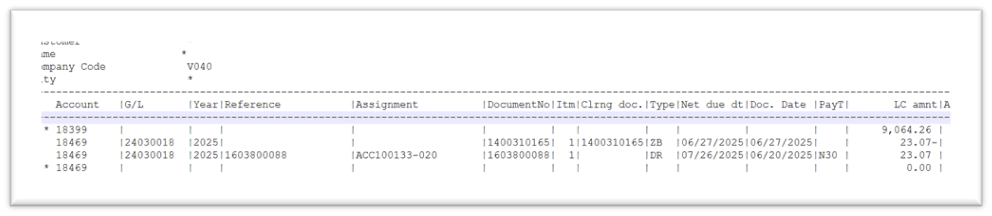
Call the PL/SQL procedure (PROCESS_SAP_TRANSACTIONS) in OIC after the data in inserted into the stage table. This procedure processes the staged raw spool data shown above and performs the complete transformation logic, converting it into a structured format as shown in the screenshot below.
Step 4: Loading Transformed Data to Target
Once the data is split into appropriate columns in the processed table as shown in Step 3, you can further read the data from the target table and ingest the data into the target applications (such as ERP, HCM, or reporting systems):
Conclusion/Key Takeaways
Processing SAP spool files in OIC typically requires clever staging and transformation since native SAP files aren’t always integration-ready, but by leveraging ATP’s SQL engine for splitting and structuring data, the process becomes reliable, maintainable, and enables seamless integration with modern target systems.
References/Links for more Information