
Key takeaways
- Oracle vets AI models for performance, safety, and enterprise fit, then selects defaults for Oracle-built agents. You can compare and change those models in AI Agent Studio.
- When Oracle retires a model, it announces a removal date and replacement, giving you up to six months to test and migrate.
- Starting with Release 26C, you can monitor AI Unit consumption in both AI Agent Studio and Cloud Console.
Who chooses the AI model behind your agent, and what happens when it changes? A new guide, “How Oracle Selects, Manages, and Bills for AI Models,” can help answer these questions. It explains how Oracle selects the models available in AI Agent Studio, how you can manage those choices, and how AI usage is measured and monitored in Release 26C and later. This article gives you an overview of the main points, but the guide is also worth reading in full.
How Oracle chooses the starting model
The AI model behind an agent helps it interpret information and produce a response. Most of these models are large language models, or LLMs. The model can affect the quality of the response, how quickly it arrives, and how much AI consumption the work requires.
Oracle vets a set of models for performance, safety, and suitability for enterprise tasks and makes them available in AI Agent Studio. Oracle-built agents ship with default models chosen for accurate, reliable results, though those models may not be the lowest-consumption option. You can choose a different model that balances cost with performance, depending on the task.
How to choose a different model
Model cards in AI Agent Studio help you see what’s available before making a change. They show each model’s provider, capability level, and intended use. They also indicate the information types the model can accept and produce, such as text, audio, or images.
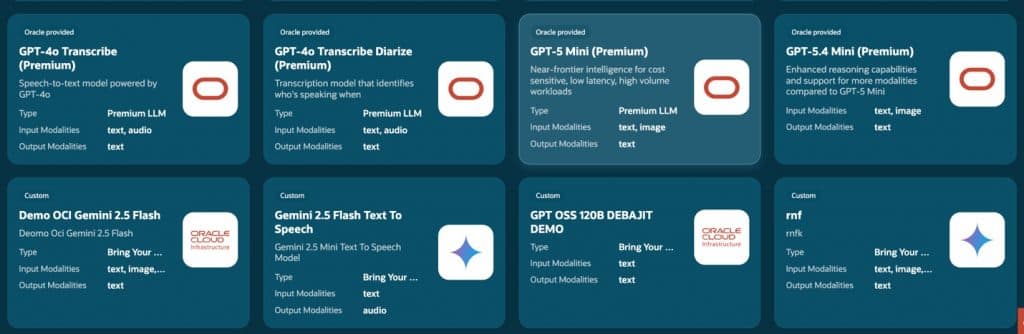
You can compare an agent’s results across models, then choose one that fits the task. AI Agent Studio lets you make model choices at the agent or workflow-node level.
Your organization can also connect a model from a supported provider. For these bring-your-own LLMs, your organization manages governance, credentials, and any charges from that provider. The list of options is updated monthly.
What happens when models change
Oracle continues to evaluate new and updated models and manages versions of the models it provides. When an Oracle-provided model is scheduled for retirement, Oracle announces a removal date and makes a replacement available. AI Agent Studio shows the model’s status, so you can test the replacement and migrate within the announced window of up to six months. (Oracle is currently retiring a model and introducing a new one; for details on the transition, check out this post on Oracle Cloud Customer Connect, login required.)
If an agent still references a removed model at runtime, the platform falls back to an available model in the same class. That fallback keeps the agent from failing outright, but its output or performance may differ. Testing and switching before the removal date is the better approach.
Models you bring from another provider follow that provider’s lifecycle, and your organization manages their transition. However, Oracle provides guidance on how to re-test prompts and validate the performance of the new model to smooth the changeover.
How to monitor AI Unit consumption
AI Units are how Oracle measures metered work performed by agents and Fusion Agentic Applications. Completed AI actions—such as answering a question or generating a document—consume AI Units. An agent’s model can affect whether (and how fast) its execution draws down the AI Unit allocation included with your subscription, so it’s useful to consider consumption alongside the quality of its results.
Starting with Release 26C, you have greater visibility into AI Unit usage. AI Agent Studio shows usage as it happens and attributes it to specific agents and Fusion Agentic Apps. Cloud Console displays AI usage totals, including the remaining AI Unit balance.
Make model choice part of your agent reviews
When you review an agent’s results, check which model it uses as well as how it performs. Revisit those choices when your work changes or Oracle announces a model update. For more details on model choices, transitions, and billing, read the full guide.
Related posts you might like
- Announcing AI Studio Skill—pro code tools for developers
- New Fusion Agentic Applications—details and demos
- Agentic Application Builder: what it is, how it works

If you’re an Oracle customer and want to get new stories from The Fusion Insider by email, sign up for Oracle Cloud Customer Connect. If you’re an Oracle partner and want to learn more, visit the Oracle Partner Community.