
Use this reference to find a request you can copy, a command for a known step, or the next check for an error. Jump to the section you need and expand the relevant group.
Request library
Copy, swap in your own workflow, app, or Business Object names, and send to your coding assistant after the guardrail request from Part 4.
Orient — show / hide
Try it: Tour the project
Inspect this AI Studio project. Tell me whether it uses the legacy src layout or app packages, list every artifact by type, and point out any workflow that hasn’t been validated or has no tests. Don’t change anything.
Try it: Explain a workflow
Explain what src/workflows/position_to_job_requisition.wf does in business terms: its routes, the Business Object functions it calls, and what each path returns. Don’t change anything.
Build — show / hide
Try it: Turn a use case into a build request
Use the aistudio skill to write a prompt I can give a coding assistant to build a standalone workflow for this use case: [describe users, intents, data, and expected answers]. Include Business Object identification, a suggested topology, wiring constraints, and finish criteria. Don’t build anything yet.
Try it: Find a Business Object
Search for an existing Business Object that can list, create, and update [records]. Show its functions and parameters, tell me whether it covers every operation I need, and recommend reuse or a new BO. Don’t create anything until I confirm.
Try it: Start an Agentic App
I want an Agentic App for [user] to [goal]. Run app intake and present the pre-build checkpoint: data source, app goal and user, first-load experience, query behavior, priority actions, communications, side effects, launch context, and validation scenario. Wait for my confirmation before creating any artifact.
Change — show / hide
Try it: Add a node safely
In [workflow file], add a condition guard before [node] so empty results return “[message]” instead of calling the next Business Object. Use file-backed patches for the expression, prettify, validate, and run the workflow test sync. Keep changes local.
Try it: Preview a change
Show me the exact file diff for adding a code node after FIND_POSITIONS in position_to_job_requisition.wf that counts the returned positions, using a dry run. Don’t write the change.
Apps — show / hide
Try it: Add a panel
Add a “[Panel heading]” panel to [app file], backed by [workflow file] and [BO file]. Data source: [query]. First load: [what it shows]. Query behavior: answer only from that result set. Priority actions: omit for now. Communications: omit for now. Validate the workflow and app and sync both test suites.
Try it: Inspect panel layout
Show me the panel layout of [app file]: each panel, the workflow agent behind it, its actions, and its communications. Don’t change anything.
Server — show / hide
Try it: Fetch for review
Fetch the latest DRAFT of app [APP_CODE] and every artifact it references, read-only. Validate the local files and give me an inventory with the status used for each, any gaps, and confirmation that nothing on the server changed.
Try it: Save a reviewed DRAFT
Save src/workflows/position_to_job_requisition.wf to its remote DRAFT. If the remote DRAFT is newer than my local file, stop and show me the version instead of overwriting it.
Debug — show / hide
Try it: Why did it take that path?
Run [workflow file] with “[message]” through the debug endpoint. Show me which nodes ran, the output of [node], and the first place the run diverged from what I expected. Don’t change the workflow.
Try it: Pin and retry
Pin this output on FIND_POSITIONS in the debugger: [paste JSON]. Run the workflow again with the same message and tell me what SELECT_POSITION produced. Clear the pinned output afterward.
Release — show / hide
Try it: Prepare a merge request
Summarize every artifact and test file changed on this branch, the validation results, and the test report links, in a form I can paste into a merge request. Confirm env.properties and test-reports aren’t staged.
Command map
The bundled CLI has more than 400 commands. You rarely type them; the assistant chooses them. These are the families you’ll see most, so you can follow what it’s doing. Run aistudio --help or aistudio <command> --help for the full list and options.
How every command runs
node .agents/skills/aistudio/scripts/aistudio.js <command> [options]from the project root. Don’t run commands throughnpm runornpm test; those scripts are for CI pipelines.
When to run a command yourself
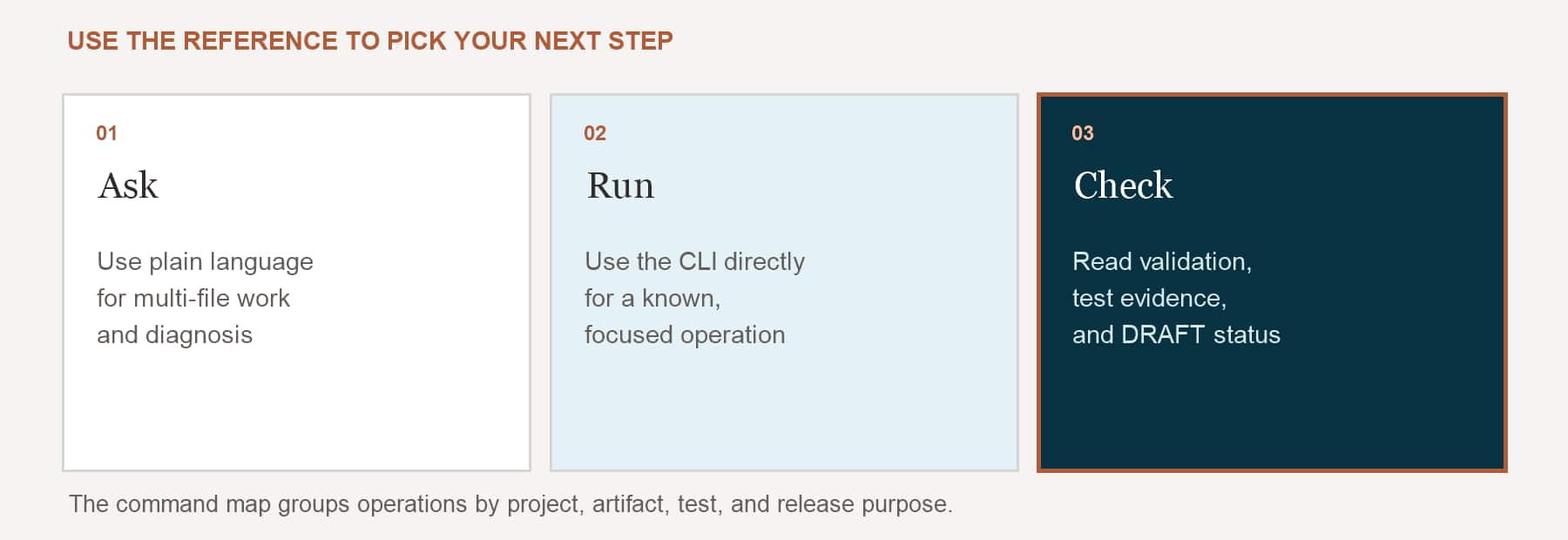
Most of the time your coding assistant runs the commands. A simple rule for when to run one yourself: use the CLI directly when the next step is known and mechanical, and bring in an assistant when the work needs planning, interpretation, or changes across several files.
Run the CLI yourself
The next step is known, the command is mechanical, and you can supply the options with confidence.
- Check the version, who you’re signed in as, or a command’s help
- Validate a file you know
- List or fetch server objects you can name
- Run a focused workflow or app test suite
- Save or publish artifacts you’ve already reviewed
Ask a coding assistant
The work needs planning, interpretation, multi-file changes, or careful sequencing.
- Create or redesign a workflow from a description or a spec
- Add nodes, panels, actions, templates, or tests
- Fix validation or test failures across several artifacts
- Decide which artifacts are needed and in what order
- Coordinate the workflows behind one application
Make aistudio a command
The CLI is a script inside the skill, so the full command is node .agents/skills/aistudio/scripts/aistudio.js <command>. To type just aistudio <command>, add a shortcut to your shell profile once. The path is relative, so run it from your project root as usual.
macOS or Linux · add to ~/.zshrc or ~/.bashrc
alias aistudio='node .agents/skills/aistudio/scripts/aistudio.js'Windows PowerShell · add to $PROFILE
function aistudio { node .agents/skills/aistudio/scripts/aistudio.js @args }Then, from the project root
aistudio whoami
aistudio validate-workflow --file src/workflows/position_to_job_requisition.wf
Your coding assistant still uses the full path
The shortcut is for you. The skill always calls the script by its path from the project root, so you’ll see the long form in the assistant’s output. The tables below use the short
aistudioform.
Session and project — show / hide
| Command | What it does |
|---|---|
authenticate · whoami · logout |
Browser sign-in, check the signed-in user, remove stored credentials. |
login-with-key |
Non-interactive sign-in with an OAuth key, for pipelines. |
version · get-server-compatibility |
CLI version; server release and which skill operations it supports. |
init · init-app-package |
Scaffold a blank legacy project, or a source-controlled app package. |
Workflows — show / hide
| Command | What it does |
|---|---|
list-workflow-families · list-workflow-products |
Valid family and product values for a new workflow. |
do-create-workflow |
Creates a local .wf file. |
do-create-node · do-modify-node · do-delete-node |
Adds, patches, or removes a node. |
do-modify-node-edges |
Adds or removes edges between nodes by code. |
do-modify-workflow-metadata · do-modify-workflow-variables |
Workflow-level metadata and workflow-scoped variables. |
get-workflow-node-structure · get-nodes-metadata-by-code |
The graph by node code; node configuration summaries. |
do-prettify-workflow · validate-workflow |
Tidies node layout after structural edits; validates and prints Test Impact. |
do-set-workflow-default-model · do-set-workflow-node-model |
Sets a model from the current environment’s catalog. |
do-fetch-workflow · do-save-workflow |
Pulls a workflow from the server; saves the local file to the remote DRAFT. |
Agentic Apps — show / hide
| Command | What it does |
|---|---|
do-create-app · validate-app |
Creates a local app file; validates it. |
do-add-agent · do-modify-agent-config · do-remove-agent |
Places, configures, or removes a workflow agent in the app. |
do-add-action · do-add-communication · do-add-template |
Adds actions, communications, and templates, each with modify and remove partners. |
get-panel-metadata · list-configured-workflow-agents |
Panel layout and agent placement; agents configured in the app. |
do-modify-page-pattern · do-modify-app-config |
Page layout and top-level app configuration. |
do-fetch-app · do-save-app |
Pulls an app from the server; saves application DRAFT metadata. |
Business Objects — show / hide
| Command | What it does |
|---|---|
search-business-objects |
Recommends existing Business Objects for what you describe. |
get-business-object-functions · get-bo-function-output-specification |
A BO’s functions; a workflow-ready output specification for one function. |
do-create-bo · do-create-bo-function-from-operation |
Creates a local .bo; adds a function from an OpenAPI operation. |
do-add-bo-function · do-add-bo-function-parameter · do-add-bo-function-example |
Adds functions, parameters, and examples by hand, each with modify and delete partners. |
validate-bo · do-fetch-bo · do-save-bo |
Validate, pull, and save. |
Agents, tools, topics, and deeplinks — show / hide
| Command | What it does |
|---|---|
do-create-agent · do-add-agent-tool · do-add-agent-topic |
Creates an agent and attaches tools and topics. |
do-create-tool --tool-type <type> |
Creates a Business Object, Deep Link, Document, Email, External REST, MCP, or Connector tool. |
do-create-topic · do-add-topic-instruction |
Creates a topic and adds instructions. |
do-create-deeplink · do-modify-deeplink-parameter |
Creates a deeplink and edits its URL-token parameters. |
search-agents · search-workflows · search-external-rest-tools |
Finds reusable agents, workflows, and tools before you build new ones. |
Other artifact types — show / hide
| Family | Typical commands |
|---|---|
| Approval processes | do-create-approval-process · do-create-approval-rule · validate-approval-process |
| Policy Store and templates | do-create-policy · do-generate-policy-functions · run-policy-test-cases · do-publish-policy |
| Document schemas | do-create-document-schema · do-generate-document-schema · validate-document-schema |
| Function templates | do-create-function · do-generate-function-implementation · run-function-test-cases |
| Connectors | do-generate-connector-definition · do-create-connector-instance · validate-connector-instance |
| Ask Oracle plugins | do-create-ask-oracle-plugin · do-add-linked-application · validate-ask-oracle-plugin |
Run and debug — show / hide
| Command | What it does |
|---|---|
run-workflow · run-workflow-chat |
Ad hoc runs through the debug or chat endpoint. Not tests. |
get-nodes-executed-on-last-debug · get-debugger-results-for-nodes |
The path of the last debug run; what selected nodes received and returned. |
do-node-override-output · do-modify-node-overrides |
Pin a node’s output, or change its configuration for debugging only. Both have clear partners. |
list-pinned-outputs · get-debugger-node-override-schema · get-logs |
Pinned outputs, editable override keys per node type, and orchestrator logs. |
Testing (ATLAS) — show / hide
| Command | What it does |
|---|---|
get-workflow-test-sync-plan · get-app-test-sync-plan |
The read-only coverage plan for a workflow or app. |
run-workflow-tests · run-app-tests · run-tests |
Run a workflow suite, an app’s panel tests, or the whole package gate. |
get-workflow-test-final-summary · get-app-test-final-summary |
The evidence behind Validation and Insights. |
The full testing command set will be covered in the upcoming ATLAS learning path.
Flags you’ll see most — show / hide
| Flag | Meaning |
|---|---|
--file <path> |
The local artifact file a command works on. |
--dry-run |
Show the exact file diff without writing it. |
--app-package <name> · --modulename <name> |
Target package and module in an app-package repo. |
--status DRAFT|PUBLISHED |
Which server version a fetch reads. Defaults to DRAFT. |
--force |
Overwrite on a fetch or save conflict. Only with your explicit approval. |
--inputs-patch @<file> |
File-backed JSON for expression-bearing node edits, so the shell can’t mangle quotes or {{...}}. |
--verbose |
Redacted request and response diagnostics, for network troubleshooting. |
Troubleshooting
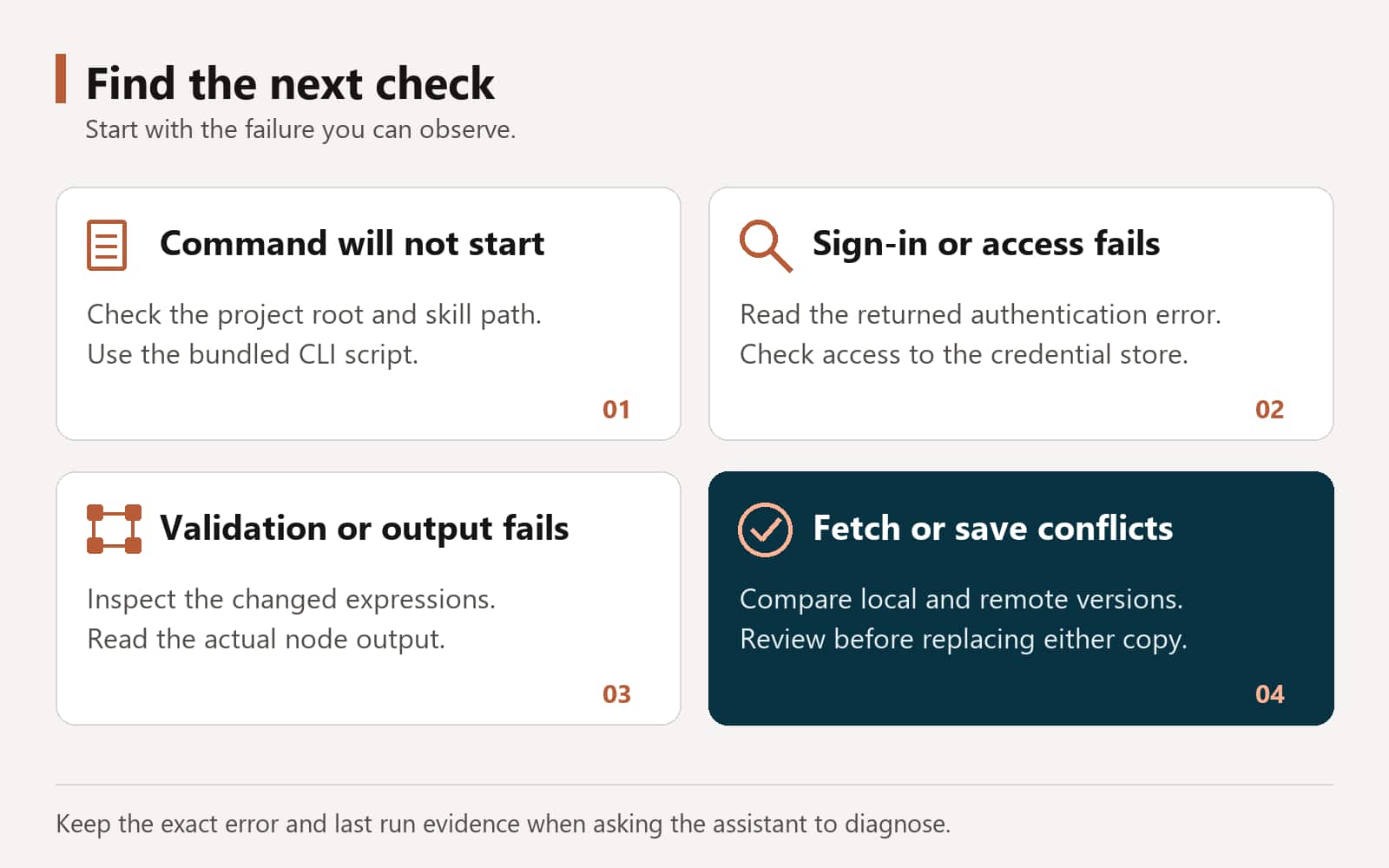
What you’re most likely to run into, and what to do about it.
“aistudio: command not found” — show / hide
There’s no global executable. Run the bundled script from the project root: node .agents/skills/aistudio/scripts/aistudio.js <command>. If the skill is installed somewhere else, use that folder’s scripts/aistudio.js, still from the project root.
The command returns AUTH_REQUIRED — show / hide
The CLI needs you to sign in again. In a real terminal, run the interactive command it returns, then retry. If your assistant’s terminal can’t show a hidden password prompt, it will offer two choices: run the command yourself, or explicitly allow it to pass a password you provide for that one step. Passwords are never written to files, arguments, or logs.
Authenticated commands fail with a credential-store error — show / hide
The assistant’s sandbox may not reach your operating system’s credential store. Ask it to rerun the same command outside the sandbox. Only if that also returns AUTH_REQUIRED do you need to sign in again.
The assistant stops and asks which app package — show / hide
Your repository has more than one app package, and the skill won’t guess. Name the package in your request. If both app-pkg/ and root-level packages exist, give it the package root as well.
A fetch says the local file differs from the server — show / hide
Your local copy has changes the server doesn’t. Commit or compare them first. The skill asks before it uses --force, which replaces your local file.
A save is rejected because the remote DRAFT is newer — show / hide
Someone changed the DRAFT after you last fetched it. Fetch and compare, or, if you’ve reviewed that version and mean to replace it, save with --overwrite-remote-draft --expected-remote-version <version>.
Validation fails right after an expression edit — show / hide
Shell quoting can strip quotes or empty strings from inline JSON. Ask the assistant to use a file-backed patch (--inputs-patch @file) and to read the node back before running tests. Quote-free guards such as {{!!...}} avoid the problem.
“This operation can’t be performed in the configured environment” — show / hide
Your server doesn’t support a feature the request needs, such as workflow CAPABILITY nodes. The skill checks this with get-server-compatibility. If the server release and skill release don’t match, update the skill to the matching release rather than working around it.
The workflow ran, but a value is empty — show / hide
Check the expression in order: no spaces inside the braces, a real node code rather than a display name, a node that runs before this one, and a path that matches that node’s actual output.
The assistant built against the wrong user’s data — show / hide
Don’t let it assume the service account or aistudio.fa-user is the end user. Ask how the runtime user maps to the Fusion identity the data needs, and to flag it as a dependency if the contracts don’t say.
I asked it to publish a workflow and it refused — show / hide
That’s by design. Workflows are published in AI Agent Studio or through your CI/CD pipeline, never from the CLI.
Key terms
- AI Studio CLI: The command-line tool that manages an AI Agent Studio project: scaffold, fetch, create, modify, validate, test, debug, and save.
- aistudio skill: The package a coding assistant loads to work on AI Agent Studio projects. Contains routing rules, references, and the bundled CLI.
- Project root: The folder with
env.properties, the skill, and your artifacts. Every command runs from here. - env.properties: Your personal connection settings for one Fusion environment. Never committed.
- Artifact: A workflow, app, agent, Business Object, tool, topic, deeplink, or other AI Agent Studio object, stored locally as a file.
- App package: A source-controlled layout marked by
sources/app-package.json, with sources, tests, and reports per module. - App-backed workflow: A workflow that serves an Agentic App panel and routes stages on
$OraMessageHint. - Material edit: A change to what an artifact does. Triggers validation and a test sync.
- Pre-build checkpoint: The design summary the assistant shows and waits on before creating an app’s artifacts.
- DRAFT: The unpublished server version of an artifact. Saves update it; they never publish.
- Debugger sidecar: Local state from the last debug run: path, node results, pins, and overrides.
Previous: Best Practices for Building with the AI Studio CLI
Back to the Learning Path for Fusion AI Agent Studio CLI