

Every database workload is different, with unique CPU, memory allocation, and storage capacity and performance requirements that often evolve over time. One of the key promises of cloud infrastructure is the ability to right-size resources, scaling them as needs change. That flexibility helps customers provision only what they need today while maintaining the ability to grow capacity later without major disruption.
To provide customers with more granular control over database storage utilization, Oracle Exadata Database Service on Dedicated Infrastructure and Exadata Cloud@Customer now support custom ASM disk group sizing. Customers may define custom allocations for the DATA, RECO, and optional SPARSE disk groups either during Exadata virtual machine (VM) cluster provisioning or at any time afterward. Oracle-supplied default allocations remain available, and customers may switch between custom and default allocations.
This new capability gives customers greater flexibility to optimize storage utilization for the specific needs of each workload. It also reduces planning risk by allowing storage allocations to evolve over time as operational requirements, backup strategies, and development workflows change.
Exadata ASM disk groups
For Exadata VM clusters using ASM, storage is divided into two or three disk groups: DATA, RECO, and the optional SPARSE. DATA stores database datafiles and online redo logs. Its primary capacity drivers are application data volume and growth, consolidation density, lifecycle management policies, and compression usage, including Exadata Hybrid Columnar Compression (HCC). RECO holds recovery-related files, such as archived redo logs, backups, and flashback logs. RECO capacity requirements are driven by backup retention policies, Oracle Data Guard usage, local backup storage, and recovery objectives. SPARSE is an optional disk group for sparse clones and snapshots supporting development, test, and CI/CD workflows. SPARSE capacity needs depend on the number of thin clones, snapshot retention practices, and the volume of changes generated by development and testing activities.
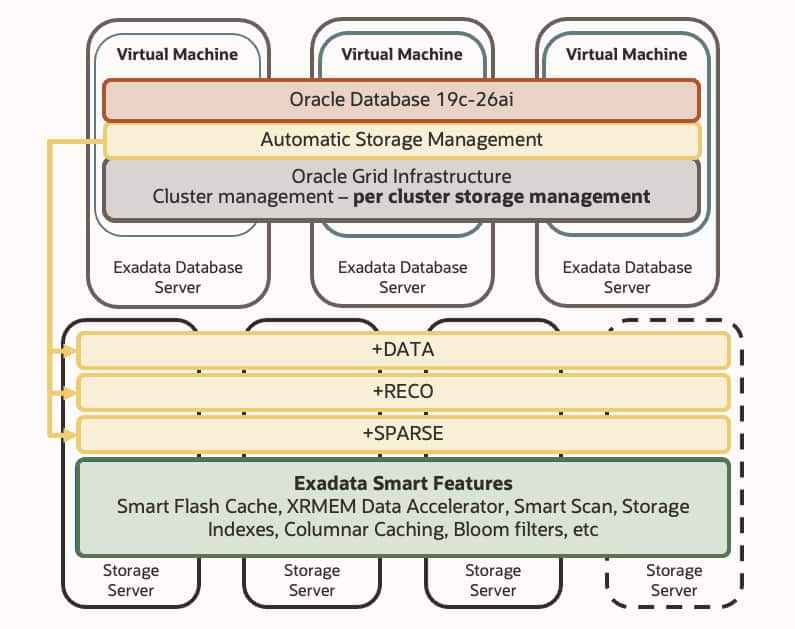
Oracle’s default allocations are designed to work well for the majority of database workloads and usage patterns, but some environments have requirements that differ substantially from the norm. Deployments with highly consolidated databases, stringent backup retention policies, or aggressive test/dev cloning practices may shift the balance of capacity needs across disk groups. Custom ASM disk group sizing addresses this need by allowing storage capacity to be allocated where it is most valuable. This improves utilization while reducing the total capacity needed for the deployment.
The option to revisit space allocations post-provisioning is also valuable because growth patterns and operational requirements are not always fully understood at deployment time. The ability to adjust allocations over the lifetime of the deployment reduces the risk of imperfect forecasting and allows changing the allocation to meet evolving needs.
Scenarios
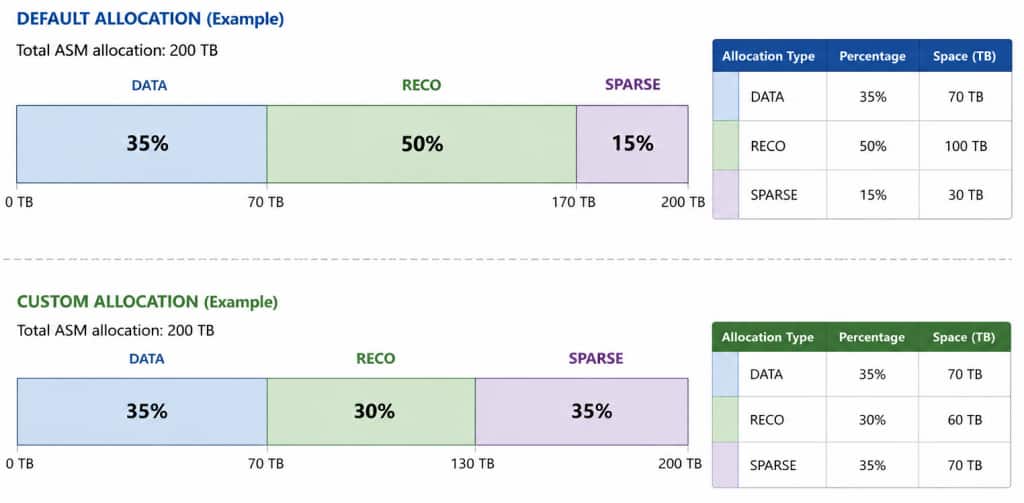
Consider a deployment supporting databases with local backups and extensive thin-clone-based development workflows. Oracle’s defaults will provide allocations of 35% DATA, 50% RECO, and 15% SPARSE. However, if recovery objectives indicate that only 30% RECO is necessary, the excess recovery space can be shifted to SPARSE to support more development and test clones without increasing total allocated storage. This improves overall space utilization and cost efficiency.
Similarly, a development or test environment may not have any backup or cloning requirements. In this case, custom allocations may be used to set DATA to 90% and RECO to 10%, while leaving SPARSE unallocated. This maximizes the space available for data without unnecessarily allocating space to the other disk groups.
As another example, a customer may initially configure a large RECO allocation to support local backups, then later adopt Oracle Zero Data Loss Autonomous Recovery Service. In that case, local recovery storage requirements may decrease substantially. The new allocation capability allows the excess RECO capacity to be reallocated to DATA or SPARSE where it can provide immediate operational value.
Operational Guidance
There are several important operational factors when using custom ASM disk group sizing. DATA and RECO each require a minimum allocation of 10%. SPARSE may be set to 0% if sparse clones are not needed, but if enabled, SPARSE also requires a minimum allocation of 10%. When reallocating disk group percentages after a VM cluster has already been provisioned, a disk group cannot be reduced below its current used capacity plus an additional 15% reserved capacity. This reserve helps prevent the resized disk group from immediately approaching full utilization and provides working space for ASM rebalance operations.
Changing ASM disk group allocations requires an ASM rebalance operation to redistribute data extents evenly across storage devices. Rebalance operations consume storage throughput and IOPS, which can temporarily affect the performance available to applications. As a result, reallocations should not be performed casually or frequently and are best scheduled during maintenance windows or lower activity periods. Exadata Database Service allows customers to tune ASM rebalance resource consumption through the asm_power_limit parameter, while Exadata System Software 25.1 introduced an ASM auto-rebalance capability that automatically adjusts rebalance intensity to minimize application impact.
For most deployments, Oracle recommends using the default ASM disk group allocations, which are designed to support common Oracle Database workload patterns while keeping provisioning simple. Custom allocations are best used when workloads have unique operational requirements or when customers want fine-grained control over storage utilization. When adjustments are necessary, customers should plan reallocations thoughtfully to minimize the number of rebalance operations whenever possible. For example, if both the total storage capacity and storage allocation percentages need to change, performing both actions together can reduce operational overhead and rebalance activity.
Conclusion
Every database workload has unique resource requirements that may evolve over time. Exadata Database Service on Dedicated Infrastructure and Exadata Cloud@Customer provide extreme performance, scalability, reliability, and security for Oracle Database workloads. The new capability to customize ASM disk group sizes increases flexibility by enabling more precise storage utilization, improved cost efficiency, and greater long-term adaptability as workload requirements change. Custom ASM disk group sizing is generally available today on Exadata Database Service on Dedicated Infrastructure in OCI and Exadata Cloud@Customer, with rollout to Oracle multicloud offerings coming soon. See how easy it is to use here!
Additional resources
- How-To: https://docs.oracle.com/en/learn/exadb-resize-asm-disk-groups/
- Blog: https://blogs.oracle.com/exadata/exadata-and-asm-auto-rebalance
- Documentation: https://docs.oracle.com/en/engineered-systems/exadata-database-machine/dbmso/automatic-asm-rebalance-tuning.html
- Documentation: https://docs.oracle.com/en/engineered-systems/exadata-database-machine/dbmso/grid-nf-dynamic-power-change.html