
Introduction
Oracle Exadata is an engineered database platform designed to deliver optimized performance for Oracle Database workloads, including AI, online transaction processing (OLTP), and analytics. Exadata is a data-optimized platform that integrates high-performance compute servers, intelligent storage servers, and high-speed networking with Remote Direct Memory Access (RDMA) for low-latency data access. The resulting extreme performance enables improved resource efficiency, enabling scalability and consolidation of all workloads. Oracle Exadata prioritizes high availability across its entire resource stack, with a particular focus on the storage tier. To ensure continuous data accessibility, Exadata architectures require at least three storage servers; this configuration enables data striping and mirroring across storage servers, thereby mitigating the risk of hardware failure. This article examines how Exadata maintains data redundancy and system integrity during critical infrastructure events, such as disk failures or the integration of additional storage servers.
What is Rebalance
Scaling an Exadata environment requires more than just adding hardware; it must utilize all the available resources efficiently and evenly, especially at the storage tier.ASM Rebalancing achieves this by redistributing data extents across all available disks. Parallelizing I/O across storage servers through the RoCE fabric is a key performance enabler in Exadata. By distributing the workload evenly across all storage servers, you ensure a consistent low-latency and high-availability environment where the entire Oracle RAC cluster can operate at its full potential. The rebalance operation is triggered in any of the following scenarios:
- Hard disk failure and replacement
- Hard disk resync during cell rolling upgrades
- Adding cell(s) to an existing cluster
- Resilvering after flash failures
- ASM Scrub identifies and repairs a corrupt extent
- Removing cells from an existing cluster
ASM Redundancy
In the world of Oracle Database management, Automatic Storage Management (ASM) redundancy is the cornerstone of a resilient infrastructure. By mirroring data extents across multiple failure groups, ASM ensures that your environment remains operational even in the event of a disk failure. Whether you implement Normal Redundancy (two-way mirroring) or High Redundancy* (three-way mirroring), the goal is the same: eliminating single points of failure at the storage layer. While selecting a redundancy level requires balancing storage costs against downtime, High Redundancy is the recommended choice for enterprise environments where data protection is paramount.
*Oracle recommends High redundancy (triple mirror) for Exadata to ensure maximum data protection and application availability. (recommendation)
Why Rebalance
On Exadata, a rebalance is typically triggered by a configuration change, such as those listed above. Because Exadata relies on intelligent storage servers, any imbalance in data distribution means some servers work harder than others, potentially leading to inconsistent query response times. For example:
- Adding Capacity: When you add new storage servers or disks, a rebalance moves existing data to the new hardware to increase overall throughput.
- Handling Failures: If a disk or an entire storage server fails, ASM uses the redundant mirrors to reconstruct data on the remaining healthy disks.
- Maintenance: If you need to gracefully take a storage cell offline for patching, a “drop” or “offline” operation triggers a rebalance to ensure data remains protected.
How to Perform and Manage an ASM Rebalance
There are two primary ways to initiate and control a rebalance: automated or manual
By default, ASM initiates a rebalance whenever a disk is added, dropped, or brought back online. The speed of this process is governed by the ASM_POWER_LIMIT
ALTER DISKGROUP data_group REBALANCE;The Power Limit: Scaling Rebalance Without Compromising Performance
ASM rebalance can be controlled by the ASM POWER limit. The higher the power limit, the more I/O resources are assigned to the rebalance operation. The rebalance operation consumes system resources that would otherwise support database I/O. To manage this, administrators can tune the ASM POWER limit to balance rebalance speed against application performance. Increasing this limit accelerates data redistribution but requires careful consideration of the potential impact on I/O throughput during peak workload periods.
ASM_POWER_LIMIT table:
| Asm_power_limit | Strategy | Behavior |
| 1 – 8 (Lower limit) | Database First | Minimal impact on database I/O. Rebalances take a long time but ensure that user queries and transactions have nearly 100% of the I/O time |
| 9 – 31 (middle ground) | Balanced | In a manual rebalance operation, this is the “sweet spot” for many admins. It utilizes more parallel processes than the lower range, allowing for a faster rebalance without completely choking the database. |
| 32 – 1024 (Higher limit) | Rebalance First | Maximum throughput for data movement. This is typically used during maintenance windows or after a disk failure when you need to get back to a redundant state as fast as possible. |
Pro Tip: In Exadata environments, it is common to set a higher power limit during maintenance windows and scale it back to a lower value during business hours using the ALTER DISKGROUP command on the fly.
Monitor an Active Rebalance Operation:
The POWER parameter regulates the I/O bandwidth consumed by ASM rebalancing. It is critical to monitor these manual operations closely to prevent contention with the database I/O. Use the SQL query below to track the progress and resource consumption of an active rebalance task.
SELECT g.name AS diskgroup, o.state, o.power, o.pass, o.est_work AS total_au_to_move, o.est_rate, o.est_minutes FROM v$asm_diskgroup g, v$asm_operation o WHERE g.group_number = o.group_number;| DISKGROUP | OPERATION | STATE | POWER | PASS | EST_WORK | EST_RATE | EST_MINUTES |
| DATA_C1 | REBAL | RUN | 32 | REBALANCE | 845,200 | 12,500 | 67 |
| RECO_C1 | REBAL | WAIT | 32 | COMPACT | 112,000 | 0 | 0 |
- STATE: If the STATE is WAIT, the work hasn’t been calculated for that group yet.
- EST_WORK: The total number of AUs that need to be moved for this operation.
- EST_RATE: The number of AUs being moved per minute.
- POWER vs. ACTUAL: POWER is what you requested; ACTUAL is what ASM is currently using (sometimes lower if the system is under heavy I/O load).
The output demonstrates that the rebalance operation is executed serially across disk groups. This sequential approach ensures that background data migration does not contend with database I/O, thereby preserving application performance.
Monitoring Physical Disks using CellCLI
One advantage of running Exadata is that you can closely monitor the activity on the storage servers using the CellCLI management utility. Log in to any of your Storage Cells as celladmin and use the following commands to ensure the hardware is performing as expected while ASM moves data.
1. Check Physical Disk Status
This confirms that no physical drives are in a “Predictive Failure” or “Poor Performance” state, which could bottleneck the rebalance.
CellCLI> LIST PHYSICALDISK ATTRIBUTES name, status, diskType;

         0:0             normal  HardDisk
         0:1             normal  HardDisk
         0:2             normal  HardDisk
         0:3             normal  HardDisk
         0:4             normal  HardDisk
         0:5             normal  HardDisk
         0:6             normal  HardDisk
         0:7             normal  HardDisk
         0:8             normal  HardDisk
         0:9             normal  HardDisk
         0:10            normal  HardDisk
         0:11            normal  HardDisk
         FLASH_1_1       normal  FlashDisk
         FLASH_1_2       normal  FlashDisk
         FLASH_3_1       normal  FlashDisk
         FLASH_3_2       normal  FlashDisk
         FLASH_6_1       normal  FlashDisk
         FLASH_6_2       normal  FlashDisk
         FLASH_8_1       normal  FlashDisk
         FLASH_8_2       normal  FlashDisk
         M2NVME_SYS_0    normal  M2Disk
         M2NVME_SYS_1    normal  M2Disk
2. Monitor Cell Disk Activity
This shows if the “Rebalance” load is being distributed evenly across the cell disks.
CellCLI> LIST CELLDISK ATTRIBUTES name, status, freeSpace;

         CD_00_scaqaw13celadm07  normal  1.50439453125T
         CD_01_scaqaw13celadm07  normal  1.50439453125T
         CD_02_scaqaw13celadm07  normal  1.50439453125T
         CD_03_scaqaw13celadm07  normal  1.50439453125T
         CD_04_scaqaw13celadm07  normal  1.50439453125T
         CD_05_scaqaw13celadm07  normal  1.50439453125T
         CD_06_scaqaw13celadm07  normal  1.50439453125T
         CD_07_scaqaw13celadm07  normal  1.50439453125T
         CD_08_scaqaw13celadm07  normal  1.50439453125T
         CD_09_scaqaw13celadm07  normal  1.50439453125T
         CD_10_scaqaw13celadm07  normal  1.50439453125T
         CD_11_scaqaw13celadm07  normal  1.50439453125T
         FD_00_scaqaw13celadm07  normal  0
         FD_01_scaqaw13celadm07  normal  0
         FD_02_scaqaw13celadm07  normal  0
         FD_03_scaqaw13celadm07  normal  0
3. View Active Alerts
If the rebalance is running slower than expected, check if the Cell has throttled I/O due to temperature or hardware faults.
CellCLI> LIST ALERTHISTORY WHERE severity like ‘warning|critical’;| 3_1 | 2025-12-08T22:29:11-08:00 | critical | The prerequisite check for the update 25.2.90.0.0.251203 failed. |
| 4 | 2025-12-10T00:33:38-08:00 | warning | type=AVC msg=audit(1765355618.282:152): avc: denied { transition } for pid=19299 comm=rpm path=/usr/bin/bash dev=md24p6 ino=25168754 sco ntext=system_u:system_r:ker nel_t:s0 tcontext= system_u: system_r:rpm_script_t:s0 tclass=process permissive=1 |
Critical Metrics for Exadata Rebalance
During an ASM rebalance, Exadata maintains performance consistency by synchronizing the Flash Cache with the moving data. As extents migrate to a new physical disk, the system automatically transitions the associated cached data to the corresponding Flash Cache on the destination cell, ensuring that ‘hot’ data remains immediately accessible. You can monitor the specific I/O throughput of the rebalance on the cell itself:
CellCLI> LIST METRICDEFINITION ATTRIBUTES NAME, DESCRIPTION WHERE OBJECTTYPE = GRIDDISK;Metric Name | Description |
| GD_IO_BY_R_LG_SEC | Large reads per second (typically rebalance traffic) |
| GD_IO_BY_W_LG_SEC | Large writes per second. |
| CL_CPUT | CPU Utilization; if this is near 100%, the rebalance power should be lowered depending on the active workloads currently running on the system. Use the ASM_POWER_LIMIT table above. |
Automatic Rebalance framework on Exadata
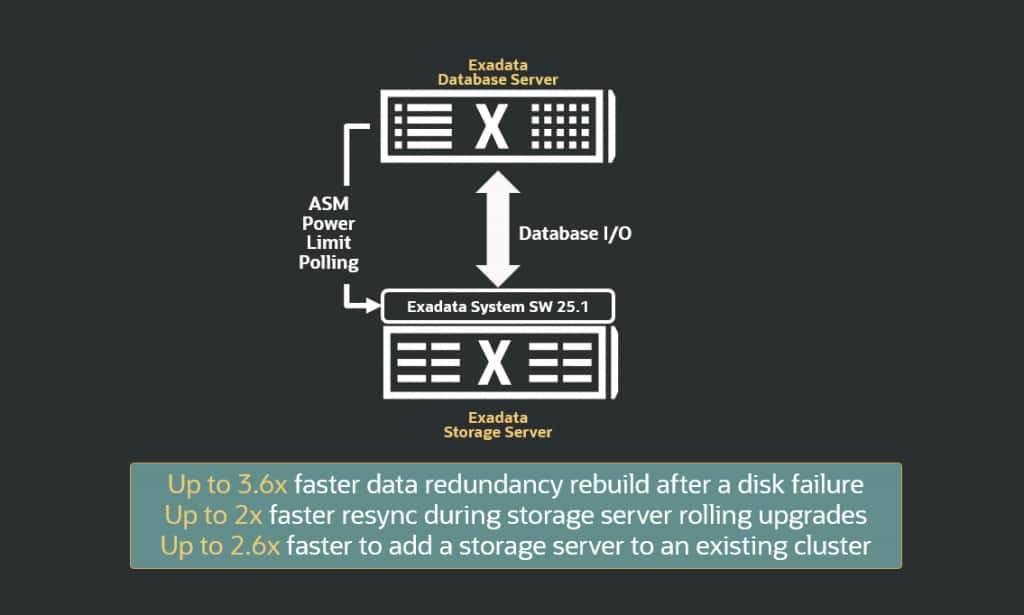
Understanding why rebalancing is essential is only the first step; managing it effectively requires continuous monitoring of key metrics. Because a high ASM POWER limit setting can consume significant bandwidth, administrators must balance the speed of redistribution against the I/O requirements of the active database environment. While increasing the ASM power limit expedites the rebalancing process, it may have an impact on active database I/O. Conversely, a lower power limit extends rebalance durations. Administrators often monitor and change the power limit to balance the database and rebalance I/O. To allow administrators to focus on more important tasks, Exadata System Software 25.1 introduces an automated rebalance framework. This capability dynamically adjusts the asm_power_limit to maximize rebalance velocity while proactively safeguarding database I/O. The Exadata system software continuously monitors database I/O and automatically tunes the ASM power limit while protecting database I/O performance. Grid Infrastructure 26ai polls Exadata storage servers for optimal ASM power limit and dynamically adjusts the rebalance speed. Under this capability, Oracle Exadata System Software continuously monitors I/O performance and automatically raises the asm_power_limit value when the system has plenty of available I/O bandwidth. Likewise, when the system detects client database workloads, it automatically lowers the asm_power_limit value to prioritize those workloads.
Conclusion
Managing rebalances across different scenarios no longer requires manual trade-offs. With the autonomous capabilities in Exadata system software 25.1, the system now self-tunes rebalance operations based on real-time workload demands. This ensures that data redistribution is completed as rapidly as possible while protecting database SLAs, a performance gain clearly reflected in the above diagram. Oracle Exadata’s automatic rebalance mechanism significantly outperforms manual intervention by optimizing data movement paths. Key performance benchmarks include a 3.6x faster return to full redundancy post-disk failure and a 2x acceleration in resync operations during maintenance windows. Additionally, the system achieves a 2.6x gain in redistribution efficiency when scaling out the infrastructure with new storage nodes. Ultimately, the introduction of ASM Auto Rebalance represents a significant shift toward autonomous storage management. By removing the need for manual intervention and eliminating the traditional trade-off between administrative speed and application stability, this framework ensures that Exadata environments remain both highly available and consistently performant. This automation not only streamlines operational workflows but also reinforces the platform’s ability to maintain peak efficiency under varying workload demands.