
Partners and customers often ask about the new features introduced with Oracle Database Release Updates (RUs) and the differences between various database releases.
Release Updates (RUs) are issued quarterly in January, April, July, and October. They are designed to provide prompt access to both security-related patches and other critical updates for each version of the database. Announcements regarding security fixes—including those found in Critical Patch Update Advisories, Security Alerts, and Bulletins—are updated regularly and can be found at: Critical Patch Updates, Security Alerts and Bulletins.
For details on the latest Database Release Updates and related bundle patches, refer to KB106822 Primary Note for Database Quarterly Release Updates (888.1). Information about the database release roadmap, including comprehensive release schedules and supported versions, is available in PNEWS1360 Release Schedule of Current Database Releases (742060.1). Additionally, subscribers can stay informed by accessing the Oracle Database Monthly News, with quick links delivered on the last Friday of each month.
How can I find information about new features included in Release Updates (RUs)?
Generally, you have the following options:
- New Features Guide for
- Release 19c: New Features in 19c Release Updates (Database New Features Guide Chapter 2)
- Release 21c: New Features in 21c Release Updates (Database News Features Guide Chapter 8)
- Release 26ai: Appendix A: Oracle AI Database 26ai Release Updates (Oracle AI Database New Features Chapter 13)
- AI Vector Search New Features for Oracle AI Database 26ai: What’s New for Oracle AI Vector Search AI (Oracle AI Vector Search User’s Guide Chapter 1)
The Database New Features Guides outline new features by release updates and provide links to the relevant documentation. Below are some examples of features from different release updates and database versions. Let’s begin with version 26ai.
New Features in Oracle AI Database 26ai Release Updates
- Release Update 23.26.1 Features e.g.
- ALTER INDEX Support for JSON Search Index
- Aggregation Filters
- Calendar Functions
- Configuration and Member Tagging for Oracle Data Guard
- DBMS_SECUREFILES Package for SecureFile LOBs
- Database Observability
- Enable Larger ONNX-Format Models
- JavaScript Web API for In-Database JavaScript
- Kerberos Constrained Delegation for DB Links
- Migrating LOBs Made Easier
- Network Monitor
- Partition by Expression
- Post-Quantum Cryptography Support
- Select AI with RAG and Synthetic Data Generation
- Simple Dot-Notation Syntax for JSON Indexes
- Release Update 23.26.0 Features
- Release Update 23.9 Features
- Release Update 23.8 Features
- Release Update 23.7 Features
- Release Update 23.6 Features
- Release Update 23.5 Features
If your primary interest is in updates related to Oracle AI Vector Search, refer to Chapter 1 of the Oracle AI Vector Search User’s Guide as mentioned above. Below, you’ll find a list of links to available updates, including detailed information on the most recent 23.26.1 release update.
AI Vector Search New Features in Release Updates
- Release Update 23.26.1 e.g.
- Release Update 23.9
- Release Update 23.8
- Release Update 23.7
- Release Update 23.6
- Release Update 23.5
For earlier releases like 19c and new features introduces in release updates, see Release 19c: New Features in 19c Release Updates (Database New Features Guide Chapter 2). Below are examples of notable release updates, with a focus on the most recent enhancements.
New Features in 19c Release Updates
- Release Update 19.29 Features
- Release Update 19.28 Features e.g.
- Release Update 19.23 Features
- Release Update 19.22 Features
- Release Update 19.21 Features
- Release Update 19.20 Features
- Release Update 19.18 Features
- Release Update 19.16 Features
- Release Update 19.12 Features
- Release Update 19.11 Features
- Release Update 19.10 Features
- Release Update 19.9 Features
- Release Update 19.8 Features
- Release Update 19.7 Features
If there are any licensing updates or changes, these are typically documented in the Database Licensing Information User Manual. For example, the following 19c features had related licensing updates:
- Automatic SQL Plan Management
Historically, this feature had some licensing restrictions limiting it to Exadata on-premises systems and ExaDB. However, its availability has been increased, so it’s now available in Oracle Database 19c Release Update 19.22 Enterprise Edition and Oracle BaseDB 23c BaseDB Enterprise Edition. - Oracle Machine Learning (formerly Advanced Analytics) no longer requires an extra cost license. See Oracle Database Insider blog post for more information.
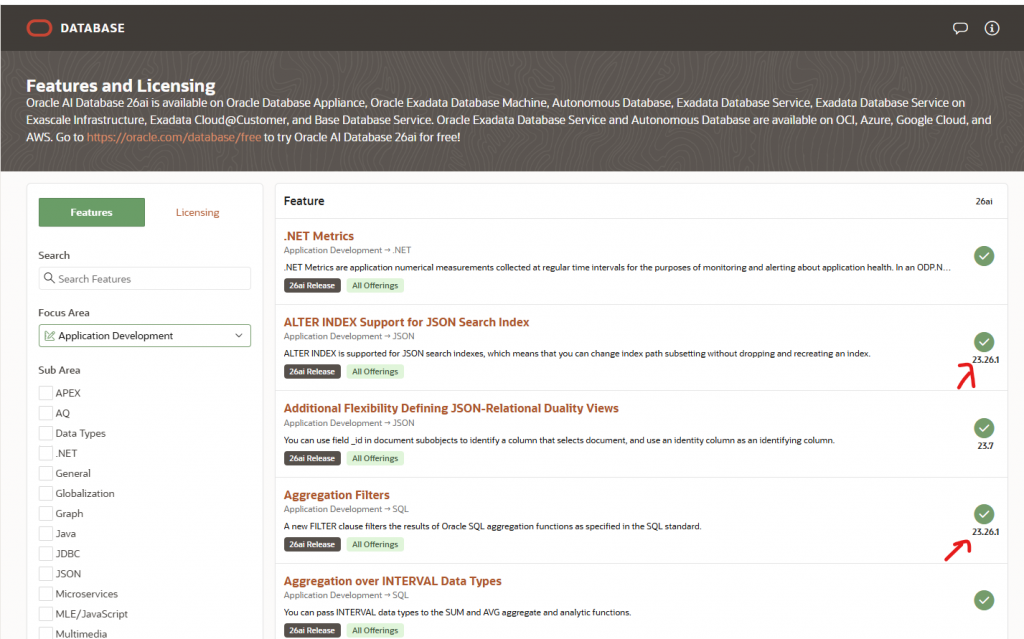
If you prefer to access this information via a website or application, you can use the Features and Licensing Application. In the screenshot below, we selected the version (26ai) and the “New features only” option. This displays all new features available in that release, along with details about the specific Release Update (RU) in which each feature was introduced. You can further refine your results by filtering using the “Focus Area” field.
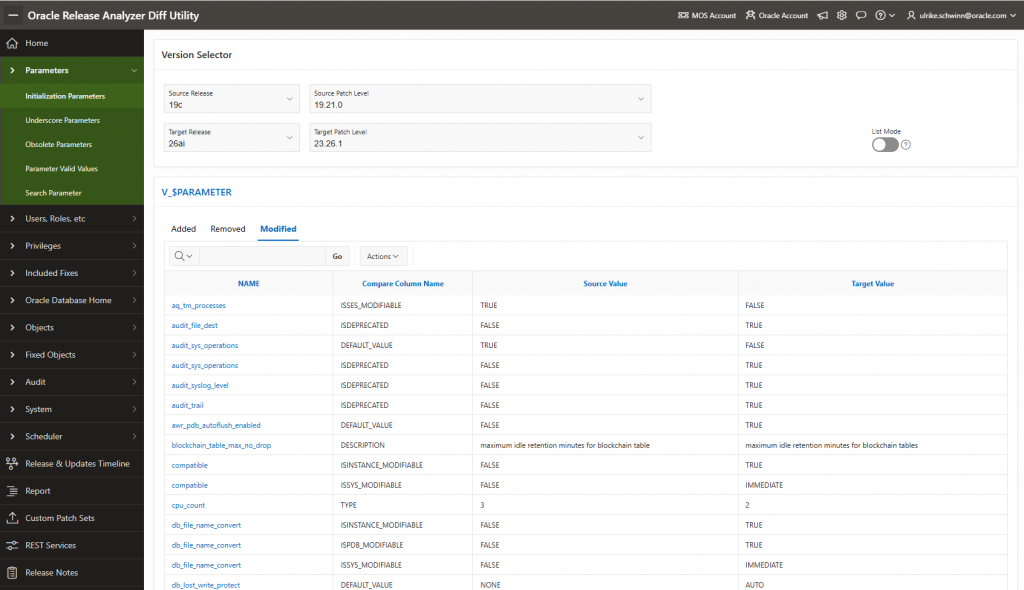
Another helpful tool is the “Oracle Release Analyzer Diff Utility (ORAdiff),” which allows you to compare two database releases, including those with patch bundles. You can access this utility at https://oradiff.oracle.com/ . Below is a screenshot to illustrate how the tool works.
Link Summary
- New Features in 19c Release Updates
- New Features in 21c Release Updates
- Appendix A: Oracle AI Database 26ai Release Updates
- What’s New for Oracle AI Vector Search AI
- Features and Licensing Application
- Oracle Release Analyzer Diff Utility (ORAdiff)
- How do find new features in Oracle Release Updates (RUs)? (Mike Dietrich)