
Digital twin applications need a consistent view of each asset, but device telemetry often arrives in different shapes. One device might send an attribute named motorTemperature, another might send mtrTemp, and another device might report a pressure value in psi while the model stores the pressure in bar. OCI Internet of Things Platform (OCI IoT Platform) digital twin adapters translate those device-specific payloads into the canonical model structure that applications use.
Using a WaterPump model, we demonstrate how adapters handle timestamps, nested components, attribute names, unit conversion, endpoint-based routing, and selected JQ expressions to map heterogeneous telemetry streams to a canonical model.
Introduction
Digital twin adapters apply to both directly connected devices and indirectly connected devices. In both cases, the adapter maps an inbound payload into the digital twin model so applications can read a consistent asset representation.
These examples focus on adapter behavior for device telemetry. Gateway configuration, gateway routing, and gateway telemetry setup are outside the scope of these examples.
An example: WaterPump model
The examples use a WaterPump model with pump-level telemetry and a reusable ElectricMotor component. The WaterPump model follows the format described in the companion post, Understanding Digital Twin Models in OCI IoT Platform. The target model shape looks like this:
{
  "motor": {
    "motorTemperature": 68.4,
    "vibrationLevel": 1.7,
    "powerConsumption": 12.6
  },
  "flowRate": 247.5,
  "dischargePressure": 4.3
}
The model treats motor telemetry as part of the pump. Applications can read motor.motorTemperature, motor.vibrationLevel, motor.powerConsumption, flowRate, and dischargePressure from one canonical structure.
What adapters do
An adapter maps inbound device payloads into a digital twin model. The model defines the target structure, and the adapter describes how values from the source payload move into that structure.
A digital twin workflow uses three related objects. The model describes the asset. The adapter maps payload values to the model. The digital twin instance associates a model with the adapter. This separation lets device payloads vary while applications read a stable model.
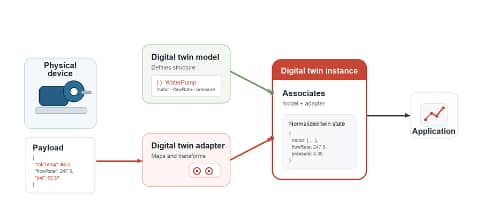
Figure 1: The digital twin instance associates the model and adapter so applications can read normalized twin state.
Structure of an adapter description
An adapter description uses two related JSON elements: an envelope description and an inbound routes description. The envelope describes the shape of the incoming message. The inbound routes define how matching messages are mapped into the digital twin model.
Envelope description:
{
    "referenceEndpoint": "/waterpump",
    "referencePayload": {
      "dataFormat": "JSON",
      "data": {
        "motor": {
          "motorTemperature": 68.4,
          "vibrationLevel": 1.7,
          "powerConsumption": 12.6
        },
        "flowRate": 247.5,
        "dischargePressure": 4.3
    }
  }
}
The envelope description identifies the model and provides a representative inbound message. The displayName and description fields make the file readable for developers. The digitalTwinModelSpecUri connects the description to the WaterPump model. The inboundEnvelope section contains the referenceEndpoint and referencePayload. The referencePayload defines the data format and sample payload structure used to test and document expected telemetry.
The envelope description shows what a device or integration sends before adapter mapping is applied. In this default-style example, the payload already follows the WaterPump model shape: motor telemetry is nested under motor, and flowRate and dischargePressure appear at the top level. Inbound routes description:
[
    {
      "condition": "*",
      "description": "Map the component-aware water pump payload directly to the WaterPump model.",
      "payloadMapping": {
      "$.motor.motorTemperature": "$.motor.motorTemperature",
      "$.motor.vibrationLevel": "$.motor.vibrationLevel",
      "$.motor.powerConsumption": "$.motor.powerConsumption",
      "$.flowRate": "$.flowRate",
      "$.dischargePressure": "$.dischargePressure"
    },
      "referencePayload": {
        "dataFormat": "JSON",
        "data": {
          "motor": {
            "motorTemperature": 68.4,
            "vibrationLevel": 1.7,
            "powerConsumption": 12.6
          },
          "flowRate": 247.5,
          "dischargePressure": 4.3
        }
      }
    }
]
The inbound routes define how the platform handles messages that match an adapter route. The inboundRoutes array can contain one or more route definitions. Each route includes a condition, description, payloadMapping, and route-level referencePayload. The condition determines when the route applies. The wildcard value * applies the route to any matching inbound message.
The payloadMapping section maps source values into digital twin model attributes. In this default-style example, flowRate and dischargePressure map directly because the incoming attribute names match the model. The motor mapping creates the nested component object and maps motorTemperature, vibrationLevel, and powerConsumption into the ElectricMotor component used by the WaterPump model.
Where JQ fits
JQ is a query and transformation language for JSON. In an adapter, a simple path such as $.flowRate copies a value from the inbound payload. A JQ expression such as ${(.dischPressPsi * 0.0689475729)} transforms a value before the platform writes it to the digital twin.
- Use envelopeMapping to extract metadata such as timeObserved.
- Use payloadMapping to map or transform telemetry values.
- Use JQ expressions to build objects, rename fields, convert units, and normalize timestamp values.
JQ expressions compute target values during route evaluation and payload mapping. Expressions use placeholder syntax, such as ${ … }, in route conditions and mappings. They can select routes based on endpoint segments, headers, or payload values; transform inbound telemetry; convert units; rename fields; normalize timestamps; and produce JSON that matches the digital twin model schema. The normalized output must satisfy model validation, including attribute types, ranges, and units.
Adapter mappings should also account for the model schema. Arithmetic operations and the floor function are supported, but casting helpers such as number() and toInteger() are not supported in route expressions. For integer model attributes, the mapping must emit an integer numeric value, such as ${(.velocity_kph / 1.609) | floor}. For double attributes, fractional values are accepted. Use floor only when whole-number storage is intended.
Endpoint matching should use segment-based conditions, such as ${endpoint(1) == ‘home’ and endpoint(2) == ‘data’ and endpoint(3) == ‘status’}, instead of wildcard patterns.
For time handling, map timeObserved when the device provides an observation timestamp; otherwise, the platform uses the received time. Functions such as fromdateformat and todateformat can normalize timestamps in envelope or payload mappings.
Creating custom adapters
When a device sends telemetry in the same format as the model, the service automatically creates a default adapter to process the incoming messages. No developer action is required when a default adapter is used. Use a custom adapter when telemetry does not match the model or when metadata needs adjustment before the platform stores the sample.
Common adjustments include date and time formatting, payload shape, attribute names, and measurement units. The following examples use the same WaterPump model while changing the incoming telemetry to show how adapters handle each case.
Example 1: Timestamp adjustment
A common adapter task is adjusting the timestamp of a telemetry sample based on a value within the JSON payload. In this example, the telemetry values already match the WaterPump model. The adapter extracts the device observation time from the payload and maps it to timeObserved. Incoming telemetry:
{
  "timestamp": "2026-07-08T12:00:00.000000Z",
  "motor": {
    "motorTemperature": 68.4,
    "vibrationLevel": 1.7,
    "powerConsumption": 12.6
  },
  "flowRate": 247.5,
  "dischargePressure": 4.3
}
Envelope mapping:
{
  "referenceEndpoint": "/waterpump",
  "envelopeMapping": {
    "timeObserved": "$.timestamp"
  }
}
Telemetry mapping:
{
  "$.motor": "${ {motorTemperature: .motor.motorTemperature, vibrationLevel: .motor.vibrationLevel, powerConsumption: .motor.powerConsumption} }",
  "$.flowRate": "$.flowRate",
  "$.dischargePressure": "$.dischargePressure"
}
The timestamp describes when the device observed the measurement. Mapping it to timeObserved keeps observation time separate from receive time.
The timestamp uses this adapter-ready format:
2026-07-08T12:00:00.000000ZCommon timestamp shapes include ISO 8601 UTC with fractional seconds, ISO 8601 UTC without fractional seconds, ISO 8601 with a timezone offset, epoch seconds, and epoch milliseconds. Source timestamps should be normalized to the format the adapter process expects.
JQ provides date and time functions for normalization:
- strptime(format) parses a timestamp string using a format pattern.
- strftime(format) formats a parsed timestamp.
- mktime converts a parsed time array to epoch seconds.
- gmtime converts epoch seconds to a UTC time array.
- localtime converts epoch seconds to a local time array.
- fromdateiso8601 parses an ISO 8601 timestamp to epoch seconds.
- todateiso8601 formats epoch seconds as an ISO 8601 timestamp.
Example 2: Flat telemetry
In the next example the payload reports all values at the top level, whereas the model expects motor telemetry inside the motor component.
{
  "motorTemperature": 68.4,
  "vibrationLevel": 1.7,
  "powerConsumption": 12.6,
  "flowRate": 247.5,
  "dischargePressure": 4.3
}
Adapter mapping:
{
  "$.motor": "${ {motorTemperature: .motorTemperature, vibrationLevel: .vibrationLevel, powerConsumption: .powerConsumption} }",
  "$.flowRate": "$.flowRate",
  "$.dischargePressure": "$.dischargePressure"
}
The adapter builds the nested motor object from flat fields in the telemetry message. flowRate and dischargePressure already match the model, so those fields map directly.
Example 3: Attribute renaming
Some devices use compact names that are meaningful near the device but less useful to application developers. In this example, mtr, mtrTemp, vibLvl, pwrUse, flowRt, and dischPress map to the canonical model names.
{
  "mtr": {
    "mtrTemp": 68.4,
    "vibLvl": 1.7,
    "pwrUse": 12.6
  },
  "flowRt": 247.5,
  "dischPress": 4.3
}
Adapter mapping:
{
  "$.motor": "${ {motorTemperature: .mtr.mtrTemp, vibrationLevel: .mtr.vibLvl, powerConsumption: .mtr.pwrUse} }",
  "$.flowRate": "$.flowRt",
  "$.dischargePressure": "$.dischPress"
}
The adapter preserves the incoming telemetry values while giving applications descriptive model fields defined in the model.
Example 4: Unit conversion from psi to bar
The WaterPump model defines dischargePressure in bar. The sample device sends the source value in pounds per square inch and names the field dischPressPsi.
{
  "motor": {
    "motorTemperature": 68.4,
    "vibrationLevel": 1.7,
    "powerConsumption": 12.6
  },
  "flowRate": 247.5,
  "dischPressPsi": 62.37
}
Adapter mapping:
{
  "$.motor": "${ {motorTemperature: .motor.motorTemperature, vibrationLevel: .motor.vibrationLevel, powerConsumption: .motor.powerConsumption} }",
  "$.flowRate": "$.flowRate",
  "$.dischargePressure": "${(.dischPressPsi * 0.0689475729)}"
}
The dischargePressure expression multiplies the incoming psi value by 0.0689475729. With the sample value, 62.37 psi maps to about 4.30 bar. Applications can read one model unit even when devices publish another unit.
Example 5: Conditional routing by endpoint
Unit conversion can also depend on how a payload reaches the adapter. Route conditions handle cases where one endpoint sends values in a different unit system than the default telemetry path.
In this example, telemetry sent to an endpoint segment named english-units reports motor temperature in Fahrenheit. The model expects Celsius, so that route converts the temperature. The default route leaves the temperature unchanged.
Inbound routes file:
[
    {
      "condition": "${endpoint(2) == \"english-units\"}",
      "description": "Convert motor temperature from Fahrenheit to Celsius for English-unit telemetry.",
      "payloadMapping": {
        "$.motor": "${ {motorTemperature: ((.motor.motorTemperature - 32) * 5 / 9), vibrationLevel: .motor.vibrationLevel, powerConsumption: .motor.powerConsumption} }",
        "$.flowRate": "$.flowRate",
        "$.dischargePressure": "$.dischargePressure"
      },
      "referencePayload": {
        "dataFormat": "JSON",
        "data": {
          "motor": {
            "motorTemperature": 68.4,
            "vibrationLevel": 1.7,
            "powerConsumption": 12.6
          },
          "flowRate": 247.5,
          "dischargePressure": 4.3
        }
      }
    },
    {
      "condition": "*",
      "description": "Map water pump telemetry without changing motor temperature.",
      "payloadMapping": {
        "$.motor": "${ {motorTemperature: .motor.motorTemperature, vibrationLevel: .motor.vibrationLevel, powerConsumption: .motor.powerConsumption} }",
        "$.flowRate": "$.flowRate",
        "$.dischargePressure": "$.dischargePressure"
      },
      "referencePayload": {
        "dataFormat": "JSON",
        "data": {
          "motor": {
            "motorTemperature": 20.2,
            "vibrationLevel": 1.7,
            "powerConsumption": 12.6
          },
          "flowRate": 247.5,
          "dischargePressure": 4.3
        }
      }
    }
]
The first route uses the condition ${endpoint(2) == “english-units“} to identify telemetry that arrives through the english-units segment. That route maps the same payload structure as the default route, but it transforms motor.motorTemperature from Fahrenheit to Celsius with (.motor.motorTemperature – 32) * 5 / 9.
The second route uses the wildcard condition *. It acts as the default route for messages that do not match the english-units condition. In that route, motorTemperature maps directly from the incoming payload to the model without conversion. The more specific route appears before the wildcard route so the conversion is applied before the default route can match.
Example 6: Additional JQ features
The previous examples use JQ for direct mapping, unit conversion, and conditional routing. JQ also supports conditional logic, default values, object construction, and value translation, which helps adapters handle payload variations without changing device firmware.
Additional JQ capabilities are described in the OCI Internet of Things Platform documentation on using JQ expressions.
The following examples are not part of the WaterPump model. However, they show additional JQ patterns that apply when a model needs fallback values or semantic mappings.
Missing-value default:
{
  "$.pressure": "${ if has(\"pressure\") then .pressure else 0 end }"
}
This mapping checks whether the inbound pressure value exists. If the device sends a pressure value, the adapter maps that value to the model. If the device does not send the value, the adapter in this example writes 0. This pattern is useful when the model requires a value but some devices omit the field. Use this pattern only when a default value is appropriate.
Semantic value mapping:
{
  "$.operatingState": "${ if .state == 1 then \"running\" elif .state == 0 then \"stopped\" else \"unknown\" end }"
}
This mapping converts a numeric device value into a string that is easier for applications to read. A device sends 0 when it is stopped and 1 when it is running. The adapter writes stopped or running into the model. The else branch writes unknown when the device sends a value outside the expected range.
Summary
Digital twin adapters translate device telemetry into the stable shape defined by a digital twin model. Direct mapping works when the payload already matches the model. Custom adapters handle differences such as explicit timestamps, flat payloads, abbreviated field names, nested components, unit conversions, and endpoint-specific routing.
The pattern is consistent: start with the model, inspect the incoming payload, add a reference payload, map source fields into model paths, and use JQ when a value needs structure or transformation.
You can configure OCI Internet of Things to create a normalized view of telemetry from heterogeneous devices. Start with a simple digital twin model and one representative telemetry payload from a real device. Create an adapter that maps that payload into the model, then create a digital twin instance that associates the model with the adapter. Once your digital twin instances are configured, send test telemetry and inspect the stored twin values to confirm that timestamps, units, attribute names, and nested components resolve as expected.
After the first path works, add more payload variations. Use custom adapters for flat telemetry, abbreviated field names, unit conversions, route-specific behavior, and other transformations that let applications read one consistent digital twin structure across different devices.