
Standing up a Kubernetes cluster has become almost trivial over the last few years. Between tooling, managed services, and widely available infrastructure as code (IaC) examples, getting a cluster up and running has never been easier.
Creating an OKE cluster is only the beginning. Day 2 operations require teams to keep worker nodes current, maintain application availability, and adapt capacity to changing workload requirements.
Karpenter Provider for OCI (KPO) automates much of this work. KPO evaluates unscheduled pods and provisions OCI compute capacity that matches their requirements. It can also replace nodes that have drifted from the desired configuration and consolidate empty or underutilized capacity
This blog explains four operational patterns: rotating worker nodes, controlling disruption, using custom OKE-derived images, and separating workload policies across multiple NodePool
Prerequisites
This blog assumes:
- You have access to an OKE cluster
- Karpenter is installed in the cluster
- To install Karpenter see the OCI KPO documentation
The examples below use placeholders such as <subnet-ocid> and <compartment-ocid-containing-oke-derived-images>. Replace those values for your tenancy. The examples are provided for guidance only. Validate and test before making any changes to production environments.
How NodePools and OCINodeClasses divide responsibilities
KPO follows the upstream Karpenter pattern.
NodePooldefines scheduling and lifecycle intent: allowed capacity types, allowed shapes, disruption settings, limits, labels, taints, and weights. Karpenter NodePool documentationOCINodeClassdefines OCI-specific infrastructure: subnet, VNICs, boot volume, OKE image selection, shape sizing for flexible shapes, tags, kubelet settings, capacity reservations, and bootstrap customization. OCINodeClass documentation
That separation is useful for Day 2 operations. Platform teams can keep infrastructure details in a small number of node classes, while application teams continue using Kubernetes-native scheduling primitives: resource requests, node selectors, affinities, topology spread constraints, taints, and tolerations.
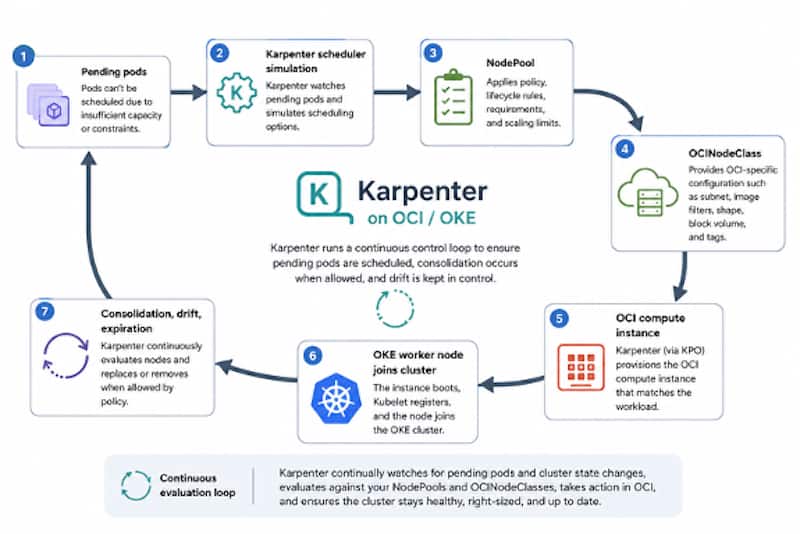
In the diagram above, we see the evaluation loop Karpenter continually runs to ensure pending pods are scheduled, consolidation occurs when allowed, and drift is kept in control.
Day 2 operations patterns
Example 1: Flexible OKE worker nodes with image filtering and expiration
The first example is a general-purpose NodePool that uses OCI flexible shapes, selects the latest OKE worker images through imageFilter, and rotates nodes using expireAfter.
Karpenter examples generally use expireAfter: Never to keep things simple, but for production we want to use an actual maximum node lifetime value. For example, 720h gives you a 30-day upper bound, if we wanted a more aggressive turnover we might use 336h for 14 days. Upstream Karpenter disruption documentation
# Relevant NodePool fields

expireAfter: 720h
terminationGracePeriod: 120m

# Relevant OCINodeClass fields

  imageConfig:
    imageType: OKEImage
    imageFilter:
      osFilter: "Oracle Linux"
      osVersionFilter: "9"
What this gives you:
imageFilterlets Karpenter resolve an OKE image instead of pinning the node class to a single image OCID.- When the desired image changes, nodes launched with an older desired image can be marked drifted and replaced through disruption policy.
expireAftergives every Karpenter-managed node a maximum lifetime to prevent long-running infrastructure being taken down for underlying maintenance or other reasons.terminationGracePeriodprevents old nodes from staying around indefinitely when pods are hard to evict by adding a drain deadline and will force deletion at the expiration of the time- Flexible shape configs let the same NodePool consider multiple CPU and memory sizes across allowed OCI flexible shapes.
Operational guidance:
- Start with
expireAfter: 720hunless your security policy requires faster worker rotation. - Consider setting
terminationGracePeriodwhen settingexpireAfter. - Use disruption budgets to keep drift and consolidation from rolling too much of the data plane at once.
- Make sure critical workloads have
PodDisruptionBudgetsthat match the availability you expect. osVersionFilterwill keep us current for minor and patch versions as they’re released within Oracle Linux 9, moving to a new major version could introduce breaking changes and is therefore an explicit action that must be taken
Example 2: Pause drift and underutilized consolidation during business hours
Image filters help keep the data plane current, but platform teams still need control over when and how the disruption occurs. This configuration prevents drift-based replacements and the cluster from contracting because of underutilization during weekday business hours. Empty nodes can still be removed, allowing Karpenter to reclaim unused capacity without disrupting workloads.
# Relevant NodePool fields

spec:
  template:
    spec:
      expireAfter: Never

  disruption:
    consolidationPolicy: WhenEmptyOrUnderutilized
    consolidateAfter: 30m
    budgets:

       - nodes: "10%"
         reasons:
           - Underutilized
           - Drifted

      - nodes: "0"
        schedule: "0 14 * * mon-fri" # 14:00-22:00 UTC
        duration: 8h
        reasons:
          - Underutilized
          - Drifted
The node fleet can move forward as images and cluster versions change, but the platform team still controls the pace.
What this gives you:
- The scheduled budget blocks
Driftedand Underutilized consolidation during the defined Monday through Friday window. - Empty nodes can still be removed during the window, allowing Karpenter to reclaim unused capacity without disrupting workloads.
consolidationPolicy: WhenEmptyOrUnderutilizedmakes both Empty and Underutilized nodes eligible for consolidation but the budget overrides only Underutilized during the windowconsolidateAfter: 30mgives workloads time to settle before a node is considered for consolidation.- Nodes do not expire automatically because
expireAfter: Neverdisables expiration. Setting an hourly value such as1hwould allow an expiration driven drain to begin regardless of the scheduled budget window
Operational guidance:
- Monitor
NodeClaimconditions and Kubernetes events to distinguish nodes waiting on a disruption budget from nodes blocked by workload eviction constraints. - Test the policy by changing a non-production
OCINodeClasssetting and observing how quickly drift replacements begin and complete. - Karpenter schedules are UTC only, so adjust accordingly
- This example allows 10% of the nodes to be disrupted for drifted and underutilized reasons outside the window, adjust as necessary
Example 3: Use custom OKE-derived images without giving up image filters
Some teams build hardened or custom images based on OKE base images, and you can still use image filtering by configuring Karpenter to search the compartment that contains those custom OKE-derived images.
Global default through Helm values:
# yaml
settings:
  preBakedImageCompartmentId: "<compartment-ocid-containing-oke-derived-images>"
Per NodeClass override:
# yaml
apiVersion: oci.oraclecloud.com/v1beta1
kind: OCINodeClass
metadata:
  name: custom-workers
spec:
  volumeConfig:
    bootVolumeConfig:
      imageConfig:
        imageType: OKEImage
        imageFilter:
          compartmentId: "<compartment-ocid-containing-oke-derived-images>"
          osFilter: "Oracle Linux"
          osVersionFilter: "9"
  networkConfig:
    primaryVnicConfig:
      subnetConfig:
        subnetId: <subnet-ocid>
For this to work, the custom image needs metadata that lets KPO determine the Kubernetes version. The KPO docs call out two supported approaches: a k8s_version freeform tag, or a BaseImageId chain to an ancestor OKE image with that tag.
What this gives you:
preBakedImageCompartmentId changes the default compartment in which KPO searches for OKE-derived images.
- A per
OCINodeClass imageFilter.compartmentIdoverride lets individual node classes search a different image compartment without changing the global setting. - Platform teams can use hardened or customized OKE-derived images while retaining automated image discovery.
- The
osFilterandosVersionFilterfields narrow image selection to the intended operating-system family and major version. - A
k8s_versionfree-form tag lets KPO determine the Kubernetes version associated with a custom image. - A
BaseImageIdancestry chain provides another way for KPO to locate the Kubernetes-version metadata from the underlying OKE image.
Operational guidance:
- Use the global Helm value only when most or all
OCINodeClassresources should search the same custom-image compartment. - Use the per-node-class
compartmentIdoverride when only selected workload classes should use the custom image pipeline. - Ensure the KPO controller has permission to read images in the target compartment.
- Preserve either the
k8s_versiontag or a validBaseImageIdchain. Without one of these, KPO may be unable to determine image compatibility. - Validate each custom image against the target OKE and Kubernetes version before making it eligible for production selection.
- Coordinate image publication and disruption budgets so that publishing a new matching image does not initiate more replacements than the application environment can tolerate.
Example 4: Use multiple NodePools to separate operational intent
A single large NodePool is simple, but it eventually becomes hard to operate. Every workload in that pool shares the same lifecycle policy, disruption budget, capacity types, shape choices, node labels, taints, and cost controls. This pattern doesn’t always match reality.
We can use multiple NodePools when different workloads need different operational behavior. Workloads use selectors and tolerations to target the capacity they need, and Karpenter applies the right provisioning policy behind it.
Common NodePool boundaries include:
platform-static: a small fixed baseline for critical platform services.general-purpose: dynamic on-demand capacity for normal application workloads.batch-spot: preemptible-first capacity for interruptible jobs.gpuoraccelerated: specialized shapes isolated from general workloads.stateful: conservative disruption settings for workloads that are slower to move.dev: aggressive consolidation and shorter expiration for non-production clusters.
The business value here is control. You can be aggressive where the risk is low, conservative where availability matters, and explicit about which workloads are allowed to use lower-cost interruptible capacity.
For example, dynamic Karpenter capacity is ideal for most workloads, but many platform teams keep a small always-on NodePool for cluster services, ingress, observability, or controllers. This avoids tying core platform availability to every application scale event while still letting the rest of the cluster scale elastically. KPO supports upstream static capacity when the feature gate is enabled.
Note that at the time of writing static capacity is an optional upstream alpha feature. If you’re uncomfortable using an alpha feature, a dedicated NodePool that uses scheduled disruption budgets (as in Example 2) to protect platform services from drift replacements and underutilized consolidation during operating hours provides similar operational protection.
Enable static capacity:
# yaml
settings:
  featureGates:
    staticCapacity: true
Then define a separate static NodePool for the platform baseline:
# Relevant NodePool fields
apiVersion: karpenter.sh/v1
kind: NodePool
metadata:
  name: platform-static
spec:
  replicas: 3
  template:
    metadata:
      labels:
        workload.oracle.com/tier: platform
    spec:
      nodeClassRef:
        group: oci.oraclecloud.com
        kind: OCINodeClass
        name: platform-static

  limits:
    nodes: 4
To direct platform workloads to this NodePool, use a node selector, node affinity, or a taint and toleration model. For example:
# yaml
apiVersion: apps/v1
kind: Deployment
metadata:
  name: platform-controller
  namespace: platform-system
# yaml
apiVersion: apps/v1
kind: Deployment
metadata:
  name: platform-controller
  namespace: platform-system
spec:
  replicas: 2
  selector:
    matchLabels:
      app: platform-controller
  template:
    metadata:
      labels:
        app: platform-controller
    spec:
      nodeSelector:
        workload.oracle.com/tier: platform
      containers:
        - name: controller
          image: <region>.ocir.io/<tenancy>/<repo>/platform-controller:latest
          resources:
            requests:
              cpu: "250m"
              memory: "256Mi"
It’s important to note that static NodePools maintain a fixed number of nodes. Static NodePools are not considered for consolidation and have constraints that differ from dynamic NodePools. They are useful for a small baseline, not as a replacement for dynamic capacity.
The key point is that NodePools should describe operational intent, not org charts. If two workloads need the same lifecycle, disruption, capacity, and cost policy, they can usually share a NodePool. If those requirements differ, separate NodePools provide a reasonable boundary and are safer to change.
What this gives you:
- Separate
NodePoolresources let platform teams assign different lifecycle, disruption, capacity, shape, and cost policies to different workload classes. - Labels, taints, tolerations, node selectors, and affinity rules provide explicit control over which workloads can use each pool.
- A small static
NodePoolcan maintain a fixed baseline for critical platform services such as ingress, observability, DNS, or controllers. - Dynamic
NodePoolresources can continue scaling application capacity in response to pending pod requirements. - Specialized pools can isolate preemptible, GPU, stateful, development, or other workloads that require distinct operational policies.
- Clear
NodePoolboundaries reduce the blast radius of configuration and lifecycle changes. - The replicas field causes the static pool to maintain a fixed number of nodes regardless of pending pod demand.
Operational guidance:
- Define
NodePoolboundaries around operational requirements, not organizational ownership. Workloads with the same lifecycle, disruption, capacity, and cost requirements can usually share a pool. - Make pools mutually exclusive where practical. A workload that matches multiple pools can be provisioned through an unintended policy.
- Use labels and selectors for positive placement and use taints and tolerations when workloads must be prevented from landing on a pool by default.
- Keep the static platform baseline small. Static capacity is intended to provide a dependable floor, not replace demand-driven provisioning for the whole cluster.
- Static
NodePoolresources are not considered for consolidation. - A static
NodePoolcannot be switched between static and dynamic mode after replicas is configured; plan the resource boundary before deployment. - Static pools cannot use weight, and only the node-count form of limits applies to them.
- Scaling a static pool bypasses node disruption budgets, although application
PodDisruptionBudgetsstill apply. - Confirm that critical platform workloads have enough replicas and topology spread to remain available if a baseline node is replaced.
Day 2 validation commands
As you test and validate Karpenter the following kubectl commands can help validate worker lifecycle, image selection, and NodeClaim behavior.
After applying a NodePool and OCINodeClass:
# bash
kubectl get nodepools
kubectl describe nodepool general-purpose
kubectl get ocinodeclasses
kubectl describe ocinodeclass general-purpose
kubectl get nodeclaims -o wide
kubectl get nodes -L karpenter.sh/nodepool,karpenter.sh/capacity-type,oci.oraclecloud.com/instance-shape
To test scale-out, deploy a temporary workload with resource requests that cannot fit on existing nodes:
# yaml
apiVersion: apps/v1
kind: Deployment
metadata:
  name: inflate
spec:
  replicas: 5
  selector:
    matchLabels:
      app: inflate
  template:
    metadata:
      labels:
        app: inflate
    spec:
      terminationGracePeriodSeconds: 0 #test only value
      containers:
        - name: pause
          image: registry.k8s.io/pause:3.9
          resources:
            requests:
              cpu: "4"
              memory: "32Gi"
Then watch Karpenter create NodeClaims and OKE worker nodes:
# bash
kubectl get pods -w
kubectl get nodeclaims -w
kubectl get nodes -w
Scale the test workload back down and watch consolidation:
# bash
kubectl scale deployment inflate --replicas=0
kubectl get nodeclaims -w
Day 2 operations takeaway
KPO shifts more of worker-node management to a continuous, policy-driven process. NodePools express how capacity should behave, while OCINodeClasses define how that capacity is created on OCI. Together, they give platform teams a Kubernetes-native way to keep the OKE data plane current, appropriately sized, and aligned with workload requirements.
The examples in this post are intended as illustrative starting points and may not be appropriate for every production environment. Any configuration changes should be tested against your individual use case and vetted through your own deployment processes before using in production.
Start with one well-understood workload or non-production cluster. Observe how Karpenter behaves then refine the policies before expanding adoption. With the right guardrails, worker-node maintenance becomes a controlled background operation rather than a recurring platform migration. To get started, review the Karpenter Provider for OCI documentation and usage examples, then deploy a test NodePool and OCINodeClass in an existing OKE cluster to evaluate the operating model in your environment