


In today’s interconnected business environments, safeguarding your organization’s portals against unauthorized access is crucial. Specifically for organizations using Oracle Fusion Cloud Suite, one effective strategy to help strengthen the security posture involves precise access restrictions to trusted clients. This can be effectively accomplished though IP-based filtering or geolocation-based filtering.
Robust IP-based Filtering with WAF for SaaS
For SaaS-based environments, Web Application Firewall (WAF) for SaaS offers a reliable solution for IP-based filtering. This helps ensure that all traffic is screened before it ever reaches the application. Such an approach can significantly help bolster security by preventing unauthorized access right at the network level. For more insights into how this is implemented, explore the following discussion that can be found here.
However, the scenario can be quite different in many enterprise environments, where not all users access Fusion Cloud from known IP addresses. This scenario is especially relevant when using Oracle Supplier Portal, which facilitates seamless interactions between organizations and their suppliers. Suppliers can register within this system and, upon approval, receive Oracle Fusion accounts for both authentication and system interaction.
Given it’s typical for organizations to not maintain a record of supplier IP addresses, WAF for SaaS helps support an exclusion for the Supplier Portal from the standard IP filtering rules.
Configuring Access with WAF for SaaS
With WAF for SaaS, managing access to the Oracle Fusion Supplier Portal can be streamlined in two distinct ways:
- Users from unknown IPs are restricted to accessing only the Supplier Portal
- Users from known, registered IPs in WAF for SaaS can access the full Fusion Cloud environment, based on their roles.
This configuration allows suppliers to interact with the system securely while internal users remain subject to strict access policies in place, aligning with best practices in access control and the shared responsibility model
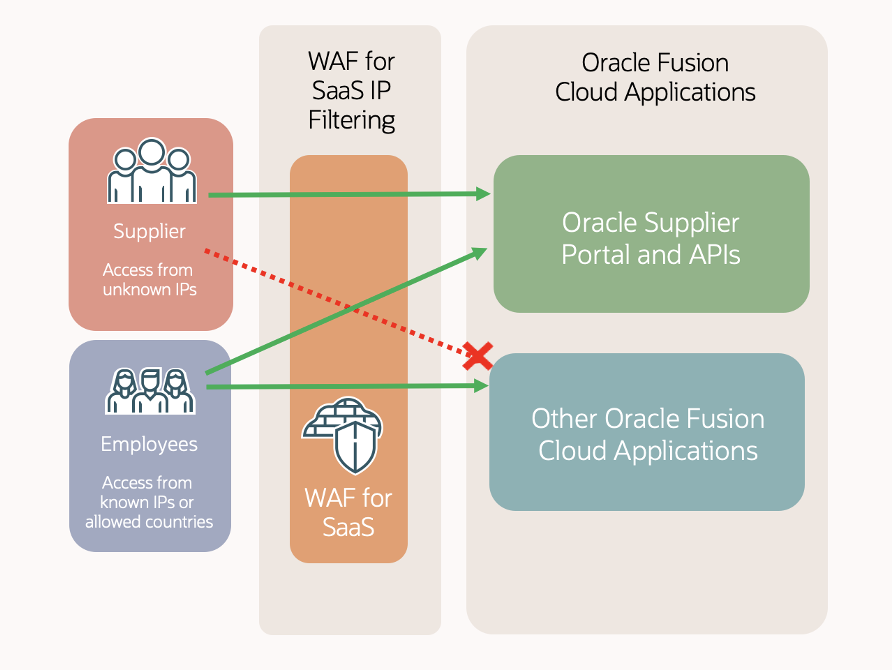
Configuring IP Filtering for Oracle Fusion Cloud with Supplier Portal
To enable IP filtering with WAF for SaaS while excluding the Supplier Portal, submit a Service Request specifying the required configurations. Simply specify the Classless Inter-Domain Routing (CIDR) ranges that should be allowed full system access and designate Oracle Supplier Portal as a qualified target for exclusion.
Example Configuration:
Allow CIDR <192.134.0.0/29, 192.158.129.23/17>
Qualified Target <Oracle Supplier Portal>
This configuration helps ensuring that:
- Only traffic from the specified CIDR ranges (such as corporate networks and VPNs) can fully access Oracle Fusion Applications.The Oracle Supplier Portal remains accessible from any IP address, allowing seamless supplier interactions without requiring a predefined IP.
Restricting Traffic by Geographic Location
For additionally security, access to the Supplier Portal can also be restricted by geographic location. This approach is particularly useful when organizations aim to limit supplier access to specific regions or countries.
Example: Restricting Supplier Portal access to the United Arab Emirates (UAE):
Qualified Target <Oracle Supplier Portal>
Allow Country <AE>
WAF for SaaS supports filtering based on ISO 2-character country codes, offering the flexibility to define access policies by country or region. This capability helps ensure secure internal traffic management while maintaining controlled access for suppliers.
Enforcing Multi-Factor Authentication (MFA)
In addition to IP-based access controls, enabling Multi-Factor Authentication (MFA) for all user accounts, with a particular emphasis on supplier accounts, is strongly recommended. Since supplier accounts often remain outside an organization’s direct control, they pose a higher security risk. Enforcing MFA adds an essential layer of security, reducing unauthorized access and potential threats.
For more security, MFA can be configured with a separate identity store for Supplier Portal users, providing an extra level of authentication before granting access. A detailed guide on setting up MFA for Supplier Portal users is available here.
Conclusion
By implementing IP-based filtering, configuring Supplier Portal exclusions, and enforcing MFA, organizations can further fortify the security of their Oracle Fusion Cloud Suite environment while maintaining accessibility for suppliers. These best practices complement existing security measures, helping organizations ensure that suppliers have the necessary access for optimal business operations while safeguarding sensitive internal resources.
For additional information on how to enhance your setup or to request specific services, check out these resources:
How To Request for WAF for SaaS IP Based Access Control? (Doc ID 2969290.1)
How to Submit a Technical Service Request for WAF for SaaS? (Doc ID 2969373.1)