
Build a cost-optimized, highly available SQL Server Failover Cluster Instance on Oracle Cloud Infrastructure (OCI) using SQL Server Standard Edition, Windows Server Failover Clustering, and shared OCI Block Volumes.
Why Standard Edition FCI on OCI?
High availability for SQL Server does not always require SQL Server Enterprise Edition. SQL Server Standard Edition supports a two-node Failover Cluster Instance (FCI), providing automatic instance-level failover, zero data loss with shared storage, and a single SQL Server network name for applications.
This pattern fits workloads that need high availability without Enterprise-only features such as readable secondaries, online index rebuilds, advanced compression, or large-scale availability group designs. Combined with OCI flexible compute, OCI Block Volumes, and private networking, this architecture delivers a resilient SQL Server platform while controlling licensing and infrastructure costs.
| Item | Enterprise Edition | Standard Edition |
|---|---|---|
| Example SQL Server 2022 list price (16 cores, before discounts) | ~$120,984 | ~$31,560 |
| FCI support | Yes | Yes, up to two nodes |
| Approximate license savings | — | ~$89,424 (about 74%) |
With a properly licensed SQL Server FCI, the passive node may be covered for failover use when the required licensing and Software Assurance rules are met. Licensing rules vary by agreement, version, deployment model, and mobility rights. Validate the final licensing position with Microsoft or a qualified licensing specialist before production use.
Additional benefits on OCI
First, OCI provides up to 10 TB of outbound data transfer per month at no charge — a significant savings
Second, each OCI OCPU represents a physical CPU core with two hardware threads, equivalent to two vCPUs, this means a 4-OCPU shape delivers 8 vCPUs of processing power, and because Microsoft licenses SQL Server per physical core, you license fewer cores on OCI for the same effective compute capacity — directly reducing your SQL Server license cost.
Finally, OCI’s flexible compute shapes allow you to right-size CPU and memory independently — you pay only for what the workload actually needs rather than selecting from fixed instance sizes that often waste resources.
Reference Architecture
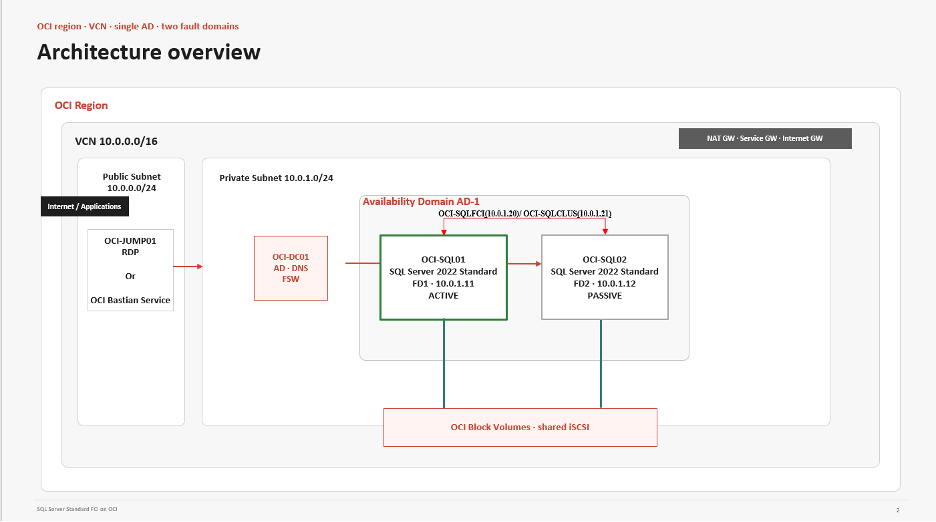
The reference architecture uses one OCI region, one Virtual Cloud Network (VCN), one private subnet for SQL Server and domain services, and two SQL Server nodes placed in separate OCI Fault Domains within the same Availability Domain. Applications connect over private networking. This walkthrough configures the traditional FCI virtual name and then adds a SQL Server Distributed Network Name (DNN) as the preferred application endpoint for cloud-friendly failover.
| Component | Purpose | Example |
|---|---|---|
| OCI-SQL01 | SQL Server FCI node 1 | Private IP 10.0.1.11, Fault Domain 1 |
| OCI-SQL02 | SQL Server FCI node 2 | Private IP 10.0.1.12, Fault Domain 2 |
| OCI-SQLFCI | SQL Server FCI virtual name | Floating secondary private IP 10.0.1.20 |
| OCI-SQLCLUS | Windows cluster name | Floating secondary private IP 10.0.1.21 |
| OCI-DC01 | Active Directory, DNS, witness | Private IP 10.0.1.10 |
During initial FCI configuration, applications can connect to the SQL Server FCI DNS name (for example, OCI-SQLFCI), not directly to the physical nodes. After configuring the DNN later in this guide, update application connection strings to use OCI-SQLFCI-DNN with MultiSubnetFailover=True.
Network and Security Requirements
Use Network Security Groups (NSGs) or security lists to restrict traffic to required sources. Tighten source CIDRs to your application, management, domain, and storage access paths.
| Traffic Type | Protocol and Port | Notes |
|---|---|---|
| SQL Server client | TCP 1433 (or custom) | From private app networks to the SQL FCI virtual IP. |
| RDP administration | TCP 3389 | Only from OCI Bastion, jump host, or approved private networks. |
| Cluster communication | TCP/UDP 3343 | Between SQL nodes. |
| Windows RPC | TCP 135, dynamic RPC | Between cluster nodes and approved management hosts. |
| SMB / File Share Witness | TCP 445 | Between cluster nodes and the witness server. |
| DNS, Kerberos, LDAP, GC | TCP/UDP 53, 88, 389; TCP 636, 3268-3269 | Between domain members and domain controllers. |
| iSCSI | TCP 3260 | From SQL nodes to OCI Block Volume iSCSI targets. |
Prerequisites
Before starting, confirm the following: OCI tenancy, compartment, and service limits for compute, networking, and block volumes; a private subnet for SQL Server nodes, domain services, and storage access; an Oracle-published Windows Server 2022 image from OCI Marketplace or platform images; SQL Server Standard Edition installation media; a validated Microsoft licensing model including passive failover rights; Active Directory and DNS reachable through private connectivity; secure administration through OCI Bastion Service, jump host, VPN, or FastConnect; and OCI CLI installed on both SQL nodes to automate OCI secondary private IP reassignment.
Deployment Walkthrough
1. Build the OCI Network Foundation
Create a VCN (e.g., 10.0.0.0/16) and a private subnet (e.g., 10.0.1.0/24) for SQL Server and domain services. Add a NAT Gateway for private outbound patching and a Service Gateway for private access to OCI services. Create separate NSGs for administration, domain services, SQL Server, and application access.
2. Provision the Windows Compute Nodes
Create the Windows servers from the Oracle-published Windows Server 2022 image. Place both SQL Server VMs in the same Availability Domain but in separate Fault Domains (e.g., FD1 and FD2) for hardware-level isolation.
| Server | Subnet | Private IP | Fault Domain |
|---|---|---|---|
| OCI-DC01 | Private subnet | 10.0.1.10 | Any appropriate FD |
| OCI-SQL01 | Private subnet | 10.0.1.11 | FD1 |
| OCI-SQL02 | Private subnet | 10.0.1.12 | FD2 |
Avoid public IP addresses on backend SQL Server nodes. Retrieve the initial Windows administrator password from the OCI Console, connect using OCI Bastion or a jump host, rename the servers, configure DNS to point to the domain controller, and join them to Active Directory.
3. Create Secondary Private IPs for Cluster and SQL FCI
This is a critical OCI-specific step. The Windows Cluster Name and SQL Server FCI Name each require a stable virtual IP address. Create these as secondary private IPs in the same private subnet as the SQL nodes.
| Purpose | Cluster Name | Secondary Private IP |
|---|---|---|
| Windows Cluster IP | OCI-SQLCLUS | 10.0.1.21 |
| SQL Server FCI IP | OCI-SQLFCI | 10.0.1.20 |
In the OCI Console, navigate to Compute > Instances > OCI-SQL01 > Networking > Attached VNICs > Subnet > IP administration > Add reserved IPv4 addresses. Add 10.0.1.20 and 10.0.1.21 as shown below
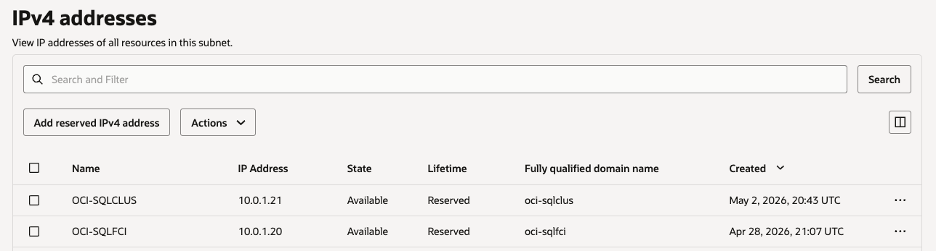
These secondary private IPs are floating service IPs required for the Windows cluster name and the traditional SQL Server FCI virtual name. When the SQL role moves from OCI-SQL01 to OCI-SQL02, OCI must reassign the secondary private IPs to the OCI-SQL02 VNIC so traffic routes correctly to the new active node. When clients use the DNN endpoint later in this guide, application traffic can use node primary IPs instead of depending on the floating SQL FCI IP.
4. Configure Active Directory, DNS, and Quorum
Join both SQL nodes to the same Active Directory domain and confirm DNS health:
nslookup OCI-DC01.sqloci.local
nslookup OCI-SQL01.sqloci.local
nslookup OCI-SQL02.sqloci.local
Test-ComputerSecureChannel -Verbose
Avoid adding service accounts to Domain Admins. In production, either pre-stage the Cluster Name Object and SQL Server network name object, or delegate the minimum required rights to create computer objects in the target OU. For a two-node cluster, use a File Share Witness on a reliable server outside these two SQL nodes.
5. Create, Attach, and Prepare Shared OCI Block Volumes
Create OCI Block Volumes with the Enable Reservations option for SQL data, SQL logs, TempDB, backups, and an optional quorum disk if you are not using a File Share Witness. Attach each volume to both SQL nodes using the options below:
- Type – iSCSI
- Read/Write – Shareable access mode. (Key to access from both nodes)
| Drive | Purpose | Guidance |
|---|---|---|
| D: | SQL data files | 64 KB allocation unit. Select performance based on I/O profile. |
| L: | SQL transaction logs | 64 KB allocation unit. Prioritize low latency and write throughput. |
| T: | TempDB | Size for workload demand. Validate layout against operational standards. |
| B: | SQL backups | Balanced performance. Consider backing up to OCI Object Storage. |
| Q: | Optional quorum disk | Usually not required when using a File Share Witness. |
Each node receives its own attachment information and iSCSI commands. Run the OCI-provided iSCSI commands on the matching node — do not reuse commands from OCI-SQL01 on OCI-SQL02 unless the portal and IQN values are confirmed identical. Verify the sessions:

After you copy the command from the OCI Console, run it in an elevated PowerShell session.
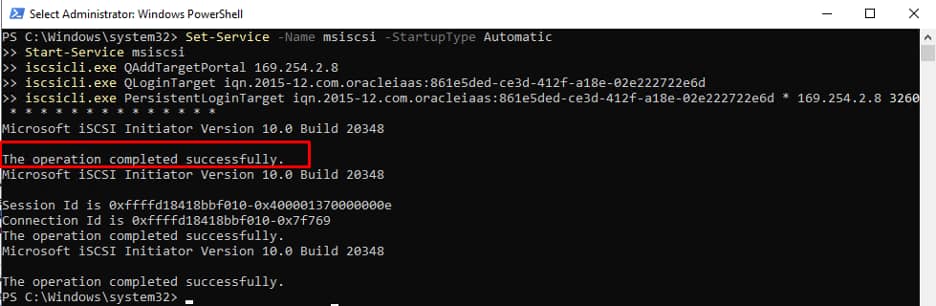
Get-IscsiSession
Get-Disk | Sort-Object Number | Format-Table Number, FriendlyName, OperationalStatus, PartitionStyle, Size
Initialize and format the shared disks on OCI-SQL01 only for now.

Repeat the disk attachment on OCI-SQL02, confirm the disks are visible, and keep them offline until the cluster owns them on OCI-SQL02:
Get-Disk | Sort-Object Number | Format-Table Number, FriendlyName, OperationalStatus, PartitionStyle, Size
Get-Volume | Format-Table DriveLetter, FileSystemLabel, FileSystem, SizeRemaining, Size

# Keep shared disks offline on the non-owner node before cluster validation.
Get-Disk | Where-Object IsSystem -eq $false | Set-Disk -IsOffline $true
Add disks to the cluster by using Add Disk in Failover Cluster Manager.
6. Install and Validate Windows Server Failover Clustering
Install the Failover Clustering feature on both SQL nodes:
Install-WindowsFeature -Name Failover-Clustering -IncludeManagementTools -IncludeAllSubFeatureValidate and create the cluster using the commands below, or use Failover Cluster Manager.
Test-Cluster -Node 'OCI-SQL01', 'OCI-SQL02'

New-Cluster -Name 'OCI-SQLCLUS' `
    -Node 'OCI-SQL01', 'OCI-SQL02' `
    -StaticAddress 10.0.1.21 `
    -NoStorage
Add cluster disks and configure the File Share Witness. You can get this share path from any reliable server outside these two SQL nodes, then add it from Failover Cluster Manager.
Select File Share Witness, or run the command below. Grant the Cluster Name Object (OCI-SQLCLUS) Full Control on the shared folder.
Set-ClusterQuorum -NodeAndFileShareMajority '\\OCI-DC01\ClusterWitness'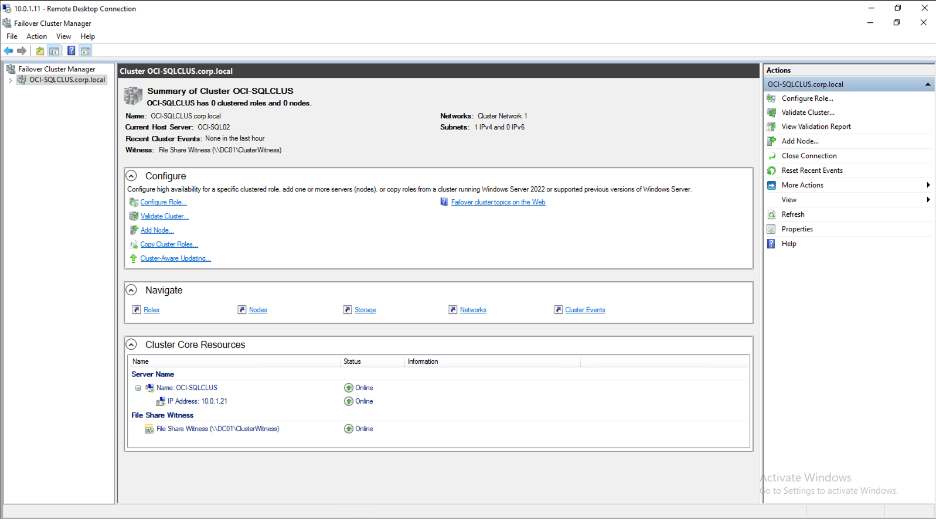
7. Install SQL Server Standard Edition FCI
On OCI-SQL01, run SQL Server Setup as administrator and choose New SQL Server failover cluster installation. Select the appropriate edition, use OCI-SQLFCI as the network name, enter 10.0.1.20 as the FCI IP when prompted, select the clustered disks, and finish setup. Example directory layout: D:\MSSQL\Data, L:\MSSQL\Log, T:\MSSQL\TempDB, B:\MSSQL\Backup. On OCI-SQL02, run Setup and choose Add node to a SQL Server failover cluster.
8. SQL Server Distributed Network Name (DNN) Setup
The Distributed Network Name (DNN) is the preferred client endpoint for SQL Server Failover Cluster Instances in cloud environments. Unlike a traditional SQL Server virtual network name (VNN), which depends on a floating virtual IP address, DNN registers the cluster name against node primary IPs. On OCI, this reduces the client-side dependency on secondary private IP reassignment and custom failover scripts. In this example, OCI-SQLFCI-DNN is the DNN that applications use for SQL Server connections.
Prerequisites
- Windows Server 2019 or later on all cluster nodes
- SQL Server 2019 CU2 or later
- Failover Cluster fully configured with SQL FCI installed
- Active Directory access with permissions to create computer objects
Step 1 — Pre-stage the DNN Computer Object in Active Directory
Run on DC01 as Domain Admin:
# Create DNN computer object in AD - must be disabled initially
New-ADComputer `
-Name "OCI-SQLFCI-DNN" `
-Path "OU=Clusters,DC=corp,DC=local" `
-Enabled $false
# Grant CNO (Cluster Name Object) Full Control over DNN object
$cno = Get-ADComputer -Identity "OCI-SQLCLUS"
$dnn = Get-ADComputer -Identity "OCI-SQLFCI-DNN"
$acl = Get-Acl "AD:$($dnn.DistinguishedName)"
$ace = New-Object System.DirectoryServices.ActiveDirectoryAccessRule(
$cno.SID,
[System.DirectoryServices.ActiveDirectoryRights]::GenericAll,
[System.Security.AccessControl.AccessControlType]::Allow
)
$acl.AddAccessRule($ace)
Set-Acl -Path "AD:$($dnn.DistinguishedName)" -AclObject $acl
# Verify
Get-ADComputer -Identity "OCI-SQLFCI-DNN" |
Select Name, Enabled, DistinguishedName
Step 2 — Create and Configure the DNN Resource
Run on OCI-SQL01 (active cluster node) as Domain Admin:
Import-Module FailoverClusters
# Step 2a - Add DNN resource to SQL Server role
Add-ClusterResource `
-Name "OCI-SQLFCI-DNN" `
-ResourceType "Distributed Network Name" `
-Group "SQL Server (MSSQLSERVER)"
# Step 2b - Set the DNN DNS name
Set-ClusterParameter `
-InputObject (Get-ClusterResource "OCI-SQLFCI-DNN") `
-Name "DnsName" `
-Value "OCI-SQLFCI-DNN"
# Step 2c - Set low TTL for fast failover (30 seconds recommended for cloud)
Set-ClusterParameter `
-InputObject (Get-ClusterResource "OCI-SQLFCI-DNN") `
-Name "HostRecordTTL" `
-Value 30
# Step 2d - Take SQL Server offline to add dependency
Stop-ClusterResource "SQL Server Agent" -ErrorAction SilentlyContinue
Stop-ClusterResource "SQL Server"
# Step 2e - Make SQL Server depend on DNN
Add-ClusterResourceDependency `
-Resource "SQL Server" `
-Provider "OCI-SQLFCI-DNN"
# Step 2f - Bring DNN online first
Start-ClusterResource "OCI-SQLFCI-DNN"
Start-Sleep -Seconds 10
# Step 2g - Bring SQL Server back online
Start-ClusterResource "SQL Server"
Start-ClusterResource "SQL Server Agent"
Start-Sleep -Seconds 10
# Verify all resources online
Get-ClusterResource |
Where-Object {$_.OwnerGroup -eq "SQL Server (MSSQLSERVER)"} |
Select Name, State | Format-Table -AutoSize
Step 3 — Verify DNN Registration
Run on DC01:
# Verify DNS records registered for DNN
Get-DnsServerResourceRecord -ZoneName "corp.local" -Name "OCI-SQLFCI-DNN" |
ForEach-Object { $_.RecordData.IPv4Address.IPAddressToString }
# Verify AD object initialized by cluster
Get-ADComputer -Identity "OCI-SQLFCI-DNN" `
-Properties Description, Enabled, PasswordLastSet |
Select Name, Enabled, Description, PasswordLastSet
Expected Output
10.0.1.11   # OCI-SQL01 primary IP
10.0.1.12   # OCI-SQL02 primary IP
Name Enabled Description PasswordLastSet
---- ------- ----------- -----------
OCI-SQLFCI-DNN True Failover cluster virtual network name 4/29/2026 Step 4 — Test Connectivity
Run from any client or cluster node:
# Test port 1433
Test-NetConnection -ComputerName "OCI-SQLFCI-DNN" -Port 1433
# Test SQL connection
sqlcmd -S "OCI-SQLFCI-DNN" -Q "SELECT @@SERVERNAME, GETDATE()" -l 10
# Check DNS resolution
Resolve-DnsName "OCI-SQLFCI-DNN"
Step 5 — Test Failover
# Failover to OCI-SQL02
Move-ClusterGroup -Name "SQL Server (MSSQLSERVER)" -Node "OCI-SQL02"
Start-Sleep -Seconds 20
# Flush DNS cache on client
Clear-DnsClientCache
# Test connectivity on new node
Test-NetConnection -ComputerName "OCI-SQLFCI-DNN" -Port 1433
sqlcmd -S "OCI-SQLFCI-DNN" -Q "SELECT @@SERVERNAME, GETDATE()" -l 10
Resolve-DnsName "OCI-SQLFCI-DNN"
# Failback to OCI-SQL01
Move-ClusterGroup -Name "SQL Server (MSSQLSERVER)" -Node "OCI-SQL01"
How DNN Works During Failover
| State | Behavior |
|---|---|
| Normal (SQL01 active) | OCI-SQLFCI-DNN resolves to the SQL node primary IPs. Client drivers using MultiSubnetFailover=True connect to the active node. |
| Failover triggered | Cluster moves the SQL role to OCI-SQL02. DNN remains registered against node primary IPs, and clients reconnect to the current owner. |
| After failover | Clients retry using OCI-SQLFCI-DNN and MultiSubnetFailover=True. SQL connections resume against OCI-SQL02. |
| No scripts needed | No VNIC assignment or custom client failover script is required for DNN-based application connections. |
Client Connection Strings
Update all application connection strings to use the DNN name:
# SQL Server connection string
Server=OCI-SQLFCI-DNN;Database=YourDatabase;Integrated Security=true;MultiSubnetFailover=True;
# With port explicitly specified
Server=OCI-SQLFCI-DNN,1433;Database=YourDatabase;Integrated Security=true;MultiSubnetFailover=True;
# ODBC
Driver={ODBC Driver 17 for SQL Server};Server=OCI-SQLFCI-DNN;Database=YourDatabase;Trusted_Connection=yes;MultiSubnetFailover=Yes;
Note: Replace names, domains, and OUs for your environment. Keep MultiSubnetFailover enabled for supported client drivers.
9. Validate Failover and Client Connectivity
Connect to the selected endpoint and verify the active node from SSMS:
SELECT SERVERPROPERTY('ServerName') AS FCIName;
SELECT SERVERPROPERTY('MachineName') AS CurrentOwnerNode;
SELECT SERVERPROPERTY('ComputerNamePhysicalNetBIOS') AS PhysicalNode;
SELECT SERVERPROPERTY('IsClustered') AS IsClustered;
SELECT SERVERPROPERTY('Edition') AS Edition;
SELECT * FROM sys.dm_os_cluster_nodes;
Perform a controlled failover test:
Get-ClusterGroup | Format-Table Name, OwnerNode, State
Move-ClusterGroup 'SQL Server (MSSQLSERVER)' -Node 'OCI-SQL02'
Validation Checklist
| Check | Expected Result |
|---|---|
| OCI-SQLFCI DNS resolution | Resolves to the private SQL Server FCI IP when using the traditional VNN path |
| OCI-SQLCLUS DNS resolution | Resolves to the Windows Cluster IP |
| OCI secondary private IPs | Associated with the active node’s VNIC after failover |
| Client connectivity | SSMS and applications connect using the DNN name, or the FCI name if you intentionally keep the traditional VNN path |
| Cluster validation | Completes with no blocking errors |
| SQL Server role movement | Moves successfully between OCI-SQL01 and OCI-SQL02 |
| Data integrity | Test database data remains intact after failover |
| Application reconnection | Applications reconnect using retry logic and MultiSubnetFailover=True where supported |
| Backup and restore | SQL backups complete and restore tests succeed |
| Monitoring | CPU, memory, disk latency, IOPS, cluster events, and SQL errors monitored |
Cost and Licensing Notes
The main cost advantage of this pattern is targeting SQL Server Standard Edition for workloads that do not need Enterprise-only features. OCI flexible shapes also allow compute and memory to be right-sized for the workload. Use the OCI Cost Estimator and current Microsoft SQL Server pricing for exact region, shape, storage tier, backup policy, and licensing assumptions. Confirm SQL Server passive failover rights, Software Assurance requirements, mobility rights, and virtualization rules with a licensing specialist. Right-size storage performance by workload profile: log volumes usually need lower latency than backup volumes. Use OCI Bastion Service where possible to avoid maintaining a permanent jump VM.
Troubleshooting Tips
| Issue | What to Check |
|---|---|
| Cluster validation reports storage issues | Confirm iSCSI shareable attachment mode, persistent sessions, MPIO settings, and disk ownership. |
| SQL Server FCI name does not come online | Check DNS, Active Directory computer object permissions, and cluster name object permissions. |
| Applications fail after failover | Confirm connection strings use the DNN name with MultiSubnetFailover=True, or the FCI name if you intentionally keep the traditional VNN path. |
| Traffic still goes to the previous node | For traditional VNN connections, confirm OCI secondary private IPs moved to the active node VNIC. For DNN connections, verify DNS and client retry behavior. |
| Failover takes longer than expected | Review SQL Server crash recovery, Windows cluster logs, and storage latency. |
| DNS resolution fails | Verify DNS client settings, A records, reverse lookup, and TTL values. |
| iSCSI disks disappear after reboot | Re-run OCI-provided iSCSI commands and confirm sessions are persistent. |
Conclusion
A two-node SQL Server Standard Edition FCI on OCI is a practical high availability pattern for many SQL Server workloads. By placing nodes in separate Fault Domains within the same Availability Domain, using shared OCI Block Volumes, creating OCI secondary private IPs where traditional virtual names require them, and adding a DNN as the preferred client endpoint, the design stays resilient and cost-conscious without unnecessary complexity.