


Generative AI applications often receive requests that are different in wording but identical in meaning. Without caching, each request can result in another call to a large language model (LLM), increasing latency and inference cost.
Semantic caching addresses this by comparing the meaning of a new request with previously cached requests. When a sufficiently similar request is found, the application can reuse the cached response instead of invoking the LLM again.
OCI Cache supports vector-based semantic caching today with Valkey 8.1 and Valkey Search 1.0.1, without requiring additional product changes.
Applications can use HNSW/KNN similarity search to find semantically similar cached prompts, with optional metadata filtering, while retaining control over embedding generation, similarity thresholds, and LLM orchestration.
How semantic caching works
Traditional caches generally require an exact key match. Semantic caching instead represents prompts as embedding vectors and compares those vectors using similarity search.
Consider these two requests:
What is the capital of France?
and:
What is France’s capital city?
The text is different, but the intent is the same.
With semantic caching, an application generates an embedding for the incoming prompt and searches OCI Cache for semantically similar cached prompts. If the closest match exceeds the application’s similarity threshold, the cached response can be returned immediately.
The overall flow looks like this:
Create vector index → Generate embedding → Search for similar cached prompt → Apply similarity threshold → Cache HIT or MISS
On a cache hit, the application returns the stored response. On a miss, it calls the LLM and stores the new prompt, response, metadata, and embedding for future requests.
What OCI Cache supports today
OCI Cache with Valkey 8.1 includes Valkey Search 1.0.1 and provides the core capabilities required for vector-based semantic caching:
- HNSW/KNN vector similarity search over embedding vectors.
- Semantic matching of exact and paraphrased prompts through embedding similarity.
- TAG and NUMERIC metadata filtering together with vector KNN search.
- HASH and JSON storage models for semantic-cache entries.
- Non-sharded and sharded vector search , including cross-shard vector retrieval.
Applications can combine these capabilities with standard Valkey operations to implement similarity-threshold-based cache decisions, read-through semantic caching, TTL-based expiration, explicit eviction, and tenant isolation or namespace-scoped retrieval.
Application and OCI Cache responsibilities
Semantic caching combines application-level AI logic with OCI Cache vector-search capabilities.
The application:
- Generates embeddings for incoming prompts.
- Defines the similarity threshold for determining a cache hit.
- Calls the LLM when a sufficiently similar cached response is not found.
OCI Cache:
- Stores prompts, responses, metadata, and embeddings.
- Maintains the HNSW vector index.
- Performs KNN vector similarity search.
- Optionally filters candidates using TAG or NUMERIC metadata.
This separation lets applications choose the embedding model, similarity policy, and LLM that best fit their use case while using OCI Cache as the low-latency storage and vector-retrieval layer.
Semantic cache request flow
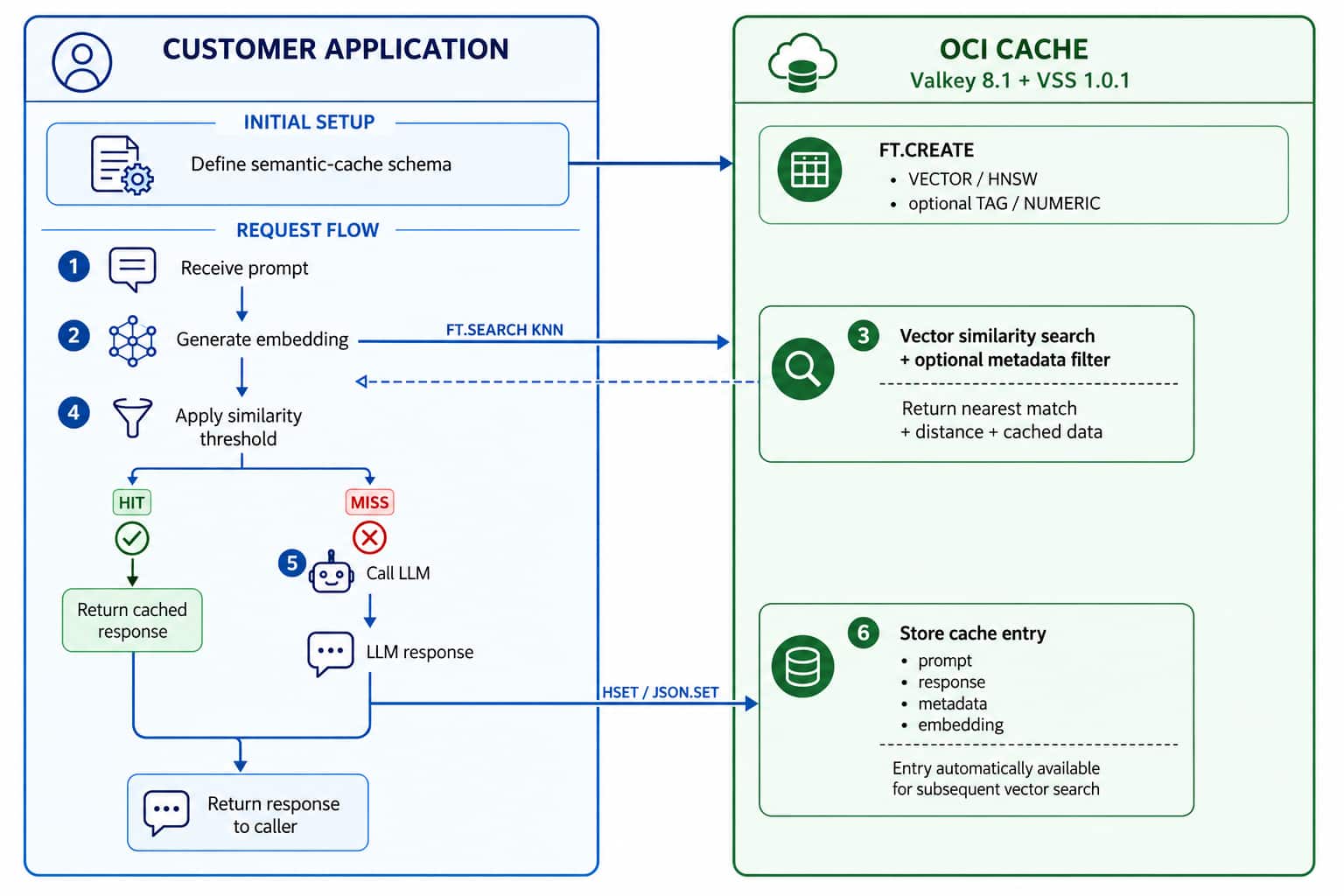
During initial setup, the application creates a Search index containing a VECTOR field and, optionally, TAG or NUMERIC metadata fields.
For each request:
- The application receives a prompt and generates its embedding.
- The application sends the embedding to OCI Cache using a KNN vector search.
- OCI Cache returns the closest cached match and its vector distance.
- The application evaluates that distance against its configured similarity threshold.
- On a HIT , the cached response is returned.
- On a MISS , the application invokes the LLM and stores the resulting prompt, response, metadata, and embedding in OCI Cache.
The newly stored entry becomes available for subsequent vector searches.
A simple example
Suppose the cache contains:
- Prompt: What is the capital of France?
- Response: Paris is the capital of France.
- Category: geography
The application generates a 384-dimensional FLOAT32 embedding and stores it with the cached response.
A HASH-based Search index can be created as follows:
FT.CREATE semcache_hash
ON HASH
PREFIX 1 semcache:h:
SCHEMA
    category TAG
    embedding VECTOR HNSW 6
        TYPE FLOAT32
        DIM 384
        DISTANCE_METRIC COSINE
The application stores the cache entry:
HSET semcache:h:1 \
    prompt "What is the capital of France?" \
    response "Paris is the capital of France." \
    category "geography" \
    embedding <384-dimensional-float32-vector>
When the application later receives:
What is France’s capital city?
it generates a new embedding and performs a KNN search:
FT.SEARCH semcache_hash \
    "*=>[KNN 1 @embedding $vec AS score]" \
    PARAMS 2 vec <query-vector> \
    RETURN 3 prompt response score \
    DIALECT 2
Suppose OCI Cache returns a cosine distance of 0.0535.
The application can convert that to similarity:
similarity = 1.0 – 0.0535 = 0.9465
With a configured similarity threshold of 0.8, this request is a semantic-cache HIT, and the application can return the cached response without another LLM invocation.
The same pattern can be implemented with JSON documents instead of HASH records.
Filter semantic searches with metadata
Applications can also restrict semantic retrieval using metadata.
For example, to search only cached entries in the geography category:
FT.SEARCH semcache_hash \
    "@category:{geography}=>[KNN 3 @embedding $vec AS score]" \
    PARAMS 2 vec <query-vector> \
    RETURN 3 prompt response score \
    DIALECT 2
This can be useful for tenant isolation, namespaces, application domains, content categories, or other application-defined boundaries.
Plan for Search capacity
Vector Search requires additional memory for the HNSW index on top of the underlying HASH or JSON data.
The following values are starting points rather than fixed requirements. As an initial sizing guideline, plan for approximately 2× the existing memory requirement for HASH workloads and 1.2× for JSON workloads when enabling Vector Search.
Actual memory usage depends on your data, vector dimensions, Search configuration, and workload characteristics. Workloads with frequent expiration, deletion, or replacement of indexed vectors should maintain additional memory headroom.
Validate sizing with representative application data before production deployment.
Current Search boundaries
The Search capabilities available with OCI Cache today are focused on vector-based retrieval.
Full-text and lexical search, standalone TAG or NUMERIC secondary-index queries, lexical + vector hybrid search, FT.AGGREGATE, SKIPINITIALSCAN, and SORTBY in FT.SEARCH are not currently supported.
These limitations do not prevent the core semantic-caching workflow described above. Applications can use vector similarity search together with metadata filtering to identify and reuse semantically similar cached responses.
What’s next
OCI Cache plans to expand Search support with Valkey 9.x and newer Valkey Search capabilities. This will address the current Search limitations described above and extend OCI Cache beyond vector-focused retrieval with capabilities such as full-text search, standalone secondary-index queries, lexical + vector hybrid search, aggregation, and additional query functionality.
The vector-based semantic caching available today provides the foundation for these broader Search capabilities.
Get started
Semantic caching can help generative AI applications reduce unnecessary LLM calls and improve response latency by reusing responses for semantically equivalent requests.
OCI Cache with Valkey 8.1 provides the vector indexing, KNN similarity search, metadata filtering, and distributed retrieval capabilities needed to support this pattern today.
Applications remain in control of their embedding model, similarity threshold, and LLM orchestration while OCI Cache provides the low-latency storage and vector-search layer.
To get started, create an OCI Cache Valkey 8.1 cluster and use Valkey Search to create a vector index over your semantic-cache data.