
In the first part we have covered Vector Similarity Search. Now we will deep dive into Semantic Caching. What is Semantic Caching? Semantic caching stores and reuses results based on the meaning of a query rather than exact wording. It typically compares embeddings of a new request against previous requests, and if they are similar enough, returns the cached response. This can make AI systems faster and cheaper, but it needs careful thresholds so it doesn’t return an answer for a query that only seems similar.
But before exploring semantic caching, it is worth reviewing a few foundational concepts. While semantic caching can reduce cost, improve latency, and help scale LLM-powered applications if it is implemented incorrectly, it can also do the opposite: waste money, return inaccurate information, and create confusing behavior for users. To use semantic caching well, we need to understand:
- Traditional caching
- Vector similarity search
- Vector distance metrics
- Approximate nearest neighbor search
- How this maps to Valkey and LLM applications
Traditional Caching
Let’s start with regular caching. Why do we use caching? Usually, we want to avoid repeating expensive or slow work. For example, we may need to reduce load on a database because SQL queries are slow, or we may be calling a third-party API that adds latency and costs money per request. A typical caching flow looks like this:
- Take user input.
- Generate a unique cache key, often using a hash function.
- Check whether that key exists in the cache.
- If the key exists, return the cached value.
- If the key does not exist, run the original operation.
- Store the result in the cache with an appropriate TTL (time to live, controls how long a cached value remains valid before it expires.).
This gives us flexibility. Some data can safely be cached for many hours. Other, more volatile data should only be cached for a few minutes.
The Accuracy Tradeoff
Caching always creates a tradeoff between performance and freshness. The longer we cache data, the faster and cheaper our system may become. But the longer we cache data, the more likely it is to become stale. For example, imagine we query a third-party API for the current weather in a specific city. That information may be accurate for several minutes, or maybe up to an hour. But if we cache it for several days, it will obviously become inaccurate.
So caching is not just about storing data. It is about deciding how long that data can safely be reused. This becomes even more important with semantic caching because we are no longer only asking, “Have I seen this exact request before?” We are asking, “Have I seen something similar enough that the previous answer is still valid?”
Semantic Caching
Now we can connect these concepts to semantic caching.
Traditional caching asks: Have I seen this exact request before?
Semantic caching asks: Have I seen a semantically similar request before, and is the previous answer still valid?
A typical semantic caching flow looks like this:
- Generate an vector for the user input by calling LLM.
- Run vector similarity search to find similar previous requests.
- If a vector match is found, check for corresponding cached content.
- If cached content exists and is still valid, return it.
- If no cached content exists, query the LLM and cache the response.
- If no vector match is found, store the new vector, query the LLM, and cache the response.
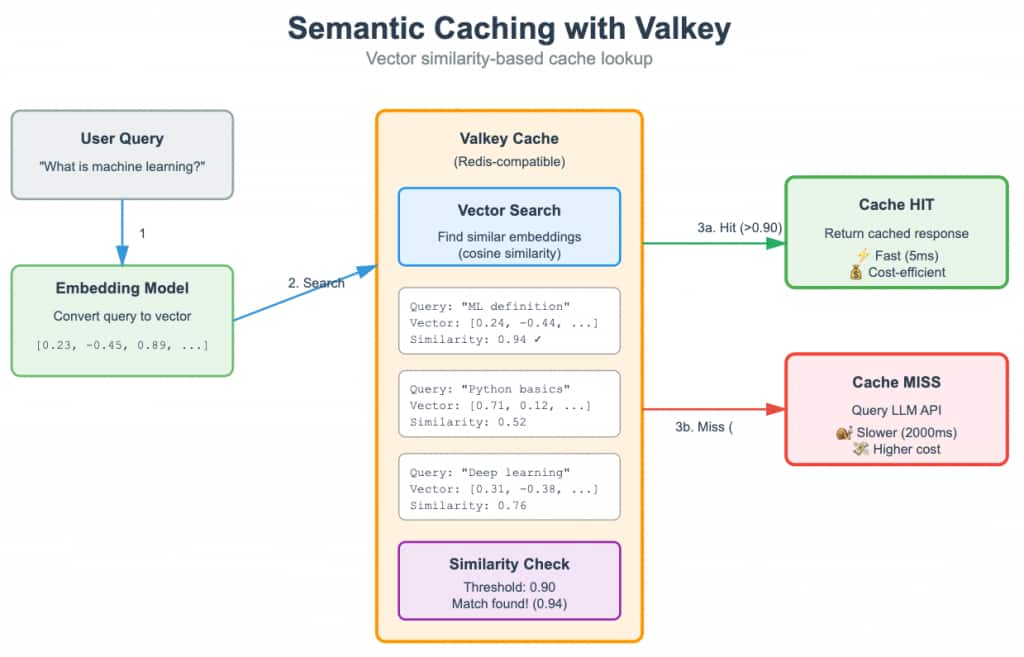
In the diagram, the query “What is machine learning?” has three possible cached matches. The strongest match is “ML definition,” with a similarity score of 0.94, so it would be returned if our similarity threshold (how numerically close the vectors are) were 0.90. If that entry did not exist, the search would not return anything at the 0.90 threshold because none of the remaining results are similar enough.
If we lowered the threshold to 0.75, the cache could return “Deep learning,” which has a similarity score of 0.76. If that entry were also unavailable, we could lower the threshold further to 0.50, at which point “Python basics,” with a similarity score of 0.52, might be returned. This demonstrates the tradeoff in semantic caching: a high threshold gives more accurate matches but fewer hits, while a lower threshold increases cache hits but may return answers that are less relevant to the original query.
In Valkey, the data may be stored using Hashes or JSON documents. Conceptually, it may look like this:
key1:
vector: [...]
cache_value: ...
optional_field1: ...
key2:
vector: [...]
cache_value: ...
optional_field1: ...
The vector allows us to find semantically similar requests. The cached value allows us to reuse a previous response.
Why Semantic Caching Matters
Running inference queries against LLMs is expensive and slow. But using LLMs to generate embeddings is relatively cheap. We are trying to minimize producing a full LLM inference response, especially with larger models.
A rough cost pattern looks like this:
Embedding generation: low cost per million tokensLLM generation: much higher cost per million tokens
Semantic caching lets us trade some memory and vector search infrastructure for fewer LLM calls. This can be especially valuable in agentic architectures. In a single-agent application, one user request may call the LLM once or a few times. In a multi-agent application, one user request may trigger many LLM calls across planners, tools, reviewers, summarizers, and specialized agents. Without caching, costs can grow quickly. Semantic caching can help reduce repeated work across these systems.
Pros and Cons of Semantic Caching
Semantic caching has several major benefits:
- Significant cost savings on LLM calls
- Lower latency for repeated or similar requests
- Reduced load on GPU-backed LLM infrastructure
- Better scalability for agentic applications
- Ability to reuse previous answers even when wording changes
But it also has to be implemented correct in order to work:
- Similar questions may still require different answers
- Similarity thresholds can be difficult to tune
- Some data is too dynamic or user-specific to cache safely
Token reduction
Semantic caching reduces token usage roughly in proportion to your cache hit rate. Simple rule: token reduction ≈ cache hit rate × tokens avoided per hit
If a cache hit lets you skip the LLM call entirely, then:
- 20% hit rate → about 20% fewer LLM tokens
- 50% hit rate → about 50% fewer LLM tokens
- 70% hit rate → about 70% fewer LLM tokens
In practice, semantic caching often saves the most when users ask many repeated or near-duplicate questions, like support bots, docs Q&A, internal assistants, or product search. For example:
Normal request: 4,000 input tokens + 800 output tokens = 4,800 tokens
Semantic cache hit: only embedding/search cost, no LLM response
Hit rate: 40%
Approximage savings: 40% of 4,800 = 1,920 tokens/request on average
So the answer is: it can reduce token usage anywhere from almost nothing to 80%+, but a realistic useful range is often 20-60% if your traffic has repeated intent.
Common Use Cases:
- Chatbots/RAG: High repetition scenarios.
- Customer Support: Reusing answers to common questions.
- Agentic Workflows: Reducing repeated computation in agents.
There is also benefit of Latency Improvement. Semantic caching can improve response times by ~97% (from ~1.67s to ~0.052s) for cached queries. With hit rate of 40% that can be significant as well.
When Not to Use Semantic Caching
Semantic caching is not always appropriate. Avoid or be very careful with semantic caching when:
- Data changes rapidly
- The answer depends on real-time information
- The answer depends on user permissions or identity
- The data is unlikely to be requested again
- The dataset is sparse and similarity matches are unreliable
For example, these two questions are semantically similar:
What is the weather in Seattle today?What is the weather in Seattle tomorrow?
But they should not return the same cached answer.
Similarly:
What is my account balance?What is John’s account balance?
These may look structurally similar, but they must never share cached responses across users.
Semantic Caching with Valkey Search
Valkey Search can support semantic caching by combining cache storage and vector search in one system. Some advantages include:
- Fast lookups
- Support for Hash and JSON storage
- Vector database and cache in one place
- Ability to index selected fields automatically
- Querying with FT.SEARCH
There are also tradeoffs:
- Vector indexes can consume significant RAM
- HNSW memory usage can be high
- Operational complexity depends on infrastructure
- Managed support may depend on your cloud vendor
- Running your own infrastructure requires careful sizing and monitoring
A common Valkey Search workflow is:
- Create an HNSW index using FT.CREATE.
- Make sure vector dimensions match the embedding model output.
- Insert data as Hashes or JSON documents.
- Store vectors as bytes using LITTLE_ENDIAN format.
- Let Valkey Search index the configured vector field.
- Query the index using FT.SEARCH.
OCI Cache service now supports Valkey 8.1 with vector-search module enabling our customers to implement semantic caching for their application.
Conclusion
Semantic caching combines traditional caching with vector similarity search. Instead of only reusing answers for exact matches, it allows us to reuse answers for semantically similar requests. That can produce major savings, especially in LLM and agentic applications. But it also introduces new correctness risks. The key questions are:
- Is this request similar enough to a previous request?
- Is the previous answer still fresh?
- Is it safe to reuse for this user and context?
- What similarity threshold should we use?
- What TTL should the cached response have?
- What data should never be semantically cached?