


For many organizations, restricting Oracle Fusion Cloud access to trusted corporate networks and virtual private networks (VPN) is an important part of their security approach. The challenge is that some business processes also depend on users outside those known networks: suppliers, job applicants, hiring agencies, and billing users may need access to selected self-service experiences.
That creates a practical balance to manage. How can organizations apply stronger Internet Protocol (IP)-based controls to the broader Fusion environment while continuing to support the external users who need a limited, specific experience?
Oracle Web Application Firewall (WAF) for SaaS can help teams apply IP-based filtering before traffic reaches the application. Teams can use Internet IP-based or geolocation-based filtering to allow full access only from trusted networks, such as corporate networks, VPNs, or approved Classless Inter-Domain Routing (CIDR) ranges.
Qualified targets can extend this approach. They can allow selected Fusion experiences to remain accessible from unknown IP addresses, while the broader Fusion environment continues to be protected by Oracle WAF for SaaS IP filtering. This blog summarizes the qualified targets supported today and how teams can use them to balance security and usability.
Robust IP-based Filtering with Oracle WAF for SaaS Qualified Targets
For teams, the value is in applying broader IP-based controls while keeping specific external-facing business processes available when needed.
Oracle WAF for SaaS supports IP-based filtering for Oracle Fusion Cloud Applications. Teams can define approved CIDR ranges so that only trusted networks, such as corporate networks or employee VPNs, can access the broader Fusion environment.
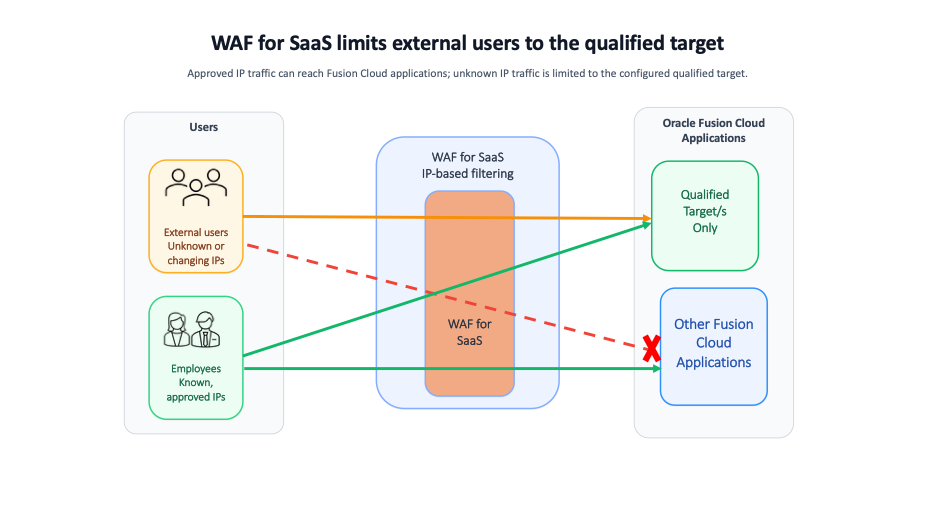
Qualified targets build on this model by helping allow specific Fusion experiences to be excluded from the broader IP restriction. In practical terms, users connecting from unknown IPs can access only the configured qualified target, while the rest of Fusion environment remains subject to Oracle WAF for SaaS IP filtering.
- Users from known, registered IP ranges can access the full Fusion environment based on their roles and privileges.
- Users from unknown IPs are limited to the supported qualified target, such as Supplier Portal, Bill Management, Hiring Agencies, or applicant-facing career pages.
- Authentication and authorization controls remain unchanged, so users can only access what their roles and privileges allow.
Figure 1. How Oracle WAF for SaaS qualified targets control Fusion access
Supported Qualified Targets Today
To support common external-user scenarios without extending broad Fusion access to unknown IP addresses, Oracle WAF for SaaS supports qualified target access for the following external-facing Fusion experiences:
- Oracle Supplier Portal: Allows suppliers to access Supplier Portal from unknown IPs after authentication and approval, while broader Fusion access remains restricted to approved CIDR ranges.
- Oracle Recruiting Cloud: Allows candidates to access career sites and job application flows from unknown IPs while internal Fusion traffic remains restricted to trusted corporate networks or VPNs.
- Fusion Bill Management: Allows external billing users to access Bill Management self-service screens from unknown IPs while other Fusion applications, including Human Capital Management (HCM) and Financials, remain protected.
- Hiring Agencies: Allows external agency users to access designated recruiting-related screens in Fusion HCM from unknown IPs, with access governed by Fusion roles and privileges.
Configuring IP Filtering for Oracle Fusion Cloud
To enable IP filtering with Oracle WAF for SaaS, submit a Service Request (SR) specifying the CIDR ranges that should be allowed full Fusion access and the qualified target to exclude from the overall Fusion IP restriction. This gives Oracle the information needed to apply the requested access model.
Example configuration:
Allow CIDR <192.134.0.0/29, 192.158.129.23/17>
Qualified Target <qualified target name>
With this setup, traffic from approved CIDR ranges can access the broader Fusion environment, while external users from unknown IPs can access only the specified qualified target experience.
Restricting Qualified Target Traffic by Geography
Where external access needs to be limited to specific regions or countries, teams can also apply country-based restrictions for qualified targets.
Example:
Qualified Target <Oracle Supplier Portal>
Allow Country <AE>
Oracle WAF for SaaS supports country-based filtering using ISO two-character country codes, giving teams more flexibility to manage external access while maintaining secure internal traffic controls.
Authentication, Authorization, and Multi-Factor Authentication (MFA)
While qualified targets help define which Fusion experiences can be reached from unknown IP addresses, they do not replace Fusion authentication or authorization controls. External users must still authenticate, and their access continues to be governed by Fusion roles, privileges, and security policies.
For external users, especially suppliers and other users outside the organization’s direct control, enabling MFA is strongly recommended. MFA can add another layer of protection and help reduce the risk of unauthorized access.
Teams may also consider separate identity stores or authentication policies for external user populations where appropriate, such as supplier users or other partner-managed accounts.
Conclusion
Oracle WAF for SaaS qualified targets can help organizations balance security and usability. Organizations can apply IP-based filtering to the broader Oracle Fusion Cloud environment while still allowing specific external-facing experiences to remain accessible from unknown IP addresses.
By combining IP-based filtering, qualified targets, geographic restrictions, and strong authentication controls such as MFA, teams can support suppliers, job applicants, hiring agencies, and Bill Management users without extending broad Fusion access to unknown IP addresses.
For additional information requesting and configuring Oracle WAF for SaaS IP-based access controls, review the following resources: