
When LLM traffic needs inference-aware routing
A conventional load balancer assumes that every healthy backend can handle the next request. That works for interchangeable stateless replicas, where routing decisions can rely on address, port, path, headers, health, and a general algorithm such as round robin or least connections.
LLM serving introduces signals that a conventional load balancer cannot see e.g. which model is requested, how busy each model server is, and whether a server has already cached part of the prompt. Inference-aware routing uses these signals to direct requests to suitable model servers, helping reduce waiting time and repeated prompt processing.
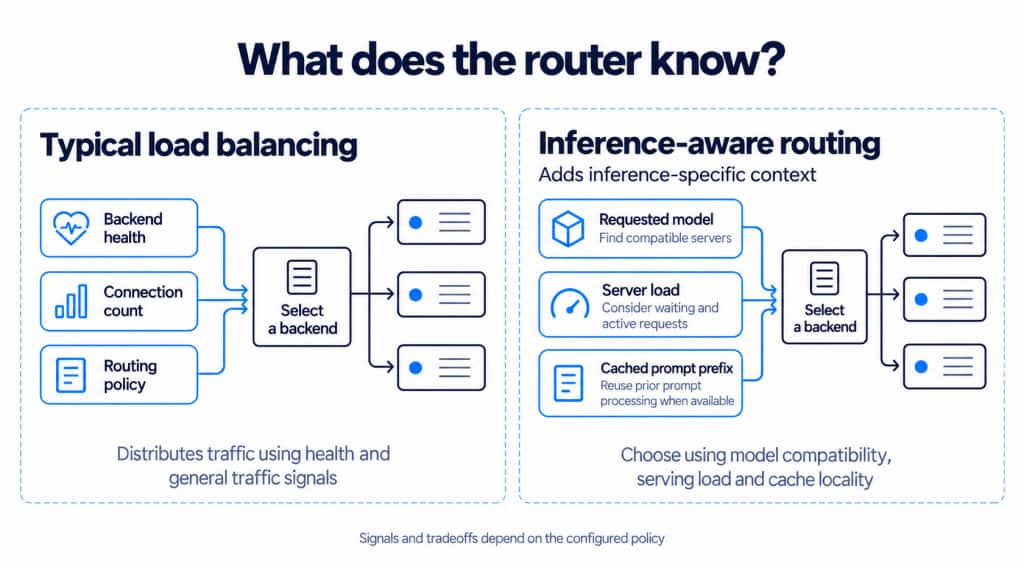
This article is a deployment walkthrough. It combines the existing OCI Kubernetes Engine (OKE) managed Istio add-on with the external Gateway API Inference Extension and llm-d components.
Demonstrating inference-aware routing
To show how inference-aware routing works on OKE, we built a small customer support application behind one public endpoint. A support agent enters a prompt and chooses Standard or Fast for response speed. These demo-specific aliases route requests to separate inference pools serving the same model, Gemma 4 E2B. Standard uses a CPU-backed model server, while Fast uses an NVIDIA A10 GPU-backed model server.
Each inference pool contains one model-server endpoint in this demo. Choosing Standard or Fast selects between the CPU-backed and GPU-backed pools. The walkthrough demonstrates pool selection and the resulting response-time differences; it does not demonstrate load-based selection among multiple replicas within a pool.
The scenario illustrates two response-time needs. An agent helping a customer troubleshoot an issue benefits from a quick response while the customer waits. Background work, such as summarizing a ticket for a later handoff, can tolerate a longer response time. Both use the same model and endpoint; the selected speed option determines which inference pool handles the request.
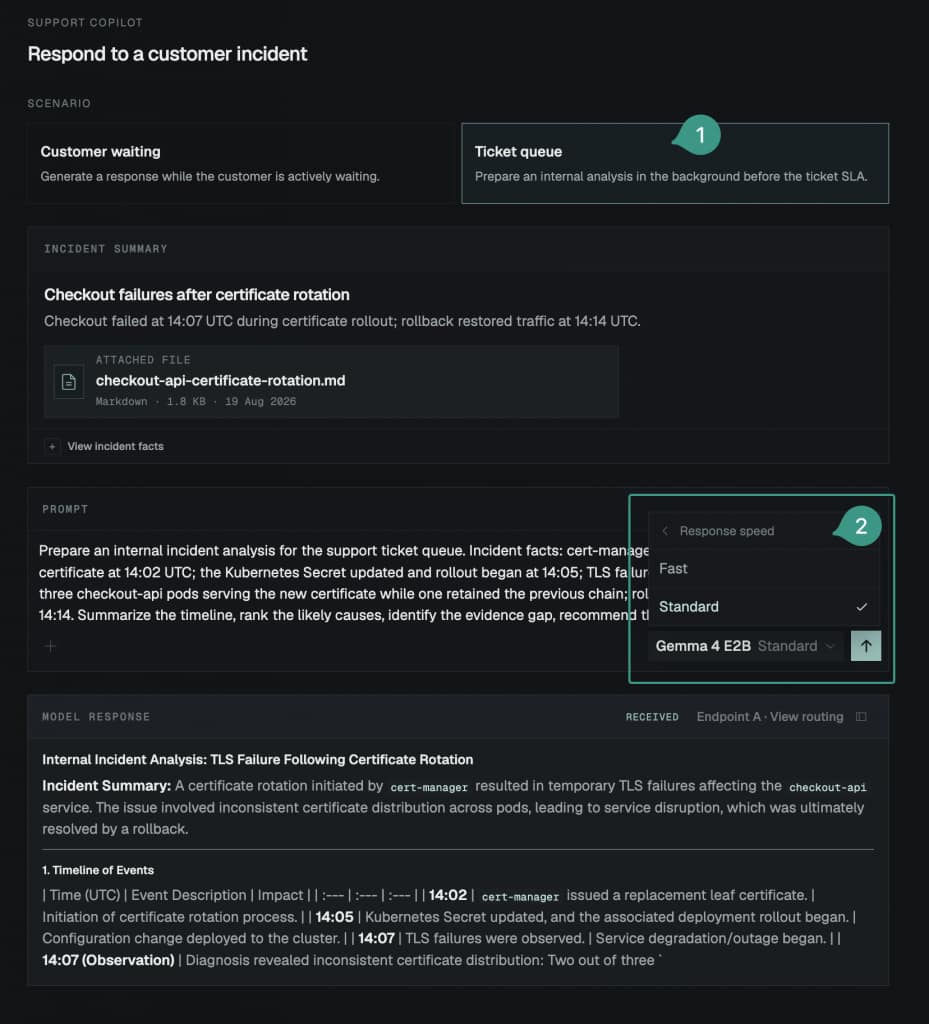
Figure 1. Using Fast for a customer-facing response.
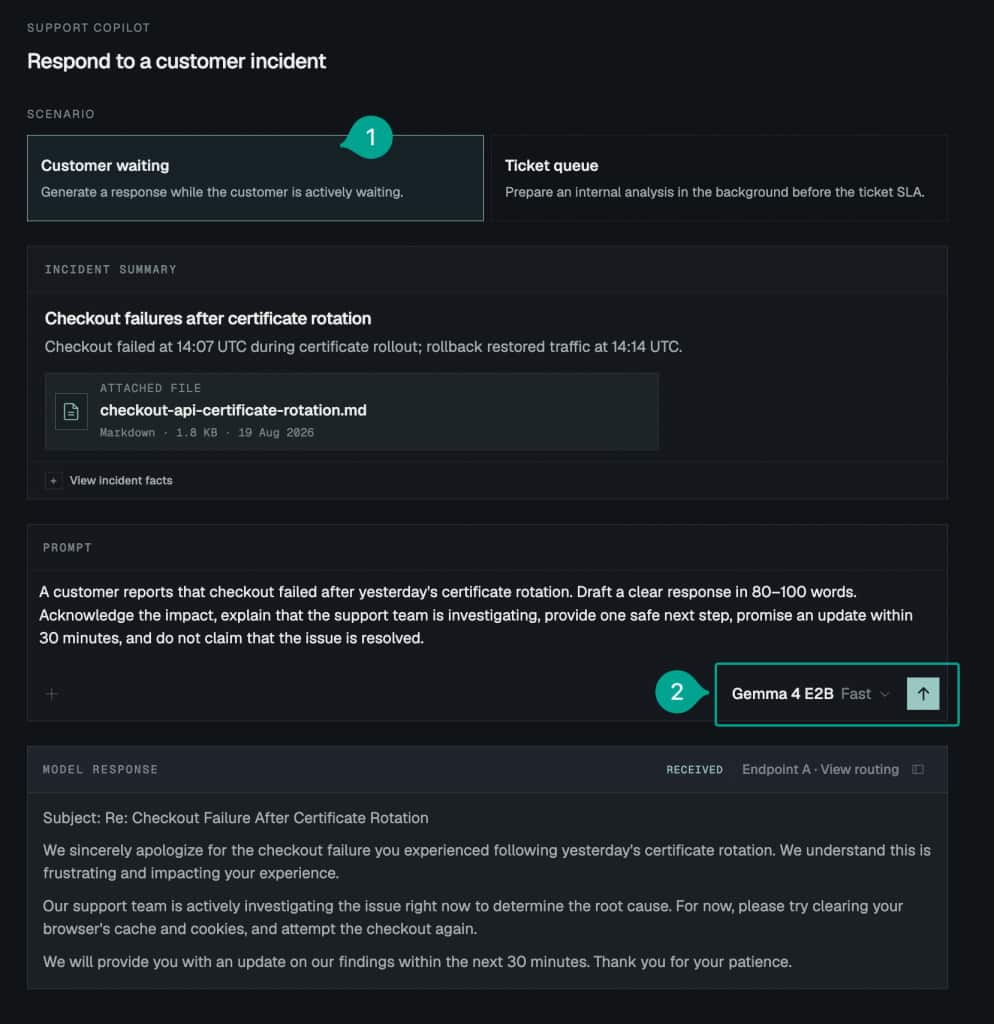
Figure 2. Using Standard for background ticket analysis; the open menu shows that Fast remains available but Standard is the default for this scenario in our demo.
Components for inference-aware routing
The cluster uses four layers, each with a distinct job:
- Gateway API defines the Kubernetes
GatewayandHTTPRouteresources that describe where traffic enters and how it is routed. The OKE-managed Istio add-on implements these resources in this demo. - Gateway API Inference Extension (GAIE) adds the
InferencePoolresource and the protocol that connects a route to an inference endpoint picker. - llm-d Router provides that endpoint picker (EPP). It chooses a compatible model server inside the selected pool.
- llm-d Inference Payload Processor (IPP) reads the model name from an OpenAI-compatible request and adds the route key that
HTTPRoutematches.
How the request reaches the selected pool
An OCI Flexible Load Balancer sends the request to the Istio Gateway. The application places the selected demo alias in the OpenAI-compatible model field. IPP reads that field, resolves the corresponding base-model route key, and adds X-Gateway-Base-Model-Name. An HTTPRoute uses the header to select an InferencePool. The pool’s endpoint picker (EPP) selects an eligible vLLM endpoint, and an InferenceModelRewrite changes the alias to the model name exposed by that endpoint.
| User choice | Request model | IPP route header | HTTPRoute destination | Model rewrite | Served model |
| Standard | support-standard | gemma-4-e2b-standard | inference-model-server-pool-standard | support-standard → gemma-4-e2b | gemma-4-e2b on the CPU-backed endpoint |
| Fast | support-fast | gemma-4-e2b-fast | inference-model-server-pool-fast | support-fast → gemma-4-e2b | gemma-4-e2b on the GPU-backed endpoint |
The request crosses two routing boundaries: HTTPRoute selects the inference pool from the alias-derived header, and that pool’s EPP selects an eligible model-server endpoint. Here, each pool contains only one endpoint. To demonstrate replica selection, a pool would need multiple compatible model-server replicas; its EPP could then choose among those endpoints according to its configured scheduling policy.
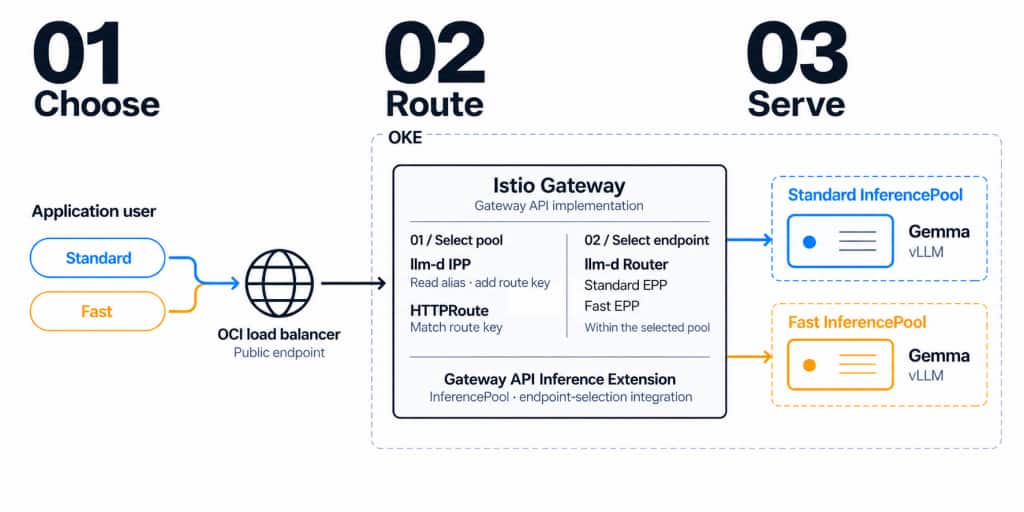
Figure 3. Request flow from the user’s service choice to the selected model server.
After a response completes, the routing view connects the user-facing choice to the observed infrastructure path. Figure 4 shows a Fast request crossing the public OCI load balancer, Istio Gateway, IPP, Fast EPP, and Fast inference pool before reaching the selected vLLM endpoint. It also reports total time, output tokens, output tokens per second, and time to first token.
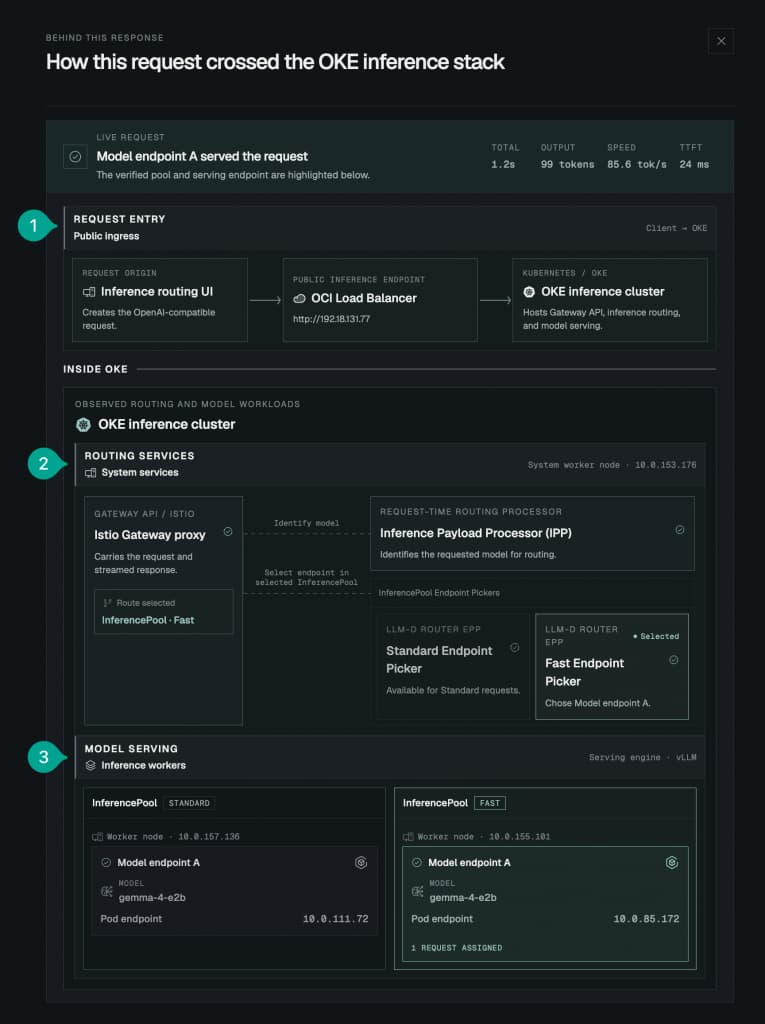
Figure 4. Observed route and per-request metrics for a Fast request.
Callout 1 marks public ingress into OKE. Callout 2 shows the routing services identifying the request and selecting the Fast pool. Callout 3 shows the vLLM endpoint that served the response.
Prerequisites and target versions
The demo separates routing services, the CPU model server, and the GPU model server onto three workers. The following setup establishes their placement and prepares the GPU worker to run the Fast backend.
For this demonstration, we set up an OKE cluster with three managed node pools and one worker in each pool. We refer to them by their role in the demo:
| Node pool role | Workers | Runs |
| System | 1 | Istio, Gateway, IPP, and EPPs |
| Standard | 1 | Model server for Standard requests |
| Fast | 1 | Model server for Fast requests |
Standard and Fast are labels used only by this demonstration. They are not OKE service tiers, performance guarantees, or SLAs. In this deployment, the labels map to different model-server configurations and CPU/GPU placements, which correspond to the observed performance difference.
Label one worker for each role. Replace the placeholders with node names from kubectl get nodes:
kubectl label node <system-node-name> workload-class=system

kubectl label node <standard-node-name> workload-class=standard

kubectl label node <fast-node-name> workload-class=fast
The infrastructure stack enables two OKE cluster add-ons during cluster setup:
- Node Feature Discovery, using the OKE-selected add-on version.
- NVIDIA GPU Operator, pinned to v25.10.1. The configuration disables the existing
NvidiaDevicePluginadd-on so the GPU Operator owns the device-plugin resources.
Node Feature Discovery labels each worker with its hardware capabilities. The GPU Operator supplies the NVIDIA drivers, container toolkit, and device plugin that make nvidia.com/gpu available to Kubernetes scheduling.
After the cluster is ready, verify that both add-ons are running and that the GPU node advertises a GPU:
kubectl get pods -A | grep -E 'nfd|gpu-operator'

kubectl get nodes -o custom-columns='NAME:.metadata.name,GPUS:.status.allocatable.nvidia\\.com/gpu'
If you start with an existing OKE cluster, enable the Node Feature Discovery and NVIDIA GPU Operator add-ons through the OKE Console or OCI CLI before deploying the GPU model. The OKE add-on installation guide covers the installation command; the GPU node guide and NVIDIA GPU Operator configuration describe supported GPU shapes, images, versions, and configuration arguments. GPU workloads must request nvidia.com/gpu in the pod specification.
The demo infrastructure uses Kubernetes v1.36.1, Gateway API Inference Extension (GAIE) v1.6.0, llm-d Router v0.10.0, llm-d Inference Payload Processor (IPP) v0.1.0, and NVIDIA GPU Operator v25.10.1.
Install the routing components
Install Gateway API, GAIE, and llm-d resources
Before creating the routing configuration, register the Kubernetes resource types that describe gateways, inference pools, and model rewrites. The following manifests make those resource types available in the cluster.
Install pinned Gateway API, Gateway API Inference Extension, and llm-d Router manifests:
export GATEWAY_API_VERSION=v1.6.1

export GAIE_VERSION=v1.6.0

export LLMD_ROUTER_VERSION=v0.10.0


kubectl apply --server-side --field-manager=gateway-api-install \

  -f "https://github.com/kubernetes-sigs/gateway-api/releases/download/${GATEWAY_API_VERSION}/standard-install.yaml"

kubectl apply --server-side --field-manager=gaie-install \

  -f "https://github.com/kubernetes-sigs/gateway-api-inference-extension/releases/download/${GAIE_VERSION}/v1-manifests.yaml"

kubectl apply --server-side --field-manager=llm-d-router-install \

  -f "https://github.com/llm-d/llm-d-router/releases/download/${LLMD_ROUTER_VERSION}/manifests.yaml"
Configure the OKE-managed Istio add-on
To route requests to inference pools, Istio needs Gateway API Inference Extension support enabled. The following add-on configuration enables that support so Istio can use InferencePool backends and connect to their endpoint pickers.
Use the OKE-managed Istio add-on as the controller for the Kubernetes Gateway API resources in this deployment. Istio creates the gateway Deployment and Service when we apply the Gateway resource later in this article, as described in the Istio Gateway API documentation.
Gateway API support is enabled by default in Istio, but support for the Gateway API Inference Extension is not. Use the add-on’s discovery.EnvVariables setting to pass the inference-extension feature flags to istiod. These flags allow Istio to route an HTTPRoute to an InferencePool. Place Istio on the system node pool and save the following as istio-gaie.json:
{

  "addonName": "Istio",

  "configurations": [

    {"key": "nodeSelectors", "value": "{\"workload-class\":\"system\"}"},

    {"key": "discovery.EnvVariables", "value": "[{\"name\":\"SUPPORT_GATEWAY_API_INFERENCE_EXTENSION\",\"value\":\"true\"},{\"name\":\"ENABLE_GATEWAY_API_INFERENCE_EXTENSION\",\"value\":\"true\"}]"}

  ]

}
Set the cluster OCID and OCI CLI profile, then install the add-on with this configuration:
export CLUSTER_ID="<cluster-ocid>"

export OCI_PROFILE="<oci-profile>"


oci ce cluster install-addon \

  --addon-name Istio \

  --cluster-id "$CLUSTER_ID" \

  --from-json file://istio-gaie.json \

  --profile "$OCI_PROFILE" \

  --wait-for-state SUCCEEDED
If the Istio add-on already exists, use the same command with update-addon in place of install-addon. Wait for istiod to roll out, then verify the live Deployment and GatewayClass:
kubectl -n istio-system rollout status deployment/istiod --timeout=5m

kubectl -n istio-system get deployment istiod -o json \

  | jq -r '.spec.template.spec.containers[].env[]? | select(.name == "SUPPORT_GATEWAY_API_INFERENCE_EXTENSION" or .name == "ENABLE_GATEWAY_API_INFERENCE_EXTENSION") | [.name, .value] | join("=")'

kubectl get gatewayclass istio -o json \

  | jq -r '.status.conditions[] | select(.type == "Accepted") | "Accepted=\(.status) reason=\(.reason)"'
Expect both variables to be true and Accepted=True. Use the live Deployment and GatewayClass as runtime evidence. See Installing a cluster add-on and Working with Istio as a cluster add-on.
Create the public Gateway
Both speed options share one public entry point. The following Gateway configuration creates that entry point; the routes added later determine which inference pool receives each request.
The infrastructure settings place the generated Istio gateway on the system worker:
kubectl create namespace istio-ingress --dry-run=client -o yaml | kubectl apply -f -


kubectl apply -f - <<'YAML'

apiVersion: v1

kind: ConfigMap

metadata:

  name: gateway-options

  namespace: istio-ingress

data:

  deployment: |

    spec:

      template:

        spec:

          nodeSelector:

            workload-class: system

---

apiVersion: gateway.networking.k8s.io/v1

kind: Gateway

metadata:

  name: gateway

  namespace: istio-ingress

spec:

  gatewayClassName: istio

  infrastructure:

    parametersRef:

      group: ""

      kind: ConfigMap

      name: gateway-options

  listeners:

    - name: http

      port: 80

      protocol: HTTP

      allowedRoutes:

        namespaces:

          from: All

YAML


kubectl -n istio-ingress wait gateway/gateway \

  --for=condition=Programmed --timeout=10m

kubectl -n istio-ingress get service gateway-istio
Deploy model servers for the Standard and Fast paths
The two speed options need separate model-serving backends. The following setup runs the same model on a CPU worker for Standard requests and an NVIDIA A10 GPU worker for Fast requests, with one model-server replica in each Deployment.
Create one vLLM Deployment for each speed option. Both must expose the same served-model name and model revision. In this demo, the Standard deployment runs on a CPU worker and the Fast deployment runs on an NVIDIA A10 GPU worker.
This example uses Gemma 4 E2B, but the routing pattern also applies to other models supported by both serving environments.
| Setting | Standard path | Fast path |
| Application label | app=inference-model-server-standard | app=inference-model-server-fast |
| Node selector | workload-class=standard | workload-class=fast |
| Model | google/gemma-4-E2B-it | google/gemma-4-E2B-it |
| Served-model name | gemma-4-e2b | gemma-4-e2b |
| Placement | CPU worker | NVIDIA A10 GPU worker |
| Accelerator request | None | nvidia.com/gpu: 1 |
Deploy the vLLM model servers
Create the namespace, then apply the two model-server Deployments:
kubectl create namespace inference-model-server --dry-run=client -o yaml | kubectl apply -f -


kubectl apply -f - <<'YAML'

apiVersion: apps/v1

kind: Deployment

metadata:

  name: inference-model-server-standard

  namespace: inference-model-server

spec:

  replicas: 1

  selector:

    matchLabels:

      app: inference-model-server-standard

  template:

    metadata:

      labels:

        app: inference-model-server-standard

        served-model: gemma-4-e2b

    spec:

      nodeSelector:

        workload-class: standard

      containers:

        - name: vllm

          image: docker.io/vllm/vllm-openai-cpu:v0.26.0-x86_64

          args: [google/gemma-4-E2B-it, --host, 0.0.0.0, --port, "8000",

            --served-model-name, gemma-4-e2b, --dtype, bfloat16,

            --max-model-len, "2048", --max-num-seqs, "1", --enforce-eager,

            --enable-prefix-caching, --enable-per-request-metrics]

          env: [{name: VLLM_CPU_KVCACHE_SPACE, value: "1"}]

          ports: [{name: http, containerPort: 8000}]

          resources:

            requests: {cpu: "8", memory: 24Gi}

            limits: {cpu: "12", memory: 28Gi}

          securityContext:

            capabilities:

              add: ["SYS_NICE"]

            seccompProfile:

              type: Unconfined

          volumeMounts: [{name: shm, mountPath: /dev/shm}]

          startupProbe:

            httpGet: {path: /health, port: http}

            periodSeconds: 10

            failureThreshold: 90

          readinessProbe:

            httpGet: {path: /health, port: http}

            periodSeconds: 10

      volumes: [{name: shm, emptyDir: {medium: Memory, sizeLimit: 4Gi}}]

---

apiVersion: apps/v1

kind: Deployment

metadata:

  name: inference-model-server-fast

  namespace: inference-model-server

spec:

  replicas: 1

  selector:

    matchLabels:

      app: inference-model-server-fast

  template:

    metadata:

      labels:

        app: inference-model-server-fast

        served-model: gemma-4-e2b

    spec:

      nodeSelector:

        workload-class: fast

      containers:

        - name: vllm

          image: docker.io/vllm/vllm-openai:v0.26.0

          args: [google/gemma-4-E2B-it, --host, 0.0.0.0, --port, "8000",

            --served-model-name, gemma-4-e2b, --dtype, bfloat16,

            --max-model-len, "4096", --max-num-seqs, "4",

            --enable-per-request-metrics]

          env: [{name: HF_HUB_ENABLE_HF_TRANSFER, value: "1"}]

          ports: [{name: http, containerPort: 8000}]

          resources:

            requests: {cpu: "2", memory: 8Gi, nvidia.com/gpu: "1"}

            limits: {cpu: "4", memory: 16Gi, nvidia.com/gpu: "1"}

          volumeMounts: [{name: shm, mountPath: /dev/shm}]

          startupProbe:

            httpGet: {path: /health, port: http}

            periodSeconds: 10

            failureThreshold: 90

          readinessProbe:

            httpGet: {path: /health, port: http}

            periodSeconds: 10

      volumes: [{name: shm, emptyDir: {medium: Memory, sizeLimit: 8Gi}}]

YAML

Create a Service for each Deployment:

kubectl -n inference-model-server expose deployment \

  inference-model-server-standard \

  --name inference-model-server-standard \

  --port 8000 --target-port 8000


kubectl -n inference-model-server expose deployment \

  inference-model-server-fast \

  --name inference-model-server-fast \

  --port 8000 --target-port 8000

Wait for both model servers to become ready:

kubectl -n inference-model-server rollout status \

  deployment/inference-model-server-standard --timeout=30m

kubectl -n inference-model-server rollout status \

  deployment/inference-model-server-fast --timeout=30m

kubectl -n inference-model-server get pods -o wide

Check each model server directly before adding it to an InferencePool. Start a port-forward for the Standard Service:

kubectl -n inference-model-server port-forward \

  service/inference-model-server-standard 18000:8000

In another terminal, check its health and served-model name:

curl -fsS http://127.0.0.1:18000/health

curl -fsS http://127.0.0.1:18000/v1/models | jq
Repeat the checks for service/inference-model-server-fast on another local port, such as 18001.
Create separate Standard and Fast inference pools
Separate inference pools keep each speed option connected to its intended backend. The pool selectors group CPU model-server pods into the Standard pool and GPU model-server pods into the Fast pool.
Install the llm-d Router Gateway chart once for each speed option. Each Helm installation creates an InferencePool and its EPP. Keeping the pools separate ensures that a Standard request stays on the Standard path and a Fast request stays on the Fast path.
- The Standard pool selects only
app=inference-model-server-standard, which runs on the CPU worker in this demo. - The Fast pool selects only
app=inference-model-server-fast, which runs on the GPU worker.
Install llm-d Router and the EPPs
Each inference pool needs an endpoint picker to select the model-server endpoint that handles a request. The following chart installations create both pools and their pickers. Each pool has one endpoint in this demo; selection among replicas requires multiple eligible endpoints within the same pool.
Save the shared chart configuration as router-values.yaml:
router:

  modelServers:

    type: vllm

    protocol: http

    targetPorts:

      - number: 8000

  inferencePool:

    create: true

    failureMode: FailOpen

  epp:

    resources:

      requests: {cpu: 100m, memory: 128Mi}

      limits: {cpu: 500m, memory: 512Mi}

provider:

  name: istio

httpRoute:

  create: false
Install both pools with the pinned llm-d Router chart. Each command supplies the application label for its model server:
export LLMD_ROUTER_VERSION=v0.10.0

export LLMD_ROUTER_CHART=oci://ghcr.io/llm-d/charts/llm-d-router-gateway


helm upgrade --install inference-model-server-pool-standard "$LLMD_ROUTER_CHART" \

  --namespace inference-model-server \

  --version "$LLMD_ROUTER_VERSION" \

  --values router-values.yaml \

  --set-string router.modelServers.matchLabels.app=inference-model-server-standard \

  --wait --timeout 15m


helm upgrade --install inference-model-server-pool-fast "$LLMD_ROUTER_CHART" \

  --namespace inference-model-server \

  --version "$LLMD_ROUTER_VERSION" \

  --values router-values.yaml \

  --set-string router.modelServers.matchLabels.app=inference-model-server-fast \

  --wait --timeout 15m
Save the EPP placement patch as epp-system-placement.yaml:
spec:

  template:

    spec:

      nodeSelector:

        workload-class: system
Apply the patch to both EPP Deployments and wait for each rollout:
kubectl -n inference-model-server patch deployment \

  inference-model-server-pool-standard-epp --type merge \

  --patch-file epp-system-placement.yaml

kubectl -n inference-model-server rollout status \

  deployment/inference-model-server-pool-standard-epp --timeout=5m


kubectl -n inference-model-server patch deployment \

  inference-model-server-pool-fast-epp --type merge \

  --patch-file epp-system-placement.yaml

kubectl -n inference-model-server rollout status \

  deployment/inference-model-server-pool-fast-epp --timeout=5m
Configure alias routing
Clients express their speed choice through the request’s model field. IPP reads that field and produces the routing header that allows HTTPRoute to distinguish Standard requests from Fast requests.
Clients express their speed choice through the request’s model field. IPP reads that field and produces the routing header that allows HTTPRoute to distinguish Standard requests from Fast requests.
Install the Inference Payload Processor
Install IPP with a request-processing profile that reads the OpenAI-compatible model field and adds the base-model route header. Save these values as ipp-values.yaml:
payloadProcessor:

  name: inference-payload-processor

  image:

    tag: v0.1.0

  customConfig:

    plugins:

      - type: body-field-to-header

        parameters:

          fieldName: model

          headerName: X-Gateway-Model-Name

      - type: base-model-to-header

    profiles:

      - name: default

        plugins:

          request:

            - pluginRef: body-field-to-header

            - pluginRef: base-model-to-header

          response: []

provider:

  name: istio

  supportedEvents: {requestHeaders: true, requestBody: true,

    requestTrailers: true, responseHeaders: false,

    responseBody: false, responseTrailers: false}

inferenceGateway:

  name: gateway
Install IPP and place it on the system worker:
helm upgrade --install inference-payload-processor \

  oci://ghcr.io/llm-d/charts/payload-processor \

  --namespace istio-ingress \

  --version v0.1.0 \

  --values ipp-values.yaml \

  --wait --timeout 15m


kubectl -n istio-ingress patch deployment inference-payload-processor \

  --type merge \

  -p '{"spec":{"template":{"spec":{"nodeSelector":{"workload-class":"system"}}}}}'

kubectl -n istio-ingress rollout status \

  deployment/inference-payload-processor --timeout=5m
Create the aliases, model rewrites, and route
The following configuration connects support-standard and support-fast to their respective inference pools. Pool-local rewrites then translate either alias into gemma-4-e2b, the model name accepted by both backends.
Create the alias mappings, pool-local rewrites, and route:
kubectl apply -f - <<'YAML'

apiVersion: v1

kind: ConfigMap

metadata:

  name: gemma-standard-model-aliases

  namespace: istio-ingress

  labels:

    inference.llm-d.ai/ipp-managed: "true"

data:

  baseModel: gemma-4-e2b-standard

  adapters: |

    - support-standard

---

apiVersion: v1

kind: ConfigMap

metadata:

  name: gemma-fast-model-aliases

  namespace: istio-ingress

  labels:

    inference.llm-d.ai/ipp-managed: "true"

data:

  baseModel: gemma-4-e2b-fast

  adapters: |

    - support-fast

---

apiVersion: llm-d.ai/v1alpha2

kind: InferenceModelRewrite

metadata:

  name: support-standard-model-alias

  namespace: inference-model-server

spec:

  poolRef:

    group: inference.networking.k8s.io

    kind: InferencePool

    name: inference-model-server-pool-standard

  rules:

    - matches:

        - model:

            type: Exact

            value: support-standard

      targets:

        - modelRewrite: gemma-4-e2b

---

apiVersion: llm-d.ai/v1alpha2

kind: InferenceModelRewrite

metadata:

  name: support-fast-model-alias

  namespace: inference-model-server

spec:

  poolRef:

    group: inference.networking.k8s.io

    kind: InferencePool

    name: inference-model-server-pool-fast

  rules:

    - matches:

        - model:

            type: Exact

            value: support-fast

      targets:

        - modelRewrite: gemma-4-e2b

---

apiVersion: gateway.networking.k8s.io/v1

kind: HTTPRoute

metadata:

  name: httproute-for-inferencepool

  namespace: inference-model-server

spec:

  parentRefs:

    - name: gateway

      namespace: istio-ingress

      sectionName: http

  rules:

    - matches:

        - path:

            type: PathPrefix

            value: /v1/completions

          headers:

            - type: Exact

              name: X-Gateway-Base-Model-Name

              value: gemma-4-e2b-standard

        - path:

            type: PathPrefix

            value: /v1/chat/completions

          headers:

            - type: Exact

              name: X-Gateway-Base-Model-Name

              value: gemma-4-e2b-standard

      backendRefs:

        - group: inference.networking.k8s.io

          kind: InferencePool

          name: inference-model-server-pool-standard

    - matches:

        - path:

            type: PathPrefix

            value: /v1/completions

          headers:

            - type: Exact

              name: X-Gateway-Base-Model-Name

              value: gemma-4-e2b-fast

        - path:

            type: PathPrefix

            value: /v1/chat/completions

          headers:

            - type: Exact

              name: X-Gateway-Base-Model-Name

              value: gemma-4-e2b-fast

      backendRefs:

        - group: inference.networking.k8s.io

          kind: InferencePool

          name: inference-model-server-pool-fast

YAML
Standard and Fast use different internal aliases so the routing layer sends each request to the correct pool. This demo implements the two paths with CPU and GPU placements.
| Speed option | Internal alias | Pool | Demo placement | Served model |
| Standard | support-standard | Standard InferencePool | CPU worker | gemma-4-e2b |
| Fast | support-fast | Fast InferencePool | NVIDIA A10 GPU worker | gemma-4-e2b |
Verify the routing stack
With the components connected, check that the gateway and route are ready to handle traffic. Then send the same prompt through both aliases to confirm that each path returns a response and compare the observed timing measurements.
Wait for both EPPs, the Istio Gateway, and the route:
kubectl -n inference-model-server get inferencepool,pod -o wide

kubectl wait -n istio-ingress --for=condition=programmed gateway/gateway --timeout=5m

kubectl -n inference-model-server get httproute httproute-for-inferencepool \

  -o jsonpath='{range .status.parents[0].conditions[*]}{.type}={.status}{"\n"}{end}'
Require Programmed=True, Accepted=True, and ResolvedRefs=True before sending traffic.
Get the public address and send the same prompt through both speed options. These validation requests are non-streaming so each answer and its metrics are returned in one JSON document:
GATEWAY_ADDRESS=$(kubectl -n istio-ingress get gateway gateway \

  -o jsonpath='{.status.addresses[0].value}')

PROMPT='List three checks for a certificate connection failure.'


for MODEL_ALIAS in support-standard support-fast; do

  RESULT_FILE="${MODEL_ALIAS}.json"

  REQUEST_BODY=$(jq -nc \

    --arg model "$MODEL_ALIAS" \

    --arg prompt "$PROMPT" \

    '{model: $model, messages: [{role: "user", content: $prompt}], max_tokens: 64}')


  CLIENT_TOTAL=$(curl -fsS "http://${GATEWAY_ADDRESS}/v1/chat/completions" \

    -H 'Content-Type: application/json' \

    --data "$REQUEST_BODY" \

    --output "$RESULT_FILE" \

    --write-out '%{time_total}')


  jq --arg option "$MODEL_ALIAS" --arg total "$CLIENT_TOTAL" '{

    option: $option,

    response: .choices[0].message.content,

    completion_tokens: .usage.completion_tokens,

    time_to_first_token_ms: .metrics.time_to_first_token_ms,

    tokens_per_second: .metrics.tokens_per_second,

    client_total_seconds: ($total | tonumber)

  }' "$RESULT_FILE"

done
Each request should return the generated answer and its timing measurements:
{

  "option": "support-standard",

  "response": "1. Check the certificate...",

  "completion_tokens": ...,

  "time_to_first_token_ms": ...,

  "tokens_per_second": ...,

  "client_total_seconds": ...

}
Compare time_to_first_token_ms, tokens_per_second, and client_total_seconds for the two result files.
Use these measurements to verify the behavior of this deployment. Results can vary based on the model, hardware, workload, and configuration; Standard and Fast are demo-specific labels and are not OKE performance tiers or guarantees.
What this demonstration shows
This demonstration shows that one public Gateway can route requests to separate inference pools. In this example, Standard and Fast select different pools that serve the same model.
This is where inference-aware routing extends normal load balancing. The OCI load balancer brings requests to the cluster, and the inference-routing layer sends each request to the pool configured for its speed option. The application continues to use one public endpoint.
Other policies can route different base models or model adapters behind one endpoint, split traffic for canary rollouts, or choose among replicas using load, priority, session affinity, or KV-cache locality.