
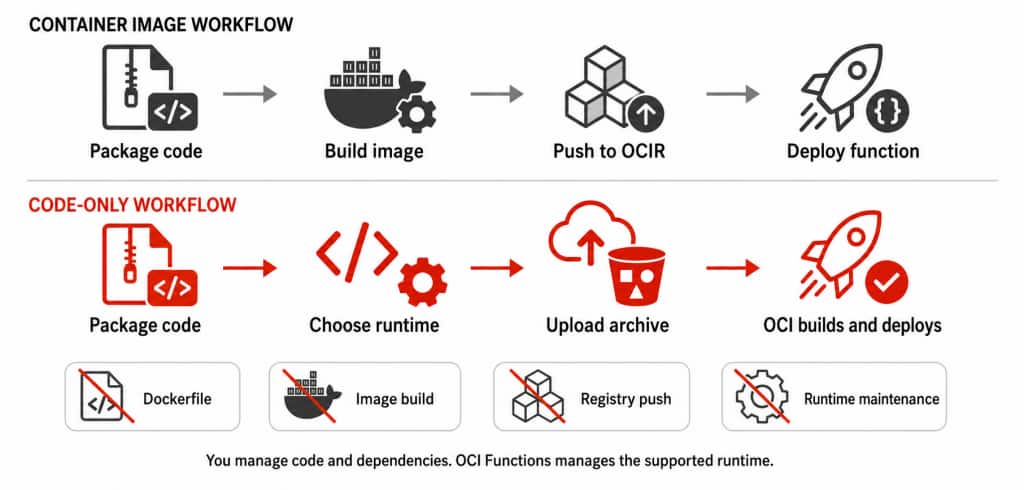
We are happy to announce that OCI Functions now supports code-only deployment for Go, Java, Node.js, and Python managed runtimes. With code-only deployment, you package your function code and dependencies as an archive, select a runtime, and create the function without building or managing a container image. OCI Functions manages the runtime environment, while you continue to control your function code, dependencies, configuration, and testing.
Code-only deployment works alongside the existing container-image workflow, which remains fully supported for workloads that need custom operating-system packages, custom runtimes or base images, or full control of an existing container build and security pipeline.
Serverless works best when developers can focus on code rather than deployment mechanics. By removing Dockerfile creation, image builds, registry pushes, and routine runtime-image maintenance from the deployment path, code-only deployment provides a shorter path from code to a running function while preserving the OCI Functions experience developers already use: invocation, scaling, logs, metrics, triggers, networking, and IAM.
Why this matters
Code-only deployment provides a more direct path from code to a running function by removing container-image work that is separate from the application itself. OCI Functions manages the supported runtime environment and provides compatible runtime maintenance, including security updates and bug fixes, while developers remain responsible for their function code and dependencies. It fits naturally into CI/CD pipelines: teams can test and scan their code and dependencies, create a versioned ZIP or JAR, and promote the same artifact across environments.
The archive-based model is also familiar to developers coming from other serverless platforms, reducing onboarding and migration friction. Image-based Functions remain available when teams need deeper control over the operating system, runtime, or image.
What’s new with code-only deployment
Code-only deployment is an archive-based deployment option in OCI Functions. It complements the existing container-image workflow; it does not replace it. After deployment, archive-based functions use the same invocation, scaling, IAM, networking, logging, metrics, triggers, and operational model as image-based Functions. At general availability, it supports:
- Managed languages: Go, Java, Node.js, and Python.
- Archive formats: ZIP for all supported runtimes. Java also supports an uber or fat JAR for a simple function.
- Archive sources: Upload an archive directly or reference one in OCI Object Storage.
- Application architectures: x86, Arm, and multi-architecture applications. Archives and native dependencies must match the application architecture.
- Runtime control: Function update and Manual runtime update modes are both available.
Get started
You can create and update functions using code-only deployment through the OCI Console, OCI CLI, OCI SDKs, REST API, Terraform, or the Fn Project CLI. The tool or SDK language you use does not need to match the function’s runtime language. The following steps show the Console workflow. You can find directions to get started in the code-only deployment documentation.
1. Choose a runtime and prepare the archive
Package your function code and dependencies using the structure required by the selected managed runtime and the architecture of the Functions application:
- Go: Package a compiled Linux executable named func. A separate handler value is not required.
- Java: Use a self-contained JAR (uber JAR or fat JAR) for a simple function. Use a ZIP containing the JAR when the function also includes resources, native dependencies, or Java program arguments.
- Node.js and Python: Use a ZIP containing the function source and required dependencies. Specify the handler that identifies the function entry point.
For multi-architecture applications or native dependencies, include artifacts that match the x86 and Arm architectures on which the function can run.
2. Choose the archive source
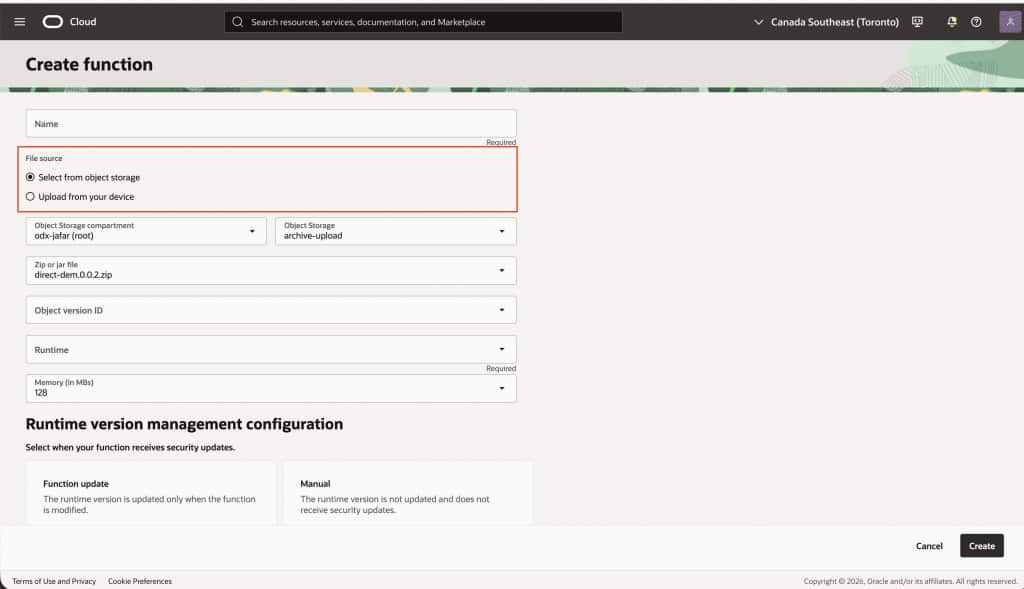
In your Functions application, select Create from archive. Upload the archive directly from your device, or reference an archive stored in OCI Object Storage. Direct upload supports archives up to 50 MB; Object Storage supports archives up to 250 MB and requires an IAM policy allowing the Functions application to read the object. Object Storage can be useful when archives are larger or already managed as versioned CI/CD artifacts.
3. Configure and deploy the function
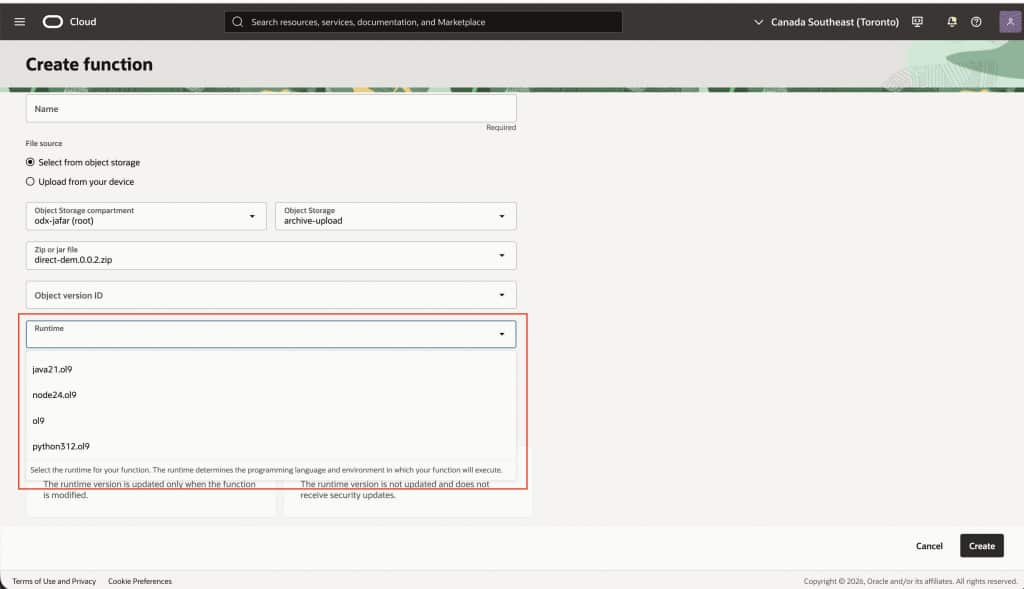
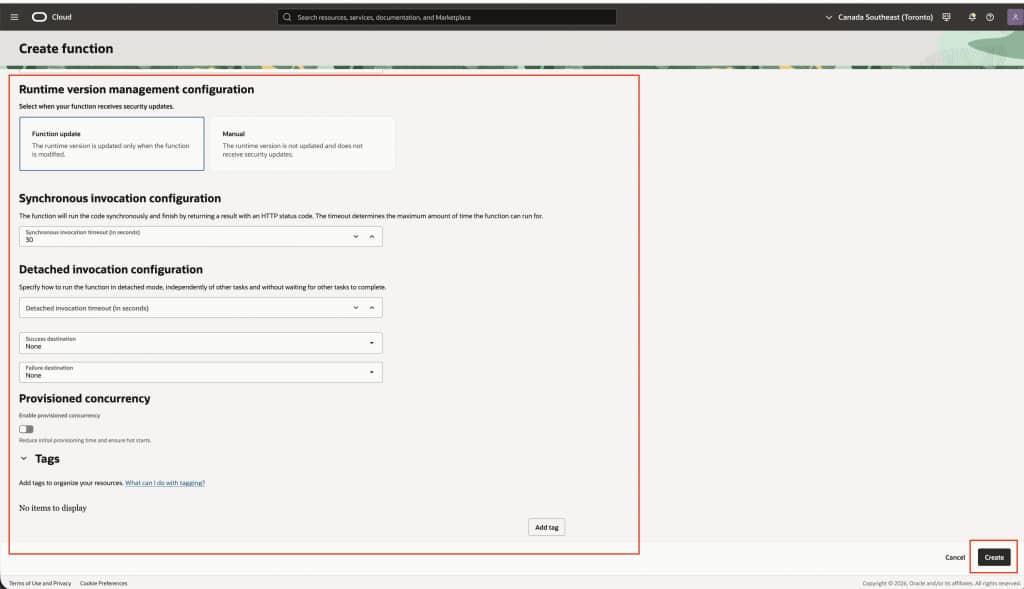
After choosing the archive source, choose the managed runtime, and configure the handler, memory, timeout, and other function settings.
Choose Function update mode to use the latest compatible managed runtime whenever you update the function. This incorporates compatible runtime maintenance, including security updates and bug fixes, into the normal delivery cycle. It works well for development, integration, and frequently updated workloads.
Choose Manual mode to pin a specific runtime version for tighter testing and rollout control. This is useful for production workloads with strict validation or change-management requirements, where teams want to test runtime changes in another environment before adopting them.
4. Invoke and operate
After creation, invoke the function from the Console or through the OCI CLI, SDKs, REST API, or an integrated OCI service.
To update your code, supply a new archive through the Console or your preferred automation tool. The function retains its existing configuration, triggers, networking, IAM policies, and other integrations. In Function update mode, OCI Functions also adopts the latest compatible managed runtime when you update the function. In Manual mode, the runtime version remains pinned until you choose to update it.
Try it today
Start with a supported Go, Java, Node.js, or Python workload, open an OCI Functions application, and select Create from archive. You can begin in the Console or incorporate archive-based creation and updates into an existing CI/CD workflow using the OCI CLI, OCI SDKs, REST API, Terraform, or the Fn Project CLI.
To learn more, see the following resources: