
Developers and QA teams need independent databases with realistic schemas and data to develop and refine features, find defects, and test application performance before release. As AI-assisted coding speeds up iteration, teams need to validate changes against current, production-like workloads without waiting for each environment to be provisioned. In a traditional IT setup, each lower environment often starts with a full production copy. Storage allocation, copying, refreshes, and DBA coordination add work and cost for every development, QA, performance, or preproduction clone. When copies are scarce, teams may have to share an environment or work with smaller or stale datasets.
The Oracle Exadata Database Service on Exascale Infrastructure (ExaDB-XS) addresses these provisioning burdens. ExaDB-XS brings native rapid clone creation into the database service. Teams can create thin PDB clones on Exascale Storage Vaults from a live PDB or snapshot. Each clone is a complete, writable copy of the source PDB’s schema and data. Exascale’s redirect-on-write requires near-zero additional data storage at creation and only grows as the clone’s data changes.
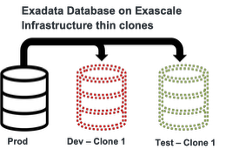
A full test database for each team
A “thin” clone does not mean the clone is “thin” on data; it contains the source PDB’s complete schema and data. “Thin” refers to the amount of storage needed to create the complete PDB. Each team gets a writable PDB where developers can test schema and application changes without touching production or another team’s environment. The clone operation is native to ExaDB-XS, so teams do not need a separate third-party cloning product to create each copy. ExaDB-XS’s native PDB cloning uses redirect-on-write technology, which keeps the initial storage footprint small.
Why redirect on write keeps clones small
How does redirect-on-write result in space efficiency? Let’s say you and your co-worker are working off the same physical book. When you’re revising a page for your own work, you write the new version separately and put a sticky note in the updated spot to reference your new work. The original book doesn’t get marked up or changed, and the untouched pages remain shared. Exascale applies the same idea to a thin clone: unchanged blocks remain shared, while changed blocks are stored separately and the clone is directed to them. In Exascale, the source PDB remains unchanged while clone stores its changes separately, leading to storage cost optimizations.

Thin clones change the storage equation
Consider a 5 TB source database and 5 lower-environment clones. Figure 1 compares estimated monthly storage costs for full copies, data-subset copies, and thin clones. Because unchanged blocks remain shared, creating several clones doesn’t mean storing several full copies.
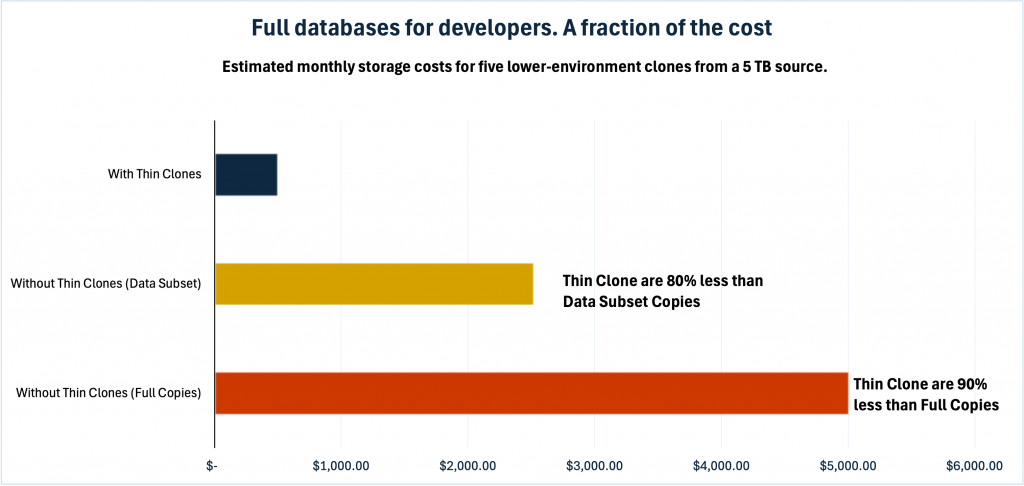
Again, each thin clone is a complete, writable database but without the additional storage costs associated with complete copies. The savings can be significant. But when providing developers with complete copies of the source, storage is only one consideration. Organizations need realistic data and production-like environments, but they also need to avoid burdening the production database or exposing sensitive information.
Isolate production clones for realistic testing
Remote cloning lets teams place a PDB in another CDB on a separate VM cluster. When the source and target share an Exascale Storage Vault, the clone can remain thin. Teams can configure the target to resemble production and run performance or integration tests on separate compute, helping keep test workloads from competing with production. Teams using production-derived data may also need to mask sensitive values. I’ll cover how Oracle Data Safe fits alongside thin clones in a separate post.
ExaDB-XS clones are more than a copy of the data
Thin clones run on Exadata, so development and test workloads can use the platform’s database and storage optimizations. Smart Scan can filter data in storage for eligible queries. Oracle Smart Scan can offload queries to the storage for fast data processing of all supported data types in Oracle AI Database such as Relational, JSON, spatial and graph including supported vector-search operations through AI Smart Scan. Hybrid Columnar Compression can reduce storage and scan I/O for suitable data. Teams can test on Exadata capabilities without provisioning a full database copy for each environment.
Summary
- Traditional full-copy provisioning makes every lower environment another database to allocate, copy, refresh, and maintain. As teams and test cycles multiply, storage needs and DBA effort multiply with them.
- ExaDB-XS creates complete, writable thin PDB clones natively from live PDBs or snapshots. Redirect-on-write keeps initial additional storage close to zero; storage grows as each clone changes.
- Reduce monthly storage costs by about 80% compared with data-subset copies and 90% compared with full copies, while giving teams complete, writable databases for development.
- For realistic testing, teams can remote clone to a separate VM cluster, keeping test workloads off production while still using Exadata’s database and storage optimizations.