
Modern enterprises handle vast volumes of unstructured documents, where extracting meaningful insights—especially those tied to location data, zip codes with a combination of phone numbers, and a lot of numeric values—can be both time-intensive and error-prone.
Oracle Cloud Infrastructure (OCI) addresses this challenge by bringing together Document AI, Select AI, and Spatial capabilities, enabling developers to convert raw document data into actionable geospatial intelligence.
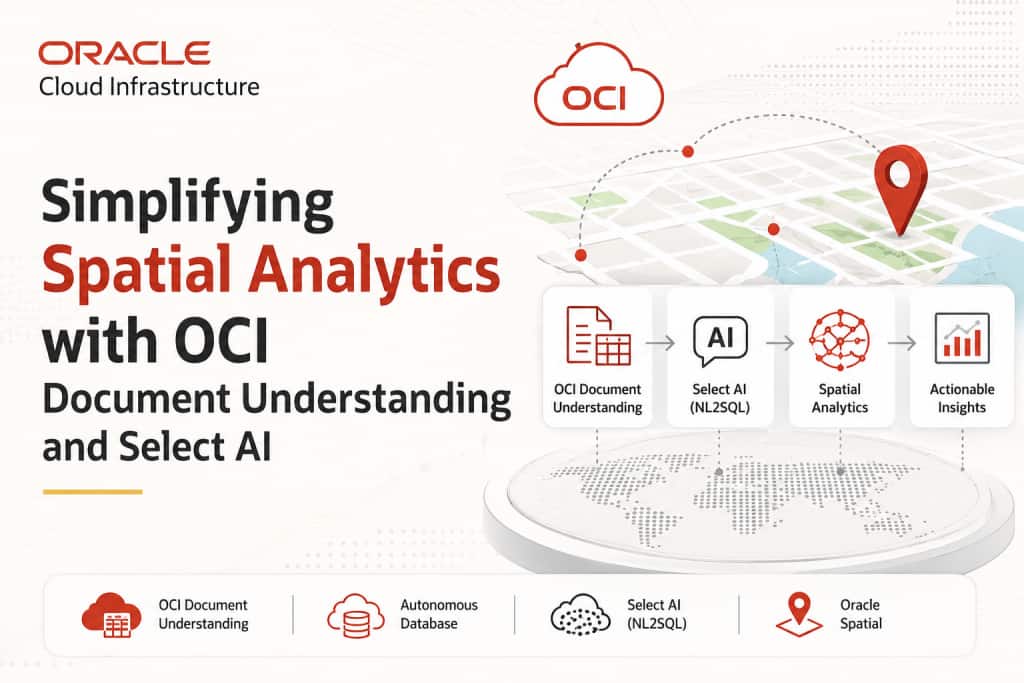
Preface: This article demonstrates how to design and implement a spatial intelligence application on OCI by integrating the following:
- OCI Document Understanding for intelligent document parsing
- Oracle Autonomous Database for structured data persistence
- Select AI (NL2SQL) for translating natural language into executable SQL queries
- Oracle Spatial for advanced geospatial analysis
Together, these services form a cohesive pipeline that bridges unstructured document processing with location-aware analytics.
We’ll go over how to construct a spatial data visualization application in this article using:
- OCI Document Understanding
- Oracle Autonomous Database (AI Database)
- Select AI (Natural Language to SQL)
- Spatial Analysis using pre-trained models
For visualization, either we can use Oracle APEX or Python Streamlit Map for a flexible, developer-driven interface to render interactive maps and spatial insights.
What is OCI Document Understanding?
OCI Document Understanding is an AI service that enables developers to extract the following:
- Text
- Tables
- Key-value pairs
- Document classifications
- Optical Character Recognition (OCR)
It provides pre-trained models for common document processing tasks and supports customization for industry-specific needs. Refer to the oracle document for detailed information
Once a model is selected, documents (PDF/images) can be uploaded via APIs or CLI.
and data from tables can be extracted either as TEXT or as structured TABLE format (rows × columns) with ease.
Solution Overview
For certain use cases where documents contain a large amount of numerical data—such as pincodes, phone numbers, latitude, and longitude—vectorizing digits may not yield optimal results.
In such scenarios, to achieve better accuracy and performance with LLMs, it is more effective to:
- Store the extracted data in relational format
- Use NL2SQL (Select AI) to query the data
With this approach, we build a pipeline that:
- Extracts structured data from documents
- Stores it in Oracle Autonomous Database
- Uses natural language queries to retrieve insights
- Performs spatial analysis using LLM-generated SQL
- Visualizes results on a map
Additionally:
- Text can be vectorized and embedded to perform similarity searches using natural language
Architecture Overview
High-level flow of the solution:
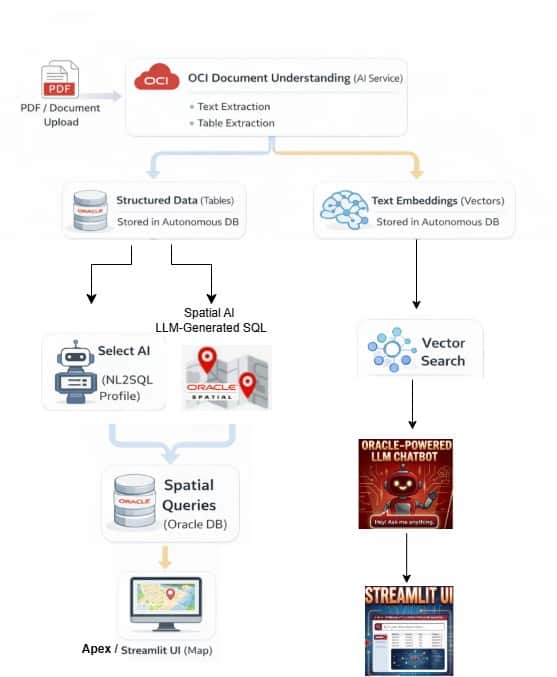
Architecture Workflow
- Upload a sample PDF containing address and geolocation data
- Extract tabular data and store it in Oracle Autonomous Database
- Extract text data and store it as embeddings
- Create Select AI profile for NL2SQL
- Create another profile for spatial analysis using LLM
- Execute queries and visualize results using Streamlit
Prerequisites
Create AI Credential
BEGIN
DBMS_CLOUD.CREATE_CREDENTIAL(
credential_name => '<cred_name>',
user_ocid => '<your_ocid1.user>',
tenancy_ocid => '<your_ocid1.tenancy>',
private_key => '-----BEGIN RSA PRIVATE KEY-----
…
       -----END RSA PRIVATE KEY-----',
fingerprint => '');
END;
Ref : https://docs.oracle.com/en-us/iaas/Content/API/SDKDocs/cliinstall.htm#configfile
Create Select AI Profiles
BEGIN
DBMS_CLOUD_AI.create_profile(
profile_name => 'profile_name',
attributes => '{
     "provider": "oci",
     "credential_name": "cred_name",
     "object_list": [{"owner": "<schema_name>",
                       "name": "<table_name"}]}');
END;
Example:
BEGIN
DBMS_CLOUD_AI.create_profile(
profile_name => 'PROP_DET_G',
attributes => '{
          "provider": "oci",
          "credential_name": "GENAI_CRED",
          "object_list": [
             {"owner": "APPUSER", "name": "SLA_PROPERTY_DETAILS_G"}]
         }');
END;
Create Spatial Analysis Profile
Example :
BEGIN
DBMS_CLOUD_AI.create_profile(
profile_name => 'SPAT_ANALY_MLLAMA4',
attributes => '{
      "provider": "oci",
      "credential_name": "GENAI_CRED",
      "model": "meta.llama-4-maverick-17b-128e-instruct-fp8",
      "region": "us-chicago-1",
      "oci_apiformat": "GENERIC",
      "temperature": 0,
      "object_list": [
                {"owner": "<schema_name>", "name": "PROPERTY_DETAILS_G"},
                {"owner": "<schema_name>", "name": "SINGAPORE_AMENTIES"}]
               }');
END;
Ref: https://docs.oracle.com/en-us/iaas/autonomous-database-serverless/doc/dbms-cloud-ai-package.html
Note: Here we are using the pre-trained model meta.llama-4 , which provides appropriate responses for spatial operators. However, we can use any models based on our requirements. Refer here for the latest LLM model information.
Python Integration
Config – Initialize the global variables in pycode
Example:
    CONFIG_PATH = r"C:\Users\Sathishkumar.oci\config"
    CONFIG_PROFILE = "DEFAULT"
    COMPARTMENT_ID = "ocid1.compartment.oc1"
    NAMESPACE = "sehubjapaciaas"
    BUCKET_NAME = "DM_bucket"
    PREFIX = "aiop"
Note: Either you can configure OCI CLI and store all OCI resource information in a config file, or you can assign those values as GLOBAL parameters inside the Python script.
Initialize OCI Clients
def init_clients():
    config = oci.config.from_file(CONFIG_PATH, CONFIG_PROFILE)

    ai_client = oci.ai_document.AIServiceDocumentClientCompositeOperations(
        oci.ai_document.AIServiceDocumentClient(config=config)
    )

    object_storage_client = oci.object_storage.ObjectStorageClient(config=config)
    return ai_client, object_storage_client
Data Processing Workflow
- Upload PDF
- Extract structured and unstructured data
- Store tabular data in database
- Store embeddings for semantic queries
The complete python routines can be referred here
1- Querying with Select AI (NL2SQL)
Set profile:
BEGIN
DBMS_CLOUD_AI.SET_PROFILE(profile_name => 'PROP_DET_G');
END;
Example: Prompts in natural language
- List all records where pincode = 571100
- Show properties on street ‘Lush on Holland Hill’
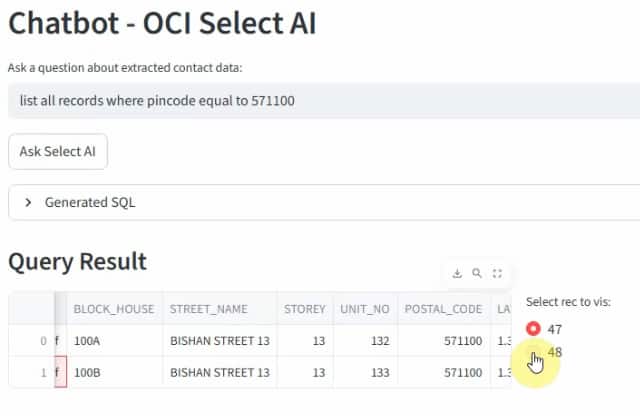
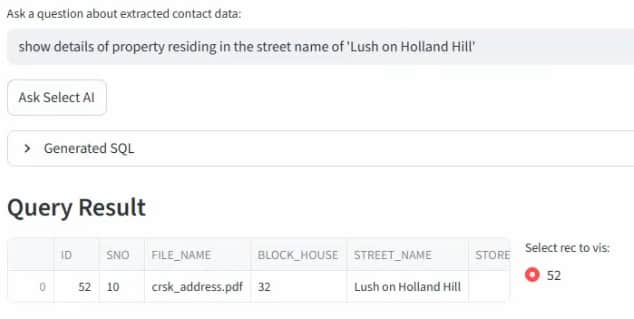
Above, output list all the properties based on prompt using Select AI ( NL2SQL)
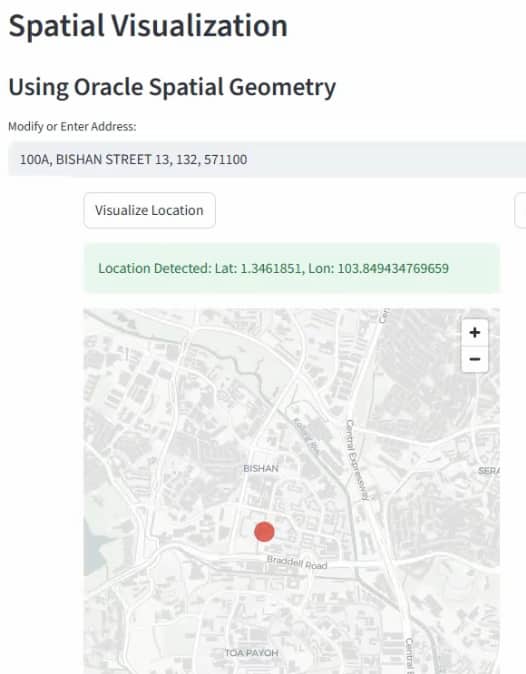
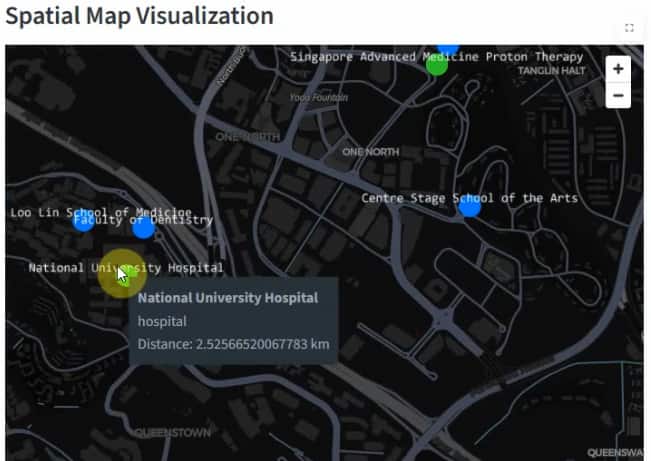
2 – Spatial Visualization
- Convert address into geolocation using Geoapify
- Display Points of Interest (PoI)
- Visualize using Streamlit map
How it works: Based on the selected record, the corresponding address attributes (such as building name, street name, and pincode) are structured into a JSON payload and sent to the Geoapify Geocoding API. The service resolves the address into precise geographic coordinates (latitude and longitude). Once the location is identified, nearby Points of Interest (PoIs) are retrieved and rendered on the map in the application for spatial visualization.
Spatial Analysis with Select AI
Switch profile:
cursor.execute("""
BEGIN
DBMS_CLOUD_AI.SET_PROFILE(profile_name => 'SPAT_ANALY_MLLAMA4');
END; """)
Example: Prompts
- Show all amenities near property ID 370 within 3 km
- Show hospitals near property ID 52 within 2 km
Generate SQL
Sample Spatial Analytical query Generation using Select AI
SELECT DBMS_CLOUD_AI.GENERATE(prompt => 'Show all amenities near property ID 370 within 3 km',
profile_name => 'SPAT_ANALY_MLLAMA4',
action => 'showsql') as query
FROM dual;
SELECT DBMS_CLOUD_AI.GENERATE(prompt => 'Show hospitals near property ID 52 within 2 km',
profile_name => 'SPAT_ANALY_MLLAMA4',
action => 'showsql') as query
FROM dual;Call the prompts inside routine in python
cursor.execute("""
SELECT DBMS_CLOUD_AI.GENERATE(
prompt => :1,
action => 'runsql'
) FROM dual
""", [system_prompt_spatial])Spatial Analytics query generated by LLM :
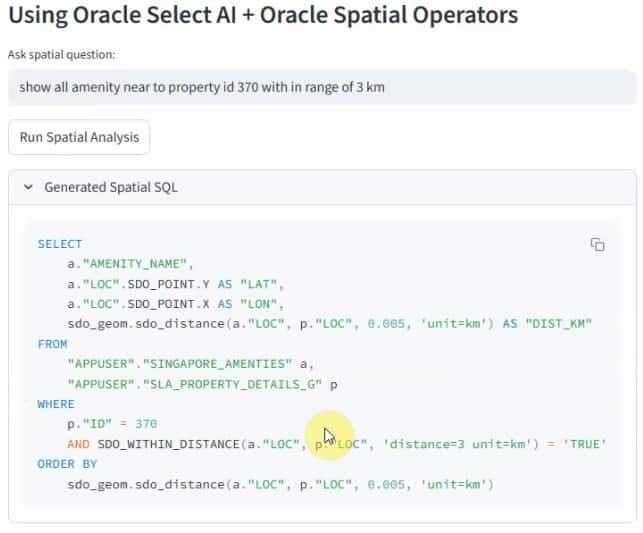
Note: Provide system prompts to guide spatial SQL generation using Oracle Spatial operators. You can refer the complete system prompt here
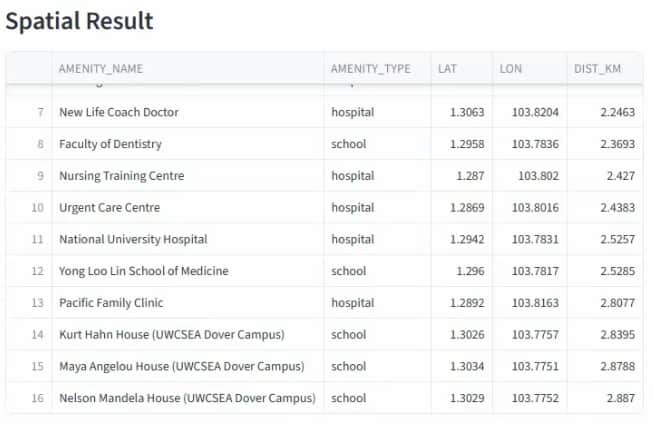
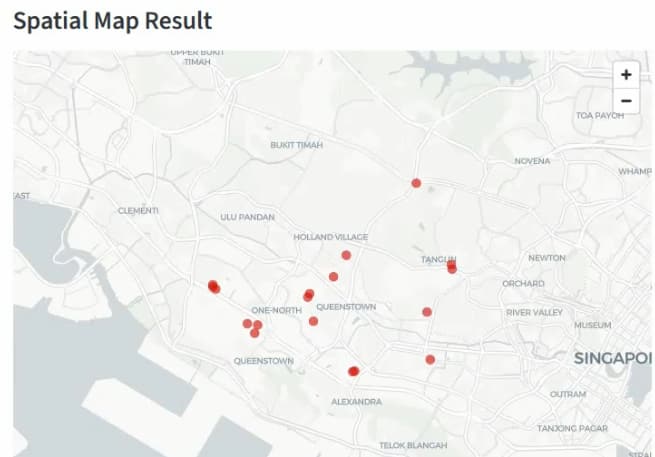
Spatial Visualization
The results (amenities, locations, and distances) are visualised using the following:
- Interactive maps
- Real-time filtering
- Spatial overlays
Key Takeaways
- Automate document processing using OCI Document Understanding
- Query structured data using natural language (Select AI)
- Generate spatial queries using LLMs
- Combine relational + vector approaches for better accuracy
- Build end-to-end applications rapidly with Python
Conclusion
By combining Document AI, Select AI, and Spatial capabilities, developers can build powerful applications that transform unstructured documents into location-aware intelligence systems.
This approach is ideal for:
- Real estate analytics
- Smart cities
- Logistics and supply chain
- Location intelligence platforms
For complete implementation, refer here: