
Introduction
Observability workloads can generate sustained time-series writes and place significant demands on persistent storage. Running these workloads on Kubernetes introduces an additional challenge: the database needs durable, predictable storage while Kubernetes continues to manage compute, scheduling, and application lifecycle.
To evaluate this storage pattern, a Btrfs-backed storage architecture was implemented and validated on Oracle Kubernetes Engine (OKE) using OCI Block Volumes. M3DB was used as the stateful time-series workload to exercise the storage layer and evaluate its behavior under sustained database I/O.
The objective was to determine whether Btrfs could sit directly beneath a database data path while retaining Kubernetes orchestration and OCI Block Volume durability and management.
Rather than starting with the complete M3DB deployment, this first article focuses specifically on the storage layer. It covers two approaches:
- Manual configuration, which is useful for understanding and validating each step of the storage setup.
- Automated provisioning, which creates and attaches the OCI Block Volume and prepares the worker using reusable cloud-init and a systemd service.
The automated approach is intentionally designed so that the same worker initialization logic can be reused with OCI CLI, Terraform, OCI Resource Manager, or another infrastructure provisioning workflow.
The resulting architecture is:
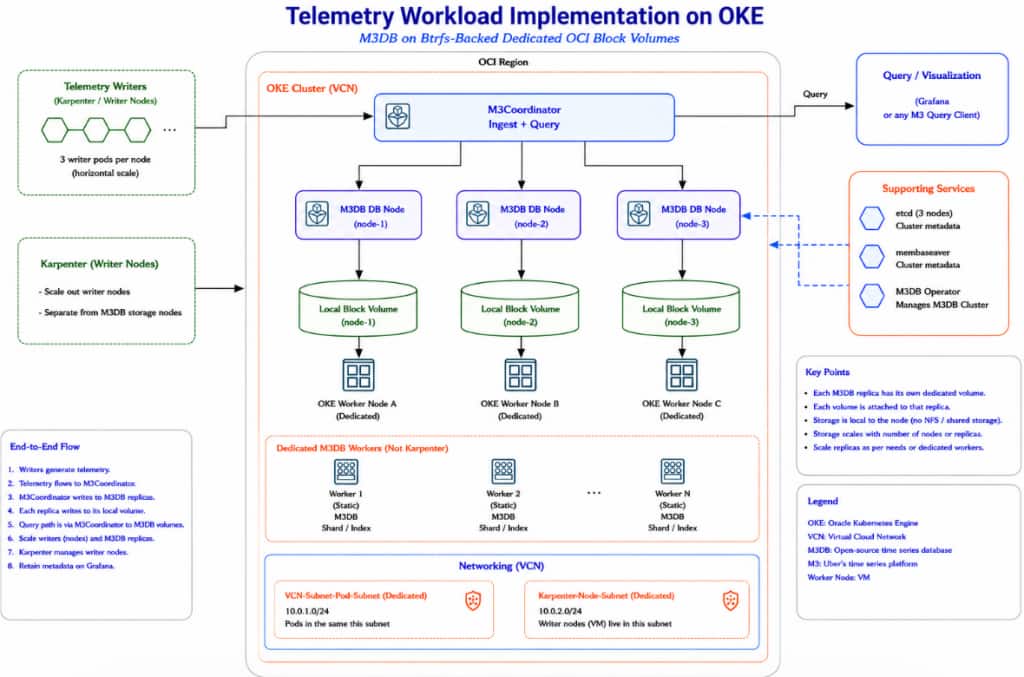
Part 2 builds on this storage foundation by deploying a replicated M3DB cluster, generating time-series data, validating replication and recovery, and adding Grafana-based observability through M3Coordinator’s Prometheus-compatible API.
What is M3DB and Why Use it for this Validation?
M3DB is a distributed time-series database designed to store and query large volumes of timestamped data. Time-series workloads typically involve continuous ingestion, large numbers of time series, replication, retention, and sustained disk activity.
These characteristics make M3DB a useful stateful workload for evaluating the storage architecture rather than relying only on synthetic filesystem tests.
This validation uses three primary M3DB components:
Metric writers generate and send time-series data. The writers are stateless and can be scaled independently to increase the workload placed on the database.
M3Coordinator provides the write and query interface to the M3DB cluster and routes requests to the database tier.
M3DB dbnodes form the persistent database layer. In this implementation, three dbnodes store and serve the time-series data and generate the storage I/O used to evaluate the Btrfs-backed storage layer.
Validation Environment
The validation was performed on an enhanced VCN-native OKE cluster created using Quick Create with the OCI VCN-Native CNI. The Btrfs storage workers used E6.Ax compute shapes with dedicated OCI Block Volumes formatted with Btrfs.
Karpenter was used for dynamic node provisioning, with E6.Flex or E6.Ax configured as eligible shapes based on workload requirements.
This configuration reflects the environment and is not a deployment requirement. Production implementations should be adapted to their networking, security, availability, performance, and storage requirements.
Btrfs Storage Architecture
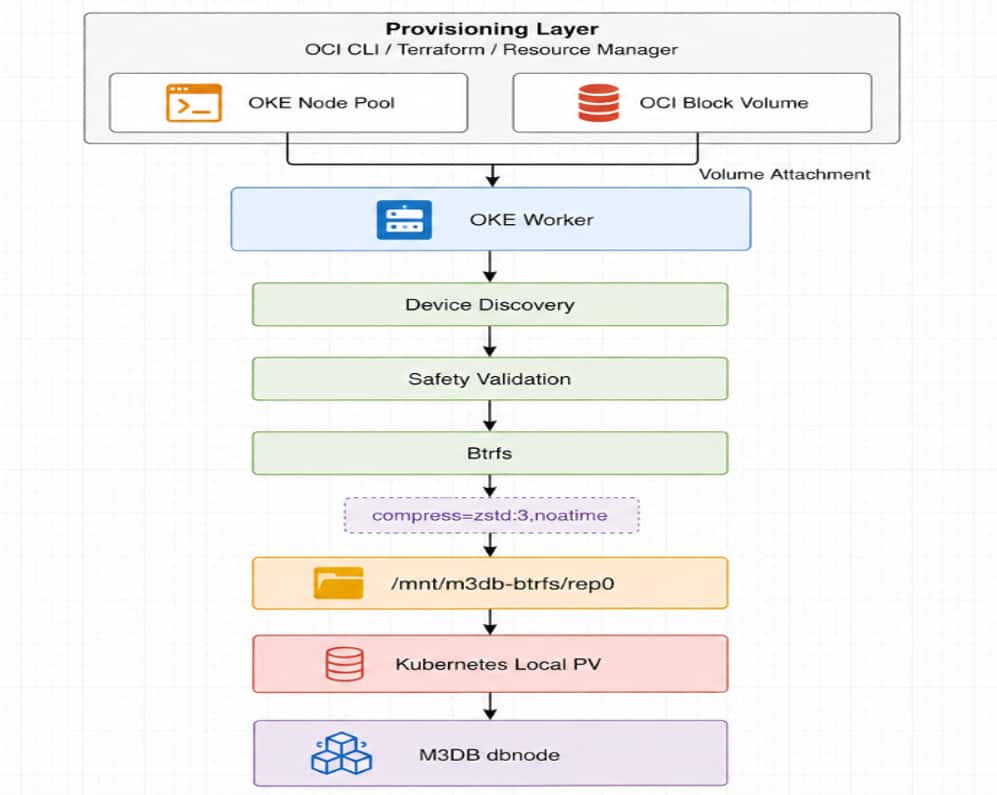
The M3DB data volume is kept separate from the OKE worker boot volume. Because Linux device names can vary, the automation does not assume a fixed device such as /dev/sdb. Instead, it identifies the intended OCI Block Volume and validates it before formatting.
Prerequisites
Before starting, you need:
- An existing OKE cluster with kubectl access.
- OCI CLI authentication for the target tenancy.
- Permissions to manage OKE node pools, compute instances, Block Volumes, volume attachments, and required networking resources.
- Btrfs kernel support and utilities on the OKE workers.
- The subnet, availability domain, Kubernetes version, and worker image information required to create the node pool.
- A dedicated OCI Block Volume for the manual validation procedure; the automated workflow creates its own volume.
IAM Permissions
The automated workflow uses the OCI CLI identity running the provisioning script to create the Block Volume and OKE node pool, identify the worker instance, and attach the volume. The worker itself does not call OCI APIs, so a dynamic group or instance-principal configuration is not required.
A representative policy structure is:
Allow group <AUTOMATION_OPERATOR_GROUP> to manage cluster-node-pools in compartment <OKE_COMPARTMENT_NAME>
Allow group <AUTOMATION_OPERATOR_GROUP> to read clusters in compartment <OKE_COMPARTMENT_NAME>
Allow group <AUTOMATION_OPERATOR_GROUP> to manage instance-family in compartment <WORKER_COMPARTMENT_NAME>
Allow group <AUTOMATION_OPERATOR_GROUP> to use virtual-network-family in compartment <NETWORK_COMPARTMENT_NAME>
Allow group <AUTOMATION_OPERATOR_GROUP> to manage volume-family in compartment <VOLUME_COMPARTMENT_NAME>
Allow group <AUTOMATION_OPERATOR_GROUP> to inspect compartments in tenancy
These policies are representative of the resources used by the validated workflow. Adjust the scope and permissions to match your tenancy’s compartment structure and least-privilege requirements.
When a Dynamic Group Is Needed
A dynamic group is only required if the worker itself calls OCI APIs using instance principals. For example:
All {
  instance.compartment.id = '<WORKER_COMPARTMENT_OCID>',
  tag.<TAG_NAMESPACE>.<TAG_KEY>.value = 'm3db-btrfs'
}
The dynamic group can then be granted only the OCI permissions required by the worker:
Allow dynamic-group m3db-btrfs-worker-instances to read instance-family in compartment <WORKER_COMPARTMENT_NAME>
Allow dynamic-group m3db-btrfs-worker-instances to read volume-family in compartment <VOLUME_COMPARTMENT_NAME>
For the implementation described in this article, these dynamic-group permissions are not required.
Building and Formatting the Btrfs Storage Layer Manually
Before introducing the automated workflow, this section demonstrates the storage preparation manually to establish and validate the expected Btrfs configuration. A privileged host-inspector pod provides access to the OKE worker that has the dedicated OCI Block Volume attached.
1. Verify the Target Worker
Identify the worker and record its Kubernetes node name as <TARGET_NODE>:
kubectl get nodes -o wide

Confirm that the dedicated test Block Volume is attached to this worker before continuing.
2. Create the Host-Inspector Pod
Important: The host-inspector pod runs in privileged mode with access to the worker host filesystem. Use it only for temporary storage validation and delete it after validation is complete.
Create the validation namespace:
kubectl create namespace btrfs-storage-validation \
  --dry-run=client -o yaml | kubectl apply -f -
Create host-inspector.yaml:
apiVersion: v1
kind: Pod
metadata:
  name: host-inspector
  namespace: btrfs-storage-validation
spec:
  restartPolicy: Never
  hostPID: true
  hostNetwork: true
  nodeName: "<TARGET_NODE>"
  tolerations:
    - operator: Exists
  containers:
    - name: inspector
      image: container-registry.oracle.com/os/oraclelinux:8
      command: ["/bin/sh", "-c", "sleep 86400"]
      securityContext:
        privileged: true
      volumeMounts:
        - name: host-root
          mountPath: /host
          mountPropagation: Bidirectional
  volumes:
    - name: host-root
      hostPath:
        path: /
        type: Directory
Apply it and confirm that it is running on the intended worker:
kubectl apply -f host-inspector.yaml
kubectl get pod -n btrfs-storage-validation host-inspector -o wide

3. Enter the Worker Host
The worker root filesystem is mounted at /host. Enter the host environment with:
kubectl exec -n btrfs-storage-validation -it host-inspector -- chroot /host /bin/bashThe remaining commands run from this host shell.
4. Identify and Validate the Block Volume
Inspect the attached devices:
hostname
lsblk -f
lsblk -o NAME,SIZE,TYPE,FSTYPE,MOUNTPOINTS
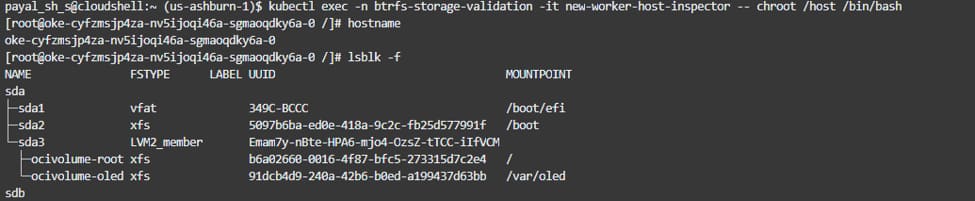
After identifying the dedicated test volume, define the device and mount path. For example:
DEVICE="/dev/sdb"
MOUNT_PATH="/mnt/m3db-btrfs/rep0"
/dev/sdb is only an example. Device names can vary between workers and attachments.
Before formatting, validate the device:
findmnt -S "$DEVICE" || true
lsblk -no NAME,SIZE,TYPE,FSTYPE,MOUNTPOINTS "$DEVICE"
blkid "$DEVICE" || true
wipefs -n "$DEVICE"
Before formatting, verify that the selected device is the intended OCI Block Volume, not the worker boot disk, and that it is unmounted and contains no existing filesystem or partition signatures.
Note: Do not run mkfs.btrfs until the target device has been positively identified as the blank test volume.
5. Format and Mount the Volume
Load Btrfs support and verify the tooling:
modprobe btrfs
lsmod | grep btrfs

mkfs.btrfs --version
mkfs.btrfs -L m3db-btrfs "$DEVICE"
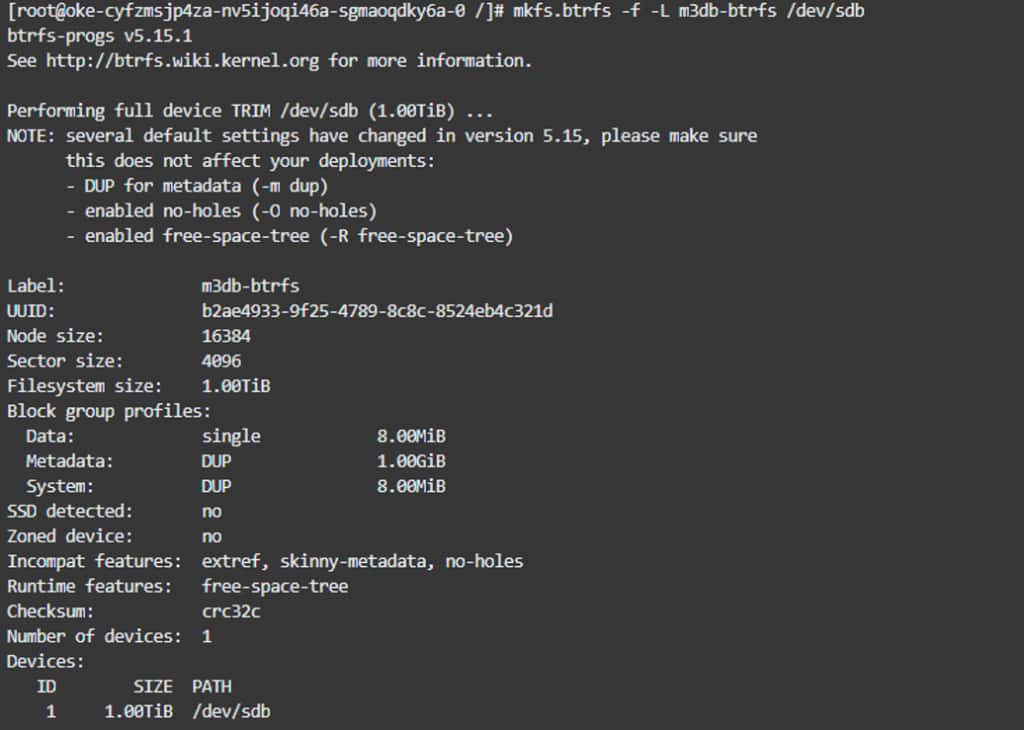
Mount it with compression and noatime:
mkdir -p "$MOUNT_PATH"
mount -o compress=zstd:3,noatime,space_cache=v2  "$DEVICE" "$MOUNT_PATH"
mkdir -p "$MOUNT_PATH/data"
Set ownership and permissions appropriate for the workload. For temporary validation:
chmod 0777 "$MOUNT_PATH/data"Production deployments should use the UID, GID, and permissions required by the workload.

6. Persist the Mount
Use the filesystem UUID rather than the Linux device name:
UUID="$(blkid -s UUID -o value "$DEVICE")"
echo "UUID=${UUID} ${MOUNT_PATH} btrfs defaults,compress=zstd:3,noatime,space_cache=v2 0 0"   >> /etc/fstab
Using the UUID avoids relying on /dev/sdb remaining unchanged after reboot.
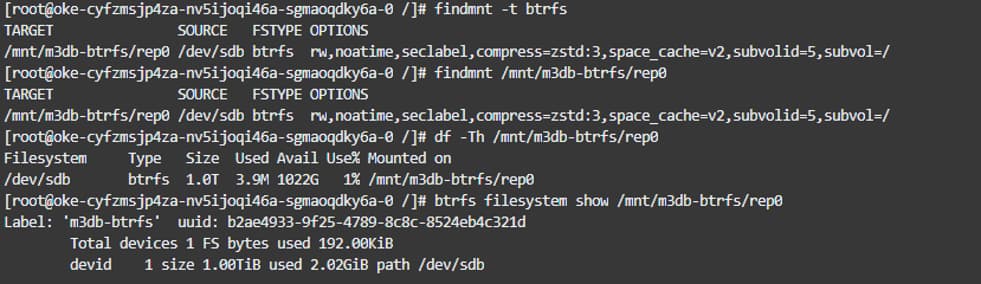
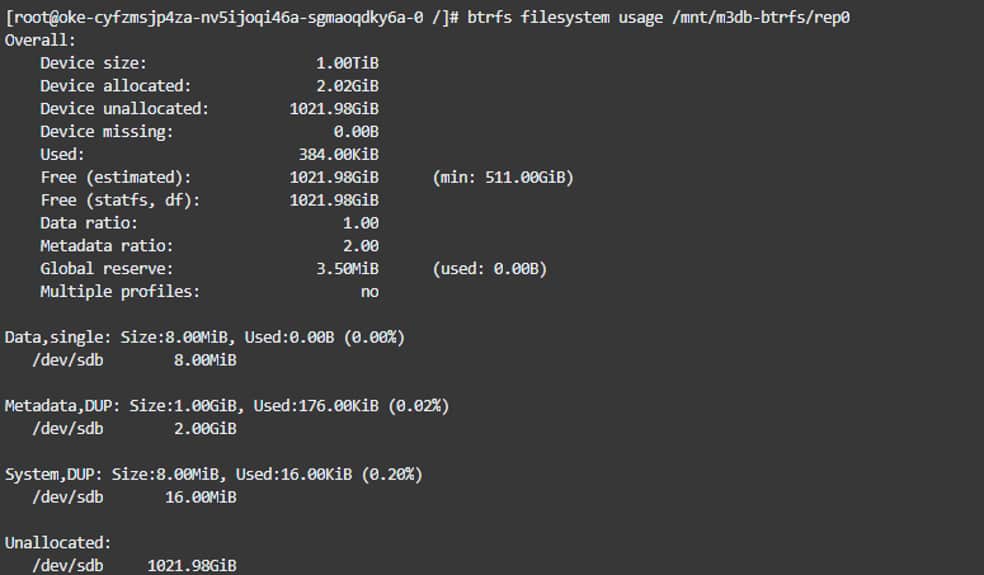
7. Validate the Storage Layer
findmnt "$MOUNT_PATH"
df -Th "$MOUNT_PATH"
btrfs filesystem show "$MOUNT_PATH"
btrfs filesystem usage "$MOUNT_PATH"
grep "$MOUNT_PATH" /etc/fstab
Verify that the filesystem is Btrfs, the expected capacity is available, compress=zstd:3 and noatime are active, and /etc/fstab references the filesystem UUID.
After capturing the validation evidence, remove the privileged host-inspector resources.
exit
kubectl delete pod host-inspector  -n btrfs-storage-validation
kubectl delete namespace btrfs-storage-validation
Automating Btrfs Worker Provisioning
The manual procedure establishes the expected storage behavior, but repeating it for every worker is not scalable. The automated approach separates OCI provisioning from worker-side storage preparation.
OCI provisioning creates the Block Volume and OKE node pool, identifies the new worker, and attaches the volume.
Worker initialization discovers and validates the attached volume, prepares or preserves Btrfs, mounts it, and persists the configuration.
The automation was validated by creating a dedicated OKE node pool with the reusable cloud-init configuration.
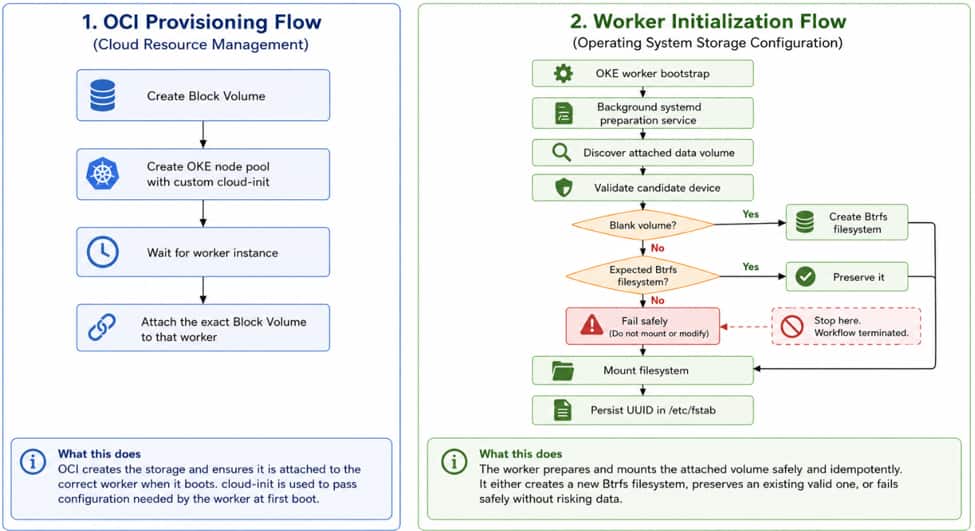
The validated sequence is:
- Create a dedicated OCI Block Volume.
- Create an OKE node pool with the reusable cloud-init supplied as user_data.
- Allow OKE bootstrap to register the worker with Kubernetes.
- Identify the worker created by the node pool.
- Attach the dedicated Block Volume to that worker.
- Allow the background systemd storage-preparation service to discover the attached volume.
- Discover and validate the intended non-root data volume.
- Create Btrfs only if the volume is confirmed blank; otherwise preserve the expected existing Btrfs filesystem.
- Mount the filesystem with the required Btrfs options.
- Persist the mount in /etc/fstab using the filesystem UUID.
The reusable automation scripts are available at:
https://github.com/Payalsharma2512/oke-btrfs-m3db
1. Why Btrfs preparation runs as a systemd service
The Block Volume may not be attached when cloud-init first runs. Waiting synchronously for storage preparation can delay OKE worker registration. Instead, cloud-init starts a background systemd service that waits for the volume and prepares Btrfs independently, allowing OKE bootstrap and node registration to continue.
2. Why the automation does not assume /dev/sdb
Device names can vary across workers and attachments. The automation therefore discovers and validates the intended data volume before formatting it. If the device contains an unexpected filesystem or does not pass the safety checks, the process fails without formatting.
3. Reusable implementation
The tested automation and cloud-init artifacts are available in the GitHub repository:
cloud-init/m3db-btrfs-worker.yaml
scripts/create-btrfs-worker.sh
scripts/prepare-btrfs-volume.sh
scripts/validate-btrfs.sh
4. Reusing the Cloud-Init Configuration
The Btrfs cloud-init configuration is independent of the provisioning method and can be reused with OCI CLI, Terraform, OCI Resource Manager, CI/CD pipelines, or other tools that support OKE custom cloud-init.
The provisioning layer supplies environment-specific values such as:
<EXPECTED_VOLUME_OCID>
<EXPECTED_VOLUME_SIZE_GB>
<MOUNT_PATH>
<BTRFS_LABEL>
<DATA_DIR_OWNER>
<DATA_DIR_GROUP>
<DATA_DIR_MODE>
This keeps the storage discovery, validation, formatting, and mount logic consistent across deployment methods. The GitHub repository provides the reusable cloud-init and automation scripts.
5. Growing Btrfs Storage
Boot-volume growth and Btrfs data-volume growth are separate operations. oci-growfs is used for OCI boot/root filesystem expansion. For the dedicated Btrfs data volume used in this implementation, resize the Btrfs filesystem explicitly after expanding the underlying Block Volume.
btrfs filesystem resize max <MOUNT_PATH>Verify the new capacity:
btrfs filesystem usage <MOUNT_PATH>
df -Th <MOUNT_PATH>
A production expansion procedure should also validate Block Volume expansion, device rescan, filesystem resize, and recovery behavior.
6. Validating the Automated Storage Configuration
After automated provisioning completes, verify both the OKE worker and the Btrfs storage configuration.
First, confirm that the new worker has joined the cluster and is Ready:
kubectl get nodes -o wideIf host-level validation is required, recreate the temporary privileged host-inspector pod described in the manual procedure, schedule it to the new worker, and enter the worker host:
kubectl exec -n btrfs-storage-validation -it host-inspector -- chroot /host /bin/bash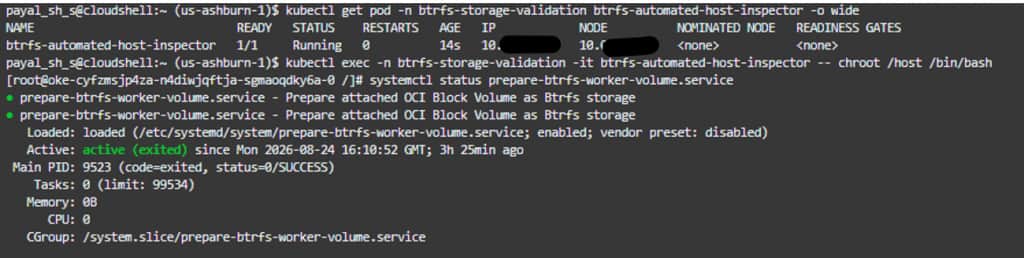
The automation has already discovered and validated the attached Block Volume, created or preserved the Btrfs filesystem, and mounted it. No manual device selection or formatting is required.
Set the mount path configured by the automation:
MOUNT_PATH="/mnt/m3db-btrfs/rep0"Verify the filesystem and mount configuration:
findmnt "$MOUNT_PATH"
df -Th "$MOUNT_PATH"
btrfs filesystem show "$MOUNT_PATH"
btrfs filesystem usage "$MOUNT_PATH"
grep "$MOUNT_PATH" /etc/fstab
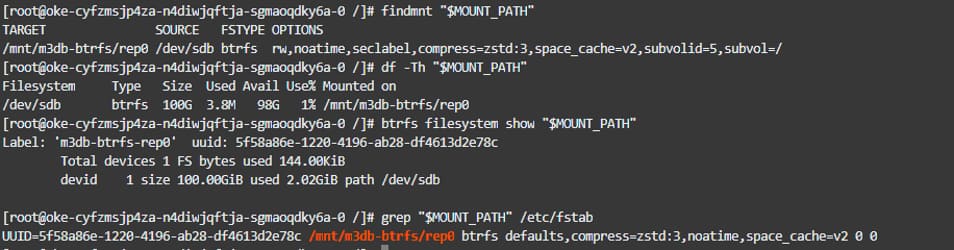
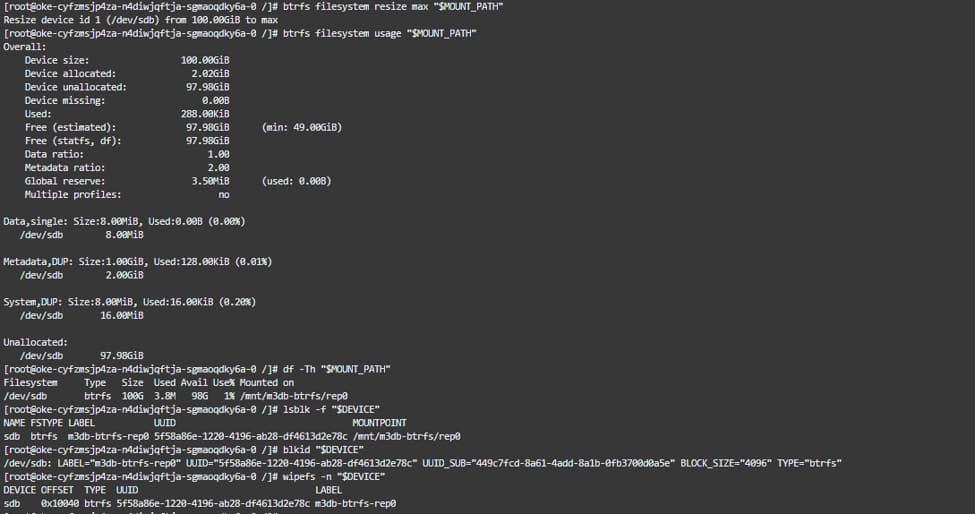
Confirm that:
- The worker is Ready.
- The correct Block Volume is attached.
- Device discovery does not depend on /dev/sdb.
- The filesystem is Btrfs.
- compress=zstd:3 and noatime are active.
- The expected capacity is available.
- The mount persists across reboot.
- The filesystem UUID remains unchanged.
- Re-running the preparation service preserves the existing filesystem and data.
Validation also confirmed reboot persistence and idempotent preparation.
The privileged host-inspector pod is required only for host-level validation. After collecting the required validation evidence, exit the host shell and remove the temporary pod and namespace:
exit
kubectl delete namespace btrfs-storage-validation
How This Differs from Standard OCI Storage
This implementation differs from using an OCI Block Volume or File Storage PVC because the filesystem is prepared explicitly on the OKE worker and exposed to Kubernetes as local persistent storage.
| Dimension | OCI Block Volume PVC | OCI File Storage PVC | Btrfs Local PV in this implementation |
| OCI storage | Block Volume | File Storage | Block Volume |
| Kubernetes model | CSI-managed PVC | NFS-backed PVC | Local PV/PVC |
| Filesystem | CSI-managed | NFS | Explicitly managed Btrfs |
| Data path | PVC mount | NFS mount | Worker Btrfs mount |
| Node relationship | CSI-managed attachment | Network accessible | Local PV node affinity |
| Compression validated | Not tested | Not tested | compress=zstd:3 |
The Local PV approach provides direct control over filesystem creation, mount options, compression, and persistence. The tradeoff is that the PersistentVolume is associated with a specific worker through node affinity, which must be considered when designing node replacement and storage recovery.
Troubleshooting
If the worker does not become Ready, verify that storage preparation is not blocking OKE bootstrap.
Check the Btrfs preparation service and logs:
systemctl status prepare-btrfs-worker-volume.service
journalctl -u prepare-btrfs-worker-volume.service
If the volume is not discovered, inspect the available devices:
lsblk -f
lsblk -o NAME,SIZE,TYPE,FSTYPE,MOUNTPOINTS
Do not resolve discovery problems by hard-coding /dev/sdb. If an unexpected filesystem is detected, inspect it without modifying it:
blkid <DEVICE>
wipefs -n <DEVICE>
Stop if the device cannot be positively identified as safe to use.
For mount or reboot-persistence issues:
findmnt <MOUNT_PATH>
grep <MOUNT_PATH> /etc/fstab
journalctl -b
The persistent mount should reference the filesystem UUID rather than a transient Linux device name.
Where We Go Next
With the Btrfs storage layer validated, the next step is to expose the prepared storage to Kubernetes and deploy the stateful workload.
Part 2 builds on this foundation to cover:
Btrfs-backed OKE workers → Local PersistentVolumes → M3DB deployment and replication → write/query validation → failure and recovery testing → M3Coordinator Prometheus-compatible API → Grafana dashboards
Part 2 also brings these components together into the complete OCI architecture and validates the deployment end to end.
Next: Part 2, Deploying a Replicated M3DB Cluster on Oracle Kubernetes Engine with Grafana Observability
References
- OKE Custom Cloud-Init Scripts
- OCI Block Volume Overview
- Attaching a Block Volume
- Connecting to a Block Volume
- Online Resizing a Block or Boot Volume
- Rescanning a Block or Boot Volume
- Btrfs Documentation
- Creating a Btrfs Filesystem: mkfs.btrfs
- Btrfs Mount Options and Compression
- Btrfs Filesystem Management and Resize
- OCI Core Services IAM Reference
- Managing Dynamic Groups
- Dynamic Group Matching Rules
- Policies for Dynamic Groups
- Kubernetes Volumes
- Linux Kernel Security Constraints for Pods and Containers