
Moving data from Amazon S3 to Oracle Cloud Infrastructure (OCI) Object Storage is technically straightforward, but preserving the lifecycle behavior associated with that data requires deliberate design. In Amazon S3 general purpose buckets, lifecycle filters can scope rules by key prefix, object tags, or a combination of both. OCI Object Storage supports tags on bucket resources, while OCI Object Lifecycle Management scopes a subset of objects by object-name filters, including prefixes and patterns, rather than per-object tag filters. For a design that applies different lifecycle policies by data class, encode that class in the destination bucket and/or object-name prefix during migration or upload.
An S3-to-OCI copy creates a new destination object. The destination object has its own OCI Last-Modified time, and OCI lifecycle rule timing is calculated relative to that time. Consequently, a direct copy does not carry over S3 lifecycle eligibility or elapsed lifecycle time. If lifecycle scope was based on S3 object tags, translate that scope into the OCI bucket and object-name design; otherwise, historical objects can receive a new OCI lifecycle clock. One practical approach is a bucket-and-prefix architecture: route each data class to its designated bucket and prefix, then configure OCI lifecycle policies to target that object-name scope.
The problem: lifecycle intent can be lost during a simple copy
Organizations often use S3 object tags such as data-class=raw, data-class=processed, or retention=archive to apply different transitions and expiration rules. If those objects are copied unchanged into OCI, the tag-based selection mechanism and original lifecycle clock do not automatically translate.
- Policy scope changes: OCI lifecycle policies are configured on a bucket, and rules scope objects by object-name prefixes or patterns—not per-object tags.
- Lifecycle timing changes: copied objects have a new OCI last-modified time.
- Historical data needs special handling: a direct bulk copy can make old objects appear new.
The solution: make classification visible in the OCI storage path
This pattern translates business classification into an OCI bucket and prefix. Terraform creates the buckets and lifecycle policies; a small upload router consistently places new objects in the appropriate destination. OCI Object Storage performs configured lifecycle actions without customer-managed compute dedicated to archive or delete execution.
Migration outcome: Translate S3 tag-driven lifecycle intent into OCI buckets, prefixes, lifecycle policies, and a small, testable upload router so historical retention is explicitly controlled rather than accidentally reset by a copy operation.
How the approach works
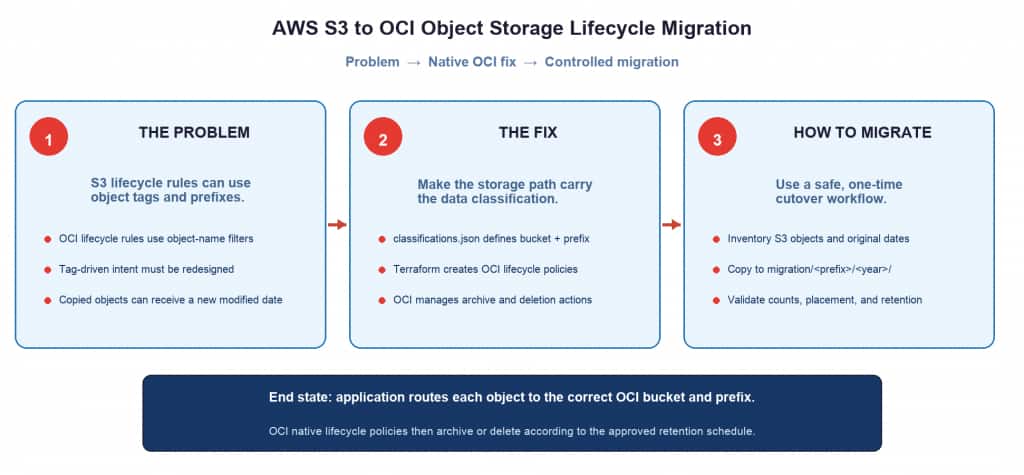
- Classify: Define data classes, target bucket/prefix, retention period, and archive action in one JSON configuration.
- Provision: Terraform reads that configuration and creates OCI buckets plus lifecycle policies that target the appropriate name prefix.
- Route: The Python router reads the classification and uploads each new object to the matching OCI bucket and prefix.
- Automate: OCI Object Lifecycle Management transitions or deletes matching objects according to the policy.
Define data classes once
File: config/classifications.json
"pii-customers": {
  "bucket"      : "bucket-pii-prod",
  "prefix"      : "customers/",
  "archive_days": 90,
  "delete_days" : 2555,
  "_note"       : "Customer PII — GDPR/CCPA — archive 90d, delete 7yr"
},

"pii-employees": {
  "bucket"      : "bucket-pii-prod",
  "prefix"      : "employees/",
  "archive_days": 90,
  "delete_days" : 3650,
  "_note"       : "HR / employee records — archive 90d, delete 10yr"
},
The configuration is the source of truth for classification, destination, and lifecycle requirements. Keep it under version control and review it as policy.
Provision OCI buckets and lifecycle policies
File: terraform/main.tf
# ── Build ARCHIVE rules ─────────────────────────────────────────────────────
  # One rule per classification where archive_days is not null.
  # Key format: "{bucket}__{prefix}__archive"
  # Double underscore used as delimiter — safe for bucket names and prefixes.
  archive_rules = {
    for key, val in local.classifications :
    "${val.bucket}__${val.prefix}__archive" => {
      bucket = val.bucket
      prefix = val.prefix
      action = "ARCHIVE"
      days   = val.archive_days
    }
    if val.archive_days != null
  }

  # ── Build DELETE rules ──────────────────────────────────────────────────────
  # Every classification always gets a DELETE rule — no exceptions.
  delete_rules = {
    for key, val in local.classifications :
    "${val.bucket}__${val.prefix}__delete" => {
      bucket = val.bucket
      prefix = val.prefix
      action = "DELETE"
      days   = val.delete_days
    }

# =============================================================================
# CREATE BUCKETS
# One bucket per unique bucket name derived from classifications.json.
# No bucket names are hardcoded here.
# =============================================================================
resource "oci_objectstorage_bucket" "buckets" {
  for_each = local.bucket_names

  compartment_id        = var.compartment_id
  namespace             = var.namespace
  name                  = each.key
  storage_tier          = "Standard"
  versioning            = "Enabled"
  object_events_enabled = true

  metadata = {
    "managed-by" = "terraform"
    "config-src" = "classifications.json"
  }
}

# =============================================================================
# APPLY LIFECYCLE POLICIES
# One policy per bucket. Rules generated dynamically from all_rules.
# The dynamic block filters all_rules to only the rules for each bucket.
# No rule definitions are hardcoded here.
# =============================================================================
resource "oci_objectstorage_object_lifecycle_policy" "policies" {
  for_each = local.bucket_names

  namespace  = var.namespace
  bucket     = each.key
  depends_on = [oci_objectstorage_bucket.buckets]

  dynamic "rules" {
    for_each = {
      for rule_key, rule in local.all_rules :
      rule_key => rule
      if rule.bucket == each.key
    }

    content {
      name        = rules.key
      action      = rules.value.action
      time_amount = rules.value.days
      time_unit   = "DAYS"
      is_enabled  = true

      object_name_filter {
        inclusion_prefixes = [rules.value.prefix]
      }
    }
  }
}
Route new uploads to the correct OCI location
File: router/oci_upload_router.py
        # ── Step 1: Validate
        if classification not in self._valid_keys:
            raise ValueError(
                f"Unknown classification '{classification}'.\n"
                f"Valid values: {sorted(self._valid_keys)}\n"
                f"To add a new one: edit config/classifications.json"
            )

        # ── Step 2: Route
        bucket, prefix = self._routing_map[classification]
        full_key       = f"{prefix}{object_name}"

        # ── Step 3: Build metadata
        # Stored for audit and search. Does NOT drive lifecycle.
        # OCI native policies on the bucket handle lifecycle.
        now = datetime.now(timezone.utc).strftime("%Y-%m-%dT%H:%M:%SZ")
        metadata = {
            "classification"         : classification,
            "upload-timestamp"       : now,
            "original-creation-date" : (
                original_date.strftime("%Y-%m-%dT%H:%M:%SZ")
                if original_date else now
            ),
        }
        if extra_meta:
            metadata.update(extra_meta)

        # ── Step 4: Upload
        try:
            self._client.put_object(
                namespace_name  = self._namespace,
                bucket_name     = bucket,
                object_name     = full_key,
                put_object_body = body,
                content_type    = content_type,
                opc_meta        = metadata,
            )
The router accepts a classification and creates the OCI object name from the configured prefix. Use OCI workload identity with a least-privilege IAM policy for OKE workloads, or use a least-privilege dynamic group for resource or instance principals; avoid long-lived credentials in code.
Handle historical S3 objects deliberately
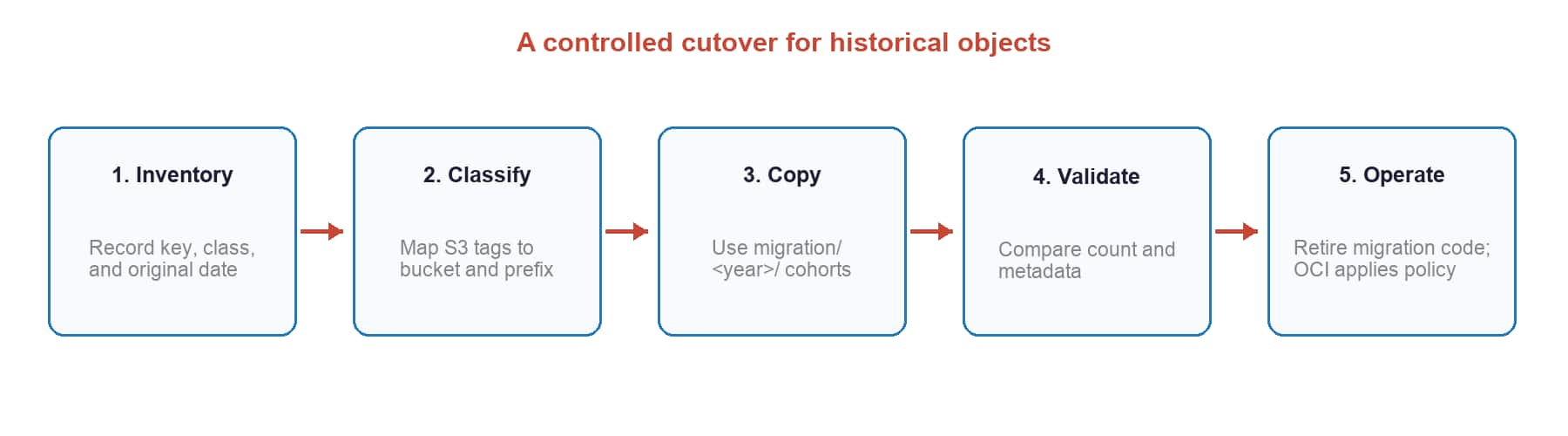
The historical migration script inventories S3 objects and uses the LastModified value to place them into a lifecycle cohort. This helps represent retention intent, but LastModified is not necessarily the original creation time. Where exact retention timing is required, carry authoritative creation or retention metadata in an inventory and validate OCI placement before enabling deletion actions.
- Inventory S3 objects and relevant metadata.
- Assign a cohort or prefix based on the retention rule and known age.
- Copy to the mapped OCI bucket and prefix.
- Validate object counts, placement, and lifecycle policy coverage.
- Enable lifecycle actions after validation and approval.
Benefits of this approach
- Retention integrity: lifecycle intent is explicitly mapped instead of being reset by a raw copy.
- OCI-native operations: after cutover, OCI manages lifecycle actions; no separate compute is required solely for archive or delete execution.
- One source of truth: classification, placement, and retention are documented in a reviewable configuration.
- Clear governance: the bucket/prefix path makes lifecycle domains visible during troubleshooting and audits.
- Security-ready design: narrow IAM policies can constrain a router to approved target buckets and prefixes.
- Repeatable migration: Terraform and a versioned mapping reduce configuration drift.
- Safer cutover: inventory, cohorting, and validation make historical migration measurable before lifecycle deletion is enabled.
Cost considerations
The upload router is only needed while moving data or while applications need routing. Once migration is complete and applications write directly to their designated OCI bucket and prefix, lifecycle execution is managed by OCI Object Storage. Ongoing charges are primarily Object Storage capacity, request operations, retrieval or archive-storage charges when applicable, and network transfer according to the services and regions used.
Production guardrails
- Begin lifecycle policies in a non-destructive state; validate before enabling delete actions.
- Use least-privilege IAM, workload identity, and encryption requirements appropriate to the data class.
- Keep migration manifests, validation results, and policy changes for auditability.
- Test restore and retrieval procedures for archived data before production cutover.
Conclusion
When you migrate from Amazon S3 to OCI Object Storage, copying data is only part of the task. By mapping lifecycle classifications to OCI bucket names and object-name prefixes, you can define clear scopes for OCI lifecycle policies and manage both new and historical objects more consistently.
The S3toObjectStorage GitHub repository is an illustrative implementation sample. Review the code, confirm that it is suitable for your environment, and follow applicable licensing and organizational approval requirements before using it.
References
- OCI Object Lifecycle Management documentation
- OCI Object Storage bucket tagging documentation
- GitHub repository – S3toObjectStorage sample — Source code in GitHub not an Oracle product and not supported by Oracle.