


Deploying a firewall in the cloud is the easy part. The real work starts when traffic has to flow through it, whether it’s moving between subnets and virtual cloud networks (VCNs), reaching the internet, or connecting to remote locations.
This eight-workshop Oracle LiveLabs series takes you from your first Palo Alto Networks VM-Series next-generation firewall (NGFW) on Oracle Cloud Infrastructure (OCI) to a working hub-and-spoke network. Choose the deployment model that fits your needs, extend connectivity to remote sites and users, and finish with routing scenarios built for that model.
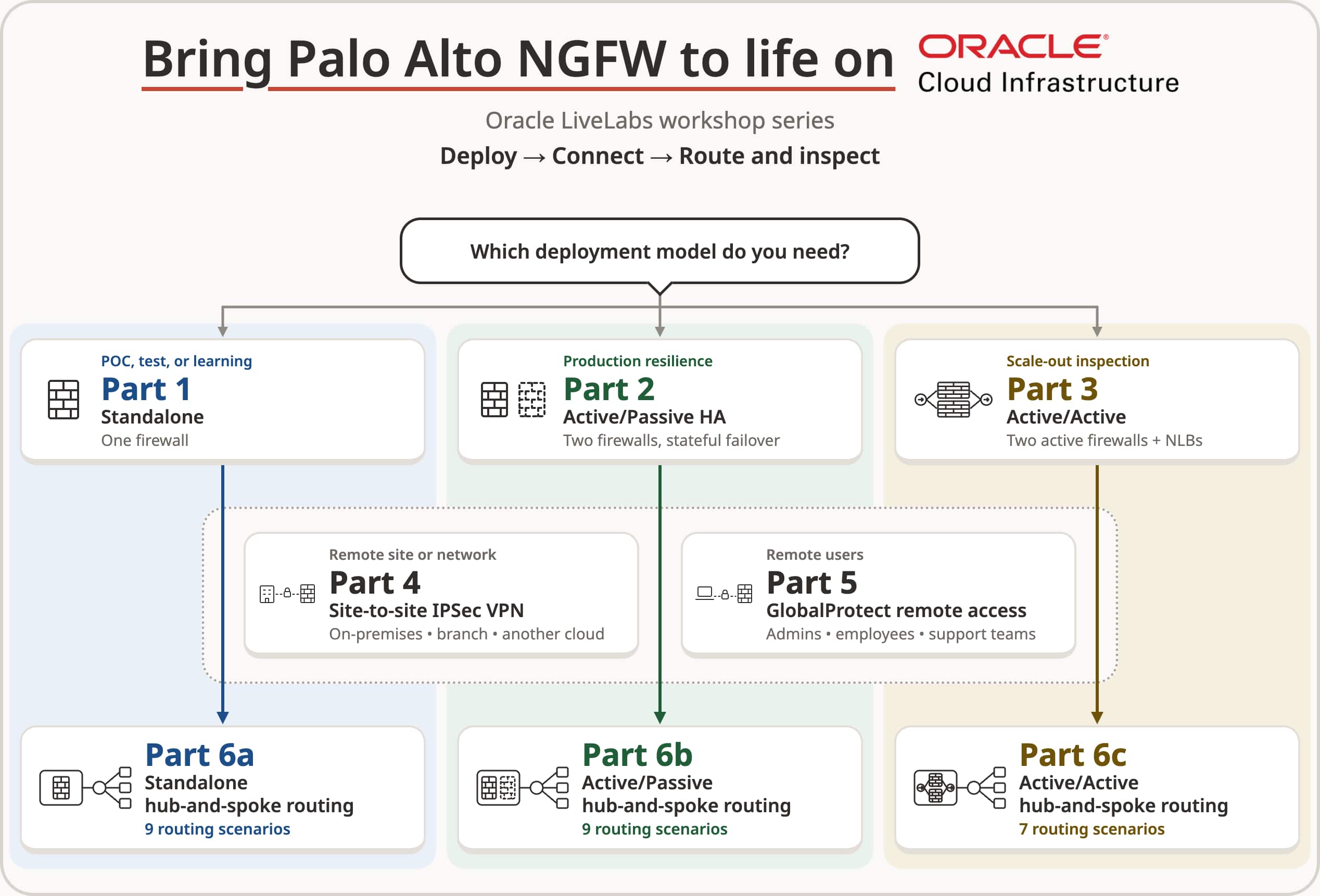
Start with your deployment
The first three workshops establish the firewall environment by covering OCI network setup, Palo Alto NGFW deployment from Oracle Cloud Marketplace, firewall interfaces, and baseline configuration.
Part 1 – Deploy Palo Alto NGFW in OCI (Standalone)
Deploy and configure a single Palo Alto NGFW in OCI.
Part 2 – Deploy Palo Alto NGFW in OCI with Active/Passive HA
Deploy and configure a highly available Palo Alto NGFW pair in OCI.
Part 3 – Deploy Palo Alto NGFW in OCI with Active/Active mode (using NLB)
Deploy and configure two independent Palo Alto NGFWs in OCI, with Network Load Balancers distributing traffic between them.
Choose the workshop that matches the deployment model you want to learn. Parts 1, 2, and 3 are independent starting points rather than sequential workshops.
Connect remote sites and users
With the firewall deployment in place, the next two workshops add connectivity for remote sites and remote users.
Part 4 – Set up IPSec site-to-site VPN on Palo Alto NGFW in OCI
Connect the Palo Alto NGFW in OCI to a remote network. The example uses another OCI region as the remote site and includes validation steps.
Part 5 – Set up remote access VPN (GlobalProtect) on Palo Alto NGFW in OCI
Configure GlobalProtect on the firewall and connect individual remote users through a VPN.
Both workshops explain the setup for the three deployment models. Choose the connectivity option you need and follow the corresponding workshop.
Bring it all together with hub-and-spoke routing
The final three workshops explore how traffic moves between the firewall and the resources around it. In a hub-and-spoke design, the hub contains the firewall deployment, while connected spoke networks contain application workloads. Choose the workshop that matches your deployment model:
Part 6a – Configure hub-and-spoke routing for a Standalone Palo Alto NGFW deployment in OCI
Configure hub-and-spoke routing for the standalone deployment from Part 1.
Part 6b – Configure hub-and-spoke routing for an Active/Passive Palo Alto NGFW deployment in OCI
Configure hub-and-spoke routing for the Active/Passive deployment from Part 2.
Part 6c – Configure hub-and-spoke routing for an Active/Active Palo Alto NGFW deployment in OCI
Configure hub-and-spoke routing for the Active/Active deployment from Part 3.
These workshops cover public application access, outbound internet connections, access to Oracle Services Network, communication between subnets and spoke networks, and hybrid VPN connectivity. Each workshop presents the routing scenarios applicable to its deployment model.
Each scenario guides you through the required configuration and shows how to check connectivity and traffic logs. This helps relate the architecture diagram to the traffic you observe during the lab.
Get started
Start with the deployment model that best matches your learning goals, add VPN connectivity where needed, and continue with the corresponding hub-and-spoke workshop. Review each workshop’s prerequisites before starting, including OCI access, required permissions, and any workshop-specific requirements.