

OCI File Storage Service now supports Snapshot Locks, a new data protection capability designed to help you improve ransomware resilience, address regulatory compliance requirements, and enforce data retention policies. Snapshot Locks are especially useful for customers in finance, healthcare, and large enterprises that store sensitive, mission-critical data on shared file systems and need to guarantee that recovery points can’t be tampered with or deleted—whether by accident, malicious actors, or unauthorized administrators.
Snapshot Locks integrate with OCI File Storage Service policy-based snapshots, enabling you to automatically create snapshots and apply locks at the same time.
At a glance:
- Lock any file system snapshot for a defined retention period—minimum 1 day, maximum 100 years
- Two modes: governance (flexible) and compliance (strict immutability after 14-day cool-off period)
- Legal hold support for indefinite, open-ended protection
- Retention periods can only be extended, never shortened—not even by a tenancy administrator in compliance mode
- Available now at no additional cost
What are Snapshot Locks?
A Snapshot Lock is a time-based protection feature that prevents a file system snapshot from being deleted for a specified retention period. You configure the lock duration (in days), and the snapshot remains undeletable until that period ends. If a snapshot has an active lock, you can’t delete the snapshot or the file system that contains it.
Governance mode: flexible retention with optional legal hold
A governance lock blocks snapshot deletion for the configured duration and takes effect immediately. With the appropriate Identity and Access Management (IAM) permissions, authorized administrators can:
- Adjust the lock duration
- Remove the lock if needed
Governance mode also supports legal hold for indefinite protection. When a snapshot is placed in legal hold, it remains protected until the hold is explicitly removed. Use governance mode when you want strong protection with the flexibility to respond to operational needs.
Compliance mode: strict retention with immutability after cool-off
A compliance lock is intended for strict, non-editable retention requirements. It includes two parameters:
- Lock duration: the retention period
- Cool-off duration: a window during which the lock can still be changed or removed if you have the appropriate permissions (default 14 days)
After the cool-off window ends, the lock becomes fully enforced and cannot be removed or shortened—only extended. We recommend compliance locks only when strict retention is required. After cool-off, no user can remove or reduce the lock duration, regardless of IAM permissions.
Use cases
- Ransomware recovery: preserve a known-good snapshot through the recovery window, even if an attack gains access to the tenancy
- Regulatory retention and audits: enforce required snapshot retention for compliance with SEC, FINRA, HIPAA, CFTC, GDPR, and similar regulations
- Internal data governance: apply retention requirements with operational flexibility using governance mode
- Legal hold: keep a snapshot protected indefinitely until legal or regulatory needs are resolved
Operational considerations
Before enabling Snapshot Locks, keep these in mind:
- File system deletion is blocked if any snapshot in the file system has an active time-based lock
- Compliance locks become immutable after cool-off period ends, so plan your configuration carefully before locking
- When a retention period expires, the snapshot returns to regular (unlocked) mode
- Locks aren’t inherited by clones or replication targets
Get started with Snapshot Locks
To lock a snapshot in the OCI Console:
- Go to File Systems and select a file system
- Select Snapshots, then choose a snapshot
- Click Actions, then update snapshot lock
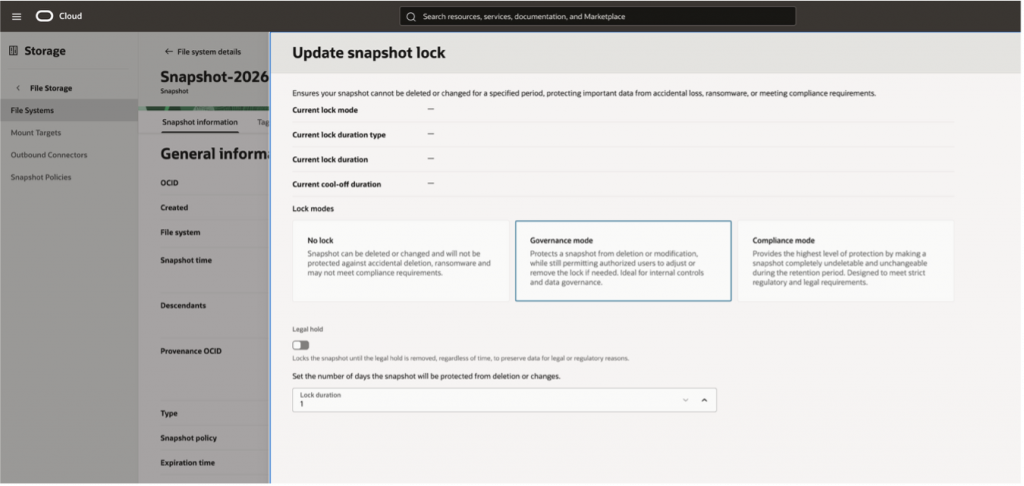
You can also manage Snapshot Locks using the OCI command line interface (CLI), application programming interface (API), or the software development kit (SDK).