
Clean up Oracle Cloud Infrastructure (OCI) environments with OCI Compartment Cleaner, an automation that discovers resources, plans their deletion, and verifies what remains in a selected compartment and region.
Demos, labs, and proof-of-concept projects are quick to create, but cleaning up afterward often takes longer than expected. OCI Compartment Cleaner provides a ready-to-use user interface (UI) that runs locally with Python installed. It automates the repetitive work while keeping the operator in control through a dry-run preview and explicit confirmation before deletion.
The challenge
Cleaning up a compartment involves more than finding resources and clicking Delete. Compute, storage, networking, and database resources can have dependencies that require a specific deletion order. A blocked operation means investigating the cause, retrying, and checking again for resources left behind.
OCI Compartment Cleaner brings discovery, dependency-aware planning, service-specific cleanup, and final verification into one repeatable workflow.
Key benefits
- Reduce manual effort: Automate resource discovery and repetitive deletion tasks.
- Handle dependencies: Build a deletion plan that accounts for resource relationships and service-specific requirements.
- Review before execution: Preview the plan with dry-run mode, which is the default.
- Track the outcome: Follow live logs, retain plan artifacts, and review remaining resources after execution.
Supported resource examples include networking, Compute, Oracle Kubernetes Engine (OKE), Object Storage, Database, and MySQL. Coverage varies by resource type; errors and unsupported resources require review.
Best practice: Confirm the compartment and region, review the plan, and preserve any required data before approving deletion. The default pre-delete Resource Manager discovery snapshot captures resource definitions; it is not a data backup.
Built for temporary environments
The cleaner is well suited to:
- Demo and lab cleanup
- Proof-of-concept teardown
- Temporary project environments
- Repeated test-environment resets
It can also help empty a compartment before you remove the compartment manually
How to use the UI
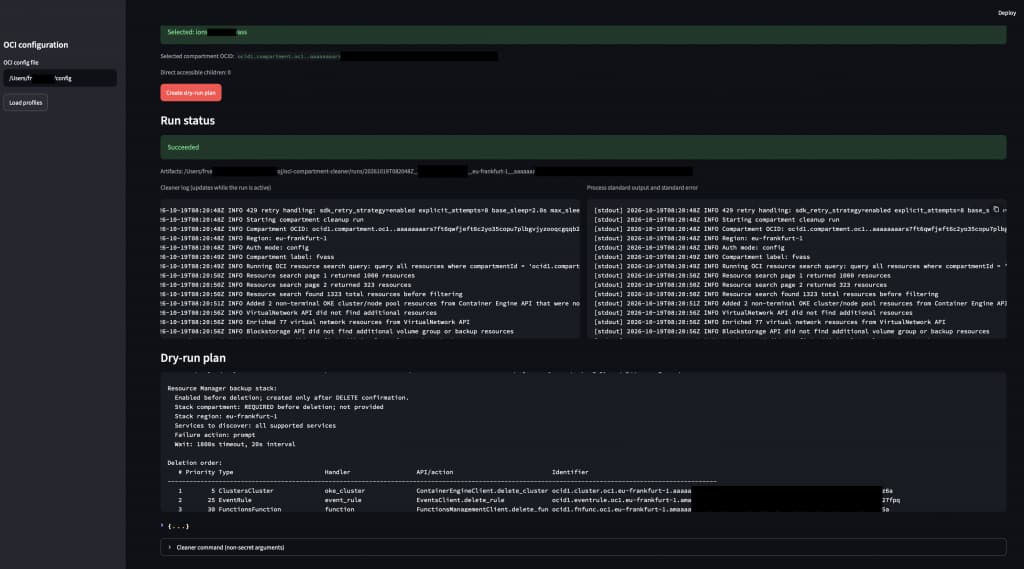
With Python installed and an OCI configuration profile set up, launch the local application and use the UI to guide the cleanup. The interface brings the target selection, dry-run plan, live logs, and run results together in one place.
Follow these steps:
- Select: Choose an OCI configuration profile, region, and target compartment.
- Preview: Run discovery and review the proposed cleanup plan.
- Confirm: Start execute discovery, review the fresh execution plan, and type DELETE to approve deletion.
- Verify: Review the logs, errors, and resources still present after cleanup.
Starting execute discovery does not delete resources; deletion begins only after confirmation. Individual deletion failures are logged, and cleanup continues.
If networking resources might be shared across compartments, run the separate, read-only Network Usage Audit before cleanup to identify accessible external references.
Get started
The complete solution and documentation is available in the Oracle DevRel GitHub repository here
Conclusion
OCI Compartment Cleaner makes resource cleanup in a selected compartment and region repeatable and easier to manage. By automating discovery, deletion planning, and verification, it helps teams retire temporary environments with less manual work while retaining review and approval at the point of deletion.