
A workload identity and Secrets Store CSI Driver pattern for Oracle Cloud Infrastructure Kubernetes Engine, illustrated with WordPress and a MySQL DB system on Oracle Cloud Infrastructure (OCI).
Kubernetes applications often depend on databases, message brokers, third-party APIs, and internal services. Many of these integrations require a credential, such as a password, token, or private key, together with connection configuration. The challenge is making those values available to the intended workload without turning credential distribution into an unmanaged copy-and-paste process.
A common approach is to create a Kubernetes Secret and reference it in a Deployment. When the credential is also held in an external secret store, this creates another copy in the Kubernetes control plane. Depending on the delivery process, additional copies can appear in manifests, Helm values, backups, or CI/CD variables, while broad role-based access control (RBAC) permissions can expand access to the Kubernetes Secret. Encrypting etcd protects data at rest; it does not remove that additional copy or define which application identity is authorized to retrieve the value from OCI.
When an application spans multiple clusters, a design based on Kubernetes Secrets requires a corresponding Secret in each target cluster. Credential changes then need a distribution and update process. Missed updates can leave stale copies, so teams need a way to track and retire them. Credential sprawl is therefore an operational concern as well as a security concern.
Another approach is to grant worker nodes OCI permissions through instance principals. This can avoid static API keys, but the principal identifies the Oracle Cloud Infrastructure Compute instance rather than the application workload. Where a shared cluster needs application-specific access policies, workload identity provides a more closely aligned authorization scope.
The problem statement
The goal is to let a workload retrieve the runtime values it needs from the vault without requiring a static OCI API credential in the application pod, synchronizing those values into a Kubernetes Secret, or using the worker node’s instance principal for this retrieval path. The IAM policy scopes the requested access to one cluster, one namespace, one Kubernetes service account, one vault, and the specified secret objects.
The pattern also needs to be operationally useful. Platform teams need a repeatable Kubernetes-native approach that application teams can adopt without broad access to the vault. Security teams need workload-level audit attribution and access controls. Operations teams need a rotation process that does not require embedding a replacement credential in a manifest.
This article describes the pattern on an enhanced cluster in us-ashburn-1. WordPress is the reference application: it consumes MySQL credentials mounted from the vault to connect to a MySQL DB system on OCI. The identity and CSI approach can be adapted to other workloads, subject to their authentication, configuration, and rotation requirements. This is a focused secret-delivery example, not a complete production WordPress deployment.
This runtime pattern is different from KMS v2 migration. KMS v2 encrypts Kubernetes Secret objects at rest in etcd. Retrieving values from the vault through the CSI driver can avoid creating these application credentials as Kubernetes Secret objects when secret synchronization is not enabled. The two approaches address different parts of secret management.
The idea: OCI Vault-backed secret delivery as a platform capability
The design has four components:
- Oracle Cloud Infrastructure Secret Management Service stores the protected runtime values, encrypted using a symmetric master key in a vault.
- The cluster’s workload identity feature identifies the workload through its cluster, namespace, and Kubernetes service account.
- Oracle Cloud Infrastructure Identity and Access Management (IAM) authorizes that identity to read the specified secret objects.
- Secrets Store CSI Driver with the OCI provider retrieves the values and mounts them as read-only files in the pod.
The application reads a local file, the CSI provider handles retrieval, and IAM evaluates the workload identity and policy conditions. These are separate responsibilities.
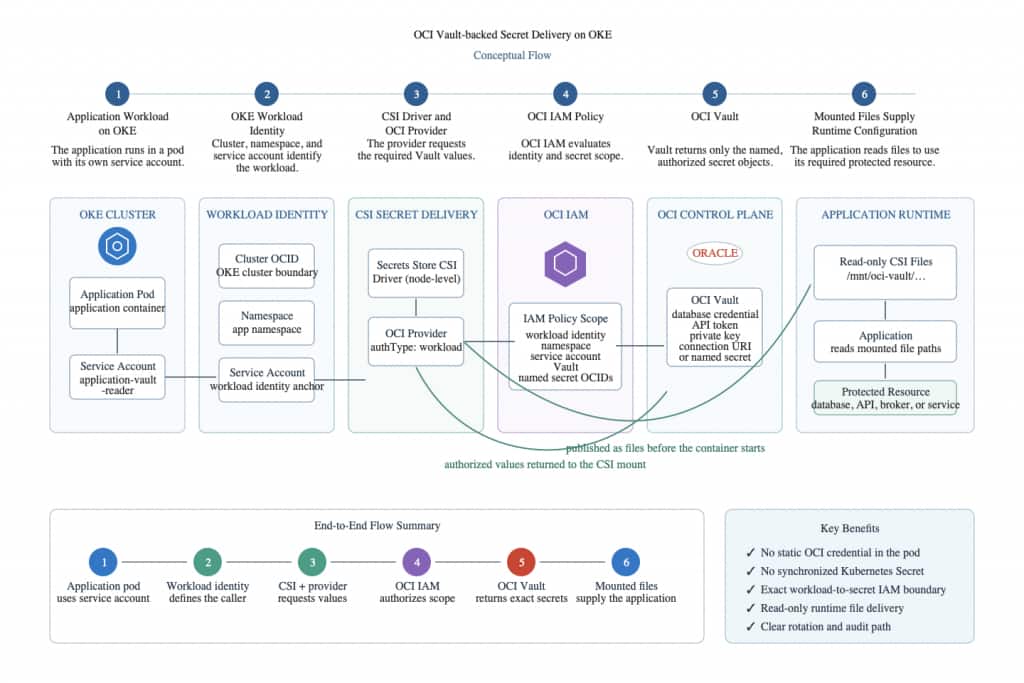
Figure 1: Generic OCI Vault-backed secret delivery workflow on OKE.
Classify secrets before mounting them
Classify values before placing them in a secret store, and give each workload access to the values it needs. The examples below use WordPress and MySQL; the same classification approach can inform the handling of API tokens, private keys, certificates, and other protected runtime values.
| Value | Classification | Intended runtime consumer | Example treatment |
|---|---|---|---|
| mysql-connection-string, mysql-port | Connection configuration | Workload using the authorized service account | Store in the vault; mount as files and render a memory-backed host:port file |
| mysql-username, mysql-password | MySQL application credential | Workload using the authorized service account | Store in the vault and mount as files |
This reference implementation uses four runtime secret objects: mysql-connection-string, mysql-port, mysql-username, and mysql-password. The first two contain host and port configuration rather than authentication credentials. They are stored in the vault here so the four inputs follow one retrieval path. The database name remains in a ConfigMap.
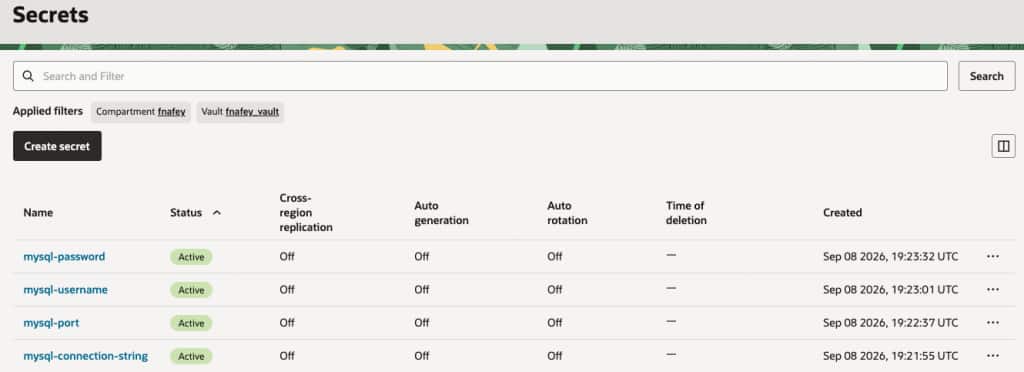
Figure 2. OCI Vault Secret Management inventory. Confirm that each runtime secret needed by the workload is active. This view must never reveal secret values; replace this illustrative capture with a current, redacted capture before publication.
Why OKE Enhanced clusters matter
This pattern requires an enhanced cluster because workload identity access to OCI resources is supported only on enhanced clusters. IAM identifies the requesting workload by the following combination:
request.principal.type:    workload
cluster:                   <cluster-ocid>
namespace:                 <application-namespace>
service account:           <application-service-account>
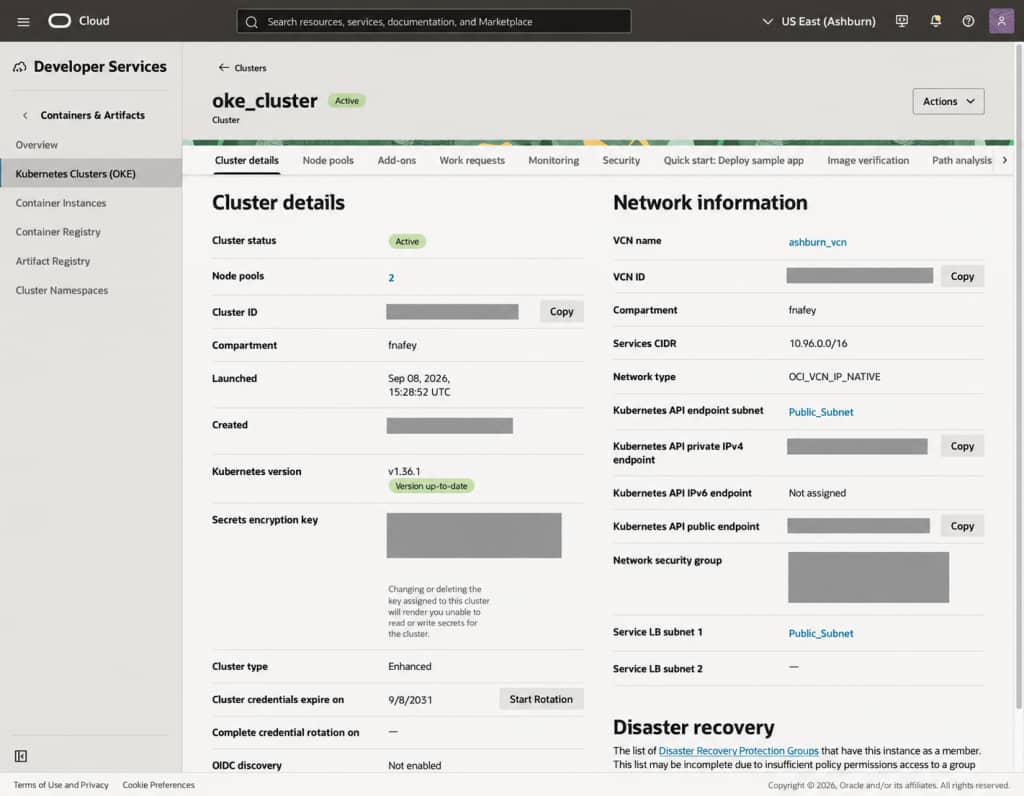
Figure 3. OKE cluster details. Confirm that the cluster is Enhanced before configuring Workload Identity. Replace this illustrative capture with a current, redacted capture before publication.
These fields identify the workload principal. The IAM policy also restricts the requested resources to the intended vault and secret objects, using secret OCIDs in this example. The resulting scope is the cluster, namespace, and service-account combination, not a unique identity for each pod. Restrict who can create or modify workloads that use that service account, and review other applicable grants before relying on this access boundary.
Choose an identity scope that matches the workload
Instance principals authorize access through the worker-node identity. Workload identity supports policies tied to a cluster, namespace, and service account. For this shared-cluster reference pattern, that workload scope matches the application-specific access requirement.
| Workload identity | Instance principal |
|---|---|
| Identifies the cluster, namespace, and service account. | Identifies the worker-node compute instance. |
| IAM can scope retrieval to the workload identity and named or OCID-specified secrets. | Permissions are associated with the node identity; evaluate which workloads can use that access path. |
| Can support workload-identity audit attribution. | Attributes requests to the instance principal. |
| Supports separate workload policies, subject to control of service-account use. | Requires an isolation design appropriate to node-scoped permissions. |
Use workload identity for this reference pattern. Evaluate instance-principal designs separately when node-scoped authorization is intentional, documenting the isolation controls and residual risks for the intended deployment.
Prerequisites
Vault and encryption key
Before creating a secret, create or identify a vault and an enabled symmetric master encryption key in that vault. Oracle Cloud Infrastructure Secret Management Service requires a symmetric key for secret creation; asymmetric keys are not supported for that operation. This example does not require a virtual private vault. Select the vault type according to the applicable isolation requirements and current service documentation. See Creating a Secret.
The person or automation creating or rotating a secret needs permissions appropriate to those operations. The application workload’s runtime policy should grant only the retrieval access required by this pattern, without granting it direct use or management of the master encryption key.
Install the node-level CSI components
SecretProviderClass is a custom Kubernetes resource whose definition is installed with the Secrets Store CSI Driver. The OCI provider retrieves values from the vault.
Install the OCI provider chart using helm, before deploying a workload that uses this pattern, and pin the version used for testing. The published metadata for chart 0.5.1 (at the time of writing) identifies provider application version 0.10.1, Secrets Store CSI Driver 1.6.0, and a Kubernetes version requirement of 1.30 or later. Confirm that the selected cluster and node configuration meet the requirements of the packaged release.
helm repo add oci-provider \
  https://oracle.github.io/oci-secrets-store-csi-driver-provider/charts

helm repo update

helm upgrade --install oci-vault-csi \
  oci-provider/oci-secrets-store-csi-driver-provider \
  --version 0.5.1 \
  --namespace kube-system \
  --create-namespace \
  --set provider.oci.auth.types.workload.enabled=true \
  --set provider.oci.auth.types.workload.resourcePrincipalVersion=2.2 \
  --set provider.oci.auth.types.workload.resourcePrincipalRegion=us-ashburn-1 \
  --set secrets-store-csi-driver.enableSecretRotation=true \
  --set secrets-store-csi-driver.rotationPollInterval=2m
resourcePrincipalVersion is not obtained from the OCI Console and is not derived from the Kubernetes, OKE, or Helm-chart version. Use the default supplied by the exact OCI provider chart release that you are installing. For the pinned 0.5.1 release in this example, inspect the value before installation:
helm show values oci-provider/oci-secrets-store-csi-driver-provider \
  --version 0.5.1 | \
  awk '/^[[:space:]]*resourcePrincipalVersion:/ { print }'
Expected output:
resourcePrincipalVersion: "2.2"
When evaluating a chart upgrade, repeat the command with the candidate chart version and use its documented default. Do not use an unpinned latest chart release in production merely to discover this value. Set resourcePrincipalRegion separately to the region identifier of the cluster, for example us-ashburn-1.
The chart is published from Oracle’s OCI Secrets Store CSI Driver Provider repository. Review its release notes and chart values before changing the pinned version.
Secret rotation is disabled by default in the chart; this example enables it explicitly. For the bundled driver version, the two-minute poll interval is a minimum cache duration, not a fixed refresh deadline: the kubelet must republish the volume. Rotation updates files in the CSI mount; it does not restart a pod, rerun an init container, or update an environment variable that already holds a value. The upstream auto-rotation documentation (at the time of writing) labels the feature alpha; check the supported status of the selected driver and provider combination before production use.
Choosing the rotation poll interval
The driver’s auto-rotation documentation describes 2m as the default minimum cache duration. A lower setting can make a mounted file eligible for refresh sooner and can increase driver and provider activity. The actual refresh time also depends on kubelet republishing and successful retrieval from the secret store.
| Interval | Potential benefit | Tradeoff |
|---|---|---|
| Below 2m | Can make a mounted value eligible for refresh sooner. | Can increase provider requests and node activity; assess aggregate load and service limits. |
| 2m | The documented default minimum cache duration for the selected driver. | Not a guaranteed refresh time; the next eligible kubelet republish and successful retrieval are still required. |
| Above 2m | Can reduce refresh-related background activity and external requests. | Can delay eligibility to fetch a newer value. Backend credential revocation and application reload remain separate concerns. |
Choose the interval according to application reload behavior and operational capacity. In this WordPress example, a shorter interval does not itself reload database credentials or rerun the host-and-port init container. Before shortening it, confirm that the application can reread the file as intended and assess aggregate request volume.
Confirm the CustomResourceDefinition (CRD) and both node-level components are ready before deploying an application:
kubectl get crd secretproviderclasses.secrets-store.csi.x-k8s.io

kubectl get daemonset --namespace kube-system \
  --selector='app.kubernetes.io/name in (oci-secrets-store-csi-driver-provider,secrets-store-csi-driver)'

kubectl get csidriver secrets-store.csi.k8s.io \
  -o custom-columns=NAME:.metadata.name,REQUIRES_REPUBLISH:.spec.requiresRepublish

helm get values oci-vault-csi --namespace kube-system --all | \
  awk '/enableSecretRotation:|rotationPollInterval:/ { print }'
For comparison, the following shows example readiness output for two nodes, with the wide DaemonSet output formatted into two column groups:
NAME                                               CREATED AT
secretproviderclasses.secrets-store.csi.x-k8s.io   2026-09-08T19:00:52Z

NAME                                   DESIRED CURRENT READY UP-TO-DATE AVAILABLE
oci-secrets-store-csi-driver-provider    2       2       2     2          2
oci-vault-csi-secrets-store-csi-driver   2       2       2     2          2

NAME                                   NODE SELECTOR            AGE
oci-secrets-store-csi-driver-provider    <none>                   92m
oci-vault-csi-secrets-store-csi-driver   kubernetes.io/os=linux    92m

NAME                       REQUIRES_REPUBLISH
secrets-store.csi.k8s.io   true

enableSecretRotation: true
rotationPollInterval: 2m
Dates, ages, and node counts vary by cluster. Confirm that the CRD exists and that each DaemonSet has the expected nonzero number of DESIRED, CURRENT, READY, UP-TO-DATE, and AVAILABLE instances. For this driver version, confirm REQUIRES_REPUBLISH is true and rotation is enabled in the Helm values. Check support for virtual or other specialized nodes rather than assuming they behave like managed Linux node pools.
IAM: authorize the workload, not the CSI DaemonSet
Create the policy before deploying the workload. It identifies the application service account, wordpress-vault-reader in this example. The provider services the mount request; this policy is intended to authorize retrieval using the application’s workload identity, rather than granting the provider’s own service account broad access to application secrets.
Use a separate policy statement for each runtime secret in this example. IAM supports secret conditions by name or OCID; the example uses four secret OCIDs to identify the intended objects. The <vault-compartment> placeholder below assumes the vault and these secret resources are in the same compartment. Confirm the compartment containing the secret resources when adapting the policy.
Allow any-user to read secret-family in compartment <vault-compartment> where all {
  request.principal.type = 'workload',
  request.principal.namespace = 'wordpress',
  request.principal.service_account = 'wordpress-vault-reader',
  request.principal.cluster_id = '<cluster-ocid>',
  target.vault.id = '<vault-ocid>',
  target.secret.id = '<mysql-password-secret-ocid>'
}
Secret-name alternative: Replace target.secret.id = ‘<mysql-password-secret-ocid>’ with target.secret.name = ‘mysql-password’ when a name-based policy is appropriate. Retain target.vault.id, because a secret name is unique only within a Vault. This reference implementation uses OCIDs so the policy remains pinned to the exact secret objects; rotating a secret version does not change its OCID.
Repeat the statement for mysql-connection-string, mysql-port, and mysql-username. Keep the workload and resource restrictions when adapting the example; do not broaden access to an entire compartment merely to shorten the policy.
Policy placement and propagation
Scope the policy to the compartment containing the secret resources and apply the workload, vault, and secret conditions. Confirm policy attachment and any cross-compartment requirements for the selected deployment. After creating or changing a policy, allow for propagation and test both intended access and rejection of out-of-scope access. If the mount returns NotAuthorizedOrNotFound, check the policy conditions, identifiers, attachment, and propagation before considering any access change.
A declarative WordPress and MySQL reference implementation
The following resources form a focused secret-delivery example: WordPress is the application, a MySQL DB system is its backend, and the vault supplies the host, port, application username, and application password. The database name is configured separately. This illustrates an application tier consuming runtime connection details for a backend service.
The identity, IAM, and CSI approach can be adapted for APIs and microservices, message-broker clients, third-party integration consumers, and workloads that need certificates or private keys. Adaptation can require configuration mapping, a reload mechanism, and coordination with the consuming system’s credential lifecycle. The access principle remains the same: grant each workload identity the retrieval permissions it needs.
This implementation adapts the configuration/code-separation objective described in Twelve-Factor App Factor III: Config rather than following its environment-variable approach literally. The database credential variables identify mounted file paths, such as WORDPRESS_DB_PASSWORD_FILE=/mnt/oci-vault/mysql-password, rather than containing the credentials. The provider retrieves those values from the vault at runtime, and the application reads the files. In this example, the database credentials are not embedded in the application code, image, manifest, Kubernetes Secret objects, or configured environment-variable values.
Use separate secret objects for production and non-production, and consider separate vaults or compartments according to the required access boundaries. Keeping secret names, mounted filenames, and application paths consistent can help reduce application configuration changes between environments. The SecretProviderClass still needs the correct environment-specific vault OCID, and the IAM policies need the corresponding workload and resource identifiers.
WordPress-specific adapter
The pattern delivers separate values as mounted files. The selected WordPress container image supports WORDPRESS_DB_HOST_FILE. This example uses a host:port value, so an init container reads the separate host and port files and writes the combined endpoint to a memory-backed emptyDir. The WordPress container reads that file, while the database name remains ordinary application configuration. The script does not include commands to print the host or port.
---
apiVersion: v1
kind: Namespace
metadata:
  name: wordpress
---
apiVersion: v1
kind: ServiceAccount
metadata:
  name: wordpress-vault-reader
  namespace: wordpress
---
apiVersion: v1
kind: ConfigMap
metadata:
  name: wordpress-config
  namespace: wordpress
data:
  WORDPRESS_DB_NAME: wordpress
---
apiVersion: secrets-store.csi.x-k8s.io/v1
kind: SecretProviderClass
metadata:
  name: wordpress-vault-secrets
  namespace: wordpress
spec:
  provider: oci
  parameters:
    authType: workload
    vaultId: <vault-ocid>
    secrets: |
      - name: mysql-connection-string
        fileName: mysql-host
      - name: mysql-port
        fileName: mysql-port
      - name: mysql-username
        fileName: mysql-username
      - name: mysql-password
        fileName: mysql-password
---
apiVersion: apps/v1
kind: Deployment
metadata:
  name: wordpress
  namespace: wordpress
spec:
  selector:
    matchLabels:
      app: wordpress
  template:
    metadata:
      labels:
        app: wordpress
    spec:
      serviceAccountName: wordpress-vault-reader
      automountServiceAccountToken: false
      initContainers:
        - name: render-mysql-endpoint
          image: busybox:1.36.1
          command: ["/bin/sh", "-ec"]
          args:
            - |
              host="$(tr -d '\r\n' < /mnt/oci-vault/mysql-host)"
              port="$(tr -d '\r\n' < /mnt/oci-vault/mysql-port)"
              test -n "$host"
              test -n "$port"
              printf '%s:%s\n' "$host" "$port" > /mnt/mysql-runtime/db-host
              chmod 0444 /mnt/mysql-runtime/db-host
          volumeMounts:
            - name: mysql-vault-secrets
              mountPath: /mnt/oci-vault
              readOnly: true
            - name: mysql-runtime-config
              mountPath: /mnt/mysql-runtime
      containers:
        - name: wordpress
          image: wordpress:7.1.0-php8.5-apache
          envFrom:
            - configMapRef:
                name: wordpress-config
          env:
            - name: WORDPRESS_DB_HOST_FILE
              value: /mnt/mysql-runtime/db-host
            - name: WORDPRESS_DB_USER_FILE
              value: /mnt/oci-vault/mysql-username
            - name: WORDPRESS_DB_PASSWORD_FILE
              value: /mnt/oci-vault/mysql-password
          volumeMounts:
            - name: mysql-vault-secrets
              mountPath: /mnt/oci-vault
              readOnly: true
            - name: mysql-runtime-config
              mountPath: /mnt/mysql-runtime
      volumes:
        - name: mysql-vault-secrets
          csi:
            driver: secrets-store.csi.k8s.io
            readOnly: true
            volumeAttributes:
              secretProviderClass: wordpress-vault-secrets
        - name: mysql-runtime-config
          emptyDir:
            medium: Memory
---
apiVersion: v1
kind: Service
metadata:
  name: wordpress-svc
  namespace: wordpress
spec:
  type: ClusterIP
  selector:
    app: wordpress
  ports:
    - name: http
      port: 8080
      protocol: TCP
      targetPort: 80
Why the init container renders db-host
The CSI volume presents mysql-host and mysql-port as separate, read-only files under /mnt/oci-vault. The render-mysql-endpoint init container runs before WordPress starts. It removes carriage-return and newline characters from both inputs, checks that each is nonempty, writes host:port to /mnt/mysql-runtime/db-host, and sets the file mode to 0444.
This is an application-format adapter. The WordPress image uses one host-setting file; this example combines the separate host and port inputs for that setting. The generated endpoint is another runtime representation of the connection configuration, stored in the shared memory-backed emptyDir, rather than a Kubernetes Secret. It does not change the source values in the vault. File permissions and volume-mount permissions are separate controls: the WordPress container’s mount of this generated-configuration volume is not read-only in the manifest.
The adapter has a rotation consequence: the CSI driver can refresh mysql-host and mysql-port in its mount, but the init container is not rerun by that refresh. Recreate the pod, for example through a Deployment rollout, to rerun the adapter after a host or port change, or implement a runtime renderer that watches and updates db-host. Restarting only the WordPress application container is not the same operation. The username and password files are mounted directly, so a consuming application that rereads those files can use their refreshed contents.
What the manifest resources do
This six-resource manifest combines the Namespace, ServiceAccount, ConfigMap, SecretProviderClass, Deployment, and Service. The ServiceAccount, SecretProviderClass, and Deployment form the workload-side secret-delivery pattern; the ConfigMap keeps ordinary configuration separate from retrieved values.
- Namespace (wordpress) creates the Kubernetes boundary used by the workload identity. IAM evaluates this namespace together with the cluster and service account, so it must match the policy condition exactly.
- ServiceAccount (wordpress-vault-reader) identifies the service account used by the WordPress pod. IAM evaluates it together with the cluster and namespace as the workload identity. automountServiceAccountToken: false disables automatic mounting of the default Kubernetes API service-account credentials in the pod; confirm the separate CSI token-delivery path for the selected provider and driver versions.
- ConfigMap (wordpress-config) carries the non-secret database name. It deliberately contains no host, port, username, or password. This makes the boundary visible: ordinary application configuration is separate from values retrieved from the vault.
- SecretProviderClass (wordpress-vault-secrets) specifies the four source secret objects and their mounted filenames. It contains references, not secret values. The CSI driver uses this configuration for the referenced volume and, when enabled, its refresh behavior.
- Deployment (wordpress) binds the service account to the pod and requests the CSI volume. Both the init container and the WordPress container mount the vault-backed CSI volume read-only. The init container renders the host and port into a separate memory-backed file; WordPress consumes that file and the credential files through the selected image’s _FILE settings.
- Service (wordpress-svc) uses ClusterIP, exposes port 8080 inside the cluster, and routes it to WordPress on port 80. The example uses port forwarding for verification; this Service does not create an external load balancer or ingress.
This focused manifest does not create persistent storage, probes, or resource limits. Add and test those resources, together with the required identity, network, and application controls, before using it as a production WordPress deployment.
How Vault values reach the pod
This example does not synchronize the retrieved application values into Kubernetes Secret objects. When the pod is scheduled, the kubelet asks the node-level Secrets Store CSI Driver to mount the referenced volume. The driver invokes the OCI provider, which uses the application’s workload identity to request the four named values. IAM evaluates that identity and the applicable policy conditions.
After successful authorization and retrieval, the driver publishes the values as read-only files at /mnt/oci-vault before the application container starts. The init container writes the combined host:port endpoint to the memory-backed /mnt/mysql-runtime/db-host file. The manifest supplies file paths, rather than database secret values, through the _FILE environment variables.
How mounted-file rotation works
When a new CURRENT version is available, the driver can retrieve it and update the corresponding CSI-mounted file during an eligible kubelet volume republish. With the configured two-minute minimum cache duration, a refresh can take longer than two minutes. Check the driver and provider status when troubleshooting. Refreshing the mount does not itself restart the pod, reload the application, or rerun render-mysql-endpoint.
The application must watch for changes or reread the mounted file to use an updated value. Test the selected WordPress image’s behavior instead of assuming either immediate reload or a universal need to restart. Where a rollout is needed, coordinate it with the backend credential change. Treat the host-and-port adapter separately: it requires a new init-container run or a runtime renderer.
File mounts are useful when an application supports file-path configuration. An environment variable can identify a mounted file, such as WORDPRESS_DB_PASSWORD_FILE=/mnt/oci-vault/mysql-password, instead of holding the secret. An adapter can translate mounted inputs into the application’s expected runtime format, subject to its storage and reload requirements. Using CSI secret synchronization to populate a Kubernetes Secret for an environment-variable reference creates the Kubernetes API copy that this example deliberately avoids.
Keep secret synchronization disabled for this pattern. Enabling it creates a Kubernetes Secret copy of the mounted values and changes the secret-storage assumptions.
Verify WordPress access to the MySQL DB system
Before deploying WordPress, confirm that the wordpress schema and a MySQL application account with the required database permissions already exist. Their provisioning is outside this runtime example. The IAM policy shown here grants retrieval access to the four specified secret objects.
After applying the manifest with the required environment-specific values, check rollout status and open the local port forward:
kubectl rollout status deployment/wordpress --namespace wordpress --timeout=5m
kubectl port-forward --namespace wordpress service/wordpress-svc 8080:8080
Complete WordPress setup through the forwarded Service and verify that the site connects to the intended database using the mounted configuration. The following illustrates rollout and workload-status output; those status checks alone do not establish a successful database connection:
deployment "wordpress" successfully rolled out

deployment.apps/wordpress   1/1   1   1
pod/wordpress-...           1/1   Running
Avoid printing the mounted values during verification, and review any logs or output before sharing them. The WordPress site administrator is a separate CMS identity, not the MySQL database credential.
Verify mounted-file rotation without exposing a secret
In a non-production environment, use the port configuration object to test version refresh without changing its configured value, where the secret’s reuse rules permit this. Do not use a password for this test. Record the mounted version before creating the new CURRENT version:
kubectl get secretproviderclasspodstatus --namespace wordpress \
  -o jsonpath='{range .items[*].status.objects[*]}{.id}{" mounted_version="}{.version}{"\n"}{end}'
For example, after a successful mysql-port version refresh, the version metadata could read:
<mysql-connection-string-secret-ocid> mounted_version=1
<mysql-port-secret-ocid> mounted_version=2
<mysql-username-secret-ocid> mounted_version=1
<mysql-password-secret-ocid> mounted_version=1
For this provider, identify the secret objects in SecretProviderClassPodStatus by OCID. Map those OCIDs to the vault inventory before evaluating the result. The following command queries secret metadata rather than retrieving a secret bundle; review names and identifiers before sharing the output:
oci vault secret list \
  --compartment-id <vault-compartment-ocid> \
  --vault-id <vault-ocid> \
  --lifecycle-state ACTIVE \
  --all \
  --query 'data[].{name:"secret-name",ocid:id}' \
  --output table
OCIDs and version numbers vary. Compare the same pod’s status before and after the test, and confirm that the version associated with the intended secret has advanced.
After creating the new version, allow for the configured cache duration and kubelet republishing, then repeat the status query. A mounted_version change, such as 1 to 2, provides evidence that the driver reports the newer mounted version. It does not demonstrate a changed password, application reload, or successful credential transition because this test preserves the port value. For a credential rotation, separately verify backend acceptance and the application’s reconnect or reload behavior.
Observe the CSI driver and OCI provider with Prometheus
A successful WordPress connection demonstrates one application path; it does not establish that every node can mount secrets or that rotation and provider access remain healthy. The Secrets Store CSI Driver metrics reference documents mount, unmount, synchronization, and rotation metrics. The driver supports Prometheus for metrics export.
The provider chart configures Prometheus-formatted metrics on port 8198, and the bundled driver uses port 8095. The resources shown here do not create a public Service for these endpoints; confirm their actual reachability and applicable network controls in the deployment. Prometheus Operator’s PodMonitor selects the DaemonSet pods by label and identifies the named container port to scrape.
The intended monitoring flow is:
- The driver exposes metrics at :8095/metrics, and the provider exposes metrics at :8198/metrics.
- Each PodMonitor selects the corresponding DaemonSet pods using the labels in the installed release.
- The release: prometheus label is intended to match the existing Prometheus instance’s podMonitorSelector. Its podMonitorNamespaceSelector must also include kube-system. Confirm these selectors and the installed PodMonitor CRD before applying the example.
- The example requests a 30-second scrape interval. With both DaemonSets running on both nodes and both monitors selected, a two-node deployment should produce four scrape targets. Confirm target discovery and scrape success in the actual deployment.
Apply the following PodMonitor resources after confirming the existing Prometheus Operator configuration. Manage them separately from the CSI Helm release and recheck their selectors and port names after chart upgrades:
---
apiVersion: monitoring.coreos.com/v1
kind: PodMonitor
metadata:
  name: secrets-store-csi-driver
  namespace: kube-system
  labels:
    release: prometheus
spec:
  selector:
    matchLabels:
      app: secrets-store-csi-driver
      app.kubernetes.io/instance: oci-vault-csi
  podMetricsEndpoints:
    - port: metrics
      path: /metrics
      interval: 30s
---
apiVersion: monitoring.coreos.com/v1
kind: PodMonitor
metadata:
  name: oci-secrets-store-csi-provider
  namespace: kube-system
  labels:
    release: prometheus
spec:
  selector:
    matchLabels:
      app.kubernetes.io/name: oci-secrets-store-csi-driver-provider
  podMetricsEndpoints:
    - port: metrics-port
      path: /metrics
      interval: 30s
The driver monitor can collect metrics such as node_publish_total, node_publish_error_total, rotation_reconcile_total, rotation_reconcile_error_total, and rotation_reconcile_duration_sec when emitted by the installed version. Successful scrapes of the provider endpoint demonstrate endpoint reachability from Prometheus, not successful secret retrieval or application reload.
A Grafana dashboard can display the series emitted by this deployment, such as mount success and failure rates, rotation reconciliations, failures, and duration distributions, alongside application and database telemetry.
Confirm that both monitor objects exist. Then run the separate PromQL expression below in the Prometheus expression browser:
kubectl get podmonitor --namespace kube-system \
  -l release=prometheus
PromQL (run in Prometheus):
up{job=~"kube-system/(oci-secrets-store-csi-provider|secrets-store-csi-driver)"}For the two-node example, check that the query returns the expected four target series and that each has a value of 1. A value of 1 for only the returned subset does not establish that every expected target was discovered. Capture the actual results when documenting a test.
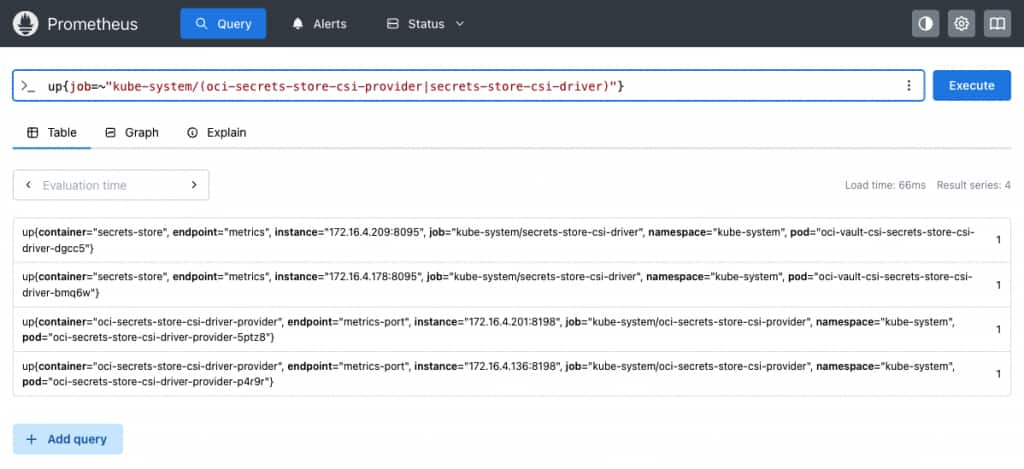
Figure 4. Prometheus console output highlighting the target status
For alerting, start with mount and rotation failures rather than raw mount volume. For example, alert on a sustained non-zero rate of node_publish_error_total or rotation_reconcile_error_total, filtering to provider=”oci” only after confirming that label is emitted by the installed driver version. A scrape interval does not control the secret rotation interval; it only controls how quickly Prometheus observes the driver.
Operational guardrails
- Enable and test rotation deliberately. Confirm that rotation is enabled, that the kubelet republishes the volume, and that the driver’s reported mounted version advances. Separately test the application’s use of the updated value.
- Design around adapters. The init container is a startup-time transformation. A host or port change in this example requires pod recreation or a runtime renderer. Add a deliberate persistence and credential-transition design before production use.
- Protect workload identity use. Restrict who can create or modify pods and workload controllers that use the service account authorized to read these secrets. Review the relevant Kubernetes RBAC permissions as part of the access boundary.
- Configure backend connectivity. Permit the required traffic from the cluster to the MySQL DB system and restrict the database TCP port with network security groups (NSGs) or security lists. The application manifest does not provision those network controls.
- Keep secret values out of diagnostic output. Use relevant status, events, and redacted logs rather than printing mounted files with cat /mnt/oci-vault/…. Review diagnostic output before sharing it.
- Keep provisioning separate from runtime access. Create backend accounts and roles through a controlled process; do not add those provisioning permissions or credentials to the application workload solely to simplify deployment.
Conclusion
This pattern uses Oracle Cloud Infrastructure Vault as the source for the four runtime values, workload identity and IAM policies to scope retrieval, and Secrets Store CSI Driver to present the values as read-only files. In the configuration shown, the application does not require a static OCI API key for retrieval, and the values are not synchronized into Kubernetes Secret objects.
The approach can help limit credential duplication and support workload-specific access control when IAM conditions, Kubernetes permissions, and backend network controls are configured and tested together. It does not replace node, cluster, or application security controls.
Keeping the secret objects and mounted paths stable can help reduce manifest edits during value rotation. It does not remove the need to verify mounted-file refresh, application behavior, and the dependent system’s credential transition. Recreating a secret object changes its OCID and requires corresponding policy updates; adapting the deployment to another environment also requires checking its identifiers and access policies.
The approach can be adapted to database credentials, API tokens, certificates, private keys, broker credentials, and other runtime configuration. Each application still needs appropriate file-path configuration, reload behavior, and coordination with its consuming systems.
For this reference implementation, use an enhanced cluster, workload-scoped IAM conditions, the required backend network controls, and a tested rotation process. Using instance principals or synchronizing values into Kubernetes Secrets changes the design assumptions and should be evaluated as a separate deployment choice.
Resources
- Managing Secrets for Kubernetes Clusters
- Granting Workloads Access to OCI Resources
- Enhanced and Basic Clusters
- OCI Secrets Store CSI Driver Provider
- Secrets Store CSI Driver
- Secrets Store CSI Driver metrics
- Prometheus Operator: PodMonitor API
- Secrets Store CSI Driver: auto rotation of mounted contents
- Official WordPress image configuration
- The Twelve-Factor App
- OCI secret-management IAM policy reference
- Kubernetes: Configure Service Accounts for Pods