
Introduction
Part 1: Building Btrfs-Backed Storage on Oracle Kubernetes Engine: Manual and Automated Approaches established the storage foundation: dedicated OCI Block Volumes attached to Oracle Kubernetes Engine (OKE) workers, formatted with Btrfs, mounted independently of the worker boot disks, and prepared through a reusable automated workflow.
Part 2 builds on that foundation by introducing the stateful workload.
M3DB is deployed across Btrfs-backed OKE workers to evaluate how the storage architecture behaves under a distributed time-series workload. The deployment also introduces replication, failure and recovery testing, and Grafana-based observability using M3Coordinator’s Prometheus-compatible API.
The objective is to validate the complete path from OCI storage through Kubernetes and M3DB to operational visibility:
OCI Block Volume → Btrfs → Kubernetes persistent storage → M3DB → replication → Grafana
This article documents the deployment architecture and the validation performed against it.
Architecture
The architecture combines three primary layers: storage, the M3DB application tier, and observability.
Each M3DB storage worker uses a dedicated OCI Block Volume formatted with Btrfs. Kubernetes exposes the worker-local storage to M3DB through Local PersistentVolumes and PersistentVolumeClaims.
M3DB dbnodes form the persistent database tier, while M3Coordinator provides the interface for writing and querying time-series data. M3DB replication distributes data across the participating dbnodes.
Grafana provides the visualization layer and queries M3Coordinator through its Prometheus-compatible API. A separate Prometheus Server was not deployed in the validated environment.
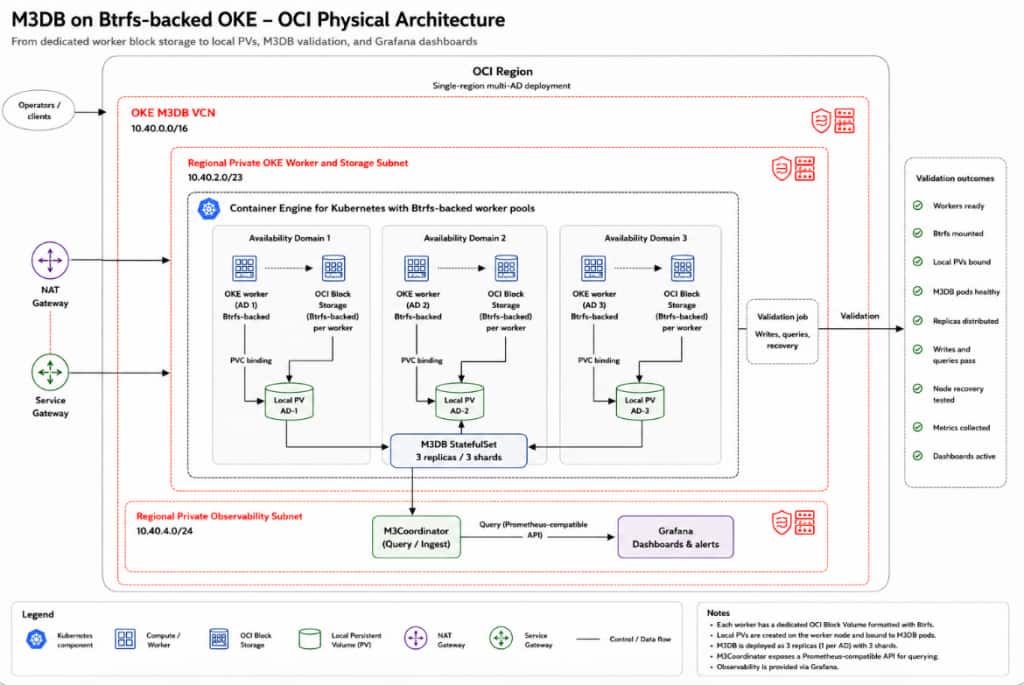
Figure 1. Validated architecture showing dedicated Btrfs-backed OCI Block Volumes on OKE workers, Kubernetes local persistent storage, the replicated M3DB tier, and Grafana-based observability.
Validated Environment
The validation environment used an OKE cluster created using the Quick Create workflow and configured as an enhanced VCN-native cluster using the OCI VCN-Native CNI.
The Btrfs-backed M3DB storage workers used E6.Ax compute shapes with dedicated OCI Block Volumes. Karpenter was used for dynamic node provisioning, with E6.Flex or E6.Ax configured as eligible shapes based on workload requirements and capacity availability.
These compute, networking, and cluster choices reflect the validation environment and are not requirements for every deployment. Production implementations should be adapted to the availability, networking, security, storage, and performance requirements of the target OCI environment.
The reusable automation scripts and deployment artifacts are available at:
https://github.com/Payalsharma2512/oke-btrfs-m3db
Prerequisites
Before deploying M3DB, confirm that:
- The Btrfs preparation from Part 1 is complete.
- Storage workers are Ready with their dedicated OCI Block Volumes attached.
- The Btrfs mount is healthy and persists across reboot.
- kubectl access and required Kubernetes permissions are available.
- The M3DB and Grafana deployment artifacts are available.
Verify the workers and storage:
kubectl get nodes -o wide
findmnt <MOUNT_PATH>
df -Th <MOUNT_PATH>
btrfs filesystem show <MOUNT_PATH>
Proceed only after the underlying storage has been validated.
Preparing Kubernetes for M3DB
Create the M3DB namespace:
kubectl apply -f kubernetes/namespace.yaml
kubectl get namespace
M3DB storage pods must run on the Btrfs-prepared workers. Use node labels, affinity, taints/tolerations, and PersistentVolume node affinity as appropriate to keep workloads aligned with their local storage.
Configuring Persistent Storage
Part 1 created the Btrfs filesystem and worker mount. Part 2 exposes that path to Kubernetes:
OCI Block Volume → Btrfs mount → Local PV → PVC → M3DB pod
Each Local PersistentVolume points to a Btrfs mount on a specific worker and uses node affinity to keep the consuming pod on that worker.
A simplified PV looks like:
apiVersion: v1
kind: PersistentVolume
metadata:
  name: <PV_NAME>
spec:
  capacity:
    storage: <CAPACITY>
  volumeMode: Filesystem
  accessModes:
    - ReadWriteOnce
  persistentVolumeReclaimPolicy: Retain
  storageClassName: <STORAGE_CLASS>
  local:
    path: <MOUNT_PATH>
  nodeAffinity:
    required:
      nodeSelectorTerms:
        - matchExpressions:
            - key: kubernetes.io/hostname
              operator: In
              values:
                - <TARGET_NODE>
Kubernetes does not create or format Btrfs in this design. It exposes the filesystem already prepared on the worker.
Repository artifacts:
kubernetes/storageclass.yaml
kubernetes/local-pv-example.yaml
scripts/render-local-pvs.sh
Installing M3DB
M3DB was deployed on OKE as containerized Kubernetes workloads, rather than installed directly on the worker operating system. The M3DB dbnodes run from the M3DB container image, while Kubernetes manifests and the M3DBCluster configuration define the database topology, persistent storage, scheduling, and replication.
The cluster uses the M3DB Operator API, with the M3DBCluster custom resource defining the M3DB deployment.
The validated configuration used three M3DB dbnodes distributed across three Btrfs-backed OKE workers.
M3DB container → PVC → Local PV → Btrfs → OCI Block Volume
M3Coordinator provides the write and query interface, while the M3DB dbnodes form the persistent database tier.
The deployment artifacts are under:
kubernetes/m3db/
├── etcd.yaml
└── m3db-cluster.yaml
kubectl apply -f kubernetes/m3db/etcd.yaml
kubectl apply -f kubernetes/m3db/m3db-cluster.yaml
Configuring M3DB Topology and Replication
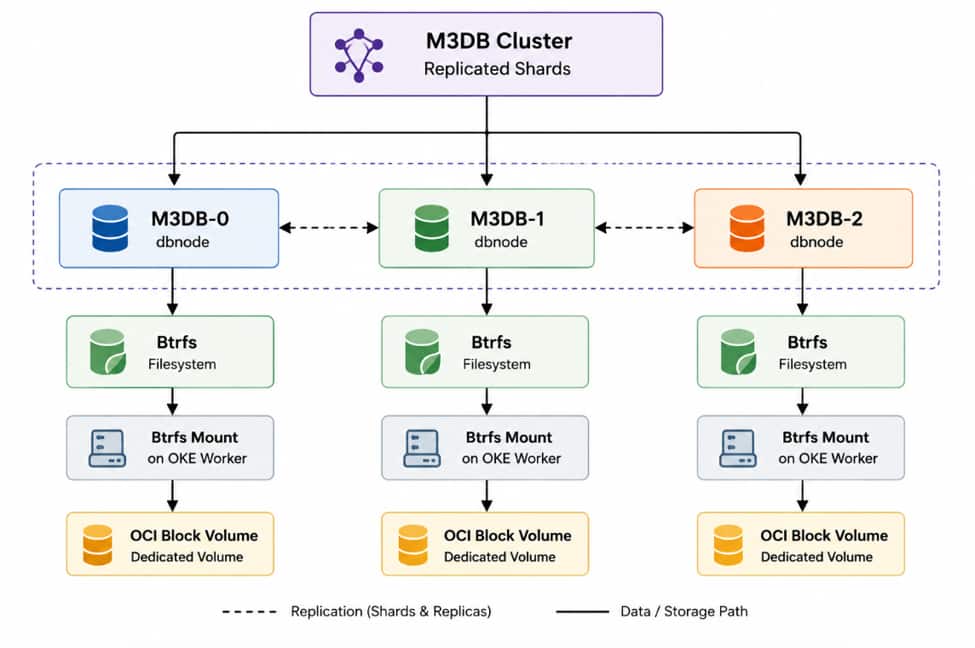
M3DB uses placement to determine how shards and replicas are distributed across the database nodes.
In this implementation, three M3DB dbnodes are deployed across three Btrfs-backed OKE workers. The placement configuration defines the participating dbnodes, shard distribution, and replication factor. This provides the database-level redundancy shown in the architecture:

Verifying Cluster Health
Before generating workload, verify the M3DB deployment itself.
Start with Kubernetes:
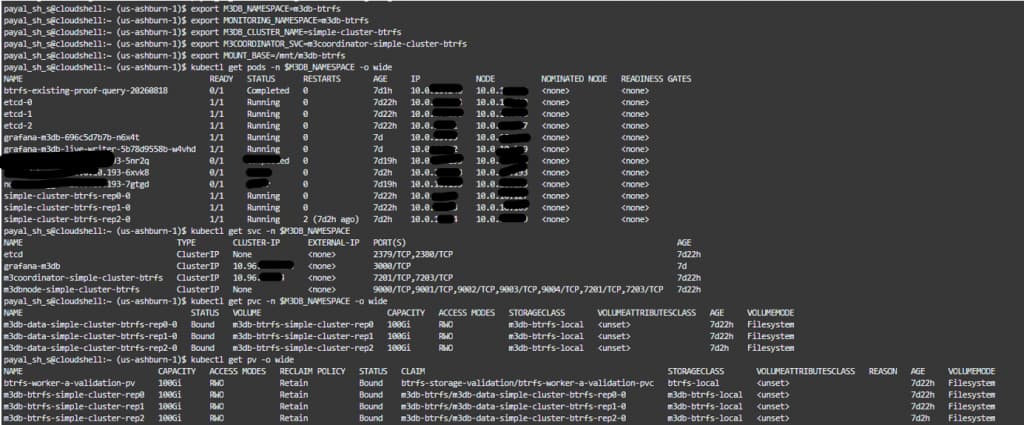
kubectl get pods -n <M3DB_NAMESPACE> -o wide
kubectl get pvc -n <M3DB_NAMESPACE>
kubectl get pv
Confirm that:
- all expected M3DB pods are Running and Ready
- each dbnode is scheduled onto the intended worker
- each PVC is Bound
- each Local PersistentVolume is associated with the expected worker
- M3Coordinator is reachable
- M3DB placement is initialized
- the expected shards are available
This establishes the baseline before data is written.
Writing and Querying Test Data
A storage validation is meaningful only when the workload actively exercises the storage layer.
The github repository includes writer-job.yaml and query-proof-job.yaml under kubernetes/load-test/. The writer sends time-series data through M3Coordinator and can be scaled through 12, 24, 48, and 72 writer stages.
After each stage, validate:
- Successful writes and queries
- M3DB and Kubernetes health
- Btrfs storage consumption
- Successful queries of previously written data through M3Coordinator

Proving Data Reaches Btrfs
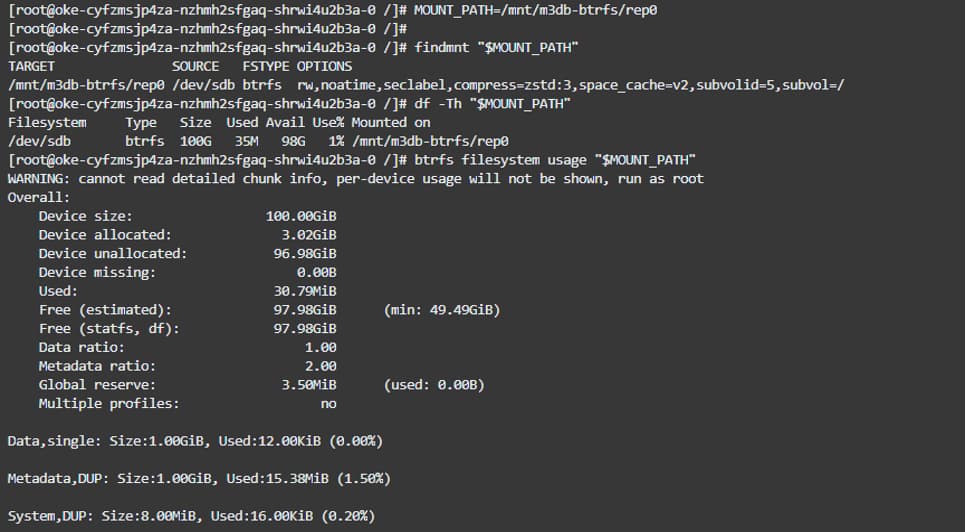
Application success does not by itself prove that M3DB is using the intended storage. On each dbnode worker, verify the Btrfs mount:
findmnt <MOUNT_PATH>
df -Th <MOUNT_PATH>
btrfs filesystem usage <MOUNT_PATH>
Compare filesystem usage before and after ingestion to confirm that the M3DB workload is consuming the intended Btrfs-backed storage.
OCI Block Volume Observations During Load Testing
OCI Monitoring was used to observe the Btrfs-backed Block Volumes while the M3DB workload was running.
At the 72-writer stage:
| Replica | Max WriteOps | Avg WriteOps | Peak Write Throughput | Avg Write Throughput | Throttled I/O |
| rep0 | 208 | 117.222 | 14,667,776 B/s | 4,295,490 B/s | 0 |
| rep1 | 177 | 117.889 | 15,077,376 B/s | 4,371,646 B/s | 0 |
| rep2 | 74 | 68.630 | 1,736,704 B/s | 1,594,558 B/s | 0 |
Across the measured workload stages, OCI reported zero throttled I/O.
The individual volumes also showed different I/O profiles, demonstrating why per-volume storage metrics are useful alongside M3DB and Kubernetes health metrics.
These results are specific to the tested workload, storage configuration, and observation window and should not be interpreted as a general performance benchmark for Btrfs or OCI Block Volume.
Proving Replication
Verify the M3DB placement to confirm that replicas are distributed across the intended dbnodes and storage workers.
Confirm that:
- The configured replication factor is active.
- Replicas are distributed across the expected dbnodes.
- dbnodes are placed on the intended Btrfs-backed workers.
- Written data is queryable before failure testing.
Failure and Recovery Testing
The validation demonstrated a controlled recovery of one M3DB replica. The Btrfs-backed OCI Block Volume was detached and reattached to a replacement dedicated worker, the filesystem was remounted, the Local PV relationship was updated, and the M3DB replica was restored.
After recovery, M3DB health and placement were restored, and previously written data remained queryable.
Observability Configuration
Grafana was configured to query the M3Coordinator Prometheus-compatible API directly. A separate Prometheus Server was not deployed for the validated configuration.
The validated path was:
Writers → M3Coordinator → M3DB dbnodes Grafana → M3Coordinator
Verify Grafana:
kubectl get pods -n <M3DB_NAMESPACE> | grep grafana
kubectl get svc -n <M3DB_NAMESPACE> | grep grafana
The Grafana data source points to M3Coordinator on port 7201.

Grafana Dashboard Validation
Grafana dashboards were used to confirm that metrics written through M3Coordinator could be queried and visualized.
Access Grafana locally:
kubectl -n <M3DB_NAMESPACE> port-forward svc/grafana-m3db 3000:3000Open http://127.0.0.1:3000 and verify that the dashboard displays the M3DB workload metrics.

End-to-End Validation
The final validation confirms the complete path from OCI storage through M3DB and observability.
| Layer | Validation |
| OKE | Storage workers Ready |
| OCI Block Volume | Dedicated volumes attached |
| Btrfs | Mounted and persistent |
| Kubernetes | Local PVs and PVCs Bound |
| M3DB | dbnodes healthy |
| Replication | Shards and replicas distributed |
| Ingestion | Writes successful |
| Query | Written data returned |
| Failure/Recovery | Tested failure recovered; data remained queryable |
| Grafana | M3DB workload metrics visible |
Together, these checks confirm that data flows through the intended Btrfs-backed storage path and remains available through the tested replication and recovery scenarios.
Troubleshooting
For common deployment issues, start with the affected layer:
# Pod placement and PVC binding
kubectl get pods -n <M3DB_NAMESPACE> -o wide
kubectl get pvc -n <M3DB_NAMESPACE>
kubectl get pv

# Pod and storage details
kubectl describe pod <POD_NAME> -n <M3DB_NAMESPACE>
kubectl describe pvc <PVC_NAME> -n <M3DB_NAMESPACE>
kubectl describe pv <PV_NAME>

# M3DB logs
kubectl logs <POD_NAME> -n <M3DB_NAMESPACE>

# Btrfs storage
findmnt <MOUNT_PATH>
df -Th <MOUNT_PATH>
btrfs filesystem show <MOUNT_PATH>
For Local PV issues, verify PV node affinity and pod placement. For M3DB write/query failures, check M3Coordinator, dbnode health, placement, and shard state.
For observability issues, first verify that Grafana can reach the M3Coordinator endpoint and that the configured data source is healthy. If the dashboard shows no data, verify that the expected metrics were written and can be queried through M3Coordinator.
Cleanup
Remove resources from the application layer downward:
Load tests → M3DB → Grafana → Kubernetes storage objects → disposable OCI infrastructure
The repository provides:
scripts/cleanup.sh
docs/cleanup.md
Run cleanup in dry-run mode first and review Local PV reclaim policies before deleting storage resources. Delete OCI Block Volumes only after confirming that no data needs to be retained.
Conclusion
This two-part series separates storage preparation from application deployment and validates each layer independently.
Part 1:
OCI Block Volume → Btrfs → persistent worker mount
Part 2:
Btrfs → Local PV/PVC → M3DB → replication → Grafana
The end-to-end validation demonstrates more than running M3DB pods. It verifies that time-series data reaches the intended Btrfs-backed storage, is replicated across dbnodes, remains queryable through the tested failure and recovery scenario, and can be visualized in Grafana using M3Coordinator’s Prometheus-compatible API.
References
- Kubernetes Persistent Volumes
- Kubernetes Local Volumes
- Kubernetes Assigning Pods to Nodes
- M3DB Documentation
- M3DB: Creating an M3 Cluster with Kubernetes
- M3DB Kubernetes Operator
- M3DB Cluster Configuration
- M3DB Placement
- M3DB Placement Configuration and Replication
- Using Karpenter Provider for OCI (KPO)
- Karpenter NodePools
- Oracle Karpenter Provider for OCI GitHub Repository
- Grafana Documentation
- Grafana Prometheus Data Source