


When security teams first look at Oracle Fusion Cloud audit logging, one question comes up quickly: “Can we get all the logs?”
It is a reasonable starting point. In many environments, the default security operations pattern is to collect as much telemetry as possible, send it to a SIEM, and decide later what matters. More data can feel like better visibility.
But in Oracle Fusion Cloud, collecting every available audit source is not always the fastest path to better security. In high-volume environments, broad ingestion can create noise, increase SIEM storage and licensing costs, and make it harder for analysts to find the events that actually answer their investigation questions.
The better question is not “Can we collect everything?” It is:
- Who signed in?
- Was the login expected?
- What changed?
- Did someone gain access they should not have?
- Was a security policy, role, or sensitive business record modified?
Those questions point to a more practical strategy: start with the audit sources that provide the clearest security signal, then add higher-volume business and operational data when there is a defined use case.
Why More Audit Data Does Not Always Mean Better Security
Oracle Fusion Cloud environments can produce audit data from several layers, including identity, federation, security configuration, business objects, and related services such as Enterprise Performance Management Cloud. Each source has value, but each serves a different purpose.
Security teams can run into trouble when every source is treated as equal-purpose SIEM telemetry. Business object audit records, for example, can be essential for a fraud investigation or compliance review. But they are not usually the best first source for detecting authentication abuse or privilege escalation. Without a clear use case, high-volume business audit data can bury higher-signal identity and access events.
A useful Fusion audit strategy starts by matching the source to the question:
- Authentication and session questions are answered by IAM Domain logs and, in federated environments, external identity provider logs.
- Role, privilege, and security configuration questions are answered by Oracle Platform Security Services audit data.
- Sensitive transaction and business-record questions are answered by targeted business object audit data.
- EPM activity questions require EPM-specific access logs for customers running EPM Cloud workloads.
This approach helps security teams move from raw collection to usable visibility.
A Layered Approach to Oracle Fusion Audit Logging
1. IAM Domain Logs: Start With Sign-In and Session Visibility
IAM Domain logs are often the highest-value starting point because they help answer who signed in, when they signed in, whether the attempt succeeded or failed, and what happened at the identity layer.
For Fusion environments using the Fusion Identity Domain model, IAM Domain audit data is available through OCI Audit. These logs can include sign-in and session activity, failed authentication attempts, and IAM Domain administrative or configuration events such as changes to authentication or MFA-related settings.
This is the right place to begin because authentication data is usually lower volume than broad application audit data and is directly useful for common security investigations. Examples include:
- A successful login from an unexpected location or IP range
- Failed authentication activity for a privileged account
- A local IAM Domain login in an environment expected to use federation
- A change to an authentication, MFA, or sign-on policy
IAM Domain logs are powerful, but they do not tell the whole story. They primarily cover the identity layer. They do not capture every authorization change made inside Fusion applications. For example, role assignments, privilege updates, and application security policy changes belong in the OPSS audit layer, not the IAM Domain layer.
For more details, see Oracle A-Team: IAM Domain FA.
2. External Identity Provider Logs: Complete the Federation Picture
Many Fusion customers use an external identity provider such as Microsoft Entra ID or Okta for federation. Those IdP logs are important because they can show federated sign-ins, MFA prompts, conditional access outcomes, and policy activity at the IdP layer.
However, IdP logs alone do not provide complete Fusion visibility. They may not show Oracle IAM Domain local accounts, certain Oracle IAM Domain configuration changes, or Fusion authorization activity after sign-in. In federated environments, customers should review IAM Domain logs and IdP logs together.
This matters in a common scenario: a security operations team monitors only the IdP and assumes Fusion authentication is fully covered. If a local IAM Domain account still exists from implementation or administration, a login through that path may not appear in the IdP logs. If OPSS audit is also not enabled, the team may miss follow-on privileged role grants inside Fusion.
3. OPSS Audit: Watch Role, Privilege, and Security Configuration Change
If IAM Domain logs show who came through the front door, OPSS audit data helps show what access changed inside the Fusion security layer.
OPSS audit data is important for questions such as:
- Was a role assigned or removed?
- Was a privilege changed?
- Did a user gain access outside the normal provisioning workflow?
- Was a security policy or audit policy modified?
These events are central to security monitoring because many high-risk incidents are not only about who signed in. They are about what access changed after sign-in.
OPSS audit can support detection and investigation for scenarios such as:
- Role assignments or revocations involving high-privilege roles
- Privilege escalation
- Unauthorized role changes outside approved workflows
- Security configuration drift
- Audit policy changes that reduce visibility
One operational detail is especially important: OPSS auditing must be enabled and configured before it can generate the audit data security teams need. Customers should confirm that the relevant audit policies are turned on early, not after an investigation begins.
For more information on Oracle Platform Security Services configuration, see Oracle Fusion Middleware Platform Security Guide
4. Business Object Audit: Use It for Targeted Business-Risk Scenarios
Business object audit data is often the data customers ask for first because it can show changes to application records and business transactions. It is valuable, but it should be used with focus.
Business object audit can help answer questions such as:
- Were supplier bank details changed?
- Was payroll or sensitive HR data modified?
- Was a high-risk finance transaction updated?
- Is evidence needed for a compliance or audit request?
Those are important questions, but they are different from authentication abuse or privilege escalation detection. Business object audit data can be high volume, application-specific, and complex to normalize. Treating all of it as general-purpose SIEM telemetry can create cost and noise without improving detection coverage.
A more effective approach is to identify the business scenarios that matter most and collect the related audit data selectively. Examples include fraud investigations, monitoring sensitive financial or HR changes, tracking high-risk transactions, or supporting specific compliance evidence requirements.
For customers with broader business-control requirements, Oracle Risk Management Cloud may also be relevant, particularly where the need is tied to controls, segregation of duties, transaction monitoring, or business-context analytics rather than raw audit ingestion alone.
For business object auditing, see Enable Audit for Oracle HCM Cloud Business Objects.
5. EPM Access Logs: Add When EPM Is in Scope
Customers running Oracle Enterprise Performance Management Cloud should consider EPM access logs as a separate layer. EPM access logs can provide details such as user actions, timestamps, IP addresses, and functions executed within EPM Cloud.
These logs are not usually the first source for a Fusion security baseline, but they can add useful context for customers with EPM workloads. They are especially relevant when teams need to support access reviews, or investigate EPM-specific actions.
For EPM logging and integration with SIEM tools, see Integration with Custom SIEM Tools
Technical Implementation References
After customers define the audit sources and use cases they need, the next question is how to move that audit data into downstream monitoring, archival, and analytics platforms. For a deeper technical implementation path, see the Oracle A-Team series:
The pattern described in these articles uses Oracle Integration to extract and transform Fusion audit events and publish them to OCI Streaming, which acts as a durable event backbone for downstream consumers. From there, customers can integrate with SIEM platforms using the downstream pattern that fits their operating model, such as a serverless push-based approach with OCI Functions and Splunk HEC or a Kafka-compatible pull-based approach with Kafka Connect.
Audit-Log Flow
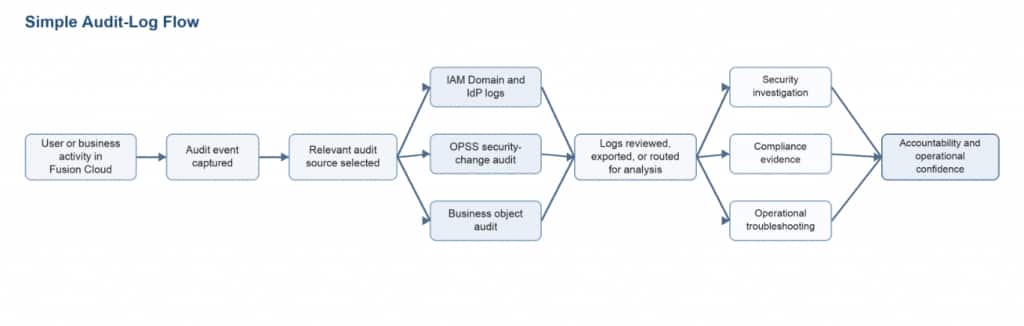
A practical audit strategy starts with the activity that needs to be understood, then selects the audit source most likely to answer the question. The goal is not maximum collection by default; it is usable evidence for investigation, compliance, and operations.
Summary
A practical Oracle Fusion Cloud audit logging strategy starts with asking the right questions, not collecting the most data. By focusing first on high-signal sources like IAM Domain logs, identity provider logs, and OPSS audit data, security teams can gain clearer visibility into sign-ins, access changes, and security configuration activity while helping reduce unnecessary SIEM noise. Business object audit and EPM access logs can then add value when tied to specific investigation, compliance, or business-risk needs. For additional context, Oracle guidance is available for IAM Domain logging, OPSS audit configuration, business object auditing, and EPM SIEM integration.