

In most architectures, Oracle databases are kept private — accessible only within trusted networks. However, there are situations where connectivity from outside Oracle Cloud Infrastructure (OCI) is needed:
- External applications in another cloud or data center
- Partner or vendor integrations
- Remote development or testing
- Transitional architectures during migration
The options below are ordered from the simplest (and least secure) to the most secure. Each involves a different trade-off between complexity, security, and database capability.
| Note: This post applies to Oracle Base Database Service (DBCS) on OCI — standalone and RAC configurations. It does not apply to Oracle Autonomous Database (ADB), which uses a different connectivity model (managed endpoints, mutual TLS, port 1522). The OCI-specific configurations discussed here do not apply to Oracle Database deployments on other cloud providers. Detailed implementation steps, CLI commands, and configuration files are available in the companion Architecture Center article. |
1. Reserved public IP — simple and direct
Assigning a reserved public IP provides a fixed address that remains unchanged across reboots, patching, and stop/start cycles — no additional infrastructure required.
Because this exposes the database directly to the internet, restrict access using Network Security Groups (NSGs) to allow only specific source IPs on TCP/1521. Consider pairing the reserved IP with a DNS name so clients connect to a hostname rather than a raw IP address.
Trade-off: Simplest to set up, but offers the least security. The database is directly reachable from the internet, with no intermediary layer for traffic inspection or access control beyond NSG rules.
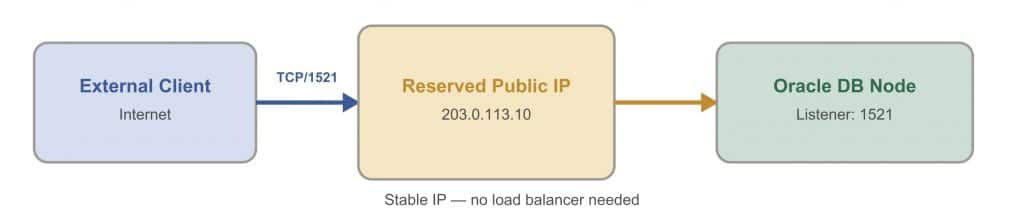
Fig 1 Option 1: Reserved Public IP
2. Network Load Balancer — database stays private
When direct exposure is not acceptable, an OCI Network Load Balancer (NLB) provides a clean separation. The NLB presents a stable public endpoint while forwarding traffic to the database in a private subnet. Because Oracle Net traffic is TCP (not HTTP), the NLB must operate at Layer 4 — the standard OCI Load Balancer (Layer 7) cannot handle SQL*Net.
Because the NLB operates at Layer 4, it does not validate database session readiness, perform TLS termination, or provide connection-level intelligence. Health checks are TCP-based only — they confirm port 1521 is reachable, not that the database is open and accepting sessions. Clients must handle retries and connection resilience.
Trade-off: The database is no longer directly exposed, but the NLB has no awareness of database state or Oracle Net protocol. It is a network-level abstraction, not a database-aware proxy.
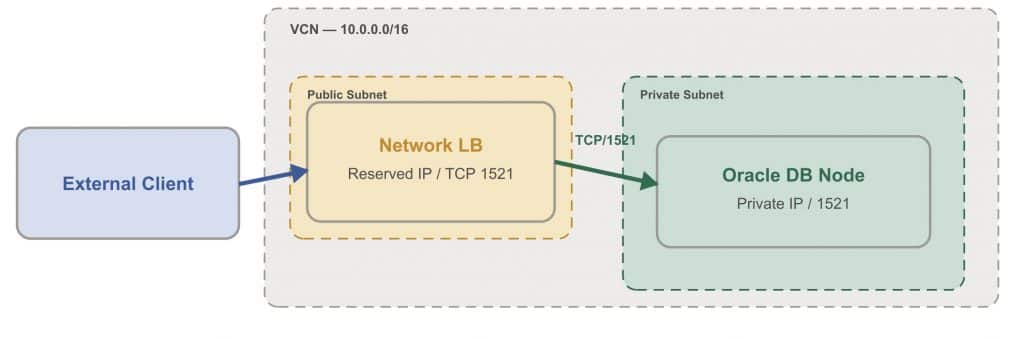
Fig 2: Option 2: Network Load Balancer
| Tip: DBCS-managed nodes do not appear in the NLB “Compute instances” dropdown — select “IP Address” as the backend type. Also disable “Preserve Source IP” before adding backends by IP, or the option will be greyed out. The companion Architecture Center article covers the full console and CLI walkthrough. |
3. NLB + CMAN — production RAC with full capabilities
Oracle Connection Manager (CMAN) acts as a protocol-aware proxy that can understand Oracle Net traffic and processes SCAN (Single Client Access Name) redirects internally. The external client connects through the NLB to CMAN, and CMAN handles the redirect on the client’s behalf — the client never sees it.
Beyond SCAN proxy, CMAN provides access control rules to accept or reject connections by source IP, destination, and service name. It supports connection filtering to restrict which clients can reach which database services, and session multiplexing to reduce the number of connections to the database. For production HA, deploy multiple CMAN instances behind the NLB.
Trade-off: Preserves full RAC capabilities (SCAN load balancing, failover, service-level routing) and adds connection-level security, but requires a separate CMAN compute instance to deploy and maintain.
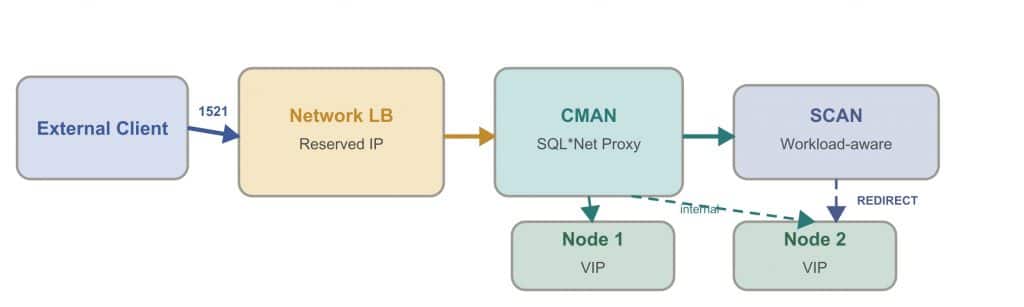
Fig 3: Option 3: NLB + CMAN
4. Private connectivity — the recommended approach
With IPSec VPN or Oracle FastConnect, external clients connect to OCI as if they were on the same private network. SCAN works natively — no NLBs, no CMAN, no workarounds. Load balancing, failover, and service-level routing all function as designed.
IPSec VPN is quick to deploy for immediate connectivity. Oracle FastConnect provides a dedicated private link for long-term enterprise use.
Trade-off: Highest security with no public exposure and full RAC capabilities, but requires VPN infrastructure or a FastConnect circuit — which involves coordination with the customer’s network team.
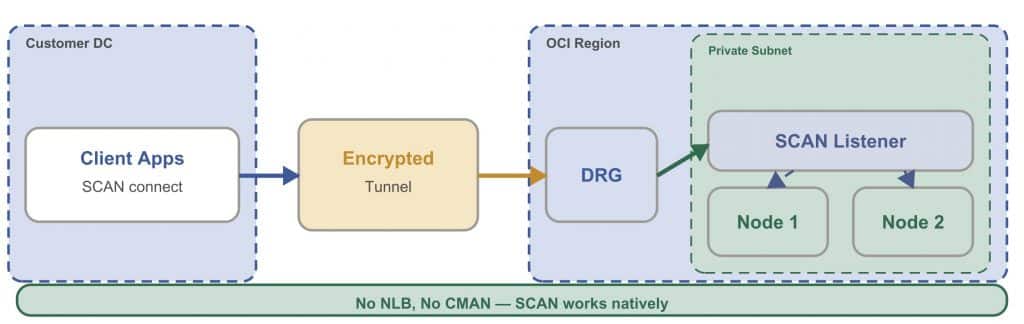
Fig 4 Option 4: Private Connectivity
The four options above cover the recommended connectivity approaches — from simple public access to fully private enterprise connectivity. There is, however, an additional configuration that appears in RAC environments and warrants careful consideration.
NLB with RAC node VIPs — a note on bypassing SCAN
In Oracle RAC, the SCAN listener redirects clients to a specific node VIP (Virtual IP), requiring a new TCP connection to that private address. When an NLB fronts SCAN, external clients receive a redirect to a private IP they cannot reach — the connection fails.
Configuring the NLB with individual node VIPs as backends provides a technically functional connection path that bypasses SCAN entirely. The NLB distributes connections using hash-based routing across the available RAC nodes.
It is important to understand what this means in practice. With SCAN bypassed, every capability that distinguishes RAC from multiple standalone database instances is no longer in effect:
- Workload-aware load balancing — the NLB uses 5-tuple hash routing with no visibility into database load; connections are not distributed based on instance utilization
- Service-level routing — OLTP and reporting workloads cannot be directed to designated node subsets
- Transparent Application Failover (TAF) — active sessions are not automatically relocated when a node fails
- Fast Connection Failover (FCF) — the application receives no notification of node or service state changes
- Session multiplexing — each client connection maps directly to a database session with no consolidation
In this configuration, the RAC infrastructure is present but its connection management capabilities are not utilized. The application must independently handle connection distribution, failure detection, retry logic, and session resilience — responsibilities that SCAN, TAF, and FCF are specifically designed to manage at the database layer.
Organizations evaluating this approach should confirm that their application framework provides equivalent connection management, or that these capabilities are not required for the workload. Options 3 and 4 preserve the full SCAN connection flow
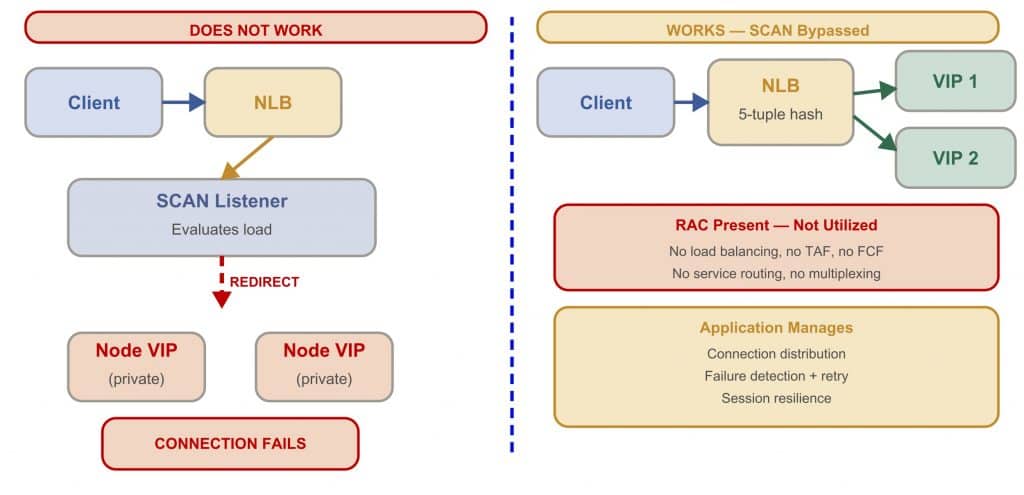
Fig 5: NLB with RAC node VIPs
Customer Perspective
Customers evaluating these options often prioritize security, reliability, and alignment with their overall architecture. In one such case, Michael Bilberry, Director of Infrastructure and Security at RecVue, shared his perspective on the approach taken for their environment:

“Reviewing the available connectivity approaches helped us identify the option that best fits our environment. We focused on implementing a solution that aligns with our security standards while keeping the architecture simple and dependable. The approach we adopted fits well with our long-term operational and scalability goals.”
Michael Bilberry,
Director of Infra & Security,
RecVue
Comparison
The following table summarizes the four recommended options across key dimensions to
help identify the right fit for your environment.
| Dimension | Reserved IP | NLB | NLB + CMAN | Private (VPN/FC) |
| Security | Low | Medium | High | Very High |
| RAC support | No | No | Yes | Yes |
| SCAN preserved | N/A | No | Yes | Yes |
| DB-aware routing | No | No | Yes | Yes |
| Latency | Low | Low | Medium | Lowest |
| Complexity | Low | Medium | High | Medium |
For a guided path to the right option based on your database type and connectivity
requirements, use the decision flowchart below.
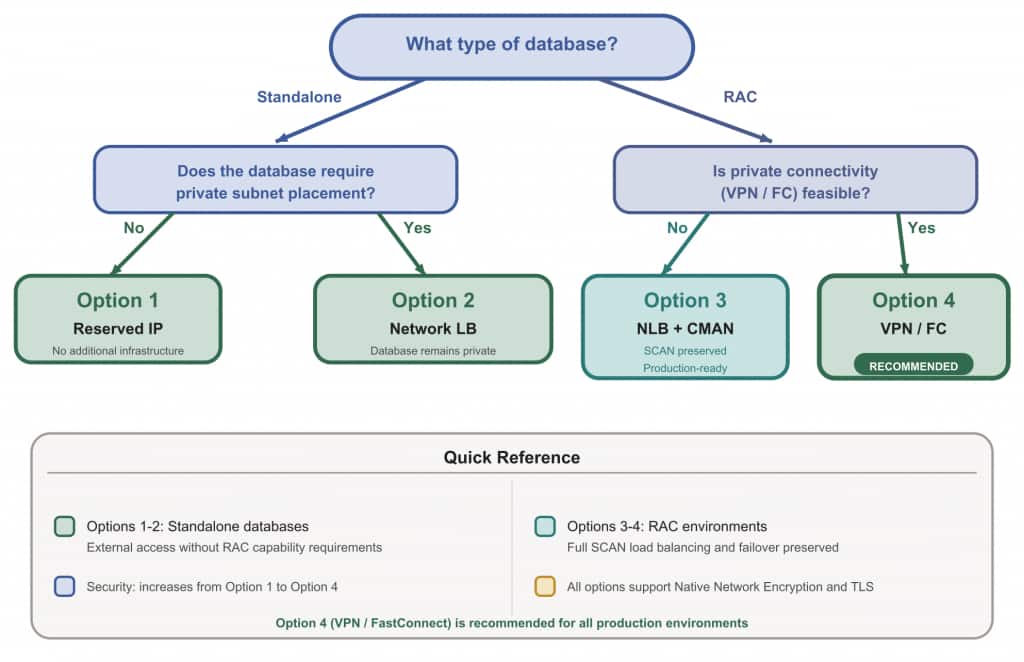
Fig 6: Decision Flowchart
Conclusion
The right approach depends on the environment. For standalone databases, a reserved public IP (with NSGs) or an NLB provides a straightforward path — with increasing security as you move from direct exposure to a private subnet. For Oracle RAC, CMAN preserves the full SCAN connection flow when private connectivity is not feasible, while VPN or FastConnect remains the recommended long-term approach. The NLB with node VIPs configuration, while technically functional, should be evaluated against the RAC capabilities it leaves unused.
Learn More
Explore the following resources for deeper guidance on each component discussed in this post:
• OCI Network Load Balancer documentation
• Oracle Connection Manager documentation