
When you build OCI Functions locally, the slowest part of the workflow is often not writing code. It is rebuilding, redeploying, invoking, and trying to understand what happened when something fails. The faster you can edit, run, inspect behavior, and fix issues, the faster you can ship to production.
In our earlier post, we shared how Fn Server improves the local development loop for OCI Functions. We’ve now added two more capabilities that make that loop even tighter:
- Local debug support, so you can attach a debugger while invoking a function locally.
- Hot reload with `fn watch`, so code changes automatically trigger a local redeploy.
Together, these features help you move from “edit-build-invoke-repeat” to a much smoother “edit-and-iterate” workflow.
Why this matters
Local development friction usually comes from two places:
- You need deep visibility (breakpoints, call stack, variable inspection) when troubleshooting.
- You waste time manually redeploying after every code change.
With local debug support and hot reload, you can now do both in a native Fn CLI workflow.
Feature 1: Debug support for developing OCI Functions locally
Fn now supports local debug workflows so you can attach your preferred debugger while running functions with Fn Server.
At a high level:
- Start Fn Server in local debug mode.
- Deploy your function with local debug enabled.
- Invoke the function.
- Attach your debugger to the local debug port.
Start Fn Server in debug mode
fn start --local-debug --local-debug-port 5678
--local-debug-port is optional. If omitted, the default is 5678.
Deploy your function in local debug mode
fn deploy --app myapp --local-debug
This builds your function image with runtime-specific debug settings and deploys locally.
Invoke and attach debugger
echo -n '{"name":"World"}' | fn invoke myapp myfunc
On invocation, the function waits for a debugger to attach. You can then step through your code, inspect variables, and troubleshoot behavior directly.
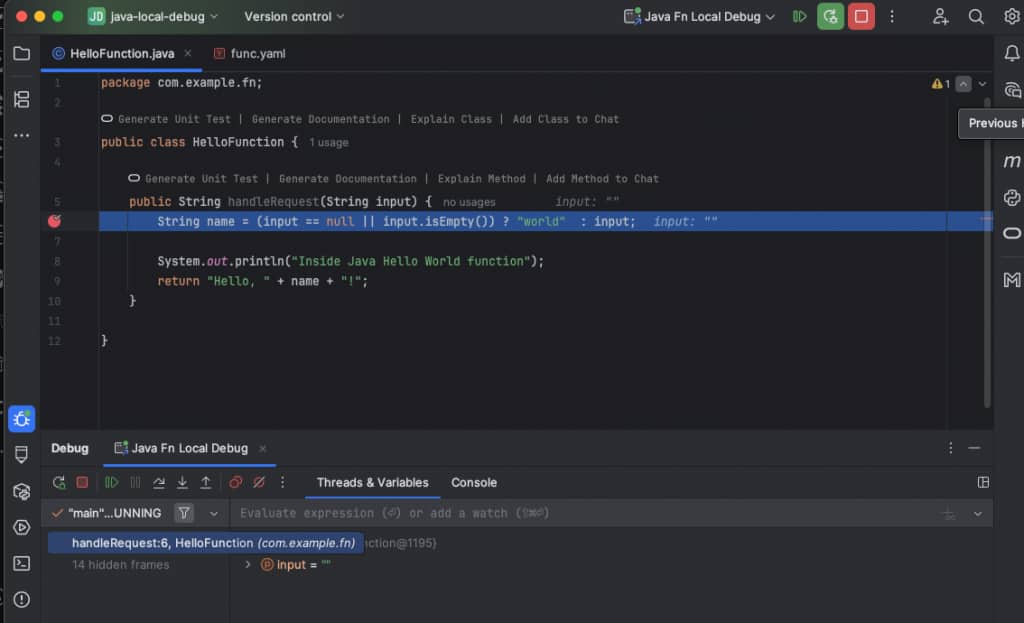
You could find more screenshots and steps in this link: https://fnproject.io/tutorials/LocalDebug/
Runtime notes
The local debug flow includes language-specific debugger setup for supported runtimes (for example, Go/Delve, Python/debugpy, Java/JDWP), and also works for custom Dockerfiles when debug tooling is configured in the image.
Feature 2: Hot reload with fn watch
The new fn watch command removes the repetitive manual deploy step while you develop locally.
Run it from your function project directory:
fn watch --app myapp
What it does:
- Recursively watches files in the current directory.
- Automatically runs local redeploys after changes (equivalent to local deploy workflow).
- Coalesces rapid edits with debounce behavior to avoid unnecessary repeated deploys.
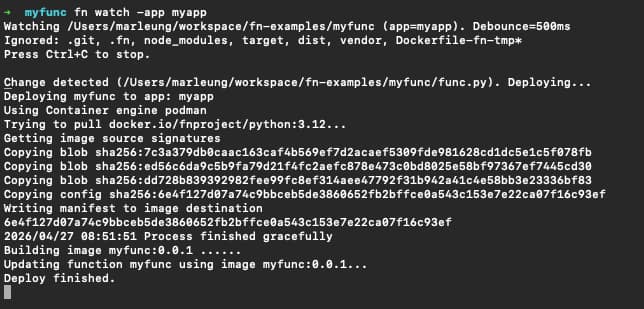
You could find more screenshots and steps in this link: https://fnproject.io/tutorials/HotReload/
Ignore files and folders
fn watch includes default ignores for common directories such as .git, .fn, node_modules, target, dist, and vendor.
You can customize further with:
- A
.fnignorefile in the function directory - Additional
--ignoreflags
Examples:
fn watch --app myapp --ignore .idea --ignore '*.log'
# .fnignore __pycache__ *.tmp
Tune redeploy timing
You can control debounce timing (default is 500ms):
fn watch --app myapp --debounce 2s
Put both features together: an accelerated local loop
A typical high-velocity loop now looks like this:
- Start Fn Server with debug enabled.
- Deploy your function once with
--local-debug. - Start
fn watchin the function directory. - Keep editing code.
- Invoke and debug as needed.
This gives you:
- Automatic local redeploys after save
- Breakpoint-driven debugging on demand
- Shorter turnaround from code change to verified behavior
Conclusion
With local debug support and hot reload, Fn CLI now offers a much faster and more practical local development experience for OCI Functions.
If you are already using Fn Server for local development, these two additions are the next upgrade to your workflow: less repetitive command churn, deeper troubleshooting visibility, and faster iteration from idea to validated function behavior. Let try these features today and get started by looking at the documentation https://fnproject.io/tutorials/LocalDebug/ and https://fnproject.io/tutorials/HotReload/ for both features!
References
- Local Debug tutorial: https://fnproject.io/tutorials/LocalDebug/
- Hot reload documentation: https://fnproject.io/tutorials/HotReload/
- Previous related blog: https://blogs.oracle.com/cloud-infrastructure/accelerate-functions-development-by-using-fn-server