
Now Generally Available
As customers deploy increasingly complex architectures on Oracle Cloud Infrastructure (OCI) Kubernetes Engine (OKE), networking requirements have evolved. Many teams need greater control over how workloads are isolated, how traffic flows, and how IP resources are allocated across their clusters.
To address these needs, Oracle is announcing the general availability (GA) of Generic VNIC Attachment (GVA) for OKE—a capability that gives you flexible, fine-grained control over pod networking.
If you’re not familiar with GVA, it enables you to attach multiple secondary VNICs to a node pool and configure each one independently with its own subnet, network security groups (NSGs), and IP allocation settings. This gives you precise control over how pod traffic is segmented, routed, and secured—rather than relying on a fixed, one-size-fits-all networking model.
With GVA, you can decide how many VNICs a node should have, tailor each interface to a specific purpose, and direct workloads to specific network paths. For example, you might route production traffic through tightly controlled subnets while isolating development or partner workloads on separate networks.
This level of control enables stronger workload isolation, more efficient use of IP address space, and the flexibility to design architectures that align with organizational boundaries, security requirements, and performance needs. It also lays the foundation for advanced patterns such as multi-network pods and high-throughput configurations on bare metal nodes.
With GA, GVA also reaches an important milestone in scalability. When combined with OCI VCN Improved IP Flexibility, OKE now supports up to 256 pods per node, up from the previous limit of 110. This increase enables higher workload density, better resource utilization, and more efficient cluster scaling.
What’s New in GA
The GA release of GVA introduces several key capabilities:
- Independent configuration of multiple secondary VNICs per node pool
- Fine-grained control over subnet placement and security policies via NSGs
- Flexible IP allocation per VNIC profile
- Native support for multihomed pods through integration with Multus
- Increased pod density (up to 256 pods per node) with improved IP flexibility
Together, these enhancements make it easier to design scalable, secure, and flexible networking architectures in OKE.
Three Common Design Patterns
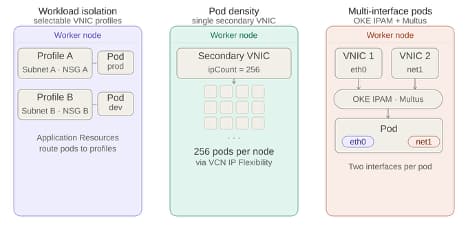
1. Workload Isolation with VNIC Profiles
When running different types of workloads on a shared cluster—such as frontend services, backend systems, partner integrations, and regulated applications—you often need strong network isolation.
GVA enables this through VNIC profiles, where each profile defines a distinct network environment, including its subnet and security rules (NSGs). You can assign workloads to specific profiles, ensuring they are placed on the correct network path. Each pod still has a single network interface. Isolation is applied at the infrastructure level, keeping the model simple and predictable while the scheduler handles placement.
2. Flexible IP Allocation with a Single Secondary VNIC
Not every use case requires multiple network paths. In many scenarios, the priority is controlling how IP addresses are allocated across nodes.
With GVA, you can configure a single secondary VNIC profile and explicitly set the number of pod IPs (ipCount) per node.
- High-scale microservices environments
- AI/ML inference workloads with many small pods
- Cost-optimized clusters
- IP-constrained enterprise environments
The total IP capacity can scale up to 256 pod IPs per node, enabling higher density or IP conservation.
3. Multiple Network Interfaces per Pod (GVA + Multus)
Some workloads require multiple interfaces per pod, such as network appliances, inspection services, and data plane applications.
GVA integrates with Multus and a native IPAM plugin to enable multihomed pod networking.
A Few Things to Keep in Mind
- GVA requires VCN-native pod networking
- Not supported with Flannel
- Verify node shape VNIC limits
- Ensure subnets are sized appropriately
- Application Resources only needed for isolation pattern
Get Started
If you kicked the tires on GVA during limited availability, now’s the moment to revisit your architecture through the lens of the GA patterns. New to GVA? Start by matching your workload to one of the three patterns, then head to the documentation for the full configuration walkthrough. We can’t wait to see what you build.